Can You Use HDMI To AV The Complete Guide You Need
Can you use HDMI to AV? The answer is yes. With the right HDMI to AV converter, you can connect modern devices to older TVs and screens. This guide breaks down everything you need to know about making this connection work.
Have you ever wanted to connect a newer device to an older TV? Maybe you have a streaming box or a game console with only HDMI output. But your TV only has AV inputs. You might be wondering if this is even possible. The good news is that it is. You can use HDMI to AV to bridge the gap between old and new technology. This guide will walk you through everything you need to know.
Whether you have an old CRT television or a vintage home theater system, the right converter can make it work. HDMI to AV conversion is more common than you think. Many people still use older displays in their homes. And finding the right connection does not have to be hard. Let us dive into the details.
Key Takeaways
- HDMI to AV conversion is possible with the right adapter or converter box.
- You need an active converter for digital-to-analog signal translation.
- RCA cables carry the AV signal and connect to older TVs and devices.
- Check device compatibility before buying any adapter or converter.
- Signal quality may vary depending on the converter quality and cable type.
- Setup is simple once you have the right equipment and follow the steps.
📑 Table of Contents
What Is HDMI to AV and Why Do You Need It
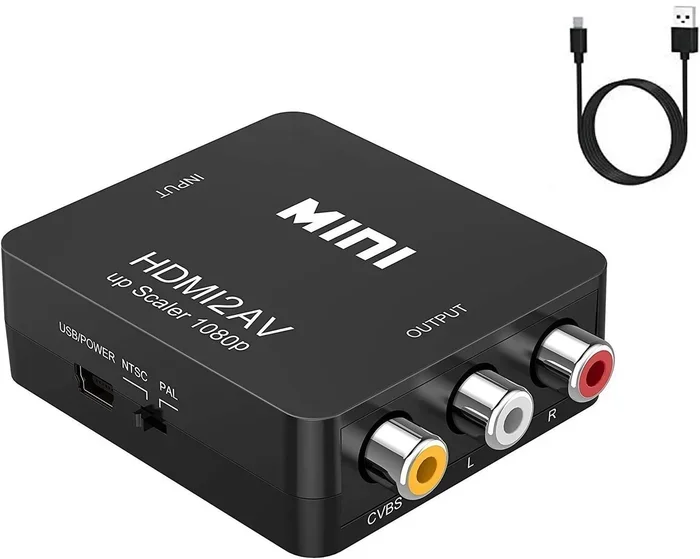
HDMI stands for High Definition Multimedia Interface. It is a digital connection that carries both video signals and audio signals through one cable. AV stands for Audio Video. AV connections are older and use analog signals. They typically rely on RCA cables with red, white, and yellow plugs.
So why would you need to convert HDMI to AV? Many older TVs and monitors only have AV inputs. These devices were built before HDMI became the standard. If you want to use a modern device with an old screen, you need a signal conversion tool. This is where an HDMI adapter or converter comes in handy.
The HDMI to AV process takes the digital output from a newer device and changes it into an analog signal. This analog signal can then travel through RCA cables to your older TV. Without this conversion, the two devices simply cannot talk to each other.
Common Devices That Need HDMI to AV
Several devices might require this kind of conversion. Here are some common ones:
- Older CRT televisions that only have AV inputs
- Vintage home theater systems without HDMI ports
- Legacy monitors used in offices or classrooms
- Older gaming consoles that need AV connections
- Portable DVD players with AV input only
Many households run multiple connected devices, from baby monitors connected to Wi-Fi to streaming boxes, all on the same network. Understanding how each device connects helps you plan your setup better.
How HDMI to AV Conversion Works
The HDMI to AV conversion process is not magic. It is a technical process that changes digital data into analog form. Let us break it down simply.
When your device sends an HDMI signal, it sends pure digital data. This data includes high-resolution video signals and multi-channel audio signals. The HDMI converter receives this digital data and processes it. It then outputs an analog signal that older devices can understand.
The converter handles several important tasks during this process:
- Digital-to-analog conversion for video
- Audio extraction and conversion
- Signal scaling to match AV resolution
- Sync adjustment for proper display timing
The output is typically a composite video signal through the yellow RCA plug. The red and white RCA plugs carry the left and right audio channels. This is the standard AV connection format that most older devices accept.
It is important to understand that this conversion can affect resolution quality. HDMI supports high resolutions like 1080p or even 4K. But AV connections are limited. The composite signal usually maxes out at 480i or 576i resolution. So the final picture will not be as sharp as the original HDMI output.
Active vs Passive Converters
There are two main types of converters. Active converters have built-in electronics to do the conversion. They need power, usually from a USB port or a wall adapter. Passive converters do not have electronics. They simply reroute the pins. Passive converters only work in very specific cases and are not true converters.
For most users, an active HDMI adapter is the right choice. It does the heavy lifting of converting the signal properly. Passive cables alone will not work for true HDMI to AV conversion.
Types of HDMI to AV Converters Available
Not all converters are the same. There are several types on the market. Each one serves a slightly different purpose. Let us look at the main options.
Basic HDMI to AV Converter Boxes
These are the most common type. They are small boxes that sit between your HDMI device and the AV display. You plug the HDMI cable into the box. Then you run RCA cables from the box to your TV. Most basic boxes also have a 3.5mm audio output for better sound.
These HDMI converter boxes are affordable. You can find them for under $20 in most cases. They work well for simple setups. They are great for connecting a laptop or a streaming stick to an old TV.
HDMI to AV Converters with Upscaling
Some converters include upscaling features. These units try to improve the output quality. They can sharpen the image or adjust the aspect ratio. Upscaling converters cost a bit more. But they can give you a better picture on older screens.
USB-Powered vs Wall Adapter Converters
Power source matters when choosing a converter. USB-powered units are convenient. You can plug them into a laptop or a USB wall brick. Wall adapter-powered units are more stable. They provide consistent power, which can mean a better and more stable signal.
When you think about your full home entertainment setup, power stability can make a real difference. Just like exploring alternatives to Dish Network and DirectTV can improve your viewing experience, choosing the right power source for your converter can improve your signal quality.
Wireless HDMI to AV Options
Some newer options use wireless technology. These send the HDMI signal through the air to a receiver. The receiver then converts it to AV output. Wireless options remove the need for long cables. They are handy when your devices are far apart. But they can sometimes have latency or interference issues.
Step-by-Step Guide to Setting Up HDMI to AV
Setting up your HDMI to AV connection is easier than you might think. Follow these steps and you will be watching in no time.
Step 1: Gather Your Equipment
Before you start, make sure you have everything you need:
- An HDMI to AV converter box or adapter
- An HDMI cable (usually included with the converter)
- RCA cables (red, white, and yellow)
- A power source for the converter (USB or wall adapter)
- The older TV or display with AV inputs
Step 2: Connect the HDMI Cable
Plug one end of the HDMI cable into your source device. This could be a streaming box, a laptop, or a gaming console. Plug the other end into the HDMI input on the converter box.
Step 3: Connect the RCA Cables
Take the RCA cables and plug them into the AV output on the converter. Match the colors. The yellow plug goes into the video input. The red and white plugs go into the right and left audio inputs. Then plug the other ends into the matching inputs on your TV.
Step 4: Power the Converter
Connect the power source to the converter. If it uses USB, plug it into a USB port on your TV or a wall adapter. If it uses a wall adapter, plug it into an outlet. The converter should power on.
Step 5: Switch Your TV to AV Mode
Use your TV remote to switch the input source. Look for labels like AV, Composite, or Video. The exact label depends on your TV model. Once you select the right input, you should see the picture.
Step 6: Adjust Settings if Needed
Go into the settings of your source device. Make sure the output resolution matches what the converter supports. Lower resolutions like 480p work best for AV connections. This will give you the clearest picture possible on an older screen.
Common Problems and How to Fix Them
Sometimes things do not work right away. Do not worry. Most issues are easy to fix. Here are the most common problems with HDMI to AV setups.
No Picture on the Screen
If you see a blank screen, check a few things first. Make sure all cables are firmly plugged in. Check that the RCA cables are in the right ports. Match the colors carefully. Also make sure the TV is on the correct input source. Try unplugging the converter and plugging it back in.
No Sound or Poor Audio
If the picture is there but there is no sound, check the audio cables. The red and white RCA cables carry the audio. Make sure they are fully inserted. Also check your source device audio settings. Make sure it is set to output through HDMI.
Fuzzy or Poor Picture Quality
A fuzzy picture is common with AV connections. This is because AV uses lower resolution than HDMI. To improve it, make sure your source device outputs at a lower resolution. 480p or 576p works best. Also check that your RCA cables are not damaged. Old or bent cables can cause a bad picture.
Converter Does Not Power On
If the converter does not turn on, check the power source. Try a different USB port or a different wall adapter. Some converters need a certain amount of power. A weak USB port may not provide enough. Using a wall adapter is usually the most reliable option.
Interference or Glitching
If you see interference lines or glitches, the cables might be too long. Keep your RCA cables short. Under six feet is ideal. Also keep the converter away from other electronics that might cause interference. A device compatibility issue can also cause glitches. Make sure your converter supports your source device.
HDMI to AV and Your Home Entertainment Setup
Using HDMI to AV is not just about old TVs. It opens up new possibilities for your home entertainment setup. You can use modern streaming devices with vintage displays. You can connect a laptop to an old projector. You can even set up a gaming station with classic CRT monitors.
Many people love the nostalgic look of older screens. The soft glow of a CRT TV has its charm. And some retro gaming communities prefer the original display experience. With the right HDMI to AV converter, you can enjoy modern content on these classic screens.
If you have other connected devices in your home, like baby monitors connected to Wi-Fi, you know how important proper connectivity is. A reliable AV connection ensures all your devices work together smoothly. The same principles apply to any device setup in your home.
Best Practices for Your Setup
- Keep cables short to reduce signal loss
- Use high-quality RCA cables for better signal strength
- Place the converter in a well-ventilated area
- Check for firmware updates on your converter
- Test with different source devices to confirm compatibility
- Store spare cables and adapters for quick swaps
Expert Tips for Getting the Best Results
Getting the most out of your HDMI to AV setup takes a little know-how. Here are some expert tips that can help.
First, always buy from a reputable brand. Cheap no-name converters often have poor signal quality. They may introduce lag or produce a weak picture. Spending a little more on a known brand pays off in the long run.
Second, match your cable lengths to your setup. Longer cables can degrade the signal. Keep your HDMI cable and RCA cables as short as your setup allows. If you need longer runs, consider using a powered amplifier.
Third, check your source device settings before you connect everything. Set the output resolution to match what AV supports. This avoids the need to constantly tweak settings after setup. Most converters work best at 480p or 576p output.
Fourth, keep your converter cool. These devices can generate heat during use. Place them somewhere with good airflow. Do not stack other electronics on top of the converter. Overheating can cause the device to shut down or produce a poor picture.
Fifth, if you are using the setup for gaming, be aware of input lag. The conversion process adds a small delay. This is usually not noticeable for watching videos. But for fast-paced games, it might be a factor. Test the setup before a gaming session if you are competitive.
Finally, keep your cables and ports clean. Dust and dirt can affect the connection. Use compressed air to clean ports gently. Wipe cable connectors with a dry cloth before plugging them in. A clean connection gives you the best possible display output.
Quick Tips at a Glance
- Buy a converter with a good warranty for peace of mind
- Test the setup before mounting or permanently placing devices
- Label your cables so you always know which is which
- Keep a spare converter on hand for emergencies
- Read reviews before purchasing any adapter or converter
Conclusion
So, can you use HDMI to AV? Absolutely yes. With the right converter and a few simple steps, you can connect modern devices to older screens. The process is straightforward and affordable. You do not need to be a tech expert to make it work.
Whether you want to use a streaming stick on an old TV or set up a retro gaming station, HDMI to AV conversion gives you the flexibility. It lets you mix old and new technology without any hassle. The key is choosing the right converter, using quality cables, and following the setup steps carefully.
Remember to check your device compatibility before buying. Make sure your converter supports your source device and your TV. Take your time with the setup. And do not be afraid to troubleshoot if something does not work right away. Most issues have simple fixes.
With this guide, you have everything you need to get started. HDMI to AV conversion opens up a world of possibilities. Enjoy your favorite content on any screen, no matter how old it is.
Frequently Asked Questions
Do I need a special converter to use HDMI to AV?
Yes, you need an active HDMI to AV converter. Passive cables alone will not work. The converter changes the digital HDMI signal into an analog AV signal. Make sure the converter you buy supports the resolution of your source device.
Will HDMI to AV conversion affect picture quality?
Yes, it can. AV connections use lower resolution than HDMI. The best output for composite AV is usually 480p or 576p. Your picture will not be as sharp as the original HDMI output. But it will still be clear enough for most viewing needs.
Can I use HDMI to AV for gaming?
You can, but there are some trade-offs. The conversion process adds a small amount of input lag. For casual gaming, this is not noticeable. For competitive or fast-paced games, the lag might be a problem. Test your setup before relying on it for serious gaming.
What cables do I need for HDMI to AV?
You need an HDMI cable and a set of RCA cables. The RCA cables should have red, white, and yellow plugs. The yellow plug carries video. The red and white plugs carry left and right audio. Most converters come with at least one HDMI cable included.
Can I connect a laptop to an old TV using HDMI to AV?
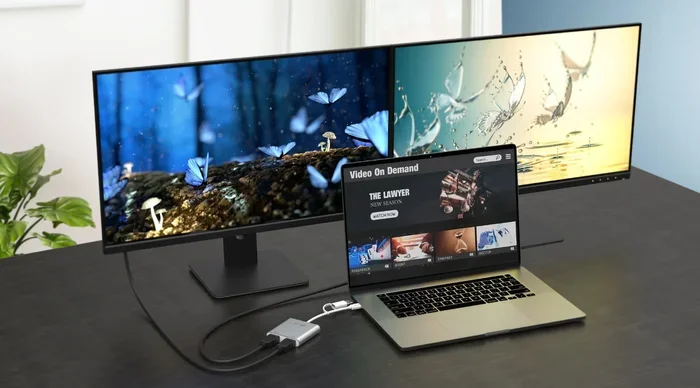
Yes, you can. A laptop with HDMI output can connect to an old TV with AV inputs using a converter. Simply follow the setup steps in this guide. Make sure your laptop recognizes the external display after you switch the TV to AV mode.
How much does an HDMI to AV converter cost?
Basic converters cost between $10 and $30. Models with upscaling or wireless features cost more, usually between $30 and $60. A good quality converter does not need to be expensive. Look for brands with positive reviews and a solid warranty.