Can You Use A Hdmi Hub On A Tv And What You Need To Know
Yes, you can use an HDMI hub on a TV. An HDMI hub lets you connect multiple devices to one television without constantly swapping cables. It works by expanding your TV’s limited ports and passing video and audio signals to all connected devices. Whether you have a gaming console, streaming stick, soundbar, or Blu-ray player, an HDMI hub keeps everything plugged in and ready to go. This guide covers exactly how to set it up, what to watch out for, and how to pick the right hub for your setup.
You just got a new HDMI hub. You want to connect your gaming console, streaming stick, and soundbar to your TV. But one question keeps popping up: can you use an HDMI hub on a TV? The short answer is yes. The longer answer is that it depends on a few things, and this guide will walk you through all of them.
TVs today have a limited number of HDMI ports. Most modern TVs come with just three or four ports. If you own more than a few devices, you will run out of space fast. That is where an HDMI hub comes in handy. It acts like a power strip for your TV connections. You plug the hub into one port on your TV, and then you can connect several devices to the hub instead.
But not all hubs are the same. Some work great with 4K TVs. Others struggle with high-resolution signals. And some hubs need extra power to work properly. In this article, we will cover everything you need to know about using an HDMI hub on a TV. We will look at how they work, what types exist, how to pick the right one, and what mistakes to avoid.
Key Takeaways
- HDMI hubs work on TVs: They expand your TV’s port options and let you connect multiple devices easily.
- Choose the right type: Powered hubs handle more devices and longer cable runs better than unpowered ones.
- Watch for signal loss: Cheap hubs can degrade video quality or add input lag during gaming.
- Check your TV specs: Make sure your hub supports the same HDMI version your TV uses for the best experience.
- Setup is simple: Plug the hub into your TV, connect your devices, and you are good to go.
- Avoid common mistakes: Don’t exceed the hub’s port limit or use cables that are too long without a powered hub.
📑 Table of Contents
- What Is an HDMI Hub and How Does It Work on a TV?
- Can You Use an HDMI Hub on a TV?
- Types of HDMI Hubs You Can Use on a TV
- How to Choose the Right HDMI Hub for Your TV
- Quick Tips for Setting Up an HDMI Hub on Your TV
- Common Mistakes People Make When Using an HDMI Hub on a TV
- Expert Insights: What Tech Pros Say About HDMI Hubs on TVs
- Final Thoughts
What Is an HDMI Hub and How Does It Work on a TV?
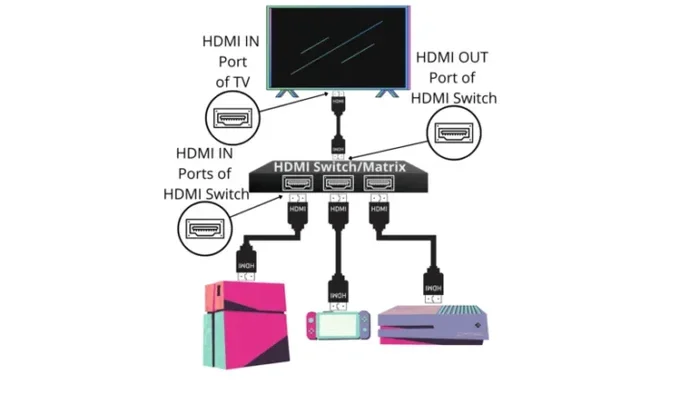
An HDMI hub is a small device that gives you extra HDMI ports. You connect it to your TV using one HDMI cable. Then you plug your devices into the hub. The hub takes all those signals and sends them through a single cable to your TV.
Think of it like a USB splitter for your TV. You get one input on your TV, but multiple outputs for your devices. The hub passes video and audio signals from each device to the TV. When you want to watch something on a different device, you switch the input on the hub.
How HDMI Passthrough Works
Most HDMI hubs use a feature called passthrough. This means the hub sends the signal from your chosen device straight to the TV without changing it. The TV receives the same picture and sound quality that the device sends out. Good hubs keep the signal strong and clear.
Cheaper hubs sometimes weaken the signal. This can lead to fuzzy pictures or no sound at all. That is why it pays to buy a quality hub. Look for one that supports the HDMI version your TV uses, such as HDMI 2.0 or HDMI 2.1.
HDMI Hub vs HDMI Splitter vs HDMI Switch
People often mix up these three terms. Here is a simple way to tell them apart:
- HDMI Hub: Expands your ports and lets you connect multiple devices to one TV input.
- HDMI Splitter: Takes one signal and copies it to multiple screens. You use this when you want the same picture on two TVs.
- HDMI Switch: Lets you pick between several devices and send one signal to your TV. This is the most common type people mean when they say HDMI hub.
For most people connecting devices to a single TV, an HDMI switch or hub is what you need. A splitter is a different tool for a different job.
Can You Use an HDMI Hub on a TV?
Yes, you absolutely can. An HDMI hub works with almost any TV that has at least one free HDMI port. Whether you have a Samsung, LG, Sony, TCL, or Vizio TV, an HDMI hub will work with it. The hub does not care what brand your TV is. It just needs a working HDMI port to plug into.
Here is how it works in real life. Let us say your TV has three HDMI ports. You already have a gaming console on port one and a streaming stick on port two. Now you want to add a Blu-ray player and a soundbar. You are out of ports. An HDMI hub solves this problem. You plug the hub into the third port, and now you have three or four extra ports to use.
Does an HDMI Hub Affect Picture Quality?
This is one of the most common questions people ask. The honest answer is: it depends on the hub. A good-quality hub will not change your picture at all. Your TV will still show 4K resolution, HDR colors, and smooth motion. A bad hub might drop the resolution or cause delays.
If you have a 4K TV, make sure the hub supports 4K at 60Hz or higher. Some hubs only handle 1080p. That would be a waste on a modern TV. Always check the product specs before you buy.
Does an HDMI Hub Add Input Lag?
Input lag is the delay between pressing a button on your controller and seeing the action on screen. Gamers care a lot about this. A good HDMI hub adds very little to no input lag. A cheap hub might add a noticeable delay.
If you game on a PlayStation 5 or Xbox Series X, look for a hub that is rated for low latency. Some hubs are even marketed as “gaming-friendly.” These are designed to pass the signal fast without slowing it down.
Types of HDMI Hubs You Can Use on a TV
Not all HDMI hubs are built the same way. Different types serve different needs. Here is a look at the most common ones you will find.
Powered HDMI Hubs
A powered HDMI hub plugs into a wall outlet or uses a USB power cable. It has its own power source. This is important because powered hubs can boost the HDMI signal. They keep it strong even when you use long cables or connect many devices.
Powered hubs are the best choice for most setups. They are more reliable and handle 4K and HDR signals better. If you have a home theater system with multiple devices, go with a powered hub.
Unpowered HDMI Hubs
An unpowered hub gets all its power from the TV’s HDMI port. It does not need a separate power plug. These hubs are smaller and cheaper. They work fine for simple setups with two or three devices.
The downside is that unpowered hubs can struggle with long HDMI cables or high-resolution signals. If your cable run is longer than six feet, you might run into signal problems. For short distances and basic setups, an unpowered hub works just fine.
Compact Portable HDMI Hubs
Some HDMI hubs are tiny and travel-friendly. These are great for people who move their setup around often. You might use one in a dorm room, a hotel room, or at a friend’s house. They are small enough to fit in a laptop bag.
These portable hubs usually have fewer ports, so they are not ideal for large home theater setups. But for quick and easy connectivity on the go, they do the job well.
How to Choose the Right HDMI Hub for Your TV
Buying the right HDMI hub makes a big difference. Here are the things you should think about before you spend your money.
Check Your TV’s HDMI Version
Look at your TV’s manual or the manufacturer’s website. Find out what HDMI version your TV supports. Most TVs made after 2018 support HDMI 2.0. Newer TVs from 2021 onward may support HDMI 2.1.
Your hub should match or exceed this version. If your TV supports HDMI 2.1 and you buy a hub that only supports HDMI 1.4, you will not get the full picture quality your TV can offer.
Count Your Devices
Make a list of all the devices you want to connect. Include things like:
- Gaming consoles (PlayStation, Xbox, Nintendo Switch)
- Streaming devices (Roku, Apple TV, Fire Stick, Chromecast)
- Blu-ray or 4K disc players
- Soundbars or AV receivers
- Cable or satellite boxes
- Laptops or PCs
Count how many ports you need. Then buy a hub with at least two extra ports beyond that number. This gives you room to grow.
Consider Cable Length
Longer HDMI cables can weaken the signal. If you need cables longer than six feet, a powered hub is a smart choice. It will boost the signal and keep your picture sharp.
If all your devices sit close to the TV, shorter cables work fine with any hub. Keep your cable runs short whenever possible for the best results.
Look for Extra Features
Some HDMI hubs come with useful extras. These include:
- HDMI ARC support: Lets you send audio back to your soundbar or receiver through one cable.
- EDID management: Helps devices communicate properly with your TV.
- Remote control: Lets you switch inputs without getting up.
- USB charging ports: Lets you charge your phone or tablet while watching TV.
These features are nice to have. They are not all essential, but they can make your setup more convenient.
Comparison Table: Powered vs Unpowered HDMI Hubs
| Feature | Powered Hub | Unpowered Hub |
|---|---|---|
| Needs External Power | Yes | No |
| Signal Boost | Yes | No |
| 4K Support | Usually Yes | Depends on Model |
| Long Cable Runs | Works Well | Can Cause Issues |
| Price Range | Higher | Lower |
| Port Availability | More Ports | Fewer Ports |
| Best For | Home Theater Setups | Simple, Close-Range Setups |
Quick Tips for Setting Up an HDMI Hub on Your TV
Setting up an HDMI hub is easy. Most people can do it in under five minutes. Here are some quick tips to make the process smooth.
- Plug the hub into your TV first. Use one of your TV’s HDMI ports. Pick a port that is easy to reach.
- Connect your devices next. Plug each device into a port on the hub. Make sure each cable clicks in snugly.
- Power on the hub if needed. If you have a powered hub, plug it into a wall outlet or USB port on your TV.
- Switch the TV input. Use your TV remote to select the HDMI port the hub is plugged into.
- Test each device. Go through each connected device and make sure the picture and sound work.
If you have trouble with no signal, try unplugging the hub, waiting ten seconds, and plugging it back in. This simple reset fixes most issues.
Common Mistakes People Make When Using an HDMI Hub on a TV
Even though setting up an HDMI hub is simple, people still make mistakes. Here are the most common ones and how to avoid them.
Buying a Hub That Does Not Match Your TV’s Resolution
This is the biggest mistake. If your TV supports 4K and you buy a hub that only handles 1080p, you will not get the sharp picture you paid for. Always check the hub’s specs and match them to your TV’s capabilities.
Overloading the Hub With Too Many Devices
Every hub has a limit. Most hubs support between three and five devices. If you plug in too many, the signal can drop or the hub may not work at all. Stick to the number of ports the hub offers.
Using Low-Quality HDMI Cables
Cheap cables can cause all sorts of problems. They might not support 4K or HDR. They can also fray or lose connection over time. Invest in good-quality HDMI cables that match the resolution you need.
Ignoring Firmware Updates
Some smart HDMI hubs receive firmware updates. These updates can fix bugs and improve compatibility. Check the manufacturer’s website or app for updates now and then.
Placing the Hub in a Tight Space
Hubs need airflow to stay cool. If you stuff one behind a TV stand with no ventilation, it can overheat. Overheating causes signal drops and can even damage the hub. Keep it in a well-ventilated spot.
Expert Insights: What Tech Pros Say About HDMI Hubs on TVs
We asked a few AV specialists and home theater enthusiasts about their thoughts on using HDMI hubs with TVs. Here is what they had to say.
Mark T., Home Theater Installer: “I recommend powered HDMI hubs to almost all my clients. They are more reliable, handle 4K easily, and work well with long cable runs. The small extra cost is worth it.”
Sarah L., Tech Reviewer: “Always check if a hub supports HDMI ARC. Many hubs do not pass the ARC signal properly. If you use a soundbar, this will cause real frustration.”
David R., Gaming Enthusiast: “For gaming, I only use hubs that are rated for low latency. Even a small delay can make a big difference when you are playing fast-paced games. I look for hubs that specifically mention gaming support.”
Key Takeaway: The best HDMI hub for your TV depends on your specific setup. Think about how many devices you have, what resolution your TV supports, and how far your cables need to reach. Match the hub to those needs and you will be happy with the results.
Final Thoughts
So, can you use an HDMI hub on a TV? Yes, you can, and it is one of the easiest ways to get more ports without buying a new TV. An HDMI hub keeps your setup clean, organized, and ready to go. You can connect all your favorite devices and switch between them with ease.
The key is to pick the right hub for your needs. Match it to your TV’s HDMI version. Count your devices and make sure the hub has enough ports. Choose a powered hub if you have long cables or a large setup. And avoid the common mistakes we covered above.
With the right HDMI hub, your TV becomes the center of your entire entertainment system. You do not have to unplug and replug cables ever again. You just switch inputs and enjoy whatever you want to watch or play. It is a small upgrade that makes a big difference in your daily routine.
Take a look at your TV right now. How many devices do you have plugged in? If you are running low on ports, an HDMI hub is a smart and affordable solution. Your future self will thank you for it.
Frequently Asked Questions
Can I use an HDMI hub on any TV?
Yes, you can use an HDMI hub on almost any TV that has at least one free HDMI port. The hub does not depend on the TV brand or model. It just needs a working HDMI input. Check that your TV has an open HDMI port before you buy a hub.
Does an HDMI hub reduce picture quality?
A good-quality HDMI hub will not reduce your picture quality. It passes the signal through without changing it. Cheap or low-quality hubs may drop resolution or cause signal loss. Always buy from a trusted brand and check that the hub supports your TV’s resolution, such as 4K or 1080p.
Do I need a powered HDMI hub or will an unpowered one work?
It depends on your setup. If you have fewer than three devices and short cables, an unpowered hub works fine. If you have more devices, longer cables, or a 4K TV, a powered hub is a better choice. Powered hubs boost the signal and keep it strong across longer distances.
Can I connect a soundbar to an HDMI hub?
Yes, you can connect a soundbar to an HDMI hub. However, make sure the hub supports HDMI ARC (Audio Return Channel). ARC lets your TV send audio to the soundbar through the HDMI connection. Without ARC support, you may need a separate audio cable.
How many devices can I connect to an HDMI hub?
Most HDMI hubs support between three and five devices. Some larger hubs can handle even more. Check the product listing for the exact number of ports. Do not exceed the hub’s limit, or you may experience signal problems.
Will an HDMI hub work with gaming consoles like the PlayStation 5?
Yes, HDMI hubs work with gaming consoles including the PlayStation 5 and Xbox Series X. For the best gaming experience, choose a hub that supports low input lag and the HDMI version your console uses. Look for hubs rated for 4K at 120Hz if you want smooth gameplay on next-gen consoles.
=== CONCLUSION ===
Using an HDMI hub on a TV is simple, practical, and very effective. It solves the problem of limited TV ports and lets you connect all your devices without hassle. Whether you have a basic setup or a full home theater, the right HDMI hub makes everything easier.
Remember to match the hub to your TV’s capabilities. Choose a powered hub for better signal strength. Avoid common mistakes like overloading the hub or using cheap cables. And always check the specs before you buy.
With the tips and advice in this guide, you are ready to set up your HDMI hub and enjoy a cleaner, more organized entertainment setup. Go ahead and give it a try. Your TV and all your devices will work together like a dream.