Can You Split USB To Two Devices And Why It Matters
Yes, you can split USB to two devices using a USB splitter or hub, but the results depend on your setup, power source, and data needs. A USB splitter lets you share a single port between multiple devices, which is useful for home offices, smart home setups, and entertainment systems. However, not all splitters are equal, and using the wrong one can slow down your data transfer or fail to charge your devices properly. This guide covers everything you need to know about splitting USB connections safely and effectively.
Have you ever found yourself with too few USB ports and too many devices to plug in? Maybe your laptop only has two ports, but you need to connect a flash drive, a mouse, a keyboard, and a charging cable all at once. It is a frustrating problem that almost everyone faces at some point.
The idea of splitting a single USB connection to two devices sounds simple enough. But can you split USB to two devices without losing speed or causing damage? The short answer is yes, but there are important details you need to understand first. This guide walks you through everything from how USB splitters work to choosing the right one for your needs.
Whether you are setting up a home office, building a smart home, or just trying to organize your desk, knowing how USB splitting works saves you time, money, and headaches. Let us break it all down.
Key Takeaways
- A USB splitter allows one port to connect two devices: but performance depends on whether the splitter is powered or unpowered.
- Powered USB hubs deliver better results: they provide independent power to each connected device and prevent bandwidth issues.
- Not all USB splitters work the same way: USB 2.0 and USB 3.0 splitters handle data transfer and power delivery differently.
- Common mistakes include using unpowered splitters for charging: this often leads to slow or failed device charging.
- Choosing the right splitter depends on your needs: consider port type, power requirements, and the devices you want to connect.
📑 Table of Contents
What Is a USB Splitter and How Does It Work
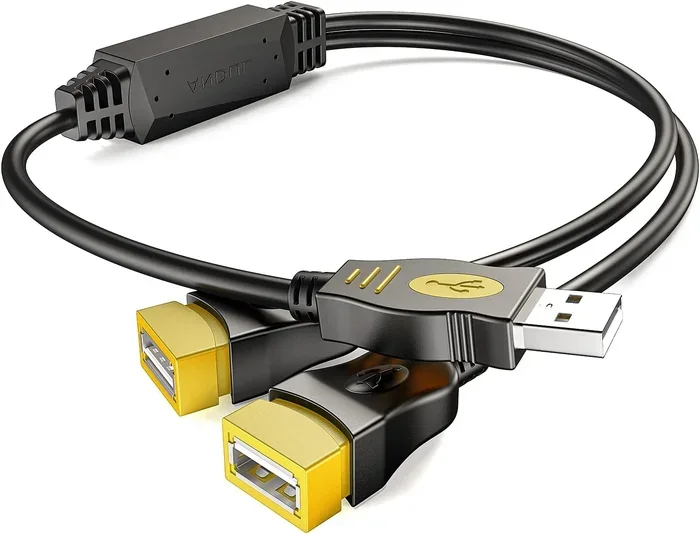
A USB splitter is a small device that takes one USB port and divides it into two or more connections. Think of it like a power strip for USB devices. You plug the splitter into your computer or wall charger, and then you plug your devices into the splitter’s ports.
But here is the thing. A USB splitter does not just copy the connection perfectly. It shares the bandwidth and power of the original port between all connected devices. This means your devices might not perform as well as they would with a direct, dedicated connection.
How USB Splitting Works
When you plug a USB splitter into a port, it creates a shared pathway for data and power. Both devices connected to the splitter use the same bandwidth and power supply from that single port.
For example, if you plug a flash drive and a mouse into a USB splitter, both devices share the data transfer speed of the original port. If you are copying files from the flash drive, your mouse might lag slightly. This is because the splitter divides the available bandwidth between the connected devices.
The same goes for power. If your laptop port delivers 5 watts of power and you split it between two devices, each device gets roughly 2.5 watts. This might be fine for a mouse, but it could struggle to charge a phone or power a larger peripheral.
USB Hub vs USB Splitter
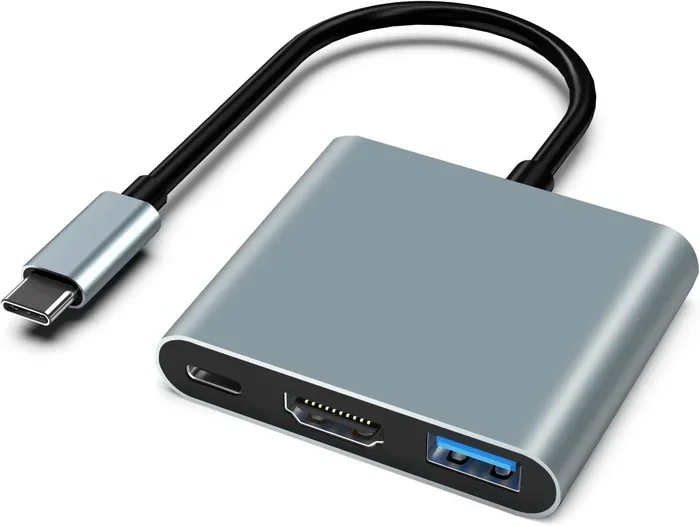
People often confuse USB splitters with USB hubs, but they are different tools for different needs. A USB hub actively manages the connections and often includes its own power supply. A basic USB splitter just divides the existing connection passively.
Here is a quick comparison:
- USB Splitter: Passively divides one port into two. No extra power source. Best for low-power devices like keyboards and mice.
- USB Hub: Actively manages connections. Often includes a power adapter. Better for multiple devices or devices that need more power.
If you want a simple and cheap solution for two low-power devices, a splitter works. If you need to connect several devices or charge anything, a powered USB hub is the better choice.
Can You Actually Split USB To Two Devices
The answer is yes, you can split USB to two devices. But whether it works well depends on several factors. Let us look at the different types of splitters and what you need to know before buying one.
Powered vs Unpowered USB Splitters
This is the most important distinction when you are thinking about splitting USB connections. A powered splitter has its own external power source, usually a wall adapter or a USB-C power cable. An unpowered splitter draws all its power from the single USB port it is connected to.
Powered splitters are almost always the better choice. They provide each connected device with its own power supply, which means faster charging and more stable data transfer. Unpowered splitters work fine for simple tasks, but they can struggle when both devices need power at the same time.
If you are planning to charge a phone while also transferring files through the same splitter, go with a powered option. The extra cost is worth the performance boost.
USB 2.0 vs USB 3.0 Splitting
Not all USB connections are created equal. USB 2.0 ports transfer data at up to 480 Mbps, while USB 3.0 ports can reach speeds of 5 Gbps. When you split a connection, both devices share the speed of the original port.
If you split a USB 2.0 port, both devices are limited to USB 2.0 speeds. If you split a USB 3.0 port, both devices share the USB 3.0 bandwidth, but neither gets the full speed on its own. This matters most when you are transferring large files or using devices that need fast data rates.
For most everyday tasks like connecting a mouse, keyboard, or printer, USB 2.0 splitting is perfectly fine. For external hard drives or video capture devices, USB 3.0 splitting gives you a much better experience.
Why Splitting USB Matters for Your Setup
You might wonder why splitting USB even matters. The truth is that it affects your daily productivity, your device performance, and even how your entire workspace functions. Let us explore the real-world reasons why USB splitting is important.
Home Office Productivity
If you work from home, you know how quickly USB ports fill up. You might need a webcam for video calls, a flash drive for presentations, a wireless mouse, and a keyboard. Running out of ports is a common problem.
A USB splitter or hub solves this problem quickly. You connect all your peripherals through one or two splitters and keep your workspace clean and organized. This is especially helpful for people who use laptops with limited port options.
Some people also use USB splitters for their smart home devices. For example, if you want to connect a baby monitor charger and a night light to a single outlet or hub, a USB splitter makes this easy and convenient.
Smart Home and Connected Devices
The modern smart home relies heavily on USB connections. From smart speakers to security cameras, many devices need a constant USB power source. When you have multiple smart devices, splitting USB connections helps you manage them all from fewer ports.
The key is to use a powered splitter so that each device gets enough power. An unpowered splitter might cause smart devices to disconnect or behave unpredictably, especially if they need a steady power supply to stay online.
Home Entertainment Setups
Home entertainment systems often need multiple USB connections too. Streaming devices, soundbars, game controllers, and external storage all use USB ports. When your TV or media center has limited USB ports, splitting becomes essential.
For people looking for alternatives to traditional cable TV, devices like streaming sticks and satellite alternatives often rely on USB power. If you are exploring options like alternatives to Dish Network and DirectTV, you might find that your entertainment setup needs more USB ports than your TV or receiver provides. A good USB splitter solves this problem quickly and keeps everything running smoothly.
Common Mistakes When Splitting USB Connections
USB splitting is simple, but people make mistakes that cause frustration. Here are the most common errors and how to avoid them.
- Using an unpowered splitter for charging devices: This is the number one mistake. Unpowered splitters cannot deliver enough power to charge phones or tablets reliably. Always choose a powered splitter if you plan to charge anything.
- Connecting too many power-hungry devices: Even with a powered splitter, there are limits. Do not connect multiple high-power devices to a single splitter unless it is designed for that load.
- Ignoring data transfer speeds: If you need fast file transfers, make sure your splitter supports USB 3.0 or higher. A USB 2.0 splitter will slow down your data speeds significantly.
- Buying cheap, uncertified splitters: Cheap splitters from unknown brands can damage your devices or cause data loss. Always buy from reputable manufacturers and look for USB-IF certification.
- Assuming all splitters work the same: Some splitters are active (they boost the signal), while others are passive (they just divide the connection). Active splitters perform better, especially over longer cable runs.
How to Choose the Right USB Splitter
Choosing the right USB splitter depends on what you plan to connect and how you plan to use it. Here are the key factors to consider before you buy.
Things to Look For
- Power delivery: Check the wattage of the splitter. Higher wattage means more power for your devices. A splitter with a 60-watt power adapter can handle most phones and tablets easily.
- USB version: Match the splitter to your port. If your computer has USB 3.0 ports, buy a USB 3.0 splitter to get the best speeds.
- Number of ports: Most splitters offer two to seven ports. Two ports are enough for most everyday needs. More ports make sense for desktop setups with many peripherals.
- Port type: Make sure the splitter has the right port types for your devices. USB-A, USB-C, and micro-USB are the most common. Some splitters offer a mix of port types.
- Build quality: Look for splitters with metal housings, braided cables, and solid construction. These last longer and perform better than cheap plastic options.
Quick Tips for Buying
- Check your device power requirements before buying a splitter.
- Read reviews from other users to find reliable brands.
- Choose a splitter with a warranty or return policy.
- Measure your available space to make sure the splitter fits your setup.
- Consider buying a USB hub with a built-in power supply for the most flexibility.
Final Thoughts
So, can you split USB to two devices? Absolutely. The real question is whether you are doing it the right way for your needs. A powered USB splitter or hub gives you the best results for most situations. It keeps your devices charged, your data flowing, and your workspace organized.
Remember that not all splitters are created equal. The cheap unpowered splitter might work fine for a mouse and keyboard, but it will fall short when you need to charge a phone or transfer large files. Invest in a quality splitter that matches your power and data needs, and you will avoid frustration down the road.
USB splitting is a simple solution to a common problem. Whether you are upgrading your home office, setting up a smart home, or organizing your entertainment center, the right splitter makes a big difference. Take the time to choose wisely, and your devices will thank you.
Frequently Asked Questions
Can I split a USB port to charge two phones at once?
Yes, you can split a USB port to charge two phones, but only if you use a powered USB splitter. An unpowered splitter will not provide enough power for both phones, and they will charge very slowly or not at all. A powered splitter with a wall adapter delivers enough current to charge both devices at a reasonable speed.
Will splitting USB slow down my data transfer speeds?
Yes, splitting USB usually reduces the data speed shared between connected devices. Both devices use the same bandwidth from the original port. If you are transferring large files, the speed will be slower than using a direct connection. USB 3.0 splitters reduce the impact, but you will still share the available bandwidth.
What is the difference between a USB splitter and a USB hub?
A USB splitter passively divides one connection into two without adding power. A USB hub actively manages connections and usually includes its own power supply. Hubs perform better for multiple devices, while splitters work fine for simple, low-power connections like keyboards and mice.
Can I use a USB splitter for external hard drives?
You can, but it is not ideal. External hard drives need consistent power and fast data transfer. A powered USB 3.0 hub works better for hard drives than a basic splitter. The hub provides stable power and maintains faster speeds for reliable performance.
Do USB splitters damage devices?
Quality USB splitters from reputable brands do not damage devices. However, cheap uncertified splitters can cause power fluctuations, data corruption, or even short circuits. Always buy splitters with USB-IF certification and read reviews before purchasing to protect your devices.
How many devices can I split a single USB port to?
Most USB splitters divide one port into two connections. USB hubs can support up to seven or more devices. The practical limit depends on the power supply and bandwidth of the original port. For best results, keep the total power draw of connected devices within the splitter or hub’s rated capacity.
=== CONCLUSION ===
Splitting USB to two devices is a practical and useful solution for anyone who needs more connections than their ports provide. Whether you are setting up a workspace, organizing your smart home, or building an entertainment center, the right splitter makes everything easier.
The key is to choose a powered splitter, match the USB version to your needs, and avoid the common mistakes that cause poor performance. With the right setup, you get fast data transfer, reliable charging, and a cleaner, more organized workspace.
Now that you know how USB splitting works, you can make a confident choice for your setup. Pick the right splitter, connect your devices, and enjoy the convenience of extra USB ports without the hassle.