Can I Transmit Usb Wirelessly And Is It Really Possible
Yes, you can transmit USB wirelessly using adapters, software, and network-based solutions. Wireless USB lets you share devices like drives, printers, and peripherals across your home or office without cables. This guide breaks down every method, so you can choose what works best for your setup.
Have you ever stared at a tangled mess of USB cables and thought, “There has to be a better way”? You are not alone. More and more people want to know if they can transmit USB wirelessly. The good news is that the answer is a definite yes. Wireless USB technology has come a long way. Today, you can share printers, external drives, and even keyboards without plugging in a single cord.
Whether you are working from home, setting up a smart office, or just tired of cable clutter, this guide has you covered. We will walk through every method, every tool, and every tip you need. By the end, you will know exactly how to transmit USB wirelessly in your own space. Let us dive in.
Key Takeaways
- Wireless USB is absolutely possible: Multiple technologies and tools let you transmit USB data without a physical cable.
- Hardware adapters are the easiest option: Wireless USB dongles and adapters plug in and work with minimal setup.
- Software solutions are free and flexible: Programs like USB over Network let you share devices across computers on the same Wi-Fi.
- Speed and range vary by method: Some wireless options match USB 3.0 speeds, while others trade speed for convenience.
- Wireless USB hubs are great for offices: They let multiple users access shared USB devices from anywhere in the room.
- Watch out for common mistakes: Interference, outdated drivers, and poor router placement can kill your wireless USB performance.
📑 Table of Contents
- What Is Wireless USB and How Does It Work?
- Can You Actually Transmit USB Wirelessly?
- Best Ways to Transmit USB Wirelessly
- Comparison: Wireless USB Methods
- Pros and Cons of Transmitting USB Wirelessly
- Common Mistakes When Using Wireless USB
- Expert Tips for Better Wireless USB Performance
- Key Takeaways
- Conclusion
- FAQs
What Is Wireless USB and How Does It Work?
Wireless USB is a technology that sends USB data through the air instead of a cable. Think of it like Wi-Fi, but specifically designed for USB devices. It uses radio signals to connect your USB peripherals to your computer or network. The result is the same — your device works — but without the physical cord.
The idea is simple. A transmitter sends the USB signal. A receiver picks it up on the other end. Together, they create a wireless bridge between your device and your computer. Some solutions use your existing Wi-Fi network. Others use dedicated radio frequencies built into the hardware.
The Technology Behind Wireless USB
Most wireless USB setups rely on one of two approaches. The first uses a dedicated wireless USB adapter. This is a small device that plugs into your USB port. It pairs with a matching receiver on the other side. The second approach uses software to share USB devices over a network. This means you can access a USB device from another computer, even if it is in a different room.
Both methods have grown much more reliable in recent years. Early wireless USB had lag and speed issues. But modern versions handle most everyday tasks with ease. File transfers, printing, and peripheral use all work smoothly now.
How Wireless USB Differs from Traditional USB
Traditional USB needs a cable. That cable limits how far you can move. It also creates clutter. Wireless USB removes those limits. You can place your USB device anywhere within range. No cable, no hassle.
However, there is a trade-off. Wireless transmission can be slightly slower than a direct cable connection. And range depends on your setup. A strong Wi-Fi signal helps a lot. So does keeping your receiver close to the device you are sharing.
Can You Actually Transmit USB Wirelessly?
The short answer is yes. You can transmit USB wirelessly in several different ways. Each method has its own strengths. Some are better for fast file transfers. Others are great for sharing a single printer across a whole office. Let us look at the most popular options available right now.
Wireless USB Adapters and Dongles
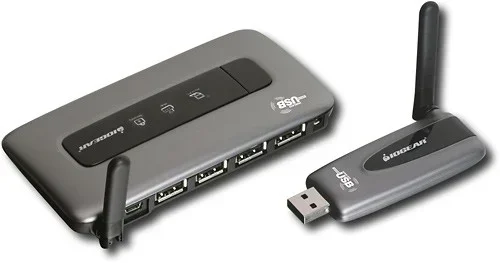
A wireless USB adapter is the simplest way to go wireless. You plug one end into your computer. The other end connects to your USB device through a receiver. Brands like IOGEAR and Targus make popular options. These adapters usually support USB 3.0 speeds, which means fast data transfer.
Setting one up is easy. Plug the adapter into your PC. Plug the receiver into your USB device. Pair them using the included software. That is it. Most setups take less than five minutes. No technical skills required.
Software-Based Solutions
Software-based solutions are a great free alternative. Programs like USB Network Gate and Virtual Here let you share USB devices over your network. You install the software on both the host computer and the remote computer. Then you select the USB device you want to share. The other computer can now access it as if it were plugged in directly.
This method works well for home offices and small teams. You do not need any extra hardware. Just a solid Wi-Fi connection and the right software. It is one of the most flexible ways to transmit USB wirelessly.
USB Over Wi-Fi and USB Over Ethernet
USB over Wi-Fi lets you access USB devices through your wireless network. This is perfect for sharing printers, scanners, or storage drives. USB over Ethernet does the same thing but through a wired Ethernet connection. Both methods use a small hardware device called a USB server.
A USB server plugs into your router or network switch. You connect your USB device to the server. Other devices on the network can then use it. This is a popular choice for small businesses. It keeps things simple and centralized.
Best Ways to Transmit USB Wirelessly
Not all wireless USB methods are the same. Some are faster. Some are easier to set up. Some cost more but offer better performance. Here are the best ways to transmit USB wirelessly, ranked by use case.
Wireless USB Adapters for Home Users
If you just want to use a USB device across the room, a wireless USB adapter is your best bet. These small devices plug directly into your USB ports. They create a point-to-point wireless connection. No network setup needed. Just pair and go.
Look for adapters that support USB 3.0 or higher. This ensures you get fast transfer speeds. Most home users will find these adapters more than enough for everyday tasks. They work great with external hard drives, flash drives, and even gaming controllers.
USB Sharing Servers for Offices
In an office setting, a USB sharing server is a game changer. These devices connect to your network and make USB devices available to everyone. You can share a single printer among many computers. Or you can share a USB drive for team file access.
USB sharing servers usually come with a web dashboard. You can manage connected devices from any browser. They also support user permissions, so you control who gets access. This makes them ideal for collaborative work environments.
Software Tools for Remote USB Access
Software tools are the most budget-friendly option. Programs like USB Network Gate let you access USB devices remotely. You can even do this over the internet, not just your local network. This is useful for IT teams who need to manage devices from a distance.
Most software solutions offer a free trial. You can test them before buying a license. They are easy to install and do not require any extra hardware. Just make sure your internet connection is stable for the best experience.
Comparison: Wireless USB Methods
| Method | Speed | Range | Cost | Best For |
|---|---|---|---|---|
| Wireless USB Adapter | USB 3.0 speeds | Up to 30 feet | Low to Medium | Home users, single device |
| USB Sharing Server | Gigabit network | Full network range | Medium | Offices, shared printers |
| USB Over Network Software | Depends on Wi-Fi | Network-wide | Free to Low | Budget setups, remote access |
| USB Over Ethernet | Wired speed | Ethernet cable length | Medium | Stable office connections |
Pros and Cons of Transmitting USB Wirelessly
Like any technology, wireless USB has its ups and downs. Let us look at the main advantages and disadvantages so you can make an informed decision.
The Pros
- No cable clutter: Your desk stays clean and organized.
- Flexibility: Place USB devices anywhere within range.
- Easy sharing: Multiple users can access one USB device.
- Remote access: Use USB devices from another room or even remotely.
- Scalability: Add more devices without buying more cables.
The Cons
- Slight speed loss: Wireless is usually a bit slower than a direct cable.
- Range limits: Signal strength drops as you move farther away.
- Interference: Wi-Fi congestion can affect performance.
- Setup complexity: Some methods require more configuration than others.
- Cost: Hardware solutions can add up if you need multiple adapters.
Common Mistakes When Using Wireless USB
Even with the best tools, people make mistakes that hurt their wireless USB experience. Here are the most common ones — and how to avoid them.
Ignoring Wi-Fi Signal Strength
Your wireless USB performance depends heavily on your Wi-Fi signal. If your router is far away, your USB device may lag or disconnect. Always check your signal strength before setting up a wireless USB connection. A simple Wi-Fi analyzer app can help you find the best spot.
Using Outdated Drivers
Old drivers cause most wireless USB problems. Make sure your adapter, dongle, and USB device all have the latest firmware. Check the manufacturer’s website for updates. A quick update can solve connection drops and slow speeds.
Overloading Your Network
If too many devices are using your Wi-Fi, your USB transfer speeds will drop. This is especially true for large file transfers. Try to use a dedicated network or a 5 GHz band for wireless USB traffic. It makes a big difference.
Skipping Security Settings
Wireless USB means your data travels through the air. If you do not secure your connection, others could access your devices. Always use encryption and strong passwords. Change default settings on any USB sharing server you set up.
Expert Tips for Better Wireless USB Performance
Want to get the most out of your wireless USB setup? Here are some expert-backed tips that really work.
Use a 5 GHz Wi-Fi Band
Most modern routers offer both 2.4 GHz and 5 GHz bands. The 5 GHz band is faster and less crowded. Use it for your wireless USB devices whenever possible. You will notice smoother transfers and fewer disconnections.
Keep Your Receiver Close
Even though wireless USB has no cable, proximity still matters. Keep your wireless receiver within a reasonable distance from the USB device. Walls and furniture can block the signal. A clear line of sight gives the best results.
Update Firmware Regularly
Manufacturers release firmware updates to fix bugs and improve performance. Check for updates every few months. This applies to your wireless adapter, USB server, and any sharing software you use.
Test with a Speed Check Tool
Before relying on wireless USB for important work, run a speed test. Transfer a few test files and check the transfer rate. This tells you whether your setup can handle your daily tasks. If speeds are too slow, try moving your router closer or switching to a wired Ethernet connection.
Key Takeaways
- Wireless USB is a real, working technology: You can absolutely transmit USB wirelessly with the right tools.
- Hardware adapters are the simplest solution: Plug in a dongle, pair it, and you are done.
- Software tools offer a free and flexible alternative: USB over Network and similar programs work well for most users.
- USB sharing servers shine in office environments: They make it easy to share printers and drives across a team.
- Speed and range depend on your setup: A strong Wi-Fi signal and updated drivers make all the difference.
- Avoid common mistakes: Check signal strength, update firmware, and secure your connection.
- Wireless USB is getting better every year: Newer adapters and software keep closing the gap with wired connections.
Conclusion
So, can you transmit USB wirelessly? The answer is a clear and confident yes. Whether you choose a wireless USB adapter, a sharing server, or a software-based solution, you have options. Each method fits different needs and budgets. Home users will love the simplicity of a wireless adapter. Office teams will benefit from USB sharing servers and network software.
The technology has matured enough that wireless USB is no longer a novelty. It is a practical, reliable way to connect your devices without cables. You get flexibility, cleaner workspaces, and easy device sharing. Just keep your Wi-Fi strong, update your drivers, and avoid the common mistakes we covered.
Now that you know how to transmit USB wirelessly, it is time to try it. Pick the method that fits your situation. Set it up in minutes. And enjoy the freedom of a cable-free workspace. You will wonder how you ever worked without it.
FAQs
Is wireless USB as fast as a regular USB cable?
It is close, but not always identical. A good wireless USB adapter can reach USB 3.0 speeds, which is up to 5 Gbps. However, your Wi-Fi signal strength and network congestion can affect real-world speeds. For most everyday tasks, the difference is barely noticeable.
Can I share a USB printer wirelessly without a special adapter?
Yes, you can. Many modern printers have built-in Wi-Fi. If your printer does not, you can use a USB sharing server or software like USB Network Gate. Both methods let you print wirelessly from any computer on your network.
How far can I transmit USB wirelessly?
It depends on the method. Wireless USB adapters typically work up to 30 feet. USB sharing servers can reach across your entire network, which may be 100 feet or more. For longer distances, a USB over Ethernet setup gives you the best range.
Do I need special software to transmit USB wirelessly?
For hardware adapters, no special software is usually needed. The adapter comes with its own driver and setup tool. For software-based solutions, you do need to install the sharing program on both the host and remote computers. Popular options include USB Network Gate and Virtual Here.
Is wireless USB secure?
Most wireless USB solutions use encrypted connections. However, you should still take basic security steps. Use strong passwords on your Wi-Fi network. Enable encryption on your USB sharing server. Keep your firmware and software up to date to patch any vulnerabilities.
Can I use wireless USB for gaming peripherals like keyboards and mice?
Absolutely. Wireless USB adapters work great with gaming keyboards, mice, and controllers. Just make sure you pick an adapter with low latency. This ensures your inputs register quickly and accurately during gameplay. Most gaming-grade wireless USB adapters handle this with ease.