Can You Boost Your Wifi At Home And Get Stronger Signal
Yes, you can boost your wifi at home and get a stronger signal using simple, proven methods. From repositioning your router and reducing interference to upgrading equipment and setting up a mesh network, there are many effective ways to improve your home network. This guide walks you through every practical step so you can enjoy faster speeds and reliable wireless coverage in every room.
Do you ever get frustrated when your wifi drops in the bedroom or the living room feels like a dead zone? You are not alone. Millions of people deal with weak wifi signal strength every single day. The good news is that boosting your wifi at home is easier than most people think.
You do not need to be a tech expert. With a few simple changes, you can significantly improve your internet speed and wireless coverage. This guide covers everything from free quick fixes to equipment upgrades. By the end, you will know exactly what to do to get a stronger, more reliable home network.
Let us dive into the practical steps that actually work. Whether you live in a small apartment or a large house, these tips will help you get the best possible wifi signal from your wireless router.
Key Takeaways
- Router placement matters: Moving your router to a central, elevated spot can dramatically improve your wifi signal strength.
- Reduce interference: Walls, appliances, and neighboring networks can weaken your wireless router performance.
- Upgrade when needed: A modern dual band router or mesh network can transform your home network.
- Small tweaks make a big difference: Changing channels, updating firmware, and using ethernet backhaul boosts network performance.
- DIY solutions work: You do not need expensive gear to fix most wifi dead zone problems at home.
- Professional help is an option: For complex homes, a network expert can design a custom setup for full wireless coverage.
📑 Table of Contents
Why Your Wifi Signal Is Weak at Home
Before fixing a problem, it helps to understand what causes it. Weak wifi signal usually comes down to a few common factors. Once you know what is going wrong, solving it becomes much easier.
Distance from the Router
The farther you are from your wireless router, the weaker the signal gets. Wifi signals spread out in all directions, and they lose power as they travel through space. If your router sits in one corner of the house, the opposite end may barely get any signal at all.
Physical Obstacles
Walls, floors, and furniture block wifi signals. Thick concrete walls are especially tough on wireless coverage. Even large metal objects like refrigerators and filing cabinets can weaken your home network signal. Water is another hidden enemy. Fish tanks and even large indoor plants can absorb wifi signals and reduce network performance.
Signal Interference
Other electronic devices create interference that messes with your wifi signal. Microwaves, baby monitors, cordless phones, and Bluetooth devices all operate on similar frequencies. Your neighbors’ wireless routers can also cause channel congestion, especially in dense apartment buildings.
Outdated Equipment
Older routers simply cannot keep up with modern internet speed demands. If your router is more than five years old, it might be time to consider an upgrade. Newer wireless routers support faster standards and handle more devices at once.
Best Ways to Boost Your Wifi at Home
Now that you know why signals get weak, let us look at the best ways to boost your wifi at home. These methods range from completely free to moderate investment.
Move Your Router to a Better Spot
This is the single easiest and most effective thing you can do. Place your wireless router in a central location in your home. Ideally, it should be on the main floor and away from corners. Elevating the router on a shelf or table also helps the signal spread more evenly.
Avoid hiding your router inside a closet or behind a TV. These spots block the signal and reduce wireless coverage. Keep it in the open where air can flow around it. A little repositioning can make a surprisingly big difference in wifi signal strength.
Update Your Router Firmware
Router manufacturers release firmware updates that improve performance and fix bugs. These updates often include better signal optimization and security patches. Check your router’s admin panel or app to see if an update is available.
Most modern routers have an auto-update feature. If yours does, make sure it is turned on. This simple step keeps your home network running at its best without any effort.
Change Your Wifi Channel
Think of wifi channels like lanes on a highway. If too many routers use the same channel, there is congestion and slowdowns. Switching to a less crowded channel can improve your internet speed and reduce drops.
You can use free apps like Wifi Analyzer to see which channels are busiest in your area. Then log into your router settings and switch to a clearer channel. This works especially well in apartments where many wireless routers are packed close together.
Reduce Interference from Other Devices
Keep your wireless router away from other electronics that cause interference. Move it at least a few feet away from microwaves, cordless phone bases, and Bluetooth speakers. Even large mirrors and metal furniture can reflect wifi signals and cause problems.
If you have many smart home devices, consider putting them on a separate network if your router supports it. This reduces the load on your main home network and keeps your bandwidth available for important tasks.
Use a Wifi Extender or Repeater
A wifi extender picks up your existing signal and rebroadcasts it to areas that get weak coverage. These devices are affordable and easy to set up. They are a great option if you have one or two rooms with poor wireless coverage.
However, wifi extenders do cut the speed in half because they use the same radio to receive and send data. They work best for light browsing and streaming, not for heavy downloads or gaming. Place the extender halfway between your router and the weak spot for the best results.
Upgrade to a Mesh Network System
A mesh network is the gold standard for whole-home wireless coverage. Instead of one router, a mesh system uses multiple nodes placed around your home. Each node communicates with the others to create a seamless, strong wifi signal everywhere.
Mesh systems are more expensive than extenders, but they deliver much better network performance. They are easy to manage through an app and handle multiple devices without slowing down. Popular options include Google Nest Wifi, Eero, and TP-Link Deco.
Switch to a 5GHz Frequency Band
Most modern dual band routers broadcast on two frequencies: 2.4GHz and 5GHz. The 2.4GHz band covers a wider area but is slower and more prone to interference. The 5GHz band is faster but has a shorter range.
For rooms close to your router, switch to the 5GHz band for the best internet speed. Use the 2.4GHz band for devices that are farther away. Many routers let you set up separate network names for each band, making it easy to choose.
Router Placement: The Hidden Game Changer
Where you put your router affects everything. Even the best wireless router will struggle if it is in a bad spot. Good router placement is the foundation of a strong home network.
Center your router in your home if possible. Think about where you use the internet the most. If you stream in the living room and work from the home office, place the router somewhere between both areas. Height matters too. A router on a high shelf sends signals downward more effectively than one on the floor.
Keep the router away from water sources and large metal objects. Bathrooms are a common mistake because of all the plumbing and tile. The wifi signal bounces off metal pipes and gets distorted, creating weak spots in your wireless coverage.
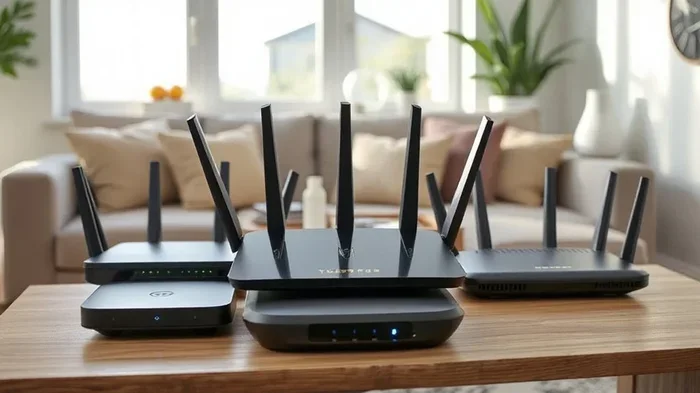
Also, avoid pointing the router antennas straight up. Point one antenna horizontally and one vertically. This helps the signal spread in multiple directions and improves network performance across different floors and rooms.
Quick Tips for Perfect Router Placement
- Place the router in an open area, not behind furniture
- Keep it away from thick walls and large appliances
- Elevate the router on a shelf or mounted on a wall
- Position antennas in different orientations for better spread
- Keep it away from windows where signal escapes outside
- Avoid corners and closets that trap the signal
Upgrade Your Equipment for Better Signal
Sometimes, no amount of tweaking will fix a weak signal if your equipment is outdated. Investing in better hardware can transform your home network and give you the stronger signal you need.
When to Replace Your Router
If your router is more than four or five years old, it is probably time for a new one. Older models do not support the latest wifi standards, which means slower speeds and weaker signal strength. Look for a router that supports wifi 5 (802.11ac) or wifi 6 (802.11ax) for the best wireless coverage.
A dual band router gives you more flexibility. It lets you use both the 2.4GHz and 5GHz bands, so you can optimize network performance for each device. If you have many smart home gadgets, a router with better processing power handles them without slowing down.
Consider a Wifi Booster or Range Extender
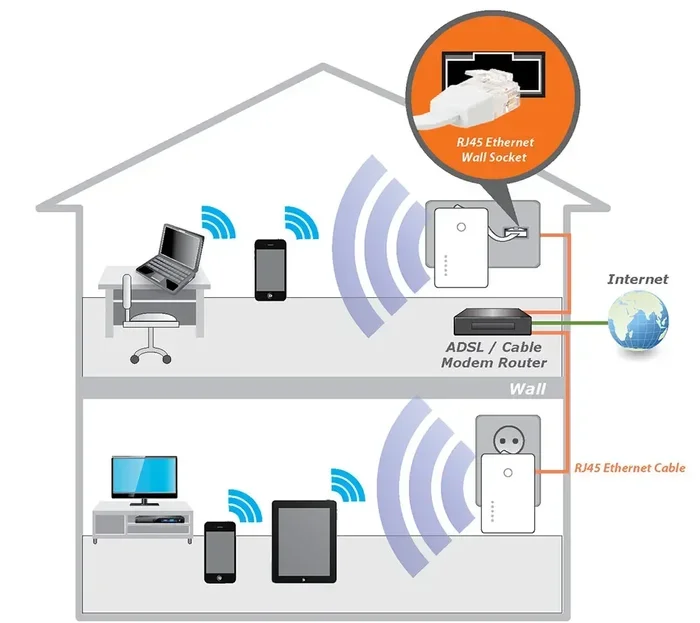
A wifi booster is a simple way to extend your signal to areas that get weak coverage. These devices plug into a wall outlet and rebroadcast your router’s signal. They are affordable and work well for single-room improvements.
Keep in mind that wifi boosters work best when placed where the signal is still moderate, not where it is completely dead. If the signal is too weak at the extender’s location, it will just repeat a weak signal and not improve much.
Powerline Adapters as an Alternative
Powerline adapters use your home’s electrical wiring to carry the internet signal. You plug one adapter near your router and another in the room where you need better coverage. This bypasses walls and obstacles that block wifi signals.
Powerline adapters are not as fast as a direct ethernet connection, but they are much more reliable than weak wireless coverage. They are a great option for home offices, gaming setups, or smart TVs in rooms far from the router.
Advanced Tips to Maximize Your Wifi Strength
If the basic steps are not enough, these advanced techniques can push your home network to the next level.
Enable Quality of Service (QoS)
Most modern wireless routers have a QoS setting that lets you prioritize certain types of traffic. For example, you can give video calls and streaming priority over downloads. This ensures your most important activities get the bandwidth they need.
To enable QoS, log into your router’s admin panel and look for the QoS or traffic management section. The exact steps vary by router model, but the feature is worth setting up for any home network with multiple users.
Use Ethernet Backhaul with Mesh Systems
If you invest in a mesh network, use ethernet cables to connect the nodes whenever possible. This is called ethernet backhaul, and it gives you the fastest and most stable connection between nodes. Without it, the mesh system uses wireless backhaul, which shares bandwidth and reduces speed.
Even running a single ethernet cable from your main router to a mesh node can make a huge difference. This setup delivers the best network performance and eliminates wifi dead zone problems for good.
Limit Connected Devices
Every device connected to your home network uses bandwidth, even when idle. Smart TVs, phones, tablets, smart speakers, and IoT devices all compete for internet speed. The more devices on your network, the slower everything can feel.
Go through your connected devices and remove any that you no longer use. Some wireless routers let you set a device limit or create a guest network for visitors. This keeps your main home network fast and responsive.
Secure Your Network
An unsecured network lets neighbors and strangers use your wifi, which eats up your bandwidth and slows down your connection. Always use WPA3 or WPA2 encryption on your wireless router. Set a strong password and never leave it as the default.
Regular security updates also protect your home network from intrusions that can degrade network performance. A secure router runs more efficiently and gives you the full internet speed you are paying for.
Common Mistakes to Avoid
- Placing the router on the floor or in a cabinet
- Hiding the router behind thick walls or large furniture
- Using an outdated router that does not support modern standards
- Ignoring firmware updates that improve performance
- Overloading the network with too many devices
- Setting up the extender in a dead zone instead of a moderate signal area
- Not securing the network, allowing neighbors to piggyback
When to Call a Professional
Most people can fix weak wifi signal on their own using the tips in this guide. But sometimes, the problem is more complex. If you have tried everything and still experience poor wireless coverage, it may be time to call in a professional.
A network specialist can assess your home’s layout, identify interference sources, and design a custom setup. They can install wired access points, configure mesh networks, and optimize your home network for peak network performance. This is especially helpful for large homes, multi-story buildings, or spaces with unusual layouts.
Professional help is also worth it if you run a home business or need rock-solid internet speed for video conferencing and streaming. The upfront cost pays for itself in reliability and productivity. Do not hesitate to reach out if DIY solutions do not solve your wifi dead zone issues.
Conclusion
Boosting your wifi at home is absolutely doable, and you do not need to spend a fortune to do it. Start with the free steps like moving your router, reducing interference, and updating firmware. These alone can make a noticeable difference in your wifi signal strength and wireless coverage.
If you need more, consider a wifi extender, powerline adapter, or a full mesh network system. Each option has its place depending on your home size, budget, and usage needs. The key is to take action and not settle for weak internet speed in parts of your home.
Your home network is the backbone of your daily digital life. Whether you are working, streaming, gaming, or browsing, a strong wifi signal makes everything better. Apply the tips in this guide, and you will enjoy a faster, more reliable connection in every room. Boost your wifi at home today and feel the difference immediately.
Frequently Asked Questions
Can I boost my wifi at home without buying new equipment?
Yes, absolutely. Many free methods can significantly improve your wifi signal strength. Simply moving your router to a central location, updating firmware, and changing the wifi channel can make a big difference. Reducing interference from other electronics also helps without any extra cost.
What is the difference between a wifi extender and a mesh network?
A wifi extender rebroadcasts your existing signal to cover one or two weak areas, but it usually cuts the speed in half. A mesh network uses multiple nodes that work together to create seamless wireless coverage throughout your home. Mesh systems deliver better network performance and are easier to manage.
Why does my wifi get slower at certain times of day?
This is usually caused by channel congestion, especially in apartment buildings. When many neighbors are online at the same time, the shared frequencies get crowded. Switching to a less crowded channel or using the 5GHz band can help maintain your internet speed during peak hours.
Does router placement really matter that much?
Yes, it matters a lot. Your wireless router needs a clear path to send signals to your devices. Walls, floors, and large objects block wifi signals. Placing the router in a central, elevated, open location dramatically improves wireless coverage and signal strength throughout your home.
How do I know if I need a new router?
If your router is more than five years old, it likely does not support the latest wifi standards. Slow speeds, frequent drops, and inability to handle multiple devices are signs you need an upgrade. A modern dual band router or mesh system can transform your home network performance.
Can powerline adapters really improve my wifi signal?
Yes, they are a great alternative when wifi signals cannot reach certain rooms. Powerline adapters use your home’s electrical wiring to carry the internet signal, bypassing walls and obstacles. They are especially useful for home offices, gaming setups, or rooms far from the router where wireless coverage is weak.