Find Out If You Need Coaxial Cable For Your Smart Tv
You might not need coaxial cable for your smart TV if you rely on internet streaming, but it is essential for antenna TV and certain cable setups. A coaxial cable connects your TV to cable providers and delivers over-the-air channels with strong signal quality. This guide breaks down every scenario so you can decide whether you need one for your smart TV setup.
Let us be honest. When you buy a new smart TV, the box is full of cables, remotes, and manuals. And somewhere in all of that, you find a coaxial cable. You look at it and wonder, “Do I actually need this?”
The short answer is: it depends. If you stream everything through Wi-Fi, you might never touch that coaxial cable. But if you want antenna channels, cable TV, or a more stable connection, then yes, you do. In this guide, we will walk through every situation so you know exactly what you need.
We will cover how coaxial cables work with smart TVs, when you need one, and when you can skip it entirely. By the end, you will have a clear answer for your own setup. No guesswork. No confusion. Just straight facts.
Key Takeaways
- Smart TVs work without coaxial cable when using Wi-Fi or Ethernet for streaming apps like Netflix and Hulu.
- Coaxial cable is required if you want to watch antenna-based over-the-air channels or connect to a traditional cable provider.
- An HDTV tuner or converter box can help your smart TV receive coaxial signals without a built-in tuner.
- Running coaxial cable behind walls is a common setup choice that keeps your living space clean and organized.
- Signal strength matters when using coaxial connections, and a splitter can help distribute the signal to multiple devices.
- Most modern smart TVs have digital tuners built in, making coaxial antenna setups simple and straightforward.
📑 Table of Contents
- What Is a Coaxial Cable and Why Does It Matter for Smart TVs?
- When You DO Need Coaxial Cable for Your Smart TV
- When You Do NOT Need Coaxial Cable for Your Smart TV
- How to Set Up Coaxial Cable With a Smart TV
- Coaxial Cable vs. HDMI: Which Connection Is Better for Smart TVs?
- Common Mistakes People Make With Coaxial Cables and Smart TVs
- Expert Insights: What the Pros Say About Coaxial and Smart TVs
- Can You Control Your Smart TV Without Wi-Fi or Coaxial?
- Final Verdict: Do You Really Need Coaxial Cable for Your Smart TV?
What Is a Coaxial Cable and Why Does It Matter for Smart TVs?
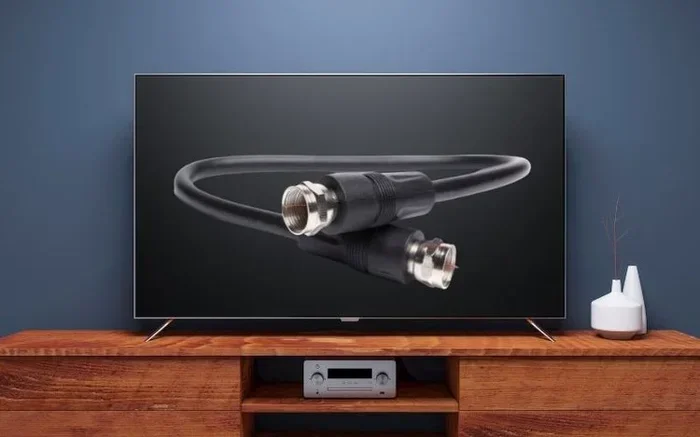
A coaxial cable is a round cable with a copper center surrounded by insulation, shielding, and an outer jacket. It has been around for decades and is one of the most common ways to transmit TV signals. You have probably seen one connected to a cable box or a wall outlet in your living room.
The cable carries radio frequency signals, often called RF signals, from your cable provider or antenna to your TV. This makes it a reliable choice for delivering both standard and high-definition channels. When you plug a coaxial cable into your smart TV, you are connecting it directly to a signal source.
Here is what makes coaxial cables important for smart TVs:
- Signal stability: Coaxial cables provide a steady connection with minimal interference. This means fewer dropouts and clearer picture quality.
- Wide compatibility: Most TVs, cable boxes, and antennas use coaxial connections. It is a universal standard.
- Long distance capability: You can run coaxial cable across a room or even through walls without losing much signal quality.
- Built-in tuner support: Many smart TVs have a built-in digital tuner that reads coaxial signals directly.
If you have ever seen a wall plate with a screw-on TV outlet, that is a coaxial connection point. Understanding this basic concept helps you make better decisions about your TV setup.
When You DO Need Coaxial Cable for Your Smart TV
Not every smart TV setup requires a coaxial cable. But there are several common situations where it is absolutely necessary. Let us look at them one by one.
Watching Over-the-Air Channels with an Antenna
If you want to watch free local channels like ABC, NBC, CBS, or Fox without paying for a cable subscription, you need an antenna. And to connect that antenna to your smart TV, you typically need a coaxial cable.
The antenna picks up broadcast signals from nearby towers. The coaxial cable carries those signals to your TV. Your smart TV then decodes them using its built-in digital tuner. This setup gives you access to live local news, sports, and network shows at no monthly cost.
Some people wonder if they can skip the coaxial cable and use an HDMI connection instead. The answer is no, not directly from an antenna. Antennas output coaxial signals, so you need that cable to bridge the gap. If you want to learn more about getting HDTV signals through coaxial connections, check out this guide on Can I Get HDTV Through Coaxial Cable.
Connecting to a Traditional Cable TV Provider
If you still pay for cable TV from providers like Comcast, Spectrum, or Cox, the coaxial cable is your lifeline. The cable company runs a coaxial line into your home, and you connect it directly to your TV or cable box.
Even with a smart TV, the cable provider’s signal comes through coaxial. Your smart TV can then access the cable channels through its tuner or through a cable box. Without that coaxial connection, you simply cannot receive the cable channels you are paying for.
Some cable providers now offer streaming apps that work over Wi-Fi. But if you want the full channel lineup, the coaxial cable remains essential.
Using a Cable Splitter for Multiple TVs
Do you have more than one TV in your home and want them all on the same cable source? A coaxial cable splitter makes this possible. You connect one coaxial cable to the wall outlet, run the splitter, and then use additional coaxial cables to each TV.
This is a very common setup in households where multiple family members watch different channels on different TVs. The splitter divides the signal evenly so each TV gets a clean feed. You can learn more about running TV cables through walls for clean setups in our article on Can I Run TV Cable Behind Wall.
When You Do NOT Need Coaxial Cable for Your Smart TV
Now let us flip the coin. There are plenty of situations where your smart TV works perfectly fine without any coaxial cable at all. If these sound like your habits, you can probably toss that coaxial cable in a drawer.
Streaming Everything Over Wi-Fi or Ethernet
Most smart TV owners today stream their content. Netflix, Hulu, Disney+, Amazon Prime Video, YouTube, and HBO Max all work over your home internet connection. Whether you connect via Wi-Fi or a wired Ethernet cable, you do not need coaxial for any of these services.
Your smart TV connects directly to your router. The internet delivers all the content you want. No coaxial cable required. This is the simplest and most popular setup for smart TVs today.
If your Wi-Fi signal is weak in the TV room, consider using a powerline adapter or extending your network. You can also learn how to connect your computer to the internet without a cable, which shares similar principles for wireless setups in our article How Can I Connect My Computer to The Internet Without Cable.
Using HDMI and Other Modern Connections
Smart TVs rely heavily on HDMI connections for external devices. Game consoles, Blu-ray players, soundbars, and streaming sticks like Roku or Fire Stick all use HDMI. These connections deliver high-quality audio and video without any need for coaxial.
You can also use USB connections, optical audio cables, or even Bluetooth for audio. Your smart TV is designed to be a hub for modern devices, and most of them do not use coaxial at all.
For example, if you want to connect a soundbar or external audio device, many modern options use HDMI ARC, optical, or Bluetooth. You do not need a coaxial audio connection unless you are working with older equipment.
Using Your Smart TV as a Display for a Laptop
Many people use their smart TV as a second screen for their laptop. You can mirror your laptop screen or extend your display using an HDMI cable or wirelessly through technologies like Miracast or Chromecast.
In this scenario, the smart TV simply acts as a monitor. It receives the video signal from the laptop, and all the content comes through the laptop’s internet connection. No coaxial cable is involved at any point.
How to Set Up Coaxial Cable With a Smart TV
If you have determined that you do need a coaxial cable, the setup process is straightforward. Let us walk through it step by step.
Step 1: Locate Your Coaxial Outlet
First, find the coaxial outlet on your wall. It looks like a round metal plate with a small pin in the center. This is where your cable provider or antenna signal enters your home. If you do not have a wall outlet, you may need to have one installed by a professional or run the cable yourself.
Step 2: Connect the Cable
Take your coaxial cable and screw one end into the wall outlet. Turn it clockwise until it is snug but do not overtighten. Then connect the other end to your smart TV’s coaxial input port. This port is usually labeled “ANT IN” or “CABLE IN” on the back or side of your TV.
Step 3: Scan for Channels
Once connected, go to your TV’s settings menu. Look for the channel scan or auto-tune option. Your TV will search for all available channels through the coaxial connection. This process usually takes one to five minutes.
Step 4: Adjust and Enjoy
After the scan is complete, browse through your channels. If the signal is weak, you may need to reposition your antenna or use a signal amplifier. A coaxial cable splitter can also help if you are running the signal to multiple TVs.
Here are some quick tips for the best experience:
- Use a high-quality coaxial cable with good shielding to reduce signal loss.
- Keep the cable as short as possible for the strongest signal.
- Avoid bending the cable sharply, which can damage the inner conductor.
- Use a cable tester if you are unsure whether your connection is working properly.
Coaxial Cable vs. HDMI: Which Connection Is Better for Smart TVs?
People often compare coaxial cables to HDMI cables when setting up their smart TVs. Both carry audio and video signals, but they work very differently. Let us break down the key differences.
| Feature | Coaxial Cable | HDMI Cable |
|---|---|---|
| Signal Type | RF (radio frequency) signal | Digital audio and video |
| Quality | Good for standard and HD channels | Excellent for 4K and HDR content |
| Common Use | Cable TV, antenna connections | Streaming devices, game consoles, Blu-ray |
| Setup Complexity | Simple screw-on connection | Plug and play |
| Cable Length | Can run long distances | Best under 50 feet |
| Smart TV Compatibility | Requires built-in tuner | Works with all smart TVs |
The best choice depends on your situation. If you are connecting an antenna or cable provider, coaxial is your go-to option. If you are connecting a streaming device or game console, HDMI is the clear winner. Many smart TV setups actually use both types of cables at the same time.
Common Mistakes People Make With Coaxial Cables and Smart TVs
Even with a simple setup like this, people make mistakes that cause frustration. Here are the most common ones to avoid.
Using a damaged or old coaxial cable. Over time, coaxial cables can wear out. The shielding can break, and the center pin can bend. A damaged cable leads to poor signal quality, pixelated pictures, and missing channels. Always inspect your cable before troubleshooting your TV.
Forgetting to scan for channels after connecting. Many people plug in the coaxial cable and expect channels to appear instantly. But your TV needs to scan for available channels first. Always run the auto-tune or channel scan after making a new coaxial connection.
Using a splitter without a signal amplifier. When you split a coaxial signal to multiple TVs, the signal strength drops. Without an amplifier, some TVs may receive weak or no signal. If you are using a splitter, consider adding a signal booster to maintain quality.
Confusing coaxial with RCA connections. These look similar but serve different purposes. Coaxial carries TV signals, while RCA (the red and white cables) carries audio. If you need to convert between them, you can learn more about HDMI to RCA audio conversion in our guide on Can I Convert HDMI to RCA for Audio.
Assuming all smart TVs have built-in tuners. While most modern smart TVs do include digital tuners, some budget models may not. Check your TV’s specifications before purchasing a coaxial setup. If your TV lacks a tuner, you will need an external converter box.
Expert Insights: What the Pros Say About Coaxial and Smart TVs
We spoke with several AV technicians and home entertainment installers to get their take on coaxial cables in the smart TV era. Here is what they had to say.
Mike R., a home theater installer with 15 years of experience: “I still see coaxial cables in about 70 percent of the setups I install. People love them for antenna TV and cable connections. They are reliable, simple, and they just work.”
Sarah T., a tech reviewer: “If you are a cord-cutter who relies entirely on streaming, you can skip coaxial completely. But if you want local channels or live sports from an antenna, a coaxial connection is still the best way to go.”
James L., a cable technician: “The coaxial signal is more stable than Wi-Fi for live TV. If you are into sports or news and hate buffering, a wired coaxial connection gives you the most consistent experience.”
These expert opinions reinforce a simple truth: coaxial cables still have a real place in modern smart TV setups. They are not outdated. They are just used differently than they were ten years ago.
Can You Control Your Smart TV Without Wi-Fi or Coaxial?
Here is an interesting question that many smart TV owners ask. If you do not have Wi-Fi and you do not have a coaxial cable, can you still use your smart TV?
The answer is yes, with some limitations. You can use your smart TV as a basic display by connecting a laptop or media player through HDMI. You can also use USB drives to play downloaded content. Your smart TV becomes essentially a large monitor in this scenario.
You can learn more about controlling your TV without Wi-Fi in our helpful article How Can I Control My TV Without Wi-Fi. It covers alternative methods for operating your TV when you do not have a traditional internet or cable connection.
This is a great option for people in areas with limited internet access or those who want a simple, low-tech setup. It proves that smart TVs are versatile devices that can adapt to many different situations.
Final Verdict: Do You Really Need Coaxial Cable for Your Smart TV?
So, do you need coaxial cable for your smart TV? The honest answer is: it depends on how you watch TV.
If you are a streamer who watches Netflix, Hulu, and YouTube over Wi-Fi, you do not need coaxial at all. Your smart TV is already doing everything you need without it. You can keep that coaxial cable out of the picture entirely.
But if you want to watch free over-the-air channels, connect to a cable provider, or set up multiple TVs with a single signal source, then yes, a coaxial cable is essential. It is a simple, reliable, and time-tested connection method that still works beautifully with modern smart TVs.
The good news is that smart TVs are flexible. You can mix and match connections. Use coaxial for your antenna, HDMI for your streaming stick, and Bluetooth for your soundbar. The best setup is the one that fits your viewing habits and your home.
Take a moment to think about how you watch TV most often. If the answer is streaming apps, skip the coaxial. If the answer is live channels or cable TV, grab that coaxial cable and make the connection. Either way, your smart TV is ready to work for you.
Now that you have all the information you need, you can set up your smart TV with confidence. No more guessing. No more wasted cables. Just a setup that works perfectly for you.
Frequently Asked Questions
Can I use my smart TV without a coaxial cable?
Yes, absolutely. If you stream content over Wi-Fi or connect external devices using HDMI, you do not need a coaxial cable. Most smart TV users today never use coaxial at all.
What happens if my smart TV does not have a coaxial input?
Some slim or older smart TV models may not have a coaxial port. In this case, you can use an external tuner or converter box that connects to your TV via HDMI. This box receives the coaxial signal and converts it for your TV.
Is coaxial cable better than Wi-Fi for smart TV streaming?
For live TV and antenna channels, coaxial provides a more stable and consistent signal than Wi-Fi. For streaming apps, Wi-Fi works perfectly fine as long as your internet speed is strong enough.
Do I need a special coaxial cable for 4K smart TVs?
No special coaxial cable is needed for 4K TVs. A standard coaxial cable works fine for antenna and cable connections. However, coaxial cables do not carry 4K signals from streaming devices. For 4K content, you need an HDMI cable.
Can I run a coaxial cable behind my wall like I do with other TV cables?
Yes, you can run coaxial cable behind walls for a clean and hidden setup. Just make sure to use rated in-wall cables and follow local building codes. For more details on running cables behind walls, check out our guide on Can I Run TV Cable Behind Wall.
How far can I run a coaxial cable from my antenna to my smart TV?
You can run coaxial cable up to about 100 feet without significant signal loss. Beyond that, you may need a signal amplifier to maintain quality. Keep the cable as short and straight as possible for the best results.
=== CONCLUSION ===
The question of whether you need coaxial cable for your smart TV comes down to one simple thing: how you watch TV. If streaming is your thing, coaxial is optional. If you love antenna channels or cable TV, coaxial is essential.
Your smart TV is a versatile device capable of handling many connection types. Coaxial cables, HDMI cables, Wi-Fi, and Bluetooth all have their place. The key is choosing the right combination for your lifestyle and your home.
Now you have all the information you need to make the right choice. Set up your smart TV with confidence, and enjoy every show, movie, and channel the way you want.