Do I Need A Mount For A Projector Everything You Should Know
Not everyone needs a projector mount, but the right projector mount can transform your viewing experience. Whether you want a ceiling mount projector setup or a simple wall placement, choosing the right projector placement option depends on your room, budget, and how often you use it. This guide covers every angle so you can make the best decision for your space.
Do you need a mount for a projector? The short answer is no, but the better answer is it depends on your setup. A projector mount is not always required, but it can make a huge difference in how your images look and how your room feels. Whether you are building a home theater or just want to watch movies on a big screen, understanding your projector placement options helps you get the best experience.
Many people assume they need an expensive mount right away. In reality, you can start with a simple table or shelf and upgrade later. What matters most is finding a stable position that gives you the right throw distance and image size. This guide walks you through everything you need to know about projector mounts so you can choose with confidence.
We will cover ceiling mounts, wall mounts, tripods, and even no-mount setups. You will learn the pros and cons of each option, what to look for in a projector bracket, and how to avoid common mistakes. By the end, you will know exactly what works best for your space and budget.
Key Takeaways
- Mounting is optional: You can place a projector on a table or shelf instead of installing a mount.
- Ceiling mounts save space: A ceiling mount projector setup creates a clean, distraction-free viewing area.
- Wall mounts work too: If you cannot mount on the ceiling, a wall mount projector bracket still offers great stability.
- Consider your throw distance: The distance between your projector and screen affects image size and focus.
- Budget options exist: You do not need to spend a lot to get a stable and functional projector setup.
- Permanent vs portable: Choose between fixed mounts and tripod options based on your needs.
- Proper alignment matters: Even the best mount will not help if your projector alignment is off.
📑 Table of Contents
What Does a Projector Mount Do?
A projector mount holds your device in a fixed position. It keeps the image stable and lets you aim the projector at your screen with precision. Without a mount, you rely on a flat surface or a temporary stand, which can shift over time.
Here is what a good mount provides:
- Stability: A projector bracket prevents the device from tipping or shaking during use.
- Precise angle control: You can adjust the tilt and position to get a perfectly square image.
- Space savings: Mounting your device frees up table and floor space.
- Clean look: Wires stay hidden and the room looks more polished.
- Better airflow: Elevated mounts allow ventilation around the projector, which helps with cooling.
Not every mount does all of this. Basic models offer a fixed position, while advanced ones let you adjust the height, angle, and even swivel direction. Your choice depends on how flexible you need your setup to be.
Ceiling Mount vs Wall Mount vs No Mount
When people ask about projector placement, they usually mean three options: ceiling, wall, or no mount at all. Each has clear strengths and weaknesses. Let us break them down so you can compare easily.
Ceiling Mount Projector Setup
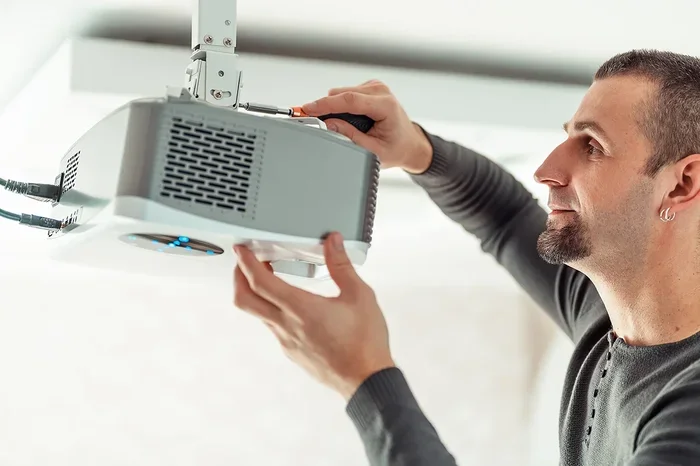
A ceiling mount projector setup is the most popular choice for home theaters. You attach a bracket to the ceiling and hang the projector upside down or right-side up, depending on the model. This keeps the device completely out of the way.
Benefits of a ceiling mount include:
- Frees up all floor and table space
- Creates a clean, professional look
- Provides the best center alignment for most rooms
- Keeps the projector away from pets and children
- Reduces the risk of accidental bumps or knocks
The main downside is installation. You need to drill into the ceiling and run cables through the wall or along the surface. If you rent your home, this might not be an option. Also, ceiling height matters a lot. If your ceilings are low, the projector might be too close to the screen, causing image distortion.
Wall Mount Projector Option
A wall mount projector bracket works well when a ceiling mount is not practical. You attach the bracket to a wall, usually above the screen or to the side. This gives you a fixed position without drilling into the ceiling.
Here is why a wall mount might work for you:
- Easier to install than a ceiling mount
- Great for rooms with low ceilings
- Still keeps the projector off the floor
- Allows for side or top placement near the screen
The tradeoff is that a wall mount takes up wall space and may not look as clean as a ceiling setup. You also need to make sure the wall is strong enough to hold the weight. Drywall alone is usually not enough, so you will need to anchor into a stud or use a heavy-duty bracket.
If you want to learn more about placing a projector on different surfaces, check out our guide on Can I Use A Projector On My Wall. It covers creative placement ideas beyond traditional mounts.
No Mount (Table or Shelf Placement)
You do not always need a mount. Many people place their projector directly on a table, shelf, or even a stack of books. This works fine for casual viewing or temporary setups.
Here is what to keep in mind with no-mount setups:
- Make sure the surface is completely level and stable
- The projector must sit at the correct throw distance from the screen
- Keep the device away from where people might bump it
- Use a vibration-free surface to avoid image shake
- Consider a dedicated projector stand for better positioning
No-mount setups are great for renters or people who move their projector around often. They are also the most affordable option since you do not need any extra hardware. The downside is less precision in alignment and a higher risk of accidental shifts during use.
Types of Projector Mounts Available
Not all mounts are the same. The market offers several types, each designed for different needs and budgets. Understanding these options helps you pick the right one without overspending.
Fixed Mount Brackets
A fixed mount holds the projector in one position permanently. You set the angle and height once, and it stays there. These are the simplest and most affordable options.
Fixed mounts work best when:
- You always project from the same spot
- Your room layout does not change often
- You want a minimalist, no-frills setup
Adjustable and Tilting Mounts
Adjustable mounts let you change the tilt, swivel, and sometimes the height after installation. These are useful when you need fine-tuning for perfect image alignment.
Look for features like:
- Tilt adjustment for keystone correction
- Swivel capability for side projection
- Sliding rails for forward and backward positioning
- Quick-release plates for easy removal
If you plan to adjust your setup often, an adjustable mount saves a lot of hassle. They cost a bit more but offer much more flexibility.
Tripod and Portable Stands
A tripod or portable stand is the go-to choice for people who move their projector around. These are not traditional mounts, but they serve a similar purpose by holding the device steady at the right height.
Portable stands are ideal for:
- Outdoor movie nights
- Presentations in different rooms
- People who do not want to drill any holes
- Renters who cannot make permanent changes
The downside is stability. Even the best tripod can wobble if bumped. For a permanent home theater, a fixed or adjustable wall or ceiling mount is a better choice.
How to Choose the Right Mount for Your Projector
Choosing a mount is not just about picking the cheapest option. You need to consider several factors to make sure the mount works with your projector and your room.
Check Your Projector Weight and VESA Pattern
Every projector has a weight rating and a VESA pattern, which is the spacing of the screw holes on the back. Your mount must match both. Check your projector manual or the manufacturer website for these specs.
Common VESA patterns include:
- Small projectors often use 75x75mm or 100x100mm patterns
- Larger projectors may need bigger mounting holes
- Always confirm the weight limit before buying
Using the wrong mount can damage your projector or create a safety hazard. Take five minutes to check the specs before you shop.
Measure Your Throw Distance
Throw distance is the space between the projector lens and the screen. This measurement determines how large your image will be and whether a mount will work in your room.
To find the right throw distance:
- Measure the width of your projected image
- Check your projector manual for the throw ratio
- Multiply the image width by the throw ratio
- Make sure your ceiling or wall height allows for this distance
If your room is shallow, you might need a short-throw or ultra-short-throw projector instead of a standard one. This changes your mount requirements significantly.
Consider Your Ceiling Height
Ceiling height plays a big role in projector placement. Standard residential ceilings are around 8 feet, but many rooms have higher ceilings. The higher the ceiling, the farther the projector sits from the screen.
Here is a quick reference for typical setups:
- 8-foot ceilings work well for most standard projectors
- 9 to 10-foot ceilings give you more flexibility with throw distance
- Vaulted or cathedral ceilings may require a longer throw lens
- Low ceilings under 8 feet might limit your options
If your ceiling is too low, a wall mount or table placement might work better than a ceiling mount. Always measure before you commit to an installation plan.
Think About Cable Management
Nobody wants to see dangling wires in their movie room. A good mount setup includes a plan for hiding cables. Some mounts come with built-in cable channels, while others require separate raceways or in-wall wiring.
Tips for clean cable management:
- Use HDMI cables long enough to reach from the mount to your source
- Run cables through the wall for the cleanest look
- Use cable raceways if in-wall wiring is not possible
- Label your cables at both ends for easy troubleshooting
- Consider a power outlet near the mount location
Proper cable management makes your setup look professional and reduces tripping hazards. It also makes future adjustments much easier.
Common Mistakes People Make with Projector Mounts
Even experienced users make mistakes when setting up a projector mount. Avoiding these pitfalls saves time, money, and frustration.
Skipping the Weight Check
This is the most common mistake. People buy a mount without checking whether it can handle their projector’s weight. A mount that cannot support the device will sag, shift, or even fall. Always match the mount weight rating to your projector weight, and add a safety margin.
Ignoring the VESA Pattern
Even if a mount supports the weight, it will not work if the screw holes do not align. The VESA pattern must match exactly. Some mounts come with adjustable plates that fit multiple patterns, but not all do. Double-check before purchasing.
Mounting Too Low or Too High
Placement height affects your viewing experience significantly. Mount the projector too low, and the image gets cut off at the bottom. Mount it too high, and you might need to tilt the projector too much, causing image distortion.
The sweet spot is usually centered with the screen, slightly above or below depending on your seating position. Take time to visualize the setup before drilling any holes.
Forgetting About Ambient Light
Your mount position affects how ambient light hits your image. A projector mounted near a window or bright lamp will produce a washed-out picture, no matter how good the device is. If possible, mount your projector on a wall or ceiling that faces away from light sources.
Want tips on improving your screen setup? Our article on Can I Paint My Projector Screen Black covers creative ways to boost contrast and reduce the impact of ambient light in your room.
Not Testing Before Final Installation
Always test your projector position before drilling permanent holes. Use temporary mounting or a tripod to find the perfect spot. Mark the wall or ceiling with a pencil first. This small step can save you from uneven holes or a poorly aligned image.
Do You Need an Expensive Mount?
You do not need to spend a fortune on a projector mount. Basic fixed brackets start at around $20 to $40 and work perfectly for most setups. Mid-range adjustable mounts run between $50 and $150, and premium models with advanced features can go above $200.
Here is a simple cost breakdown:
- Budget ($20-$40): Fixed brackets that get the job done
- Mid-range ($50-$150): Adjustable tilt and swivel options
- Premium ($150+): Full motion, quick-release, and premium build quality
For most people, a mid-range adjustable mount offers the best value. You get flexibility without breaking the bank. Only spend more if you need specific features like full-motion positioning or quick-release capability.
If you are looking for budget-friendly projector alternatives or want to explore creative screen options, check out our guide on Can I Use A Sheet As A Projector Screen. It offers great ideas for affordable projector setups.
Final Thoughts on Projector Mounts
So do you need a mount for a projector? The honest answer is that it depends entirely on your situation. If you want a permanent, clean, and stable setup, a mount is a great investment. If you are just getting started or have a tight budget, a table or shelf works just fine.
The key is to match your mount to your room, your projector, and your viewing habits. Take the time to measure your space, check your projector specs, and plan your cable routing. A little preparation goes a long way toward a great viewing experience.
Whether you choose a ceiling mount, a wall bracket, or no mount at all, what matters most is that you enjoy the big picture. Set up your projector the way that works for you, and you will be watching your favorite movies and shows in no time.
For more tips on getting the most out of your projector, explore our other guides. If you are curious about connecting your phone to your projector, read our article on Can I Pair My Phone To A Projector. And if you want to elevate your viewing environment, check out how to paint your projector screen black for a cinema-quality look at home.
Frequently Asked Questions
Can I use a projector without any mount at all?
Yes, you can place your projector on a flat, stable surface like a table or shelf. Just make sure the surface is level and the throw distance is correct for your screen size. This works well for casual or temporary setups.
What is the best type of projector mount for a home theater?
A ceiling mount projector setup is the most popular choice for home theaters. It keeps the device hidden, saves floor space, and provides clean center alignment. An adjustable ceiling bracket gives you the most flexibility for fine-tuning your image.
Do I need professional help to install a projector mount?
Not necessarily. Most mounts come with clear instructions and basic tools. If you are comfortable drilling into a ceiling or wall and running cables, you can handle the installation yourself. However, if you are unsure about structural support, hiring a professional is a smart choice.
How far should the projector be from the screen?
The distance depends on your projector’s throw ratio and your desired screen size. Check your projector manual for the specific throw distance recommendation. A shorter throw distance works for smaller rooms, while larger rooms need more space between the projector and screen.
Can I use a projector mount with any projector model?
Most mounts work with standard projectors, but you must check the weight rating and VESA pattern first. Not all projectors share the same mounting hole spacing. Always confirm compatibility before purchasing a mount to avoid returns or compatibility issues.
Is a wall mount or ceiling mount better for small rooms?
In small rooms, a wall mount often works better than a ceiling mount because it avoids low-ceiling clearance issues. However, if your ceiling is high enough, a ceiling mount still provides the cleanest look. Consider your room dimensions and seating position before deciding.