How Do I Find My Phone With My G Shock Watch Easily
Finding your phone with a G Shock watch is simple and fast. You can use the built-in Bluetooth connection and the G Shock app to make your phone buzz or ring, even on silent mode. This guide walks you through every step so you can locate your phone quickly and never waste time searching again.
Have you ever set your phone down somewhere and could not find it five minutes later? It happens to all of us. You flip the couch cushions, check the kitchen counter, and even look in the bathroom. What if your G Shock watch could save you from this frustrating search?
The answer is yes. How do I find my phone with my G Shock watch is a question many G Shock owners ask. The good news is that most modern G Shock models come with a built-in phone finder feature. This feature uses Bluetooth to connect your watch to your phone. Once connected, you can make your phone ring or buzz right from your wrist. It is one of the most useful hidden features on your G Shock.
In this guide, we will walk you through everything you need to know. From setting up the connection to troubleshooting common issues, you will find clear and simple steps. By the end, you will know exactly how to use your G Shock as a phone locator watch. Let us get started.
Key Takeaways
- G Shock watches have a built-in phone finder: You can link your watch to your phone using Bluetooth and make your phone ring on demand.
- The G Shock Connected app is your main tool: Download it, pair your devices, and use the phone locator feature with just a tap.
- Setup takes only a few minutes: The process is straightforward and works with most G Shock models that support Bluetooth.
- Troubleshooting is easy: Common issues like connection drops or app glitches have simple fixes you can do yourself.
- Prevent future phone loss: Use additional tips like keeping your watch charged and enabling notifications for faster phone recovery.
📑 Table of Contents
- Understanding the G Shock Phone Finder Feature
- How to Set Up the Connection Between Your G Shock and Phone
- Using the G Shock App to Locate Your Phone
- Troubleshooting Common Issues With G Shock Phone Finding
- Tips to Never Lose Your Phone Again With Your G Shock
- G Shock Phone Finder vs Other Phone Locator Solutions
- Common Mistakes People Make When Using the G Shock Phone Finder
- Frequently Asked Questions
- Final Thoughts on Finding Your Phone With Your G Shock
Understanding the G Shock Phone Finder Feature
The phone finder feature on a G Shock watch is a clever little tool. It connects your watch to your phone through Bluetooth wireless technology. When you press a button or use the G Shock app, your phone makes a sound. This works even if your phone is on silent or vibrate mode. It is a lifesaver when you misplace your device at home or in the office.
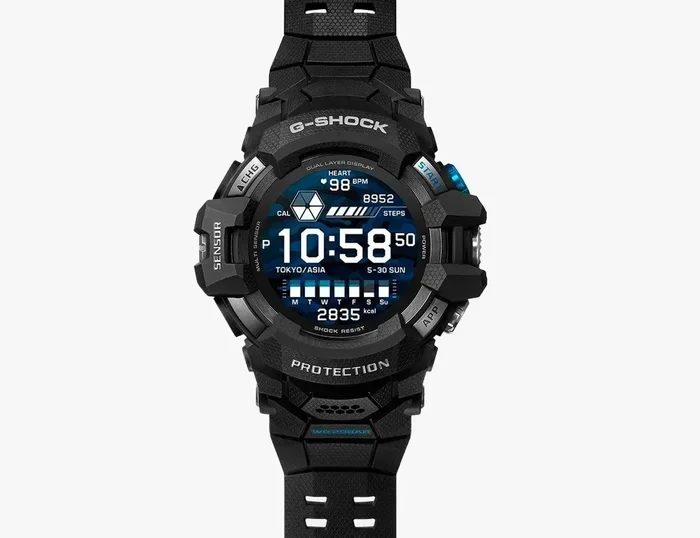
Not all G Shock models have this feature. The technology is found in G Shock watches that support Bluetooth connectivity. These are often part of the G Shock Connected line. Models like the GA-B2100, GA-2100, and GW-M5610E series include this capability. Older analog-only G Shock models may not have it. So it is important to check your watch manual or the Casio website to confirm your model supports G Shock Bluetooth phone finder.
How the Bluetooth Phone Connection Works
When you pair your G Shock watch with your phone, the two devices create a wireless link. This link stays active within a certain range. The Bluetooth range is typically about 10 meters or 30 feet. If your phone is within this range, you can send a signal from your watch to your phone.
Here is what happens step by step:
- Your G Shock watch sends a Bluetooth signal to your phone.
- The phone receives the signal and triggers an alert.
- The phone starts ringing, buzzing, or flashing a light.
- You follow the sound or vibration to find your phone.
This process is fast and works in seconds. It is much faster than calling your phone from another device. The G Shock phone finder technology uses a simple but effective method. You press a button on the watch or tap the screen in the app, and your phone responds immediately.
How to Set Up the Connection Between Your G Shock and Phone
Setting up the connection between your G Shock watch and your phone is easy. You do not need any special skills or technical knowledge. Follow these steps carefully, and you will be up and running in just a few minutes.
Step 1: Download the G Shock Connected App
First, you need the right app on your phone. The app is called G Shock Connected. You can find it in the Apple App Store for iPhone users or the Google Play Store for Android users. Search for “G Shock Connected” and download the free app.
Make sure your phone has Bluetooth turned on. Also, check that your phone has enough battery life before you start. A low battery can cause connection problems during setup.
Step 2: Turn on Bluetooth on Your G Shock Watch
Next, you need to activate Bluetooth on your watch. The process varies slightly depending on your model. For most Bluetooth-enabled G Shock watches, you press and hold the top left button. This opens the menu. Use the side buttons to scroll to the Bluetooth option. Select it to turn it on.
Your watch will now be visible to other devices. You should see a Bluetooth icon appear on the watch screen. This means it is ready to pair.
Step 3: Pair Your Watch with Your Phone
Open the G Shock Connected app on your phone. The app will search for nearby G Shock watches. When your watch appears on the screen, tap on it. You may need to confirm a pairing code on both devices. Once paired, the app will show a connected status.
Now your watch and phone are linked. You can use the phone finder feature anytime. Keep the app open in the background for the best results. Some phones may put the app to sleep to save battery. Check your phone settings to allow the app to run in the background.
Step 4: Test the Connection
After pairing, always test the connection. Open the app and look for the phone finder option. Tap it and see if your phone rings. If it does, you are all set. If not, go back and check the Bluetooth connection on both devices. A quick test ensures everything works when you really need it.
Using the G Shock App to Locate Your Phone
Once the setup is complete, finding your phone becomes effortless. The G Shock Connected app gives you direct access to the phone finder tool. You do not need to remember any complicated steps. The app is designed to be simple and user-friendly.
Finding Your Phone from the Watch
Most G Shock watches with Bluetooth have a dedicated button for phone finding. On many models, pressing the top left button once activates the phone finder. Your phone will start ringing immediately. The sound plays at full volume, even if your phone is on silent.
This is especially useful in situations like:
- You are at home and cannot find your phone on the coffee table.
- You left your phone in the office and need it quickly.
- You are in a crowded place and your phone is buried in your bag.
- You put your phone on silent and cannot hear it vibrate.
The G Shock phone buzz alert is loud and clear. It cuts through noise and helps you locate your phone fast. The watch also shows a notification on the screen confirming that the phone finder signal was sent.
Finding Your Phone from the App
You can also use the app itself to find your phone. Open the G Shock Connected app and look for the “Find Phone” option. Tap it, and your phone will ring. Some versions of the app also show the Bluetooth signal strength. This helps you estimate how far away your phone is.
The app method is helpful when you do not have your watch on your wrist. Maybe you left the watch at home but still have your phone somewhere nearby. In that case, use another Bluetooth device or ask someone to check the app on their phone if they have the G Shock Connected app too.
Phone Finder for Smartphones With Custom Ringtones
One great thing about the G Shock phone finder is that it overrides custom settings. If you have a custom ringtone or have set your phone to vibrate only, the phone finder will still make your phone ring at full volume. It bypasses these settings temporarily. This ensures you can always hear your phone when you need it most.
Troubleshooting Common Issues With G Shock Phone Finding
Sometimes things do not work as expected. Bluetooth connections can be tricky at times. If your G Shock watch is not finding your phone, do not worry. Most issues have simple solutions. Here are the most common problems and how to fix them.
Watch and Phone Will Not Pair
If your watch does not appear in the app, try these steps:
- Turn off Bluetooth on your phone and turn it back on.
- Restart your G Shock watch by holding the button for 10 seconds.
- Delete the old pairing from the app and try again.
- Make sure your phone and watch are within 10 meters of each other.
- Check that the G Shock Connected app is updated to the latest version.
Phone Does Not Ring When You Press Finder
If you press the phone finder button but nothing happens, check the following:
- Make sure Bluetooth is active on both devices.
- Check that your phone is not in airplane mode.
- Verify that the G Shock Connected app has permission to access your phone’s sound settings.
- Ensure your phone is not completely dead or powered off.
- Restart both the watch and the phone, then try again.
Connection Keeps Dropping
A weak or unstable Bluetooth connection can cause the phone finder to fail. This often happens when you are far from your phone. Walls, furniture, and other electronic devices can also interfere with the signal. To fix this:
- Stay within the Bluetooth range of 10 meters.
- Remove any obstacles between your watch and phone.
- Turn off other Bluetooth devices nearby that might cause interference.
- Update the firmware on your G Shock watch through the app.
App Crashes or Freezes
If the G Shock Connected app crashes, try uninstalling and reinstalling it. This clears any corrupted data. Also, make sure your phone has enough storage space. Low storage can cause apps to behave poorly. Restart your phone after reinstalling the app for the best results.
Tips to Never Lose Your Phone Again With Your G Shock
The phone finder feature is a great tool. But there are also smart habits you can build to reduce the chances of losing your phone in the first place. Combining the G Shock phone finder with good habits gives you the best results.
Keep Your Watch Charged
Your G Shock watch needs battery power to use the Bluetooth phone finder. If the watch battery dies, you lose the phone finder ability. Make it a habit to charge your watch regularly. Most G Shock watches have long battery life, but the Bluetooth feature uses extra power. A quick charge each night keeps everything ready for the next day.
Enable Phone Notifications on Your Watch
Many G Shock watches show phone notifications on the screen. When you get a call or message, the watch vibrates and displays the notification. This helps you know where your phone is without even searching for it. If your watch buzzes and you feel your pocket, you know your phone is close.
Use a Phone Finder as Part of Your Daily Routine
Make it a habit to check for your phone at key moments. Before you leave the house, before you sit down at your desk, and before you go to bed. A quick press of the G Shock phone finder button takes just one second. Over time, this becomes second nature.
Keep Your Phone in One Dedicated Spot
Designate a specific place for your phone at home. A charging station, a bowl on the entry table, or a drawer works well. When your phone always goes in the same spot, you rarely lose it. The G Shock phone finder is still great for those rare moments when you forget.
Share the Feature With Family Members
If your family members also use G Shock watches, teach them how to find their phones. Everyone benefits from this simple feature. It is a great way to help kids, partners, or older relatives stay organized and avoid the stress of a lost phone.
G Shock Phone Finder vs Other Phone Locator Solutions
There are many ways to find a lost phone. How does the G Shock phone finder compare to other options? Let us look at a quick comparison.
| Feature | G Shock Phone Finder | Apple Find My | Tile Tracker | Samsung SmartThings |
|---|---|---|---|---|
| Works with G Shock watch | Yes | No | No | No |
| Bluetooth range | ~10 meters | ~10 meters (Bluetooth) | ~30 meters | ~10 meters |
| Requires extra device | No | No | Yes (Tile tag) | Yes (SmartThings tag) |
| Works on silent mode | Yes | Yes | Yes | Yes |
| Setup difficulty | Easy | Easy | Easy | Moderate |
| Cost | Free (built-in) | Free | Paid (Tile device) | Free |
| Works with any phone | Android and iOS | Apple only | Any phone | Android and iOS |
The G Shock phone finder stands out because it requires no extra device and costs nothing extra. It is built right into your watch. You do not need to buy a separate tracker or tag. The G Shock Bluetooth phone locator is a free and convenient solution that works with both Android and iPhone devices.
However, the Bluetooth range is limited compared to some dedicated trackers like Tile. The Tile tracker can reach up to 30 meters in open space. The G Shock phone finder works best when your phone is within a reasonable indoor range. For most everyday situations, this is more than enough.
Common Mistakes People Make When Using the G Shock Phone Finder
Even with a simple feature like the phone finder, people make mistakes. Avoid these common errors to get the best results from your G Shock watch.
Not Checking If Bluetooth Is On
The most common mistake is assuming Bluetooth is active when it is not. Always check that Bluetooth is turned on both on your watch and your phone. A quick glance at the watch screen will show the Bluetooth icon if it is active.
Ignoring App Permissions
The G Shock Connected app needs permission to access your phone’s sound and notification systems. If you deny these permissions, the phone finder may not work. Go to your phone settings, find the G Shock Connected app, and make sure all permissions are enabled.
Forgetting to Update the App
Old app versions can have bugs that affect the phone finder. Always keep the G Shock Connected app updated. Updates fix known issues and improve performance. Set your phone to auto-update apps to stay current.
Assuming It Works at Any Distance
The Bluetooth connection has a limited range. If your phone is in another building or across a large campus, the phone finder will not work. Stay within the Bluetooth range for the best results. Think of it as an indoor tool, not a long-range tracker.
Not Charging the Watch Regularly
A dead watch battery means no phone finder. Make charging your G Shock watch part of your daily routine. A watch that is always charged is always ready to help you find your phone.
Frequently Asked Questions
Which G Shock models support the phone finder feature?
Most G Shock models released after 2018 with Bluetooth support include the phone finder. Popular models include the GA-B2100, GA-2100, GW-M5610E, and GA-700 series. Check your watch manual or visit the Casio website to confirm your specific model supports this feature.
Can I find my iPhone using a G Shock watch?
Yes, you can. The G Shock Connected app works with both Android and iPhone devices. The phone finder feature sends a signal to your iPhone through Bluetooth, making it ring even on silent mode. The setup process is the same for both operating systems.
Does the phone finder work if my phone is in another room?
It depends on the distance and obstacles. Bluetooth has a range of about 10 meters indoors. If your phone is in the same building and within this range, it should work. Thick walls, floors, and large furniture can reduce the effective range. For best results, stay on the same floor and within a reasonable distance.
Do I need an internet connection to use the phone finder?
No, you do not need the internet. The phone finder uses Bluetooth, which is a local wireless connection. You do not need Wi-Fi or mobile data. This means the phone finder works even in areas without internet access, making it reliable in many situations.
What should I do if the G Shock Connected app is not working?
Start by restarting both your watch and phone. Make sure Bluetooth is active on both devices. Check that the app has the right permissions. If the problem continues, uninstall and reinstall the app. Also, check for app updates in your phone’s app store. A fresh install often fixes most issues.
Can I use the phone finder if my phone battery is low?
Yes, you can. The phone finder will work as long as your phone has enough battery to power the speaker and Bluetooth. Even at low battery levels, your phone can ring when the G Shock watch sends the signal. However, if your phone is completely dead, the finder will not work.
Final Thoughts on Finding Your Phone With Your G Shock
Knowing how to find your phone with your G Shock watch is a skill that saves time and reduces stress. The process is simple, fast, and completely free. You do not need any extra gadgets or apps beyond the G Shock Connected app. Your watch already has everything built in.
The G Shock phone finder is one of those features that you do not think about until you need it. And when you do need it, you will be glad it is there. Whether you are at home, at work, or out running errands, your G Shock watch acts as a reliable phone locator right on your wrist.
Take a few minutes today to set up the connection if you have not already. Download the app, pair your devices, and test the phone finder. Once it is set up, you will wonder how you ever lived without it. Keep your watch charged, keep the app updated, and enjoy the peace of mind that comes with never losing your phone again.
The G Shock Bluetooth phone connection is more than just a feature. It is a practical tool that fits seamlessly into your daily life. With the tips and steps in this guide, you are now equipped to use it like a pro. Your G Shock watch is not just a durable timepiece. It is a powerful helper that keeps you connected and in control.