Do All Laptops Come With Microsoft Office Preinstalled
Not all laptops come with Microsoft Office preinstalled. Most budget and Chromebook models skip the suite entirely, while premium Windows laptops from brands like Dell, HP, and Lenovo often bundle it. Understanding what your laptop includes saves money and helps you choose the right device for your productivity needs.
You just bought a new laptop. You open it up, excited to start typing that report or building a spreadsheet. Then you search for the Office icon. And it’s not there.
That moment of confusion is more common than you think. So do all laptops have Microsoft Office? The short answer is no. But the full story is much more interesting. Let’s walk through exactly what you need to know.
Whether you’re a student, a freelancer, or a business professional, knowing whether your laptop includes Microsoft Office matters. It affects your workflow, your budget, and even which laptop you should buy. This guide breaks it all down in simple terms.
Key Takeaways
- Microsoft Office is not standard on every laptop: Many manufacturers leave it out to keep prices low.
- Premium Windows laptops are most likely to include it: Brands like Dell, HP, and Lenovo frequently bundle the suite.
- Chromebooks almost never include Microsoft Office: They rely on Google Workspace instead.
- Free alternatives exist: Tools like LibreOffice and Google Docs offer solid word processing and spreadsheet capabilities.
- Always check before buying: Look at the product specifications or ask the retailer directly.
- Microsoft 365 is the new model: Microsoft now pushes subscriptions over one-time purchases.
- Trial versions are common: Some laptops include a 30-day trial, not a full license.
📑 Table of Contents
- What Does It Mean When a Laptop Comes With Microsoft Office?
- Which Laptops Typically Include Microsoft Office?
- Laptops That Do NOT Include Microsoft Office
- Free Alternatives to Microsoft Office
- How to Check If Your Laptop Has Microsoft Office
- Should You Buy a Laptop Based on Office Inclusion?
- Common Mistakes People Make About Laptop Office Bundles
- The Future of Office on Laptops
- Final Thoughts
What Does It Mean When a Laptop Comes With Microsoft Office?
When a laptop manufacturer says their device includes Microsoft Office, they mean the core apps come preloaded on the machine. These apps typically include Microsoft Word, Microsoft Excel, Microsoft PowerPoint, and sometimes Outlook and OneNote.
But here’s the catch. There’s a big difference between a full license and a trial version. Some laptops ship with a product key attached. That means you can activate the full suite right away. Other laptops include what’s called a trial version. You get 30 days of full access. After that, you need to purchase a subscription or license.
The Difference Between a Full License and a Trial
A full license gives you permanent access to the Office apps on that device. A trial gives you temporary access. Don’t assume that just because Office comes on your laptop means it’s free forever. Always read the fine print.
Most modern laptops that include Office actually come with a Microsoft 365 subscription. This is Microsoft’s newer model. Instead of buying Office once, you pay a monthly or yearly fee. The subscription gives you access to the latest features, cloud storage through OneDrive, and updates automatically.
What Apps Are Included in the Suite?
The standard Microsoft Office suite includes these core applications:
- Microsoft Word: The go-to tool for word processing, essays, letters, and reports.
- Microsoft Excel: A powerful spreadsheet app for data analysis, budgets, and charts.
- Microsoft PowerPoint: Used for creating presentations and slideshows.
- Microsoft Outlook: An email client and calendar tool popular in business settings.
- Microsoft OneNote: A digital note-taking app that works across devices.
Not every laptop includes all of these. Some bundles only include Word and Excel. Others might include the full suite. It depends entirely on the manufacturer and the model.
Which Laptops Typically Include Microsoft Office?
So which laptops actually come with the suite preinstalled? The answer mostly comes down to price range and brand.
Premium Windows Laptops
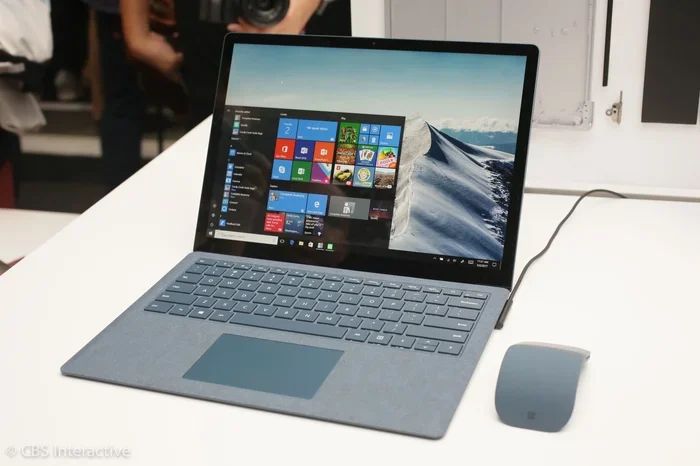
High-end Windows laptops are the most likely to include Microsoft Office. Brands like Dell, HP, Lenovo, and Microsoft themselves often bundle the suite with their flagship models. If you’re looking at a premium laptop bundle, there’s a good chance Office is part of the package.
For example, many Dell XPS and HP Spectre models come with a preinstalled Office subscription. Lenovo’s ThinkPad line, popular among business users, frequently includes it too. Microsoft’s own Surface lineup almost always includes Microsoft 365.
Mid-Range Laptops
Mid-range laptops are a mixed bag. Some include Office. Others don’t. It really depends on the specific model and the retailer. Best Buy and Amazon sometimes offer special bundles that include Office. But the base model might not have it.
Here’s a quick tip. Before you buy, check the product description carefully. Look for phrases like “includes Microsoft Office” or “bundled with Office.” If you don’t see it mentioned, assume it’s not there.
Business and Enterprise Laptops
Laptops sold specifically for business use are more likely to include Office. Companies often negotiate bulk licensing deals. These deals sometimes extend to the end user. If you bought your laptop through your employer, there’s a strong chance Office is already set up for you.
However, even business laptops can skip Office. Some companies prefer to use their own software or cloud-based tools. It’s not guaranteed just because the laptop is a business model.
Laptops That Do NOT Include Microsoft Office
Now let’s talk about the laptops that don’t include Office. This group is actually quite large.
Budget Laptops
Budget laptops are the biggest group that skips Microsoft Office. Brands like Acer, ASUS, and Toshiba offer many models under $500 that don’t include the suite. The reason is simple. Office adds cost. And budget laptop makers want to keep prices as low as possible.
If you’re shopping on a tight budget, don’t be surprised if the laptop doesn’t come with Office. You’ll need to use a free alternative or purchase a subscription separately.
Chromebooks
Chromebooks run on Google’s ChromeOS. They are designed around Google’s ecosystem. So they almost never include Microsoft Office. Instead, they come with Google Docs, Google Sheets, and Google Slides. These are Google’s versions of Word, Excel, and PowerPoint.
Chromebooks are popular in schools and for casual users. They are affordable, fast, and simple. But if you specifically need Microsoft Office, a Chromebook is probably not the right choice for you.
MacBooks
Apple’s MacBook lineup does not include Microsoft Office by default. MacBooks come with Apple’s own suite: Pages, Numbers, and Keynote. These apps handle similar tasks to Word, Excel, and PowerPoint. But they are not the same software.
You can install Microsoft Office on a MacBook. You just need to download it from the Mac App Store and subscribe to Microsoft 365. Some newer MacBooks even come with a free trial of Microsoft 365. But a full license is not preinstalled.
refurbished and Used Laptops
Refurbished laptops are another category where Office is often missing. The previous owner may have already used up the product key. Or the laptop may have never included Office in the first place. Always verify the software list before buying a used laptop.
Free Alternatives to Microsoft Office
If your laptop doesn’t have Microsoft Office, don’t worry. There are excellent free alternatives that cover most of your needs.
Google Workspace (Google Docs, Sheets, Slides)
Google Workspace is the most popular free alternative. It runs entirely in your web browser. You don’t need to install anything. All you need is a Google account and an internet connection.
Google Docs handles word processing. Google Sheets covers spreadsheets. Google Slides takes care of presentations. These tools are simple to use and work well for most everyday tasks.
The biggest advantage is collaboration. Multiple people can work on the same document at the same time. This makes Google Workspace a favorite for students and remote teams.
LibreOffice
LibreOffice is a free, open-source office suite. It works offline, unlike Google Workspace. You download it once and use it without an internet connection.
LibreOffice includes Writer (like Word), Calc (like Excel), and Impress (like PowerPoint). It can open and save files in Microsoft Office formats. This means you can share documents with people who use Office without any compatibility issues.
LibreOffice is a great choice if you want a full-featured office suite without paying a dime. It’s available for Windows, Mac, and Linux.
Other Free Options
Here are a few more free alternatives worth knowing about:
- WPS Office: A free suite that looks very similar to Microsoft Office. It includes Writer, Spreadsheet, and Presentation apps.
- OnlyOffice: Another free option with strong compatibility with Microsoft file formats.
- Apple iWork: Free for Mac users. Includes Pages, Numbers, and Keynote.
Each of these tools handles basic productivity tasks well. They might not have every advanced feature that Microsoft Office offers. But for most users, they are more than enough.
How to Check If Your Laptop Has Microsoft Office
Not sure if your laptop already has Office? It’s easy to check. Here’s how.
On Windows Laptops
Click the Start menu. Type “Word” in the search bar. If Microsoft Word appears in the results, you have Office installed. You can also type “Office” or “Excel” to check for other apps.
Another way is to go to Settings. Click on Apps. Scroll through the list. Look for any Microsoft Office app. If you see one, you’re good to go.
To check if you have an active subscription, open any Office app. Go to File. Click on Account. It will show your license status and subscription details.
On MacBooks
Open the Applications folder. Look for Microsoft Word, Excel, or PowerPoint. If you see them, Office is installed.
You can also open the App Store and search for Microsoft 365. If it shows “Installed,” you already have it.
What If You Only See a Trial?
If you find an Office app but it asks you to sign in or enter a product key, you likely have a trial version. You’ll need to purchase a subscription to keep using it after the trial period ends.
Don’t panic if this happens. You still have options. You can subscribe to Microsoft 365, switch to a free alternative, or purchase a one-time Office license.
Should You Buy a Laptop Based on Office Inclusion?
This is a question many buyers ask. And the answer depends on your needs.
For Students
If you’re a student, Microsoft Office is probably important to you. Many schools expect students to use Word and Excel. In this case, look for a laptop that includes Office or factor the cost of a subscription into your budget.
Some students qualify for a free or discounted Microsoft 365 Education license. Check with your school before you buy anything.
For Casual Users
If you only need to write emails, browse the web, and do light document editing, you might not need Office at all. Google Docs or LibreOffice can handle these tasks easily. A budget laptop without Office could save you money.
For Business Professionals
If you work in an office environment, Microsoft Office is often essential. Complex Excel spreadsheets, polished PowerPoint presentations, and professional emails are part of daily life. In this case, prioritize a laptop that includes Office or budget for a subscription.
Quick Tips for Buyers
- Always read the full product description before purchasing.
- Ask the retailer if Office is included and whether it’s a full license or trial.
- Compare total cost. A slightly more expensive laptop with Office included may save money in the long run.
- Check for student or business discounts on Microsoft 365 subscriptions.
- Consider your actual needs. You might not need the full suite at all.
Common Mistakes People Make About Laptop Office Bundles
There are a few mistakes buyers make frequently. Avoiding these can save you time and money.
Assuming All Windows Laptops Include Office
This is the biggest mistake. Windows and Microsoft Office are separate products. Windows is the operating system. Office is the productivity suite. Just because a laptop runs Windows does not mean it includes Office.
Confusing a Trial With a Full License
A 30-day trial is not the same as a full license. Many buyers don’t realize this until the trial expires. Always check the license type before assuming you have permanent access.
Overlooking Free Alternatives
Some buyers pay for Microsoft Office when they don’t need to. Google Docs and LibreOffice handle most everyday tasks for free. Before you spend money, explore the free options first.
Not Checking Subscription Terms
Microsoft 365 is a subscription. It renews automatically unless you cancel. Some people forget this and get charged monthly without realizing it. Set a reminder to review your subscription status regularly.
The Future of Office on Laptops
Microsoft is changing how it sells Office. The one-time purchase model is fading. The company now pushes Microsoft 365 subscriptions. This means more laptops may include trial versions rather than full licenses in the future.
Cloud-based office tools are also growing in popularity. Google Workspace and Microsoft’s own web apps are becoming more powerful. Some experts believe the future of office software is browser-based. This could change what it means for a laptop to “include” Office.
For now, the landscape remains mixed. Some laptops include full suites. Others include trials. And many include nothing at all. The best approach is to stay informed and check before you buy.
Final Thoughts
So do all laptops come with Microsoft Office preinstalled? No, they don’t. The inclusion of Office depends on the brand, the price range, and the specific model. Premium Windows laptops are the most likely to include it. Budget laptops, Chromebooks, and MacBooks usually don’t.
The good news is that you have options whether your laptop has Office or not. Free alternatives like Google Docs and LibreOffice cover most needs. Subscriptions like Microsoft 365 are affordable and feature-rich. And checking before you buy helps you avoid surprises.
Next time you’re shopping for a laptop, make sure you know exactly what software comes with it. A few minutes of research can save you hundreds of dollars and a lot of frustration. Knowledge is your best tool when it comes to buying the right laptop for your needs.
Frequently Asked Questions
Do all new laptops come with Microsoft Office?
No, not all new laptops include Microsoft Office. Many budget laptops, Chromebooks, and MacBooks do not come with the suite. Only certain premium and mid-range Windows laptops bundle it. Always check the product specifications before purchasing.
Can I get Microsoft Office for free on my laptop?
Yes, you can use free alternatives like Google Docs, LibreOffice, or WPS Office. Some laptops also include a free trial of Microsoft 365. Additionally, students and educators may qualify for a free Microsoft 365 Education license through their school.
How do I know if my laptop has a full Office license or just a trial?
Open any Office app and go to File, then Account. It will show your license status. If it mentions a subscription expiry date or asks you to activate, you likely have a trial. A full license will show as active with no expiration date.
What is the difference between Microsoft Office and Microsoft 365?
Microsoft Office traditionally referred to a one-time purchase of the suite. Microsoft 365 is a subscription model that includes Office apps plus cloud storage, regular updates, and extra features. Most new laptops today include a Microsoft 365 subscription rather than a one-time license.
Do Chromebooks support Microsoft Office?
Chromebooks do not come with Microsoft Office preinstalled. However, you can use Microsoft Office apps through the web browser or install them from the Chrome Web Store. The experience is not as full-featured as on a Windows laptop, but it works for basic tasks.
Is LibreOffice as good as Microsoft Office?
LibreOffice handles most everyday tasks very well. It can open and save files in Microsoft formats. However, it may lack some advanced features found in Microsoft Office. For casual users and basic productivity needs, LibreOffice is an excellent free alternative.
=== CONCLUSION ===
Do all laptops come with Microsoft Office preinstalled? The answer is clearly no. The inclusion of Office depends on the laptop brand, price point, and target audience. Premium Windows laptops from Dell, HP, Lenovo, and Microsoft often bundle the suite. Budget laptops, Chromebooks, and MacBooks typically do not.
Knowing this before you buy can save you money and prevent frustration. Always check the product details. Explore free alternatives if Office is not included. And remember, the best laptop for you is one that fits your actual needs and budget.
Take what you learned here and use it on your next laptop purchase. You’ll make a smarter choice and get exactly what you need without paying for anything extra.