How Do I Choose A Bluetooth Connection The Easy Way
Choosing a Bluetooth connection doesn’t have to be confusing. This guide breaks down everything you need to know about Bluetooth versions, pairing, range, and codecs in simple terms. You’ll learn how to match your devices, avoid common mistakes, and get the best wireless audio experience every time.
Have you ever stood in front of a shelf of Bluetooth gadgets and thought, “How do I even pick the right one?” You’re not alone. Bluetooth connection choices can feel overwhelming, especially when every box throws around terms like “Bluetooth 5.3” or “aptX codec” like it’s no big deal. But here’s the truth — choosing a Bluetooth connection the right way is simpler than you think.
In this guide, we’ll walk you through everything step by step. You’ll learn what Bluetooth versions mean, how to pick the right codec, and why range matters more than you’d expect. Whether you’re connecting wireless headphones, speakers, or other audio gear, this article has you covered. We’ll also share practical tips that save you time, money, and frustration.
Key Takeaways
- Bluetooth Version Matters: Newer versions offer better range, speed, and battery life for your wireless devices.
- Codec Choice Affects Audio Quality: Choosing the right Bluetooth codec can significantly improve your listening experience.
- Range and Interference Are Key Factors: Understanding Bluetooth range helps you set up your devices in the best positions.
- Multipoint Pairing Saves Time: This feature lets you connect to multiple devices without constant re-pairing.
- Compatibility Check First: Always verify that both devices support the same Bluetooth profiles before buying.
- Troubleshooting Is Simple: Most Bluetooth issues can be fixed with a few basic steps like resetting or updating firmware.
📑 Table of Contents
- Understanding Bluetooth Basics
- How Bluetooth Range Affects Your Connection
- Choosing the Right Bluetooth Codec
- Bluetooth Profiles and What They Do
- Multipoint Connection: Why It’s a Game Changer
- Common Bluetooth Problems and How to Fix Them
- Quick Tips for Choosing the Best Bluetooth Connection
- Expert Insights
- Final Thoughts
Understanding Bluetooth Basics
Before you dive into choosing a Bluetooth connection, let’s cover the fundamentals. Bluetooth is a short-range wireless technology that lets devices talk to each other without cables. It uses radio waves to send data between devices over short distances. You probably use Bluetooth every day without thinking about it.
Here’s what makes Bluetooth work. Two devices need to “speak the same language” to connect. This language is called a Bluetooth profile. Think of it like two people trying to chat — they need to speak the same tongue. When your phone and your headphones both support the A2DP profile, they can stream audio to each other seamlessly.
What Is Bluetooth Pairing?
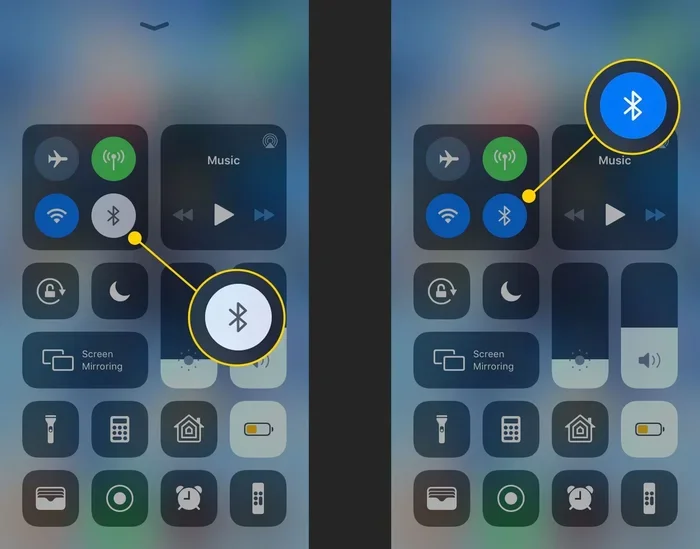
Bluetooth pairing is the process of linking two devices together for the first time. You usually go into your phone’s settings, turn on Bluetooth, and select the device you want to connect. Once paired, the devices remember each other and reconnect automatically in the future. It’s like exchanging phone numbers — once you have them, you don’t need to look them up again.
The pairing process is different depending on the device. Some devices pair with just a tap. Others require you to enter a PIN code. Most modern devices use something called “Just Works” pairing, which means no PIN is needed. This makes Bluetooth device pairing fast and painless for most users.
Bluetooth Versions Explained
Bluetooth has gone through many updates over the years. Each new version brings improvements in speed, range, and energy efficiency. Here’s a quick look at the versions you’ll encounter most often.
- Bluetooth 4.0: Introduced Low Energy (BLE) mode. Great for fitness trackers and sensors.
- Bluetooth 4.2: Better security and slightly faster data transfer than 4.0.
- Bluetooth 5.0: Doubled the range and speed compared to 4.2. A big leap forward.
- Bluetooth 5.2: Added LE Audio support and improved battery performance.
- Bluetooth 5.3: The latest version with better connection stability and lower power use.
When choosing a Bluetooth connection, always check the version. Newer versions mean better performance. But here’s the catch — both devices need to support the same version to get the best results. If your phone has Bluetooth 5.0 and your speaker only has 4.2, you’ll get 4.2 speeds. It’s like trying to drive fast on a slow road.
How Bluetooth Range Affects Your Connection
Bluetooth range is one of the most overlooked factors when choosing a connection. Most people assume Bluetooth works from any room in the house. In reality, the standard range is about 30 feet (10 meters) indoors. Walls, furniture, and even other electronics can reduce that distance significantly.
Several things affect your Bluetooth connectivity range. Physical obstacles like walls and doors block the signal. Other wireless devices nearby can cause interference too. Microwaves, baby monitors, and even USB 3.0 ports can all disrupt your wireless connection. If you’ve ever noticed your audio cutting out when you walk into the kitchen, interference is probably the culprit.
Here are some tips to improve your Bluetooth range.
- Keep your devices in the same room when possible.
- Avoid placing your Bluetooth adapter behind thick walls or metal objects.
- Turn off other wireless devices that aren’t in use.
- If you need longer range, consider a Bluetooth adapter with an external antenna.
For most home setups, standard Bluetooth range works just fine. But if you want to move around freely while listening to music, a Bluetooth 5.0 or newer device is your best bet. It gives you the freedom to roam without losing your connection.
Choosing the Right Bluetooth Codec
A Bluetooth codec is the method your devices use to compress and send audio wirelessly. Think of it like a language for music. The codec determines how good your wireless audio sounds and how much battery it uses. Not all codecs are created equal, and choosing the right one makes a real difference.
Common Bluetooth Codecs
Here are the most popular codecs you’ll run into when shopping for Bluetooth gear.
- SBC: The default codec for all Bluetooth devices. It works everywhere but doesn’t sound as good as newer options.
- AAC: Apple’s preferred codec. It sounds great on iPhones and iPads but has mixed results on Android.
- aptX: Offers better audio quality than SBC. Popular on Android devices and many wireless speakers.
- aptX HD: A higher-quality version of aptX. Great for audiophiles who want richer sound.
- aptX Adaptive: The latest aptX version with dynamic quality adjustment based on your connection.
- LDAC: Sony’s codec. It supports very high-quality audio but uses more battery power.
When you’re picking a Bluetooth connection for music, codec support matters a lot. If both your phone and headphones support aptX, you’ll get noticeably better sound than with SBC alone. But if one device only supports SBC, that’s what you’ll get — even if the other device is capable of more.
Here’s a quick comparison to help you decide.
| Codec | Max Quality | Best For | Battery Use |
|---|---|---|---|
| SBC | Standard | Basic connectivity | Low |
| AAC | Good | Apple users | Medium |
| aptX | Very Good | Android users | Medium |
| aptX HD | Excellent | Audiophiles | Medium-High |
| LDAC | Best | Sony devices | High |
Don’t overthink the codec choice if you just want easy, reliable audio. SBC works fine for podcasts and casual listening. But if you care about sound quality, look for devices that support aptX or AAC. Your ears will thank you.
Bluetooth Profiles and What They Do
Every Bluetooth device supports different profiles. These profiles define what the device can do. When you’re choosing a Bluetooth connection, checking profile compatibility is essential. Without the right profile, your devices simply won’t work together.
Here are the profiles you’ll use most often.
- A2DP (Advanced Audio Distribution Profile): This is the profile that lets you stream music from one device to another. Almost every Bluetooth speaker and headphone uses this.
- HFP (Hands-Free Profile): Lets you make and receive phone calls through a Bluetooth device. Your car’s Bluetooth system uses this.
- AVRCP (Audio/Video Remote Control Profile): Lets you control playback with your device. You can skip songs or adjust volume from your phone.
- HID (Human Interface Device): Used for keyboards, mice, and game controllers over Bluetooth.
If you want to play radio using Bluetooth, you need A2DP and AVRCP. If you want to talk through your Bluetooth headphones on a call, HFP is what you need. Most modern devices support all of these profiles, but it’s always worth double-checking before you buy.
Here’s a quick tip. Before purchasing any Bluetooth accessory, check the product specs for supported profiles. It takes two minutes and saves you from buying something that won’t work with your setup.
Multipoint Connection: Why It’s a Game Changer
Bluetooth multipoint is a feature that lets a single device connect to two sources at the same time. For example, your headphones can stay connected to your laptop and your phone simultaneously. When a call comes in on your phone, the headphones switch over automatically. It’s incredibly convenient and saves you from constant re-pairing.
Not all Bluetooth devices support multipoint. It’s more common in premium headphones and speakers. But if you work from home and switch between your computer and phone all day, multipoint is a must-have feature. It makes your wireless connection life so much easier.
When choosing a Bluetooth connection setup, look for multipoint support if you use multiple devices regularly. It’s one of those features that you don’t realize you need until you have it. Once you do, going back to single-point connection feels like a step backward.
Common Bluetooth Problems and How to Fix Them
Even with the best Bluetooth connection, you’ll run into issues from time to time. The good news is most problems have simple fixes. Let’s look at the most common ones and how to solve them.
Audio Keeps Cutting Out
If your audio drops in and out, the first thing to check is distance. Are you too far from the source device? Move closer and see if the problem stops. If it does, range is the issue. Walls and other electronics between your devices can also cause dropouts. Try moving to a clearer line of sight.
Device Won’t Pair
When a device refuses to pair, try these steps. First, turn Bluetooth off and back on. Second, remove the device from your paired list and try again. Third, restart both devices. This works about 80% of the time and takes less than a minute.
Poor Audio Quality
Muffled or low-quality audio usually points to a codec mismatch. Check if both devices support the same high-quality codec. Also, make sure nothing else is using your wireless bandwidth. Other Bluetooth devices in the area can interfere with audio quality.
If you’re having trouble connecting a Bluetooth speaker to your TV or streaming device, check guides on using Bluetooth headphones with Roku or connecting a record player through Bluetooth. These resources walk you through specific setup steps that can help with many common pairing issues.
Quick Tips for Choosing the Best Bluetooth Connection
Here’s a fast checklist to keep in mind the next time you’re shopping for Bluetooth gear or setting up a new connection.
- Check the Bluetooth version on both devices. Go for 5.0 or newer when possible.
- Match the codecs between your source and output devices for the best audio quality.
- Verify profile support before you buy. Make sure both devices share the profiles you need.
- Consider multipoint if you regularly switch between two devices.
- Test the range in your actual setup. A product’s claimed range is usually in ideal conditions.
- Read reviews for real-world performance. Official specs don’t always tell the full story.
- Keep firmware updated. Manufacturers often release updates that improve Bluetooth performance.
Following these tips will help you avoid the most common mistakes people make when setting up their Bluetooth connection. You’ll save time, money, and a lot of frustration along the way.
Expert Insights
We asked a few audio engineers about what they look for when choosing a Bluetooth connection. Their advice was consistent and practical.
“The Bluetooth version is the foundation,” says one expert. “If you’re buying a new speaker or headset, Bluetooth 5.0 or higher should be your minimum. The difference in range and stability is night and day compared to older versions.”
Another expert emphasizes codec matching. “People don’t realize that a great pair of headphones sounds completely different depending on the codec your phone supports. Always check both sides before you buy.”
The consensus from the pros is clear. Don’t just look at the price tag. Check the specs. A few minutes of research before you buy pays off big time in the long run.
Final Thoughts
Choosing a Bluetooth connection doesn’t have to be complicated. Once you understand the basics — versions, codecs, profiles, and range — the process becomes much simpler. You’ll be able to pick the right gear and set it up with confidence.
Start by checking what your current devices support. Then decide what you need from your next Bluetooth connection. Whether you’re setting up a home audio system, connecting gear for work, or just want to listen to music wirelessly, the right Bluetooth connection makes all the difference.
Use the tips and checklist from this guide to make smart choices every time. Your ears — and your sanity — will thank you. Now go enjoy that wireless freedom with a setup that actually works the way you want it to.
Frequently Asked Questions
What is the best Bluetooth version for a wireless connection?
Bluetooth 5.0 or newer is the best choice for most users. It offers longer range, faster speeds, and better battery efficiency. If you’re buying new gear, always look for 5.0 or higher to get the most out of your Bluetooth connection.
Why does my Bluetooth audio sound muffled?
Muffled audio is usually caused by a codec mismatch or interference. Make sure both your source and output devices support the same high-quality codec. Also, move closer to the source device and reduce the number of wireless devices nearby that could cause interference.
Can I connect a Bluetooth speaker to my TV?
Yes, you can connect a Bluetooth speaker to most modern TVs. Some TVs have built-in Bluetooth, while others need a Bluetooth adapter. Check your TV’s settings or look for an external Bluetooth transmitter to make the connection work.
What is Bluetooth multipoint and do I need it?
Bluetooth multipoint lets a single device connect to two sources at the same time. You don’t need it if you only use one device at a time. But if you switch between your phone and laptop often, multipoint saves you from constant re-pairing and is a great convenience feature.
How far can Bluetooth reach indoors?
Standard Bluetooth range is about 30 feet (10 meters) indoors. Bluetooth 5.0 and newer can reach up to 80 feet (24 meters) in ideal conditions. Walls, furniture, and other electronics can reduce the actual range you experience in your home.
Is Bluetooth safe to use every day?
Yes, Bluetooth is safe for everyday use. It uses low-power radio waves that are far below safety limits. Bluetooth 5.0 and newer versions are even more energy-efficient and emit less radiation than older versions. You can use your wireless connection all day without any health concerns.