How Do I Call Xfinity Wireless Customer Support Team
Knowing how to call Xfinity Wireless customer support saves you time and stress. Whether you need help with billing, technical issues, or plan changes, this guide gives you the direct phone numbers, hours, and tips to reach a real person fast. We also share the best times to call and what to have ready before you dial.
Key Takeaways
- Multiple contact options exist: Xfinity Wireless offers phone, online chat, and in-store support for customers.
- Have your account ready: Keeping your account number and device details handy speeds up the call.
- Best times to call are early morning: Avoid peak hours to skip long hold times.
- Technical and billing support are separate lines: Use the right number to get faster help.
- Online and app options work too: You can solve many issues without calling at all.
📑 Table of Contents
- How Do I Call Xfinity Wireless Customer Support Team
- Why You Might Need to Call Xfinity Wireless Support
- The Right Phone Numbers to Call
- Best Times to Call Xfinity Wireless
- How to Prepare Before You Call
- What to Expect During the Call
- Alternative Ways to Reach Xfinity Wireless Support
- Common Problems Xfinity Wireless Support Can Help With
- Tips for a Smooth Support Experience
- What If You Cannot Get Through?
- Final Thoughts on Calling Xfinity Wireless
How Do I Call Xfinity Wireless Customer Support Team
Need to reach the Xfinity Wireless customer support team? You are not alone. Many customers want to know the fastest way to get help with their Xfinity Wireless plans, billing questions, or technical problems. Calling is still one of the most direct ways to solve your issues. This guide walks you through every step. You will learn the right phone numbers, the best times to call, and how to prepare so your call goes smoothly.
Xfinity Wireless is part of the larger Xfinity family from Comcast. It uses the Verizon network to give customers reliable mobile service. Whether you are a new user or have been with Xfinity for years, knowing how to reach Xfinity customer service is important. Let us dive in and make this easy for you.
Why You Might Need to Call Xfinity Wireless Support
There are many reasons to pick up the phone and contact Xfinity Wireless support. Some issues are simple. Others need a live person to fix them. Here are the most common reasons customers make the call:
- Billing questions: You see a charge you do not understand and need Xfinity wireless billing support right away.
- Plan changes: You want to switch plans, add lines, or adjust your data options.
- Technical problems: Your phone will not connect to the network or you have signal issues.
- Account help: You need to update your personal details or reset your login.
- Device support: You are having trouble with your Xfinity wireless device or SIM card.
- Coverage questions: You want to know about Xfinity wireless coverage in your area.
No matter the reason, calling the right number gets you to the right person faster. Let us look at those numbers next.
The Right Phone Numbers to Call
Not all Xfinity Wireless phone numbers are the same. Each line serves a different purpose. Using the correct one saves you time and frustration.
General Customer Service Line
The main Xfinity customer service number for wireless is 1-800-XFINITY (1-800-934-6489). This line handles general questions, billing, and account changes. It is the go-to number for most customers. You can reach this line from Monday through Sunday. Hours are typically 8 AM to midnight Eastern Time.
Technical Support Number
If you are having Xfinity wireless troubleshooting issues, use the technical support line at 1-800-934-6489 as well. When you call, listen to the automated menu. Pick the option for technical support. This routes you to agents who can help with network problems, signal issues, and device setup. They can also walk you through how to connect your Wi Fi directly to your TV if that is part of your Xfinity home setup.
New and Existing Customer Lines
Xfinity also has a dedicated line for new customers. If you are thinking about switching to Xfinity mobile, the number for new sales is 1-800-XFINITY. Existing customers should use the general support line. Both lines connect you to a Xfinity wireless representative who can assist you.
Deaf and Hard of Hearing Support
Xfinity offers a TTY/TDD line at 711 for customers who are deaf or hard of hearing. This ensures everyone has equal access to Xfinity wireless customer care. The service is available during regular business hours.
Best Times to Call Xfinity Wireless
Nobody likes waiting on hold. The good news is that timing your call can reduce wait times a lot. Here is what we know about the best times to reach Xfinity customer support:
- Early morning (7 AM – 9 AM): This is the quietest time. You will likely speak to a person in minutes.
- Weekdays over weekends: Monday through Thursday tend to be less busy than Friday through Sunday.
- Avoid lunch hours (12 PM – 2 PM): This is a peak time for call volume.
- Late evenings (after 8 PM): Wait times can be short, but support options may be limited.
Pro tip: Call right after Xfinity opens at 8 AM. You will beat the rush and get faster help with your Xfinity wireless account.
How to Prepare Before You Call
Being ready before you dial makes a huge difference. Here is a simple checklist to follow:
- Gather your account number. You can find this on your bill or the Xfinity app.
- Know your phone number. The number tied to your Xfinity wireless plan.
- Have your device info ready. Note your phone model and any error messages you have seen.
- Write down your question. A quick list keeps you on track during the call.
- Prepare your ID. Have your date of birth or last four digits of your Social Security number handy for verification.
If you also use home internet, you might want to know how to find your Wi Fi password in settings before calling. This saves time if the agent needs to verify your network details during the conversation.
What to Expect During the Call
Knowing the flow of a Xfinity Wireless support call helps you stay calm and prepared. Here is what typically happens:
Step 1: The Automated Greeting
When you dial the number, you will hear a welcome message. You will be asked to choose a language and then select a topic. Pick the option that matches your issue. If you are not sure, choose the general support option.
Step 2: Account Verification
The system will ask for your account number or phone number. It may also ask for your date of birth. This is for security. Have your details ready to answer quickly.
Step 3: Wait for a Representative
You may hear some hold music. This is normal. If the wait is long, you can also use the Xfinity online chat option on the website. Sometimes chat is faster than the phone. You can also check if connecting your Wi Fi mesh to your existing router is something you can troubleshoot on your own while you wait.
Step 4: Speak to a Live Agent
Once connected, explain your issue clearly. Start with the main problem. Give the agent all the details you prepared earlier. If you need a follow-up, ask for a case number and the agent’s name.
Alternative Ways to Reach Xfinity Wireless Support
Calling is not the only way to get help. Xfinity offers several other options for Xfinity wireless customer support:
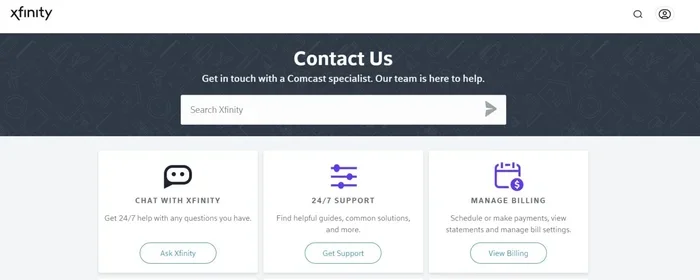
Online Chat
The Xfinity website has a live chat feature. You can chat with a support agent in real time. This is great for quick questions. It is also helpful if you do not want to wait on hold. Go to xfinity.com and look for the chat icon in the bottom corner.
The Xfinity App
The Xfinity app lets you manage your account on the go. You can chat with support, check your bill, and change your plan. The app also has a help section with answers to common questions. This is a great first step before you pick up the phone.
In-Store Support
If you live near an Xfinity store, you can visit in person. A team member can help you with device setup, plan changes, and Xfinity wireless troubleshooting. Use the store locator on the Xfinity website to find the nearest location.
Social Media
Xfinity is active on Twitter and Facebook. You can send a message or tweet your issue. While this is not the fastest option, it can work for simple questions. Many customers have had success getting quick responses through social media channels.
Common Problems Xfinity Wireless Support Can Help With
The Xfinity Wireless customer support team handles a wide range of issues. Here are some of the most common ones they resolve:
- Activation problems: Your new phone or SIM card will not activate. Support can walk you through the steps.
- Network errors: You see “No Service” or “Suspended” on your screen.
- Billing disputes: A charge looks wrong and needs investigation.
- Plan upgrades: You want more data or a better deal on your Xfinity wireless plans.
- Device swaps: You need to switch to a new phone and transfer your service.
- Coverage concerns: You want to know why signal is weak in certain areas of your home.
Most of these issues can be solved in one call if you are prepared. The key is staying patient and clear with the agent.
Tips for a Smooth Support Experience
Here are some expert tips to make your call to Xfinity Wireless customer service as smooth as possible:
- Be polite and patient. Agents deal with many calls a day. A friendly tone goes a long way.
- Take notes during the call. Write down any case numbers, agent names, and promised follow-ups.
- Do not rush the agent. Let them finish explaining before you ask your next question.
- Use the app first. Many issues can be solved without a call. Check the app or website before dialing.
- Know your rights. If you are not satisfied, you can ask to speak to a supervisor. Stay calm and firm.
If you are dealing with home network issues at the same time, you might also want to learn how to connect your Wi Fi directly to your TV or how to extend your Wi Fi to your shed. These are common setups for Xfinity customers and can often be handled with simple steps.
What If You Cannot Get Through?
Sometimes the lines are busy. If you cannot reach Xfinity Wireless support by phone, do not give up. Try these alternatives:
- Call back later: Early morning or late evening usually has shorter wait times.
- Use the chat feature: Online chat on the Xfinity website is often faster.
- Visit the Xfinity community forum: Other users may have already solved your problem.
- Check the help center: Xfinity.com has a detailed help section with guides and FAQs.
- Use social media: A tweet or Facebook message can sometimes get a quick response.
Persistence pays off. Most customers do find a resolution one way or another. The Xfinity wireless support team is there to help you.
Final Thoughts on Calling Xfinity Wireless
Calling the Xfinity Wireless customer support team does not have to be stressful. With the right number, the right time, and the right preparation, you can get help fast. Remember to have your account details ready, call during off-peak hours, and stay clear and patient with the agent. Whether you need Xfinity wireless billing support, technical help, or plan advice, the team is ready to assist you.
If you are managing your home network at the same time, knowing how to change your Wi Fi router settings or how to find your Wi Fi password in settings can save you a separate support call. Small steps like these make a big difference in your overall experience with Xfinity.
Keep this guide bookmarked. The next time you need to reach Xfinity customer support, you will know exactly what to do. A little preparation goes a long way toward a quick and painless resolution.
Frequently Asked Questions
What is the main phone number for Xfinity Wireless customer support?
The main Xfinity Wireless phone number is 1-800-XFINITY (1-800-934-6489). This line handles billing, account changes, and general questions. You can reach it seven days a week, typically from 8 AM to midnight Eastern Time.
What is the best time to call Xfinity Wireless support?
The best time is early morning between 7 AM and 9 AM. Weekdays are also less busy than weekends. Avoiding lunch hours from 12 PM to 2 PM helps you skip the longest wait times.
Can I chat with Xfinity Wireless support online instead of calling?
Yes. Xfinity offers a live chat feature on its website. You can also use the Xfinity app to chat with a support agent. Online chat is often faster than calling, especially during busy hours.
Do I need my account number before calling Xfinity Wireless?
Yes, having your account number or phone number ready speeds up the process. You may also need your date of birth or the last four digits of your Social Security number for verification. Keep these details handy before you dial.
Can I visit an Xfinity store instead of calling for support?
Yes, you can visit an Xfinity store for in-person help. Store associates can assist with device setup, plan changes, and basic troubleshooting. Use the store locator on the Xfinity website to find the nearest location.
What if I am deaf or hard of hearing and need to contact Xfinity Wireless?
Xfinity offers a TTY/TDD support line at 711. This service is available during regular business hours and ensures all customers have equal access to Xfinity wireless customer care. You can also use the online chat feature as an alternative.
=== CONCLUSION ===
Now you know exactly how to call Xfinity Wireless and get the help you need. Whether it is billing, technical trouble, or a plan question, the right number and the right approach make all the difference. Keep the tips from this guide in mind and you will save time every time you reach out. Xfinity Wireless customer support is ready to help you, and now you are ready to contact them with confidence.