How Can I Make My Wifi Antenna Better for Faster Internet
Want faster internet? Making your wifi antenna better is easier than you think. You can upgrade your antenna, adjust router settings, and reposition your device to get stronger signals and faster speeds. This guide covers simple, proven methods anyone can use right now.
Slow wifi is one of the most frustrating things in daily life. You are trying to stream a show, join a video call, or finish work, and the connection just crawls. The problem often comes down to your wifi antenna. A weak or poorly positioned antenna kills your internet speed and wifi coverage. The good news is that you can fix this. There are many simple and affordable ways to make your wifi antenna better and get faster internet right away.
You do not need to be a tech expert. Whether you want a quick fix or a long-term upgrade, this guide has you covered. We will walk you through every option, from free placement tips to hardware upgrades. By the end, you will know exactly how to boost your wireless connection and get the speed you deserve.
Key Takeaways
- Upgrade your antenna: Replacing your stock antenna with a high-gain model can dramatically improve signal strength.
- Placement matters: Moving your router to a central, elevated location boosts coverage significantly.
- Add external hardware: External antennas, signal boosters, and mesh systems extend your reach.
- Adjust settings: Changing channels and bands reduces interference and improves speed.
- DIY solutions work: Simple homemade fixes like aluminum reflectors can enhance your signal for free.
- Know when to replace: Older routers may not support modern speeds, and upgrading can be a game changer.
📑 Table of Contents
Understanding How Your Wifi Antenna Works
Before you fix anything, it helps to understand the basics. Your wifi antenna sends and receives radio signals. These signals travel through the air and connect your devices to the wireless router. The stronger the antenna, the farther and more reliably your signal reaches.
What Is Antenna Gain?
Antenna gain measures how well an antenna directs signal in a specific direction. Think of it like a flashlight. A regular bulb shines light everywhere. A focused beam shines farther in one direction. High-gain antennas push your wifi signal further. They also improve signal strength in targeted areas. Most home routers come with low-gain antennas. These work fine for small spaces. But if you have a larger home or dead zones, you need more power.
Types of Wifi Antennas
There are two main types you should know about:
- Omnidirectional antennas: These send signals in all directions. They are perfect for general home coverage.
- Directional antennas: These focus the signal in one direction. They are great for reaching a specific far-away spot.
Most routers use omnidirectional antennas. If you need coverage in one specific area, a directional antenna can be a smart choice. Knowing this helps you pick the right upgrade later on.
Free Ways to Improve Your Wifi Antenna Performance
You do not always need to buy new gear. Some of the best improvements cost nothing. Try these tips first.
Reposition Your Router
Where you place your router matters a lot. A router hidden in a closet or behind a TV wall struggles to send a strong signal. Move it to a central, open area in your home. Elevate it on a shelf or mount it on a wall. This helps the signal spread evenly throughout your space.
Keep your router away from thick walls, metal objects, and electronics that cause interference. Microwaves, baby monitors, and cordless phones can all disrupt your wireless connection. A simple move can make a big difference.
Adjust Your Router Settings
Your router has settings that affect performance. Logging into your router’s admin panel lets you tweak these options:
- Change your wifi channel: Neighboring networks can overlap and cause interference. Switching to a less crowded channel improves speed.
- Switch to the 5GHz band: This band is faster and less crowded than the 2.4GHz band. It works well for streaming and gaming.
- Update your router firmware: Manufacturers release updates that improve performance and fix bugs.
These small changes can noticeably improve your network performance without spending a dime.
Remove Obstacles Between Your Router and Devices
Physical barriers weaken your signal. Water, brick, concrete, and even large furniture absorb radio waves. Try to keep a clear path between your router and the devices you use most. If your wifi signal strength is weak in the bedroom, moving the router closer can help instantly.
Upgrade Your Antenna for Better Signal
If free tips are not enough, upgrading your antenna is the next step. This is one of the most effective ways to make your wifi antenna better for faster internet.
Buy a High-Gain Antenna
A high-gain antenna sends a stronger, more focused signal. Most routers allow you to unscrew the stock antenna and attach a new one. Look for antennas with higher dBi ratings. A 5dBi or 9dBi antenna will reach farther than the standard 2dBi antenna that comes with most routers.
Before buying, check that your router has a detachable antenna. Not all routers do. Some have internal antennas that you cannot replace. In that case, you have other options, which we will cover below.
Add an External Antenna to Your Router
If your router supports it, adding an external antenna can be a game changer. External antennas offer more power and better direction than internal ones. They also let you aim the signal exactly where you need it. You can find compatible antennas online for a reasonable price. Just make sure to match the connector type with your router. Common types include RP-SMA and SMA connectors.
Adding an external antenna is one of the simplest upgrades you can make. It takes just a few minutes and can dramatically improve your wifi coverage in areas that previously had weak or no signal.
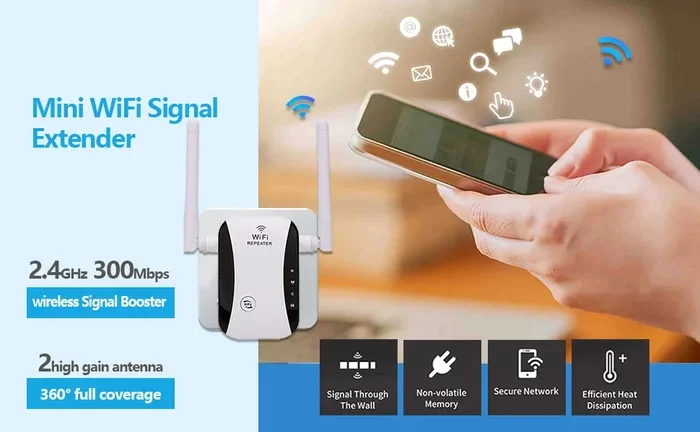
Use a Wifi Range Extender
A range extender picks up your existing signal and rebroadcasts it. It is like giving your antenna a second life. Place the extender halfway between your router and the weak spot. This fills in dead zones and extends your reach. Range extenders are affordable and easy to set up. They are a great option for larger homes.
Upgrade Your Router or Wifi Card
Sometimes the antenna is not the only problem. Your router or computer’s wifi card might be outdated. Upgrading these can give you a major speed boost.
Get a Better Router
Older routers use older wifi standards like 802.11n or 802.11ac. Newer routers support wifi 6 and wifi 6E. These standards are much faster and handle more devices at once. If your router is more than five years old, upgrading can transform your internet experience.
Modern routers also come with better antennas built in. They use advanced technology like beamforming, which focuses the signal directly at your devices. This improves signal penetration through walls and obstacles.
Get a Wi-Fi Card for Your Computer
If you are using a desktop computer with a weak wifi card, upgrading the card can help a lot. A USB wifi adapter or a PCIe wifi card with a better antenna can dramatically improve your connection. Look for cards that support the latest wifi standards. A good wifi card can make your computer feel like it has a built-in signal booster.
Consider a Mesh Wifi System
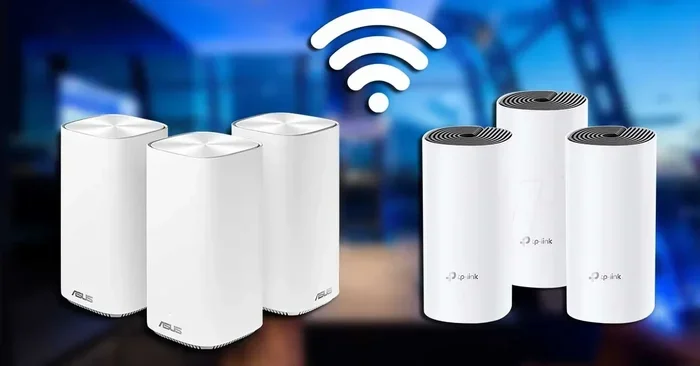
A mesh wifi system replaces your single router with multiple nodes placed around your home. Each node acts like a mini router that shares the signal. This creates seamless wifi coverage everywhere. Mesh systems are especially helpful for large homes or multi-story buildings. They are easy to set up and manage through a phone app.
If you already have a router, you can connect a mesh system to it. This lets you keep your existing setup while adding stronger coverage. You can also connect Deco mesh wifi to an existing router for an affordable mesh solution.
DIY Tricks to Boost Your Wifi Antenna
Want to try something creative? There are fun DIY projects that can improve your antenna for free or very little cost.
Build a Parabolic Reflector
A parabolic reflector focuses your wifi signal in one direction. You can make one from a wire coat hanger and aluminum foil. Shape the hanger into a curve, cover it with foil, and place it behind your router’s antenna. This directs the signal forward and boosts strength in a specific area. It is a simple trick that actually works surprisingly well.
Use a Cantenna
A cantenna is a DIY antenna made from a metal can. You cut the bottom off a tin can, attach a wifi adapter, and aim it at your router. The can acts as a waveguide that focuses the signal. Cantennas are a popular hack among tech enthusiasts. They are free and can improve signal strength in a targeted direction.
Create an Aluminum Foil Reflector
Wrapping aluminum foil around a piece of cardboard and placing it behind your router can reflect signal in the direction you need. This is one of the easiest and cheapest improvements you can make. It won’t match a high-gain antenna, but it helps in a pinch.
Common Mistakes That Hurt Your Wifi Antenna
Avoid these mistakes so you do not undo your hard work:
- Hiding your router: Putting your router inside a cabinet or behind furniture blocks the signal. Keep it out in the open.
- Placing it near interference sources: Microwaves, baby monitors, and Bluetooth devices can all weaken your connection.
- Using the wrong channel: A crowded channel causes slowdowns. Use a wifi analyzer app to find the best channel.
- Ignoring firmware updates: Old firmware can cause performance issues. Always keep your router updated.
- Overloading one band: If all your devices are on the 2.4GHz band, it gets crowded. Switch some devices to 5GHz for better speed.
Steering clear of these mistakes keeps your wireless connection running smoothly and your signal strong.
When to Call a Professional
Most wifi antenna improvements are easy to do yourself. But sometimes you need expert help. If you have tried everything and still have weak spots, a professional can assess your home and install a custom solution. They can run ethernet cables, install access points, and optimize your setup for the best possible performance.
This is especially true for large homes, offices, or buildings with thick walls. A pro can also help you boost your wifi signal outside if you need coverage in a patio, garage, or yard. They have the tools and experience to get the job done right.
Final Thoughts
Making your wifi antenna better does not have to be complicated or expensive. You can start with free tips like repositioning your router and changing settings. Then, move to hardware upgrades like high-gain antennas, range extenders, or a new router. For a fun challenge, try a DIY reflector. Each step brings you closer to faster, more reliable internet.
The key is to understand your space and your needs. A small apartment has different needs than a large multi-story home. Start with the basics, test your results, and build from there. With the right approach, you can turn weak wifi into a strong, fast connection that works everywhere in your home.
If you are serious about improving your setup, consider upgrading your hardware. A new router or a better antenna can make a world of difference. And remember, the best wifi is the one that works for you. Take action today and enjoy faster internet tomorrow.
Frequently Asked Questions
Can I make my wifi antenna better without buying anything?
Yes, absolutely. Repositioning your router, changing your wifi channel, and switching to the 5GHz band are all free ways to improve your signal. Even simple DIY tricks like a foil reflector can boost strength without spending a dime.
What is the best type of wifi antenna for home use?
Most homes work best with a high-gain omnidirectional antenna. It sends signal in all directions and covers a wide area. If you need to reach one specific far-away spot, a directional antenna is a better choice.
Will upgrading my router improve my wifi antenna performance?
Yes. Newer routers have better built-in antennas and support the latest wifi standards like wifi 6. They also use features like beamforming to focus your signal directly at your devices, which improves speed and range.
How do I know if my wifi antenna is weak?
Signs include slow internet speeds, dropped connections, and dead zones in your home. You can also check your wifi signal strength on your device. If the bars are low or fluctuating, your antenna may need improvement.
Can I add an external antenna to any router?
Not all routers support external antennas. Check if your router has a detachable antenna with a visible connector. If it does, you can buy a compatible high-gain antenna. If the antenna is internal, you will need other solutions like a range extender or mesh system.
Is a mesh wifi system better than a signal extender?
Mesh systems are generally better for whole-home coverage. They create a seamless network with multiple nodes. Signal extenders are cheaper and work well for filling in one or two weak spots. Mesh systems cost more but offer a smoother experience overall.