Does Att Smart Wi Fi Cost Anything 2 for Your Home
Does AT&T Smart Wi-Fi cost anything 2 for your home? The short answer is that AT&T Smart Wi-Fi comes with your internet plan, but there are monthly fees, equipment costs, and optional add-ons you should know about. This guide breaks down every price so you can make an informed decision.
Have you ever wondered whether AT&T Smart Wi-Fi actually costs anything extra? Maybe you just signed up for AT&T internet and noticed a Wi-Fi gateway fee on your bill. Or perhaps you are thinking about upgrading to AT&T Smart Wi-Fi 2 and want to know what you are getting into. Either way, you are in the right place.
This guide covers everything you need to know about AT&T Smart Wi-Fi pricing, hidden fees, equipment costs, and whether it is worth the money. We will keep it simple and straightforward. No jargon. No fluff. Just honest answers about AT&T home Wi-Fi costs.
AT&T Smart Wi-Fi is a feature that comes bundled with many AT&T internet plans. It gives you a smart home network with mesh coverage, parental controls, and security tools. But the big question most people ask is: does it cost extra? The answer depends on your plan, your equipment choices, and whether you rent or buy your own gear. Let us dive into the details.
Key Takeaways
- Basic AT&T Smart Wi-Fi is included with most internet plans, but there are monthly rental fees.
- AT&T charges a Wi-Fi gateway rental fee that typically ranges from $10 to $15 per month.
- You can buy your own router to avoid recurring rental costs and save money over time.
- AT&T Smart Wi-Fi offers mesh coverage and advanced security features for enhanced home connectivity.
- Hidden fees like equipment protection plans can add extra costs if you are not careful.
- AT&T Fiber plans often include Smart Wi-Fi at no extra charge compared to DSL or fixed wireless.
- Setting up your own network can help you avoid monthly charges and gain more control.
📑 Table of Contents
- What Is AT&T Smart Wi-Fi?
- Does AT&T Smart Wi-Fi Cost Anything?
- AT&T Smart Wi-Fi Plans and Pricing Breakdown
- How to Set Up AT&T Smart Wi-Fi at Home
- AT&T Smart Wi-Fi vs. Buying Your Own Equipment
- Common Mistakes People Make With AT&T Smart Wi-Fi Costs
- Is AT&T Smart Wi-Fi Worth the Cost?
- Final Thoughts on AT&T Smart Wi-Fi Costs
What Is AT&T Smart Wi-Fi?
AT&T Smart Wi-Fi is a home networking service that AT&T offers to its internet subscribers. It turns your AT&T internet connection into a smart, managed Wi-Fi network throughout your home. Instead of relying on a single basic router, AT&T Smart Wi-Fi uses a gateway device that combines a modem and a router into one unit.
The service includes features like whole-home coverage, automatic firmware updates, and a dedicated AT&T Wi-Fi app. You can manage your network from your phone, set up guest access, and even prioritize devices for better internet speed where you need it most.
AT&T Smart Wi-Fi 2 is the newer version of this service. It offers improved mesh technology, faster speeds, and better device handling. The “2” simply means it is the second generation of AT&T’s smart Wi-Fi platform. It works with AT&T Fiber, AT&T Fixed Wireless, and some DSL plans.
Key Features of AT&T Smart Wi-Fi
- Mesh network coverage that reaches every corner of your home
- Parental controls to manage kids’ screen time and content
- Security suite that blocks suspicious websites and threats
- Guest network access so visitors can use Wi-Fi without touching your main network
- Device prioritization for streaming, gaming, or video calls
- Easy setup through the AT&T Smart Home Manager app
Does AT&T Smart Wi-Fi Cost Anything?
This is the question everyone wants answered. The truth is that AT&T Smart Wi-Fi does not cost extra as a standalone service. It is built into most AT&T internet plans. However, there are costs you need to be aware of. Let us break them down clearly.
Monthly Wi-Fi Gateway Rental Fee
AT&T charges a monthly rental fee for the Wi-Fi gateway device they provide. This fee typically ranges from $10 to $15 per month. It appears on your bill as a “Wi-Fi Gateway” or “AT&T Smart Wi-Fi” charge. This is separate from your internet plan cost.
So even though the Smart Wi-Fi feature itself is included, you are paying for the hardware that makes it work. Over a year, that rental fee adds up. For example, a $15 monthly fee means $180 per year just for the gateway device.
Equipment Protection Plan
AT&T also offers an equipment protection plan for an additional monthly fee. This plan covers damage or loss of your AT&T gateway device. It typically costs around $5 to $10 per month. While this is optional, many people sign up for it without thinking twice.
If you already have homeowner’s insurance that covers electronics, you might not need this extra protection. It is worth checking your existing coverage before adding another monthly charge.
Can You Avoid These Fees?
Yes, you can. One option is to buy your own compatible router instead of renting AT&T’s gateway. This can save you significant money over time. If you already have a Wi-Fi router you own, you can connect it to your AT&T modem and skip the rental fee entirely.
Just keep in mind that using your own equipment means you lose access to some AT&T Smart Wi-Fi features. You will not get the mesh coverage or the AT&T Smart Home Manager app experience. But for many people, the cost savings are worth it.
AT&T Smart Wi-Fi Plans and Pricing Breakdown
AT&T offers several internet plans, and the Smart Wi-Fi experience varies depending on which plan you choose. Here is a closer look at how pricing works across different AT&T internet tiers.
AT&T Fiber Plans
AT&T Fiber plans generally offer the best Smart Wi-Fi experience. Fiber connections provide fast speeds and low latency, which makes the Smart Wi-Fi features shine. AT&T Fiber plans typically range from $55 to $80 per month for internet-only options.
The Smart Wi-Fi gateway is included with these plans, but the rental fee still applies unless you bring your own compatible device. AT&T Fiber plans also tend to have no data caps, which is a big plus for heavy Wi-Fi users.
AT&T Fixed Wireless Plans
Fixed Wireless is AT&T’s alternative to fiber in areas where fiber is not available. These plans usually cost between $60 and $75 per month. Smart Wi-Fi is included, and the gateway rental fee applies the same way.
Fixed Wireless speeds can vary based on your location and signal strength. If you live in a rural area, this might be your best option for reliable home internet with Smart Wi-Fi features.
AT&T DSL Plans
DSL is the older technology in AT&T’s lineup. DSL plans are usually the most affordable, starting around $35 to $50 per month. Smart Wi-Fi is available on DSL plans too, but the speeds are much lower.
If you are on a DSL plan and paying for the gateway rental, you might want to consider whether upgrading to a faster plan or switching to a different provider makes more sense for your budget.
| Plan Type | Monthly Cost Range | Smart Wi-Fi Included | Gateway Rental Fee |
|---|---|---|---|
| AT&T Fiber | $55 – $80 | Yes | $10 – $15 |
| Fixed Wireless | $60 – $75 | Yes | $10 – $15 |
| DSL | $35 – $50 | Yes | $10 – $15 |
| Equipment Protection | +$5 – $10 | Optional | Varies |
How to Set Up AT&T Smart Wi-Fi at Home
Setting up AT&T Smart Wi-Fi is pretty straightforward. You do not need to be a tech expert. Here is what you need to know to get started.
What You Need
- An active AT&T internet plan
- An AT&T Wi-Fi gateway device (rented or purchased)
- A smartphone or computer for initial setup
- The AT&T Smart Home Manager app
Step-by-Step Setup
- Connect your gateway to the wall outlet or phone line for internet access.
- Plug in the power adapter and wait for the lights to stabilize.
- Download the AT&T Smart Home Manager app on your phone.
- Follow the on-screen prompts to configure your network name and password.
- Place the gateway in a central location for the best Wi-Fi signal strength.
- Connect your devices and test the network speed.
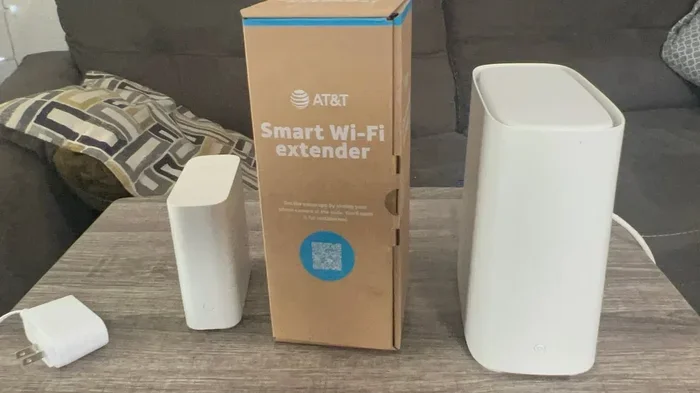
If you want better coverage in larger homes, you may need additional AT&T mesh nodes or Wi-Fi extenders. These can be purchased separately or added through your AT&T account.
Tips for Better Performance
- Place your gateway in an open area away from walls and metal objects
- Keep the gateway away from microwaves and other electronics that cause interference
- Update your gateway firmware regularly through the app
- Use the device prioritization feature for streaming and gaming
- Run a Wi-Fi speed test monthly to check for issues
You can also boost your Wi-Fi signal outside if you use your network in the yard or on the patio. This is especially helpful if you have a smart outdoor setup or like to work from your backyard.
AT&T Smart Wi-Fi vs. Buying Your Own Equipment
This is one of the most important decisions you will make regarding your home network. Should you rent AT&T’s gateway or buy your own router? Let us compare both options side by side.
Renting AT&T Equipment
Renting gives you access to AT&T’s full Smart Wi-Fi feature set. You get mesh coverage, the Smart Home Manager app, and customer support from AT&T if something goes wrong. The downside is the ongoing monthly fee that never ends as long as you rent.
Over five years, a $15 monthly rental fee adds up to $900. That is a lot of money for equipment that you do not own. Many people do not realize how much they pay in rental fees over time.
Buying Your Own Router
Buying your own router means a one-time cost, usually between $80 and $200 for a quality mesh system. After that, you own the equipment and there are no recurring fees. You also get more control over your network settings and security.
However, you will lose access to some AT&T-specific features like the Smart Home Manager app and certain parental controls. You will also need to set up your network manually, which can be a learning curve for some users.
If you want to explore options for getting a Wi-Fi router without paying monthly fees, buying your own is the way to go. You can also check whether your current router works with AT&T internet before making a purchase.
Quick Comparison
- Renting: Easy setup, full features, ongoing cost, no ownership
- Buying: One-time cost, more control, no monthly fees, manual setup
For most people who plan to stay with AT&T for several years, buying your own router saves money in the long run. But if you value convenience and do not mind the rental fee, AT&T’s gateway works well.
Common Mistakes People Make With AT&T Smart Wi-Fi Costs
There are a few common mistakes that lead to unexpected charges on your AT&T bill. Being aware of these can help you avoid surprise fees and keep your internet costs under control.
Not Reading the Fine Print
Many people sign up for AT&T internet without carefully reading the terms. The gateway rental fee is often buried in the fine print. Always ask about all monthly charges before you commit to a plan.
Ignoring the Equipment Protection Plan
The equipment protection plan sounds like a good idea. But if you already have homeowner’s or renter’s insurance, you might already be covered. Signing up for duplicate coverage is a waste of money.
Staying on a Plan Too Long
AT&T internet plans can change in price after promotional periods end. If you have been on the same plan for a while, call AT&T and ask about current rates and promotions. You might find a better deal that includes Smart Wi-Fi at a lower cost.
Not Using the AT&T Wi-Fi App
If you rent AT&T’s gateway, you should be using the Smart Home Manager app. It helps you troubleshoot issues, run speed tests, and manage connected devices. Not using it means you are not getting the full value of what you are paying for.
Forgetting to Return Equipment
If you cancel your AT&T service, make sure you return the gateway device. AT&T charges a non-return fee if you do not send the equipment back. This fee can be $100 or more, so always return your gear when you cancel.
Is AT&T Smart Wi-Fi Worth the Cost?
The answer depends on your needs and budget. If you want a hassle-free, fully managed home network with mesh coverage and smart features, AT&T Smart Wi-Fi is a solid choice. The convenience factor is real, and the app makes network management easy.
However, if you are cost-conscious and do not need all the smart features, buying your own router can save you hundreds of dollars over time. The key is to evaluate what matters most to you: convenience or savings.
For families with multiple devices, heavy streamers, and smart home users, the AT&T Smart Wi-Fi experience adds real value. The mesh coverage ensures every room has a strong signal, and the parental controls give parents peace of mind.
On the other hand, if you are a light user with just a few devices, you might not need all the features Smart Wi-Fi offers. In that case, a basic plan with your own equipment might be the better fit.
You can also consider connecting your Wi-Fi directly to your TV for a better streaming experience without putting extra strain on your wireless network. This simple step can improve your overall home network performance.
Final Thoughts on AT&T Smart Wi-Fi Costs
So, does AT&T Smart Wi-Fi cost anything? The service itself is included with most AT&T internet plans, but the gateway rental fee and optional protection plan add real costs. Understanding these charges helps you make the best decision for your home and budget.
Whether you choose to rent AT&T equipment or buy your own, the most important thing is that you have a reliable, fast home network. AT&T Smart Wi-Fi delivers on that promise, but the cost depends on how you approach it.
Take some time to review your current plan, check for hidden fees, and explore your options. A little effort today can save you a lot of money over the life of your internet service. And remember, you are always in control of your home network and what you pay for it.
For more tips on managing your home network and Wi-Fi costs, explore our other guides on topics like buying a Wi-Fi router without monthly fees, boosting your Wi-Fi signal outside, connecting Wi-Fi directly to your TV, and changing your Wi-Fi router for better performance.
AT&T Smart Wi-Fi can be a great home networking solution when you understand what you are paying for. Use this guide to make an informed choice and enjoy a strong, reliable Wi-Fi connection in every room of your home.
Frequently Asked Questions
Does AT&T Smart Wi-Fi cost extra on top of my internet plan?
The Smart Wi-Fi service itself is included with your AT&T internet plan. However, AT&T charges a monthly gateway rental fee of $10 to $15. This fee appears separately on your bill. The service feature is free, but the equipment is not.
Can I get AT&T Smart Wi-Fi without paying a rental fee?
Yes, you can avoid the rental fee by using your own compatible router. Simply connect your personal router to the AT&T modem and configure it yourself. You will lose some AT&T-specific features, but you will save on the monthly charge.
What is the difference between AT&T Smart Wi-Fi and Smart Wi-Fi 2?
AT&T Smart Wi-Fi 2 is the second generation of the service. It offers improved mesh technology, faster speeds, and better device management compared to the original version. Smart Wi-Fi 2 works with AT&T Fiber and newer internet plans for the best experience.
Are there any hidden fees with AT&T Smart Wi-Fi?
The main hidden costs are the gateway rental fee and the optional equipment protection plan. Some users also face early termination fees if they cancel before their contract ends. Always review your full bill to understand all charges before committing.
Is AT&T Smart Wi-Fi worth the monthly rental fee?
It depends on your needs. If you want easy setup, mesh coverage, and smart features like parental controls, the rental fee is reasonable. But if you prefer to save money long-term, buying your own router is the better option.
Can I use AT&T Smart Wi-Fi with multiple devices in my home?
Yes, AT&T Smart Wi-Fi is designed for homes with many connected devices. The mesh network handles multiple phones, tablets, smart TVs, and smart home devices without slowing down. The device prioritization feature ensures important tasks get the bandwidth they need.