Do Wifi Pods Get Hot And Here Is What Causes The Heat
Do wifi pods get hot? Yes, they can. WiFi pods, also known as mesh WiFi nodes or wireless hotspots, often warm up during normal use. The heat comes from power consumption, poor ventilation, and heavy network traffic. Understanding the causes helps you protect your network equipment and keep your internet speed strong.
Have you ever touched your wifi pods and thought they felt a little too warm? You are not alone. Many people notice their mesh WiFi devices heating up, and it can be a bit concerning. The good news is that some warmth is completely normal. But when does heat become a real problem? And what can you do about it?
In this guide, we will walk through everything you need to know about do wifi pods get hot. We will cover the common causes, warning signs, and simple fixes. Whether you use a single WiFi range extender or a full mesh network with multiple nodes, this article has you covered. Let us get into it.
Key Takeaways
- WiFi pods naturally generate heat: Like any electronic device, they produce warmth during operation.
- Overheating can slow your network: High temperatures may reduce signal strength and network performance.
- Placement matters a lot: Keeping pods in open, well-ventilated areas prevents heat buildup.
- Software updates help: Firmware updates often fix bugs that cause excess power use and heat.
- Cooling solutions work: Simple steps like fan placement and avoiding sunlight make a big difference.
- When to worry: Persistent overheating or a hot-to-touch pod may signal a hardware problem that needs attention.
📑 Table of Contents
What Are WiFi Pods And How Do They Work
WiFi pods are small devices that help extend your wireless coverage throughout your home. They are also called mesh nodes, satellite units, or wireless hotspots. You plug them into wall outlets around your house, and they work together to create one seamless wireless network.
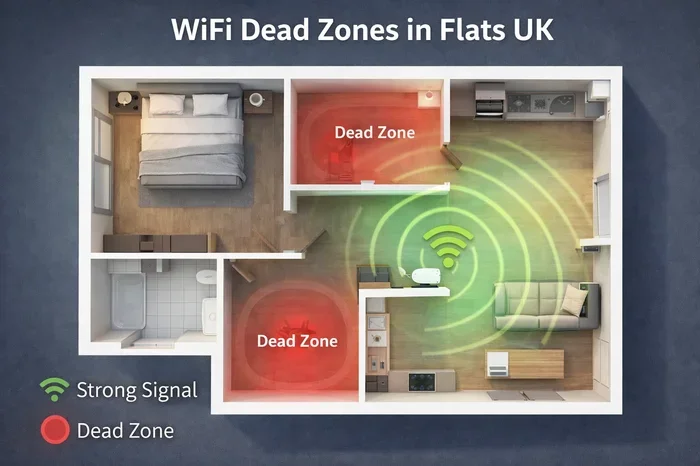
Each pod receives a signal from your main router and then rebroadcasts it. This fills in dead zones and gives you strong signal strength in every room. Products like Google WiFi, Netgear Orbi, and TP-Link Deco all use this basic idea. If you have ever wondered whether Can Deco Be Used As Wifi Extender, the answer is yes, and these devices work in very similar ways.
Because pods are always on and always working, they use electricity constantly. And whenever electricity flows through a device, some of it turns into heat. That is why do wifi pods get hot is such a common question among homeowners.
Why Do WiFi Pods Get Hot
Heat is a natural byproduct of electronics. But some pods run hotter than others. Let us look at the main reasons your network equipment might be getting warm.
1. Constant Power Usage
WiFi pods run 24 hours a day, seven days a week. They never really turn off. This means the internal components are always drawing power. The more power they draw, the more heat they produce. This is especially true for pods that handle a lot of data, like streaming video or large file downloads.
If you have many devices connected at once, your pod works harder. More work means more heat. Think of it like a car engine that runs hotter when you are going uphill.
2. Poor Ventilation
Most WiFi pods are small and compact. They do not have big fans or large vents. When you place a pod in a tight space, like inside a cabinet or behind a TV stand, the heat has nowhere to go. It builds up around the device.
Good airflow is essential for keeping your pod cool. If your pod feels hot, check where it sits. Is it pressed against a wall? Is it tucked inside a closed shelf? These are common reasons for excess heat.
3. Heavy Network Traffic
When your home network is busy, your pods work overtime. Multiple people streaming, gaming, or video calling at the same time puts a lot of load on the system. This heavy use can cause the internal temperature to rise.
If you notice your pod gets hotter during evening hours, that is probably why. That is when most households use the internet the most. Network overheating during peak hours is very common.
4. Outdated Firmware
Firmware is the software that runs inside your pod. Manufacturers release updates to fix bugs and improve performance. Old firmware can cause your pod to work inefficiently. This means it uses more power than it needs, which creates extra heat.
Keeping your firmware up to date is one of the easiest ways to prevent heat problems. Most pod systems have a simple app that handles updates for you.
5. Room Temperature And Environment
Where you live matters. If your home gets very warm, your pod will heat up faster. Placing a pod in direct sunlight or near a heater can make things worse. Even the season can play a role. People often notice their pods running hotter in summer than in winter.
How To Tell If Your WiFi Pod Is Overheating
Not all heat is bad. But there are clear signs that your pod is running too hot. Here is what to watch for:
- The pod feels very hot to the touch: If you cannot hold it comfortably, that is a red flag.
- Slow internet speeds: Overheating can cause the pod to throttle performance to protect itself.
- Frequent disconnections: A pod that is too hot may drop devices from the network.
- LED lights blinking oddly: Many pods use light patterns to signal problems, including overheating.
- Strange smells or sounds: This is rare but serious. If you smell burning or hear buzzing, unplug the pod right away.
If you are dealing with heat issues, you might also want to check whether your setup is optimal. For example, if you are using mesh nodes with an existing router, you may want to learn more about Can I Connect Deco Mesh Wifi To Existing Router to make sure your system is configured correctly.
Can Overheating Damage Your WiFi Pod
The short answer is yes. Prolonged exposure to high temperatures can shorten the life of your pod. Here is what can happen over time:
- Reduced lifespan: Electronics wear out faster when they run hot for long periods.
- Performance drops: The pod may slow down your internet speed to avoid damage.
- Hardware failure: In extreme cases, the pod can stop working completely.
- Network instability: Even if the pod does not die, it may cause intermittent connection problems.
Some people ask whether do wifi pods get hot more than regular routers. The answer is that pods are smaller, so they have less space for heat to dissipate. A standard router has more room inside for airflow. A pod is compact by design, which makes heat management more important.
Interestingly, overheating is not unique to WiFi pods. Many wireless devices face the same challenge. For instance, if you have ever wondered Can Google Wifi Overheat, the answer is yes, and the reasons are very similar to what we have discussed here.
Simple Fixes To Keep Your WiFi Pods Cool
The good news is that preventing heat problems is usually easy. You do not need special tools or technical skills. Here are practical steps you can take right now.
1. Improve Airflow Around Your Pods
Place each pod in an open area where air can move freely. Avoid the following spots:
- Inside closed cabinets or drawers
- Behind large furniture pieces
- On top of other electronics
- In direct sunlight
- Near heating vents or radiators
A good rule of thumb is to keep your pod at least a few inches away from walls and other objects on all sides. This lets heat escape naturally.
2. Keep Your Firmware Updated
Check your pod manufacturer’s app regularly for firmware updates. These updates often include performance improvements that reduce unnecessary power use. Less power use means less heat.
3. Limit The Number Of Connected Devices
Every device connected to your network adds a small load to your pods. If you have smart home gadgets, phones, tablets, computers, and streaming boxes all connected at once, your pods are working hard. Consider using a separate network for smart home devices if your system supports it.
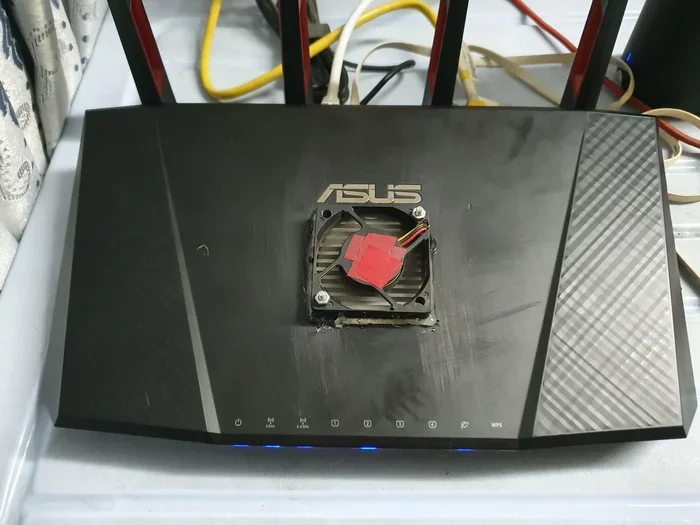
4. Use A Small Fan Nearby
This sounds simple, but it works. A small desk fan pointed near your pod can make a noticeable difference. It helps carry heat away from the device. You do not need a powerful fan. Even gentle airflow helps.
5. Avoid Stacking Pods Too Close Together
If you have multiple pods in your mesh network, give them space. Stacking them tightly together traps heat between the devices. Each pod needs room to breathe. A gap of at least a few inches between units is ideal.
6. Check For Hardware Issues
If you have tried all the tips above and your pod is still getting very hot, there may be a hardware problem. Contact the manufacturer for support. In some cases, a defective unit may need to be replaced. Most companies offer warranties that cover these issues.
Quick Tips To Prevent WiFi Pod Overheating
Here is a quick checklist you can follow to keep your pods cool:
- Place pods in open, well-ventilated areas
- Keep firmware updated through the manufacturer app
- Avoid direct sunlight and heat sources
- Give each pod several inches of space around it
- Reduce the number of devices on each pod if possible
- Use a small fan to improve airflow in the pod area
- Restart your pods weekly to clear temporary data
- Check for firmware or hardware updates monthly
These simple habits can go a long way in keeping your wireless coverage strong and your devices running smoothly. A cool pod is a happy pod.
When Should You Replace A WiFi Pod
Sometimes, despite your best efforts, a pod just will not cool down. Or it may stop working properly even after you try all the fixes. Here are signs that it is time for a replacement:
- The pod is more than three to five years old
- It consistently runs hot even with good airflow
- Your internet speeds have dropped significantly
- The pod frequently disconnects or resets on its own
- The manufacturer has stopped providing firmware updates
If you are in the market for a new pod, look for models with good thermal design. Some brands build their pods with heat-dissipating materials and internal fans. Reading reviews before you buy can save you a lot of trouble later.
Also, if you are planning a new setup, you might want to learn about Can I Extend My Wifi To My Shed if you need coverage in an outdoor or detached building. This is a common use case for additional pods or extenders.
Final Thoughts
So, do wifi pods get hot? Yes, they absolutely can. The heat comes from normal operation, heavy usage, poor placement, and sometimes outdated software. The key is to stay proactive. Keep your pods in open spaces, update the firmware regularly, and watch for warning signs of overheating.
A little attention goes a long way. Your pods will last longer, your network performance will stay strong, and you will avoid frustrating connection problems. Heat is a natural part of how electronics work, but with the right care, it does not have to be a problem.
Take a few minutes today to check your pod placement and firmware status. Your home network will thank you for it. A cool, well-ventilated setup means faster speeds, fewer interruptions, and peace of mind for years to come.
Frequently Asked Questions
Is it normal for WiFi pods to feel warm?
Yes, it is completely normal. WiFi pods use electricity constantly, and some of that energy turns into heat. A warm pod is usually nothing to worry about. However, if the pod is too hot to touch comfortably, you should take action to cool it down.
Can a hot WiFi pod slow down my internet?
Yes, it can. When a pod gets too hot, it may reduce its performance to protect itself. This can lead to slower internet speeds and weaker signal strength. Keeping your pod cool helps maintain consistent network performance.
Should I turn off my WiFi pods at night to prevent overheating?
No, you should not turn them off. WiFi pods need to stay on to provide continuous coverage throughout your home. Instead, focus on improving airflow and placement to manage heat. Turning them off would disrupt your wireless network and defeat the purpose of having a mesh system.
How can I tell if my WiFi pod is overheating?
Signs of overheating include the pod being very hot to the touch, frequent disconnections, slow speeds, and unusual blinking lights. Some pods also show warning messages in their companion app. If you notice these signs, move the pod to a cooler, more open area right away.
Do mesh WiFi pods run hotter than regular routers?
Mesh pods are smaller than most routers, so they have less internal space for heat to spread out. This can make them feel warmer. However, modern mesh systems are designed to handle normal heat levels. As long as you place them properly, they should stay within safe temperature ranges.
What temperature is too hot for a WiFi pod?
Most WiFi pods are designed to operate safely up to about 104°F (40°C). If the surface temperature exceeds this or the pod feels uncomfortable to touch, it is too hot. Move it to a cooler spot with better ventilation and check for firmware updates that might be causing excess power use.