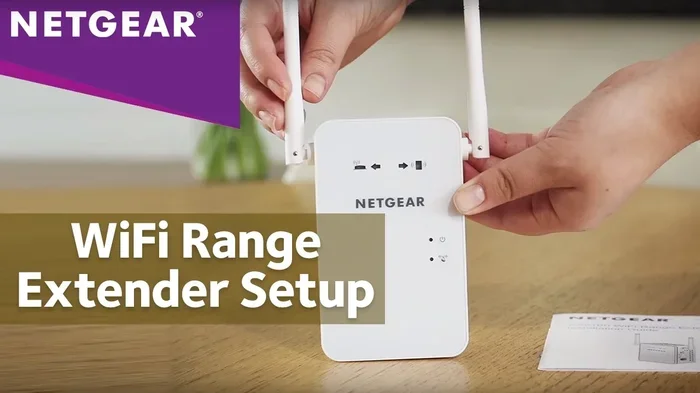
Do Netgear WiFi Boosters Work or Are They Worth It
Do Netgear WiFi Boosters work? Yes, they genuinely improve WiFi coverage and signal strength in most homes. Netgear offers a wide range of WiFi boosters and range extenders designed to eliminate dead zones and extend your wireless network. Whether you need a basic model or a high-performance Nighthawk booster, this guide covers everything you need to know before buying.
Have you ever walked into a room and your phone instantly lost signal? Or maybe your WiFi works fine in the living room but completely drops in the bedroom. Weak WiFi signals are one of the most common frustrations in modern homes. This is exactly why so many people look into WiFi range extenders and signal boosters. Netgear is one of the biggest names in networking gear. Their boosters promise to extend your wireless signal and eliminate those annoying dead zones. But do Netgear WiFi Boosters really work?
The short answer is yes. Netgear WiFi Boosters are proven devices that strengthen your home network and push your wireless signal further into every corner of your house. However, the real question is whether they are worth your money. That depends on your home size, your internet plan, and which model you choose. In this guide, we will break down everything you need to know. We will look at how they work, which models perform best, and what you should expect before buying one.
If you have ever searched “do Netgear WiFi boosters work” and gotten confusing answers, this article is for you. We keep it simple, practical, and honest. No marketing fluff. Just real information to help you make the best decision for your home network.
Key Takeaways
- Netgear WiFi Boosters do work: They effectively extend your wireless signal and reduce dead zones in most home environments.
- Multiple models available: From budget-friendly extenders to premium Nighthawk boosters, Netgear has options for every need and budget.
- Easy setup process: Most Netgear boosters feature simple plug-and-play installation with the Netgear Nighthawk app.
- Not a replacement for a strong router: A WiFi booster works best when paired with a quality router and good internet plan.
- Speed loss is possible: Budget extenders may cut your WiFi speed in half, so choosing the right model matters.
- Mesh systems are an alternative: If you need whole-home coverage, a mesh WiFi system might outperform a single booster.
- Placement is critical: Where you position your booster determines how well it performs in your home.
📑 Table of Contents
- How Do Netgear WiFi Boosters Work?
- Do Netgear WiFi Boosters Actually Improve Signal Strength?
- Best Netgear WiFi Booster Models Compared
- Setting Up Your Netgear WiFi Booster
- Netgear Boosters vs Mesh WiFi Systems
- Common Mistakes People Make With WiFi Boosters
- Are Netgear WiFi Boosters Worth the Money?
- Final Thoughts
How Do Netgear WiFi Boosters Work?
A WiFi booster, also called a range extender or WiFi amplifier, catches your existing wireless signal and rebroadcasts it to areas where the signal is weak. Think of it like a megaphone for your WiFi. Your router sends out a signal, and the booster picks it up and sends it further. This helps cover rooms, floors, or outdoor areas that your router alone cannot reach.
Netgear boosters work with almost any standard router. They do not replace your router. Instead, they work alongside it to expand your WiFi coverage area. Most Netgear models support dual band WiFi, meaning they use both the 2.4GHz and 5GHz frequency bands. The 2.4GHz band travels farther but is slower. The 5GHz band is faster but has a shorter range. Good Netgear models use both bands intelligently to balance speed and coverage.
Single-Band vs Dual-Band Boosters
Budget Netgear extenders often use a single band. These can cut your WiFi speed in half because they receive and send data on the same channel. Dual-band models are smarter. They use one band to communicate with your router and another to serve your devices. This means much less speed loss and better overall WiFi performance.
Here is a quick comparison of the two types:
- Single-band boosters: Cheaper but slower. Good for basic browsing and email. Not ideal for streaming or gaming.
- Dual-band boosters: Faster and more reliable. Great for HD streaming, video calls, and online gaming.
- Tri-band boosters: The premium option. They add a second 5GHz band for maximum speed in large homes.
When shopping for a Netgear WiFi booster, always check whether it is single, dual, or tri-band. This one detail makes a huge difference in your daily internet experience.
Do Netgear WiFi Boosters Actually Improve Signal Strength?
This is the question most people want answered. And the answer is yes, but with some important caveats. A Netgear WiFi booster will improve your signal strength in areas where your router’s signal is weak or nonexistent. However, it cannot create a signal out of thin air. If your router is in a basement and your booster is on the third floor with thick walls between them, the results will be limited.
In most real-world setups, people notice a significant improvement in WiFi coverage after adding a Netgear booster. Dead zones that had no signal at all suddenly get full bars. Video calls stop dropping. Streaming buffers less. These are real, measurable improvements that make a daily difference.
What Affects Booster Performance?
Several factors determine how well your booster will work:
- Distance from the router: The booster needs a decent signal from your router to rebroadcast. If it is too far away, it has nothing to amplify.
- Wall thickness and material: Concrete, brick, and metal weaken WiFi signals significantly. The more obstacles between your router and booster, the weaker the rebroadcast signal.
- Number of connected devices: Every device on your network uses bandwidth. Too many devices can cause network congestion and slow things down.
- Your internet plan speed: A booster cannot make your internet faster than what your provider gives you. It only extends the signal you already have.
- Booster placement: This is huge. We will cover the best placement tips in a later section.
The key takeaway is that a Netgear WiFi extender works best when it is placed halfway between your router and the area with weak signal. It needs a strong enough input signal to produce a strong output signal.
Best Netgear WiFi Booster Models Compared
Netgear offers many booster models at different price points. Choosing the right one depends on your home size and what you need from your network. Here are the most popular models and what they offer.
Netgear EX6120 — Best Budget Option
The EX6120 is a solid dual-band extender that costs under $30. It is perfect for small apartments or single-room coverage. Setup is simple using the WPS button or the Netgear Nighthawk app. It provides a good speed boost for basic internet activities like browsing, emailing, and light streaming.
Netgear EX7300 — Best Mid-Range
The EX7300 is a tri-band booster that delivers excellent performance for medium-sized homes. It has three external antennas for better signal direction. Many users report strong coverage through two floors and multiple rooms. This model handles HD streaming and video calls with ease.
Netgear Nighthawk X6S — Best Premium Option
The Nighthawk X6S is a top-tier tri-band booster with advanced features like beamforming and MU-MIMO technology. It is designed for large homes with many connected devices. If you have a smart home with dozens of devices, this model handles the load without breaking a sweat.
| Model | Band Type | Max Speed | Best For | Price Range |
|---|---|---|---|---|
| EX6120 | Dual-band | 1200 Mbps | Small apartments | $20-$35 |
| EX7300 | Tri-band | 2200 Mbps | Medium homes | $60-$90 |
| Nighthawk X6S | Tri-band | 5400 Mbps | Large homes, smart homes | $120-$180 |
Each model serves a different purpose. The budget EX6120 handles light use well. The EX7300 is the sweet spot for most families. The Nighthawk X6S is built for power users and large households. No matter which one you pick, all three Netgear WiFi boosters genuinely improve your wireless coverage.
Setting Up Your Netgear WiFi Booster
One of the best things about Netgear boosters is how easy they are to set up. Most models follow the same basic process. You do not need to be a tech expert to get one working.
Step-by-Step Setup Guide
- Plug in the booster: Find a power outlet halfway between your router and the weak-signal area.
- Wait for the power light: The booster will boot up. Wait until the LED light shows it is ready.
- Connect using WPS: Press the WPS button on your router, then press the WPS button on the booster. This pairs them automatically.
- Or use the Nighthawk app: Download the free Netgear Nighthawk app on your phone. Follow the on-screen prompts to connect the booster to your network.
- Test your signal: Walk to the previously weak area and check your WiFi signal. You should see a noticeable improvement.
The entire setup usually takes less than five minutes. If you run into issues, the Nighthawk app has a helpful troubleshooting guide. You can also reset the booster by pressing the reset button for 10 seconds.
Quick Tips for Best Placement
- Place the booster where it still gets a strong signal from your router. A good rule of thumb is to place it where your phone still shows at least three bars.
- Do not put the booster in a closet or behind furniture. This blocks the signal and reduces performance.
- Keep the booster away from microwaves, cordless phones, and other devices that cause interference.
- Elevate the booster on a shelf or table for better signal spread.
Proper placement makes all the difference. A well-placed booster can transform your home network, while a poorly placed one will disappoint you no matter how good the model is.
Netgear Boosters vs Mesh WiFi Systems
Many people wonder whether they should buy a WiFi booster or invest in a mesh WiFi system. Both solutions extend your wireless coverage, but they work differently.
A WiFi booster like a Netgear extender rebroadcasts your existing signal. It creates a secondary network that your devices may need to switch to manually. A mesh WiFi system replaces your router and uses multiple nodes placed around your home. These nodes work together as one unified network. Your devices switch seamlessly between nodes without any interruption.
Here are the key differences:
- Price: Netgear boosters cost $20-$180. Mesh systems typically cost $150-$400 or more for a full kit.
- Setup complexity: Boosters are simpler to set up. Mesh systems require more planning but offer better long-term performance.
- Seamless roaming: Mesh systems win here. Your devices stay connected as you move around the house. Boosters sometimes cause brief disconnections during the handoff.
- Scalability: Mesh systems are easier to expand. You just add another node. Boosters have more limited coverage per unit.
If you live in a small to medium home and want a quick fix, a Netgear WiFi booster is a great choice. If you have a large home or need whole-home coverage with no dead zones, a mesh system might be the better long-term investment.
Common Mistakes People Make With WiFi Boosters
Even the best booster will underperform if you make common setup mistakes. Here are the errors to avoid.
Placing the Booster Too Far From the Router
This is the number one mistake. People place the booster in the dead zone itself, where the signal from the router is already too weak. The booster cannot amplify a signal it barely receives. Always place the booster where it still gets a strong signal from your router.
Expecting the Booster to Increase Your Internet Speed
A booster extends your signal. It does not increase your internet speed. If your internet plan gives you 50 Mbps, a booster will not make it 100 Mbps. What it does is deliver that 50 Mbps more reliably to areas where the signal was weak before.
Ignoring Firmware Updates
Netgear regularly releases firmware updates that improve performance and fix bugs. Check the Nighthawk app periodically to make sure your booster has the latest software. An outdated booster may not perform as well as it should.
Using an Old Router With a New Booster
If your router is more than five years old, it might be the bottleneck, not the coverage. A new booster paired with an old router will not give you the best results. Consider upgrading your router first if it is outdated.
Are Netgear WiFi Boosters Worth the Money?
After looking at all the evidence, the answer is clear. Do Netgear WiFi boosters work? Yes, absolutely. They are effective tools for extending your wireless network and improving coverage in areas with weak signals. The key is choosing the right model for your needs and placing it correctly.
For most households, a mid-range Netgear booster like the EX7300 offers the best value. It delivers strong performance at an affordable price. Budget models work well for small spaces. Premium Nighthawk models are ideal for large homes with many devices.
Before you buy, assess your home. Measure the distance from your router to the weak areas. Count how many devices use the network. Consider whether a mesh system might be a better fit. With the right choice, a Netgear WiFi booster can transform your internet experience and finally eliminate those frustrating dead zones.
Take the time to pick the right model, set it up in the optimal location, and keep the firmware updated. You will enjoy a stronger, more reliable wireless network throughout your entire home. That is the real value of a good WiFi booster.
Final Thoughts
Do Netgear WiFi boosters work? They absolutely do. From budget-friendly extenders to premium Nighthawk models, Netgear has built a solid reputation for reliable wireless coverage solutions. Whether you need to fix a single dead zone or extend coverage across a large home, there is a Netgear booster that fits the job.
The best part is that these devices are easy to set up, affordable compared to mesh systems, and deliver real results. You do not need advanced technical skills to get one working. Just plug it in, follow a few simple steps, and enjoy better WiFi throughout your home.
Now that you know how Netgear WiFi boosters work and what to expect, you can make a confident buying decision. Your home network deserves to be fast and reliable in every room. A quality booster makes that possible without breaking the bank.
Frequently Asked Questions
Do all Netgear WiFi boosters work with any router?
Yes, Netgear WiFi boosters are compatible with virtually any router, regardless of the brand. They work with standard WiFi protocols and connect to your existing wireless network. You do not need to buy a Netgear router to use a Netgear booster.
Will a WiFi booster slow down my internet speed?
Some speed loss is normal with any booster, especially single-band models. Dual-band and tri-band Netgear boosters minimize this loss significantly. The speed reduction depends on the model you choose and how far the booster is from your router.
How many boosters do I need for my home?
For most homes, one booster is enough to cover a weak area or one additional floor. Larger homes with multiple dead zones may benefit from two or more boosters. A mesh WiFi system might be a better option if you need coverage throughout a very large house.
Can I use a Netgear WiFi booster outdoors?
Most Netgear boosters are designed for indoor use only. However, some people place them near windows facing outdoor areas to extend coverage to patios or garages. For dedicated outdoor use, you would need a weatherproof outdoor access point instead.
Is a WiFi booster the same as a WiFi repeater?
Yes, the terms are used interchangeably. A WiFi booster, repeater, and range extender all perform the same basic function. They pick up your existing WiFi signal and rebroadcast it to extend coverage. Netgear uses the term “booster” and “extender” depending on the model.
How do I know if my Netgear booster is working properly?
The LED lights on the booster indicate its status. A solid green light means it is connected and working well. An amber or red light suggests the booster is too far from your router or there is a connection issue. You can also check the signal strength in the weak area using your phone or laptop to confirm improvement.
=== CONCLUSION ===
Do Netgear WiFi boosters work? The evidence is clear. They are effective, affordable, and easy to use tools for improving your home WiFi coverage. Whether you pick a budget model or a premium Nighthawk booster, you will see real improvements in signal strength and wireless performance. Choose the right model, place it correctly, and enjoy a stronger, more reliable network in every corner of your home.