Do I Need An Alexa Device To Use Alexa In My Smart Home
You do not need a dedicated Alexa device like an Echo to use Alexa. The Alexa app on your phone or tablet gives you full access to voice commands, smart home control, and Alexa routines. However, having a smart speaker like the Amazon Echo makes hands-free use much easier. This guide shows you every option for setting up Alexa without buying extra hardware.
Do I need an Alexa device to use Alexa? The short answer is no. You can access Amazon Alexa on your phone, tablet, or even through other smart devices you already own. But there is more to the story than just a simple yes or no. Let us walk through everything you need to know about using Alexa without a dedicated Echo device.
Amazon Alexa has become one of the most popular voice assistants in the world. Millions of people use it every day for smart home automation, playing music, setting timers, and getting quick answers. But not everyone wants to buy an Amazon Echo or another Alexa-enabled smart speaker. The good news is that you have plenty of options. You can get the full Alexa experience without spending extra money on hardware.
In this guide, we will cover every way you can use Alexa without a dedicated device. We will also look at what you gain and lose when you skip the Echo. By the end, you will know exactly what works best for your setup.
Key Takeaways
- You can use Alexa without any Echo device: The free Alexa app on your phone or tablet gives you full access to voice commands, smart home control, and Alexa routines.
- A smart speaker makes things much easier: Devices like the Amazon Echo let you use Alexa hands-free from anywhere in your home.
- Third-party devices support Alexa too: Many smart home hubs, soundbars, and even some TVs let you access Alexa without a separate Echo.
- Alexa works great with your existing smart devices: You can control lights, plugs, locks, and more through the app even without a dedicated Alexa speaker.
- Setting up Alexa without hardware is simple: Just download the app, sign in, and follow the on-screen steps to get started.
- Bluetooth and WiFi are your best friends: Most ways to use Alexa without an Echo device rely on a solid WiFi connection or Bluetooth pairing.
📑 Table of Contents
- What Is Alexa and How Does It Work?
- Do You Actually Need an Alexa Device?
- Ways to Use Alexa Without an Echo Device
- Alexa Without a Device vs. Alexa With a Device
- Setting Up Alexa Without Any Extra Hardware
- Can Alexa Work With Your Existing Smart Home Devices?
- Common Mistakes People Make When Using Alexa Without a Device
- Expert Tips for Getting the Most Out of Alexa Without an Echo
- Final Thoughts on Using Alexa Without a Dedicated Device
What Is Alexa and How Does It Work?
Amazon Alexa is a virtual assistant powered by artificial intelligence. It lives in the cloud and responds to your voice. You speak a command, Alexa processes it through Amazon servers, and then it gives you an answer or performs an action.
The Alexa voice service runs on many different devices. It is not locked to just one product. Amazon built Alexa to work across a wide range of hardware. This is why you can find it in Echo speakers, third-party smart home devices, phones, and even cars.
At its core, Alexa relies on three things. First, it needs a microphone to hear you. Second, it needs an internet connection to process your commands. Third, it needs a speaker or screen to respond. Any device that has these three pieces can run Alexa.
How the Alexa App Works Without Extra Hardware
The Alexa app is available for both iOS and Android. When you download it, you get access to the same Alexa voice assistant that lives inside an Echo device. You can ask questions, control smart home devices, create Alexa routines, and more. The app uses your phone’s built-in microphone and speaker to handle everything.
This means you already have a working Alexa setup in your pocket. You just need to download the app and sign in with your Amazon account. No extra hardware required. Many people use the app as their primary way to interact with Alexa every single day.
One thing to keep in mind is that the app works best when your phone is connected to WiFi. If you are using mobile data, Alexa still works, but it uses your data allowance. For the smoothest experience, a stable WiFi connection makes a big difference. If you are curious about WiFi setup and Alexa, you can check out this guide on whether Alexa needs a WiFi password.
Do You Actually Need an Alexa Device?
Here is the honest truth. You do not need a dedicated Alexa device to use Alexa. But whether you should get one depends on how you plan to use it. Let us break down the different scenarios so you can decide what makes sense for you.
When You Do NOT Need an Alexa Device
You do not need an Alexa device if any of these situations apply to you. First, if you only want to control smart home devices occasionally, the Alexa app handles that perfectly. You can turn lights on and off, adjust thermostats, and check camera feeds right from your phone.
Second, if you already have other smart speakers or displays in your home, you might not need an Echo. Many smart TVs, soundbars, and home hubs now support Alexa built in. You can ask Alexa questions and control smart devices through those devices without buying anything extra.
Third, if you are just testing the smart home world, the free Alexa app is the best place to start. You can explore Alexa skills, set up routines, and connect compatible devices before spending any money on hardware. It is a zero-risk way to see if Alexa fits your lifestyle.
When You Might Want an Alexa Device Anyway
Even though you do not need one, there are good reasons to get an Alexa device. The biggest advantage is hands-free convenience. With an Echo speaker in every room, you can call Alexa from anywhere without picking up your phone. This makes daily tasks much faster and smoother.
Another reason is audio quality. The built-in speakers on Echo devices are designed to deliver clear sound for music, calls, and announcements. Your phone speaker works fine for quick commands, but it does not compare for listening to music or podcasts all day.
Finally, Alexa devices come with features that the app alone cannot fully replicate. The far-field microphone array on Echo devices picks up your voice from across the room, even when music is playing. This makes the whole experience feel more natural and responsive.
Ways to Use Alexa Without an Echo Device
There are several practical ways to get Alexa working in your home without buying a dedicated Echo device. Let us go through each one so you can pick the option that fits your needs best.
Method 1: Use the Alexa App on Your Phone or Tablet
This is the simplest and most common way to use Alexa without extra hardware. Just download the Alexa app from the App Store or Google Play Store. Sign in with your Amazon account, and you are ready to go.
The app gives you access to all the core Alexa features. You can:
- Ask questions and get voice answers
- Control smart home devices
- Create and manage Alexa routines
- Set timers, alarms, and reminders
- Make calls and send messages
- Check the weather, news, and traffic
- Enable and use Alexa skills
The only downside is that you need to hold your phone or keep it nearby. You cannot walk away and shout commands from across the room. But for most people, having their phone within arm’s reach makes this a non-issue.
Method 2: Use Alexa Through a Third-Party Smart Speaker
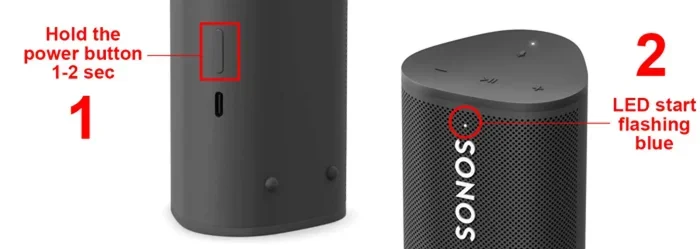
Many smart speakers from other brands now support Alexa. Brands like Bose, Sonos, and JBL have built Alexa into some of their products. If you already own one of these speakers, you can enable Alexa and use it without buying an Echo.
This is a great option because you get the smart speaker hardware and Alexa in one package. You do not need to buy two separate devices. Just check that the speaker you own has Alexa compatibility, then follow the setup instructions in the Alexa app.
Method 3: Use Alexa Through Your Smart TV or Soundbar
If you have a smart TV or a soundbar with Alexa built in, you already have a way to use Alexa without an Echo. Many modern TVs from brands like LG, Samsung, and Toshiba include Alexa support. You can use your TV remote or the TV’s built-in microphone to speak with Alexa.
Some people also use Alexa as a Bluetooth speaker for their TV. This works great when you want to use Alexa voice commands while watching a show or movie. You can pair your phone or tablet to the TV via Bluetooth and control Alexa through the connection.
Method 4: Use Alexa on a Computer or Laptop
You can also access Alexa through the Alexa app for Windows or by visiting the Alexa web portal in your browser. This is less common, but it works in a pinch. You can use your computer’s microphone and speakers to interact with Alexa. It is not the most convenient setup, but it does work.
Alexa Without a Device vs. Alexa With a Device
To help you decide, let us compare the experience of using Alexa through the app alone versus using it with a dedicated Echo device. Both approaches have clear strengths and weaknesses.
| Feature | Alexa App Only | Alexa with Echo Device |
|---|---|---|
| Hands-free use | No, you need your phone | Yes, always listening |
| Smart home control | Full access | Full access |
| Audio quality for music | Phone speaker quality | Much better, designed for audio |
| Voice recognition range | Phone microphone range | Room-wide with far-field mics |
| Cost | Free | $30 to $250 depending on model |
| Portability | Very portable | Stays in one room |
| Alexa routines | Fully supported | Fully supported |
| Bluetooth speaker mode | Yes, through your phone | Yes, built-in |
As you can see from the comparison, the Alexa app gives you most of the same features as an Echo device. The main differences are convenience, audio quality, and hands-free capability. If those things matter to you, an Echo device is worth the investment. If not, the app alone gets the job done.
Setting Up Alexa Without Any Extra Hardware
Getting started with Alexa without a dedicated device is quick and easy. Here is the step-by-step process to follow.
- Download the Alexa app from the App Store or Google Play Store.
- Open the app and sign in with your Amazon account.
- Allow the app to access your phone’s microphone and speaker when prompted.
- Connect the app to your WiFi network.
- Explore the home screen and try saying “Alexa” or tapping the microphone icon.
- Start adding smart home devices through the Devices tab.
- Create your first Alexa routine to automate daily tasks.
That is it. You now have a fully working Alexa setup without spending a dime on extra hardware. The whole process takes about five minutes, and you can start using Alexa right away.
One tip that makes a big difference is to keep your phone plugged in near where you use Alexa the most. Since the app uses your phone’s microphone and speaker, having your phone in a convenient spot makes the experience much smoother. If you want to learn more about connecting devices and getting the best setup, check out this article on how to extend your WiFi to reach more areas of your home.
Can Alexa Work With Your Existing Smart Home Devices?
Yes, absolutely. Alexa works with thousands of smart home devices from hundreds of brands. Whether you have smart lights, smart plugs, smart locks, smart cameras, or smart thermostats, there is a very good chance Alexa supports them.
The Alexa app acts as a central hub for all your smart devices. You can group them by room, create scenes, and set up routines that automate multiple devices at once. For example, you can create a “Goodnight” routine that turns off all your lights, locks your doors, and sets your thermostat to sleep mode. All of this works through the app without needing an Echo device.
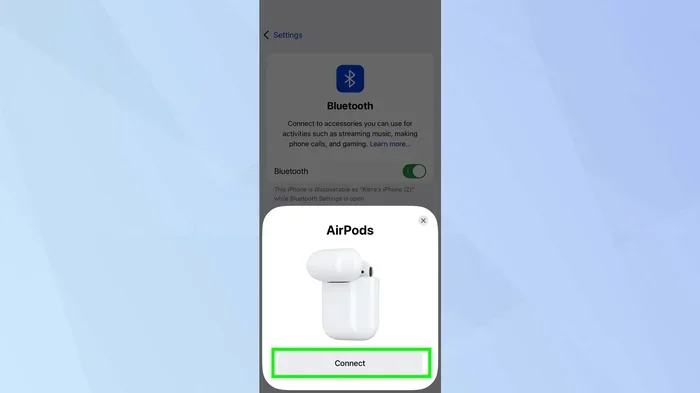
If you have a Bluetooth-enabled smart device, you can pair it directly through the Alexa app. Some devices also connect through WiFi or a smart home hub. The Alexa app supports most connection types, so compatibility is rarely an issue. You can also use Alexa to control Bluetooth devices like headphones and speakers. For instance, you might want to pair Bluetooth headphones to your TV and use Alexa for hands-free control. You can learn more about Bluetooth connections and Alexa compatibility here.
The key takeaway is that Alexa works with your existing smart devices regardless of whether you own an Echo. The app gives you full control over your smart home ecosystem. You do not need any extra hardware to enjoy the benefits of smart home automation.
Common Mistakes People Make When Using Alexa Without a Device
There are a few common pitfalls that people run into when they try to use Alexa without a dedicated Echo device. Knowing about these ahead of time can save you a lot of frustration.
First, people forget that the phone needs to be awake and nearby. Alexa on the app does not listen in the background the way an Echo does. You need to open the app or tap the microphone icon to give a command. This seems obvious, but many people expect the same hands-free experience they would get with an Echo device.
Second, people do not set up their WiFi properly. A weak WiFi signal means slow responses and dropped commands. Make sure your phone has a strong WiFi connection before you start using Alexa through the app. If your WiFi does not reach everywhere in your home, consider looking into WiFi extenders to improve coverage.
Third, people skip exploring Alexa skills. Skills are like apps for Alexa. They let you do things like order food, track fitness, play games, and more. The Alexa app has a full skills store that you can browse and enable. Taking the time to set up relevant skills makes the experience much more useful.
Finally, some people do not realize that Alexa routines work the same way in the app as they do on an Echo device. Routines are one of the most powerful features of Alexa. You can automate almost anything. Do not skip this step when you set up your account.
Expert Tips for Getting the Most Out of Alexa Without an Echo
Here are some practical tips that will help you get the best experience using Alexa without a dedicated device.
Keep your phone on a charging stand in the room you use most. This ensures Alexa is always within reach. You can simply pick up your phone and ask a question or give a command without searching for the device.
Use Bluetooth to connect Alexa to other speakers. If you want better audio quality than your phone provides, you can pair your phone to a Bluetooth speaker through the Alexa app. This gives you room-filling sound while still using Alexa through the app.
Explore Alexa routines early. Routines save you time and make your smart home feel smarter. Start with simple routines like a morning alarm that turns on lights and reads the news, then build from there.
Use the Alexa app on a tablet for a better experience. A tablet has a bigger screen and better speaker than a phone. It also stays charged longer. Using the Alexa app on a tablet gives you a setup that feels closer to having a dedicated Alexa device.
Keep your Alexa app updated. Amazon regularly adds new features and fixes bugs. An updated app ensures you get the latest improvements and the smoothest experience possible.
Final Thoughts on Using Alexa Without a Dedicated Device
So, do I need an Alexa device to use Alexa? The answer is clearly no. The Alexa app on your phone or tablet gives you everything you need to get started with voice commands, smart home control, and automation. You can build a fully functional smart home setup without ever buying an Echo or any other Alexa-enabled speaker.
That said, an Alexa device like the Amazon Echo adds real value if you use voice commands throughout the day. The hands-free convenience, better audio quality, and room-wide voice recognition make a noticeable difference. Think of it as an upgrade, not a requirement.
Start with the free Alexa app. Explore your options. Connect your smart devices. Set up routines. Once you see what Alexa can do, you will have a much better idea of whether a dedicated device makes sense for your home. There is no wrong way to get started. The most important thing is to take that first step and bring Alexa into your daily life.
Whether you use the app alone or add an Echo device later, you are making a smart choice. Alexa is designed to be flexible and accessible. It meets you where you are, and it grows with your smart home. So go ahead, download the app, and start exploring what Alexa can do for you today.
Frequently Asked Questions
Can I use Alexa without owning any Amazon device at all?
Yes, you can. The Alexa app works on any smartphone or tablet, regardless of brand. You just need an Amazon account and an internet connection. You do not need to own any Amazon hardware to access Alexa features.
Is the Alexa app free to download and use?
Yes, the Alexa app is completely free to download on both iOS and Android. There are no subscription fees to use Alexa through the app. You only pay for optional premium features or smart home devices you choose to add.
Can I control smart home devices with Alexa through the app?
Absolutely. The Alexa app lets you connect, control, and automate smart home devices just like you would with an Echo device. You can group devices by room, create scenes, and set up routines through the app interface.
Do I need WiFi to use Alexa without an Echo device?
Yes, WiFi is essential for using Alexa without an Echo device. The app needs an internet connection to process your voice commands and communicate with smart home devices. Without WiFi, Alexa will not work through the app.
Can I use Alexa on my phone while the app is closed?
No, the Alexa app on your phone needs to be open or running in the foreground for voice commands. Unlike an Echo device that listens in the background, the phone app requires you to tap the microphone icon or have the app active on screen.
Will using Alexa on my phone drain the battery quickly?
It can use more battery than normal, especially if you use voice commands frequently. The microphone and speaker stay active during use. To conserve battery, keep your phone plugged in when using Alexa for extended periods or use a tablet instead.