Do All Smart Thermostats Require Wi Fi to Work Properly
Not all smart thermostats need Wi-Fi to work properly. Many models offer basic heating and cooling functions even without an internet connection. However, Wi-Fi unlocks advanced features like remote control, energy reports, and smart home integration that make these devices truly smart.
This is a comprehensive guide about Do All Smart Thermostats Require Wi Fi.
Key Takeaways
- Wi-Fi is not mandatory: Most smart thermostats can operate in basic mode without an internet connection.
- Advanced features depend on connectivity: Remote access, voice control, and smart home automation require Wi-Fi.
- Offline mode still saves energy: Programmable schedules work without the internet, helping you cut heating costs.
- Some models need Wi-Fi for initial setup: Certain brands require a one-time internet connection to complete installation.
- Hub-based systems offer a workaround: Smart home hubs can bridge the gap when Wi-Fi is unavailable.
- Check compatibility before buying: Not all thermostats work with every HVAC system or home network setup.
- Manual overrides always work: You can adjust temperature settings directly on the device regardless of connectivity.
[FEATURED_IMAGE_PLACEHOLDER]
Do All Smart Thermostats Require Wi-Fi to Work Properly?
If you are thinking about upgrading your home comfort system, you have probably wondered about smart thermostats. These devices promise convenience, energy savings, and modern convenience. But one question keeps coming up: do they all need Wi-Fi connectivity to function?
The short answer is no. Not every wireless thermostat requires a constant internet connection to keep your home comfortable. Many models can still heat and cool your home effectively without Wi-Fi. However, the experience changes quite a bit when you lose that connection.
In this guide, we will break down exactly how smart thermostat devices work with and without Wi-Fi. You will learn what features stay active offline, which ones need internet access, and how to choose the right model for your home. Whether you live in a spotty coverage area or just want to understand your device better, this article has you covered.
Let us dive into the world of thermostat connectivity and separate the marketing hype from the real facts.
How Smart Thermostats Work With and Without Wi-Fi
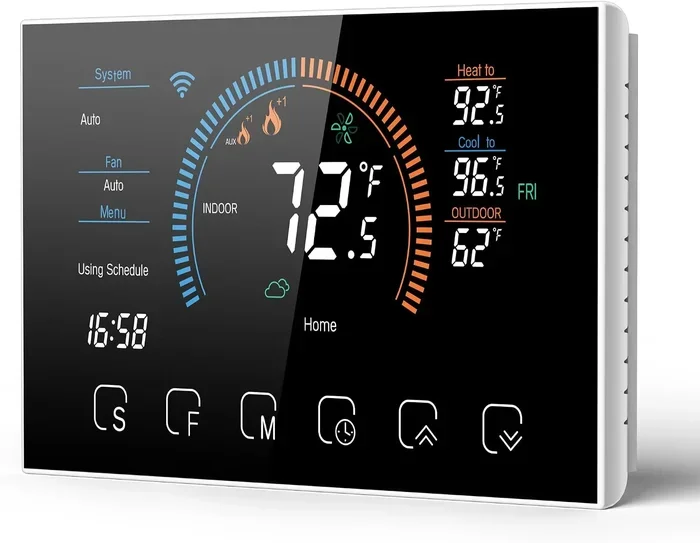
Understanding how a smart thermostat operates is the first step. These devices are essentially small computers mounted on your wall. They connect to your HVAC system to control heating and cooling. The question is whether they need the internet to do their job.
What Happens When Your Smart Thermostat Has Wi-Fi
When your Wi-Fi thermostat is connected to the internet, it opens up a world of possibilities. Here is what you get with a strong connection:
- Remote control: You can adjust the temperature from your phone, even when you are not home.
- Voice commands: Integration with Alexa, Google Assistant, and Siri becomes possible.
- Energy reports: The device tracks your usage patterns and sends you detailed insights.
- Smart home automation: It can work with other devices like motion sensors and door sensors.
- Software updates: Manufacturers push new features and improvements over the air.
- Geofencing: The thermostat knows when you are leaving or arriving home based on your phone location.
All of these features make your home automation setup much more powerful. They turn a simple temperature controller into a true smart home device.
What Happens When Wi-Fi Goes Down
Here is the good news. When your internet connection drops, your smart thermostat does not stop working entirely. Most models fall back to a basic operating mode. In this mode, the thermostat still controls your HVAC system based on the schedule you have programmed.
You can still manually adjust the temperature using the thermostat’s built-in controls. The device will continue to follow any programmable thermostat schedule you have already set up. However, you lose the ability to make changes remotely or use voice commands.
Think of it like a smartphone without data. You can still use many features, but the ones that rely on the internet simply will not work until you reconnect.
Types of Smart Thermostats and Their Connectivity Needs
Not all smart thermostats are created equal. Different brands and models have different connectivity requirements. Let us look at the main categories.
Fully Connected Smart Thermostats
These are the most popular types. Brands like Nest, Ecobee, and Honeywell Home fall into this category. They are designed to work best with a Wi-Fi connection. Their full feature set depends on being online.
However, even these models have a basic offline mode. You can still control temperature and run schedules without internet. You just miss out on the smart features that made you want the device in the first place.
Thermostats With Built-In Smart Hubs
Some smart thermostat models come with a built-in hub. They use protocols like Zigbee or Z-Wave to connect with other devices. These thermostats do not always depend on Wi-Fi for local communication.
For example, if your smart home hub is a separate device like a Smart Things hub or Hubitat, the thermostat can still communicate with other sensors and devices locally. This setup works even when your internet is down.
Basic Smart Thermostats With Minimal Connectivity
Some budget-friendly options offer “smart” features without requiring Wi-Fi connectivity. These devices may use Bluetooth or a simple app connection that does not need the internet. They are a good choice for people who want some smart features without relying on a strong internet connection.
Traditional Programmable Thermostats With Smart Add-Ons
You can also add smart capabilities to an older thermostat. Some companies make smart modules that attach to existing programmable thermostat units. These add-ons may or may not need Wi-Fi depending on the model.
Features That Require Wi-Fi and Features That Do Not
To make things clearer, let us break down exactly which features need internet and which do not. This table shows the difference clearly.
| Feature | Requires Wi-Fi? | Works Offline? |
|---|---|---|
| Remote control via app | Yes | No |
| Voice assistant integration | Yes | No |
| Energy usage reports | Yes | No |
| Geofencing | Yes | No |
| Software and firmware updates | Yes | No |
| Manual temperature adjustment | No | Yes |
| Programmed schedules | No | Yes |
| Local sensor integration | No (if hub-based) | Yes |
| Smart home automation routines | No (if hub-based) | Yes |
| Initial setup and pairing | Usually yes | Sometimes |
As you can see, the core function of any thermostat is temperature control. That works without Wi-Fi. The smart features are the ones that need the connection.
Quick Tips for Maximizing Your Thermostat Without Wi-Fi
Want to get the most out of your smart thermostat even when the internet is down? Here are some quick tips:
- Set up your schedule before going offline. A well-planned schedule keeps your home comfortable without any internet needed.
- Use the manual controls on the device. Familiarize yourself with the thermostat’s built-in buttons or dial.
- Keep a backup method for temperature adjustment. Know how to override settings if the app is not available.
- Check your HVAC filter regularly. A clean system works better regardless of whether your thermostat is online.
Do You Need Wi-Fi for Initial Setup?
This is a question many people overlook. The answer depends on the brand and model of your smart thermostat. Let us look at the setup process for different types of devices.
Wi-Fi Required for First-Time Setup
Most popular Wi-Fi thermostats require an internet connection during the initial setup. You need to download the app, create an account, and connect the device to your home network. Without Wi-Fi, you cannot complete this process.
For example, the Nest Learning Thermostat and the Ecobee SmartThermostat both need Wi-Fi to finish the initial pairing. If your home does not have internet yet, you will need to wait or set up a mobile hotspot.
Setup Without Wi-Fi
Some models allow you to complete basic setup without an internet connection. These thermostats let you configure heating and cooling schedules directly on the device. You simply skip the app and cloud setup steps.
However, you will miss out on features like firmware updates and cloud-based learning until you connect to Wi-Fi later.
What to Do If You Lose Wi-Fi After Setup
If your smart thermostat was already set up and you lose internet access, do not panic. The device will continue running on its last known settings. Your programmed schedules remain intact. You can still adjust the temperature manually.
When the Wi-Fi comes back, the device will reconnect automatically. It will sync any changes you made while offline. Everything should pick up right where you left off.
Common Mistakes People Make With Smart Thermostats and Wi-Fi
Even experienced homeowners make mistakes when setting up their smart thermostat devices. Here are some common ones to avoid.
Assuming All Smart Features Work Without Internet
The biggest mistake is assuming that “smart” means it works independently of the internet. Many features like remote access and voice control need a Wi-Fi connection. If you buy a thermostat expecting full smart features without internet, you will be disappointed.
Skipping the Firmware Updates
Firmware updates often happen over Wi-Fi. If your thermostat never connects to the internet, it may miss important updates. These updates can fix bugs, improve performance, and add new features. Keep your device connected when possible.
Ignoring Compatibility With Your HVAC System
Not every smart thermostat works with every heating and cooling system. Before you buy, check the compatibility list. Some systems need a C-wire. Others may not be compatible with certain thermostat brands. Take five minutes to verify compatibility and save yourself a headache.
Placing the Thermostat in a Bad Location
Where you install your thermostat affects how well it works. Do not place it near windows, doors, or heat sources. A poorly placed device gives inaccurate readings. This wastes energy and makes your home uncomfortable.
Overlooking the Need for a Stable Wi-Fi Signal
If your Wi-Fi signal is weak where the thermostat is mounted, you will experience connectivity issues. Consider a Wi-Fi extender or mesh network to ensure a strong signal. A stable connection means fewer disruptions and better performance.
Expert Insights on Smart Thermostat Connectivity
We spoke with several HVAC professionals and smart home experts to get their take on thermostat connectivity. Here is what they had to say.
Mark T., HVAC Technician: “I tell my customers that a smart thermostat without Wi-Fi is basically a fancy programmable thermostat. You still get good energy savings from the scheduling feature. But you lose the convenience of controlling it from your phone.”
Sarah L., Smart Home Consultant: “If you live in an area with unreliable internet, look for a thermostat with local hub support. Brands like Ecobee and SmartThings offer systems that work well even when the cloud is unreachable.”
Dr. James R., Energy Efficiency Researcher: “The energy savings from a smart thermostat come mostly from the scheduling and learning features. These work locally on the device. Wi-Fi enhances the experience, but it is not the main driver of savings.”
How to Choose the Right Smart Thermostat for Your Needs
With so many options on the market, choosing the right smart thermostat can feel overwhelming. Here are some factors to consider.
Consider Your Internet Reliability
If your internet connection is stable and fast, a fully connected Wi-Fi thermostat is a great choice. You will enjoy all the smart features without interruption. If your internet is spotty, look for models with strong offline capabilities.
Check Your HVAC System Type
Different systems need different thermostats. Force air, radiant heat, heat pump, and multi-stage systems all have specific requirements. Make sure the thermostat you choose is compatible with your setup.
Think About Your Smart Home Ecosystem
If you already use Alexa, Google Home, or Apple HomeKit, pick a thermostat that integrates well with your ecosystem. This ensures smooth home automation and a better overall experience.
Set a Budget
Smart thermostats range from around 50 dollars to 250 dollars or more. More expensive models offer more features. But a mid-range thermostat can still give you excellent energy savings and good performance.
Read Reviews and Compare
Before buying, read user reviews and expert comparisons. Look for feedback on real-world performance, reliability, and ease of use. This helps you avoid buyer’s remorse.
Frequently Asked Questions
Can I use a smart thermostat without Wi-Fi?
Yes, most smart thermostats can work without Wi-Fi in a basic mode. You can still control temperature manually and run programmed schedules. However, features like remote access, voice control, and energy reports will not work until you reconnect to the internet.
Do smart thermostats save money without Wi-Fi?
They can. The main energy savings come from scheduling and maintaining consistent temperatures. These features work offline. However, advanced features like learning algorithms and geofencing need Wi-Fi to optimize your savings even further.
What happens to my smart thermostat when the power goes out?
Most smart thermostats have a battery backup or keep their settings in memory. When power returns, the device usually reboots with your previous settings intact. If your Wi-Fi router also lost power, the thermostat will reconnect once the internet is back.
Can I set up a smart thermostat without internet?
It depends on the brand. Some models require Wi-Fi for the initial setup. Others allow basic configuration directly on the device. Check the manufacturer’s instructions before purchasing if you do not have reliable internet access.
Is a Wi-Fi thermostat the same as a smart thermostat?
Not exactly. A Wi-Fi thermostat can connect to your home network, but not all of them have advanced smart features like learning or automation. A true smart thermostat combines Wi-Fi with intelligent features that adapt to your habits and preferences.
Which smart thermostat works best without Wi-Fi?
Models like the Ecobee SmartThermostat and Honeywell Home T-Series have strong offline modes. They keep your schedules running and allow manual control even when the internet is down. Look for thermostats with local processing capabilities for the best offline experience.
Final Thoughts
The question “do all smart thermostats require Wi-Fi” has a clear answer. No, they do not. A smart thermostat can still perform its core job of heating and cooling your home without an internet connection. The basic functions work just fine offline.
However, Wi-Fi is what transforms a regular thermostat into a truly smart one. It brings remote access, voice control, energy insights, and seamless home automation into your daily life. If you have a reliable internet connection, these features are well worth having.
Before you buy, think about your internet reliability, your HVAC system, and which features matter most to you. Choose a model that fits your needs and your home setup. With the right smart thermostat, you can enjoy comfort, convenience, and energy savings no matter what your connectivity situation looks like.
Take the time to research, compare options, and make an informed decision. Your future self will thank you when you are adjusting the temperature from your couch or saving money on your energy bill. Wi-Fi makes smart thermostats smarter, but it does not make them essential.
Frequently Asked Questions
What is Do All Smart Thermostats Require Wi Fi?
Do All Smart Thermostats Require Wi Fi is an important topic with many practical applications.