Can You Use A Mini Projector With Your Phone For Movies
Yes, you can use a mini projector with your phone for movies, and it is easier than you might think. Whether you want a backyard cinema or a cozy bedroom setup, connecting your phone to a mini projector opens up a world of entertainment. This guide walks you through every method, from wireless casting to wired adapters, so you can start watching big-screen content right away.
Have you ever wanted to turn any room into your own personal movie theater? The good news is that you can use a mini projector with your phone for movies, and it does not require a computer or any fancy equipment. A mini projector paired with your phone gives you a big-screen experience wherever you go. Whether you are camping in the woods or hosting a movie night on the patio, this setup works beautifully.
So how does it actually work? The short answer is that phones and mini projectors talk to each other through several simple methods. You can go wireless using screen mirroring or Bluetooth. Or you can use a cable and adapter for a more stable connection. Each method has its own pros and cons. Let us walk through all of them so you can pick the best option for your needs.
In this guide, we will cover everything you need to know. You will learn about different connection types, which portable projector models work best with phones, and how to get the best picture quality. We will also share tips on avoiding common setup mistakes. By the end, you will feel confident setting up your own phone-to-projector system at home or on the go.
Key Takeaways
- Multiple Connection Methods: You can connect your phone to a mini projector using wireless screen mirroring, Bluetooth, HDMI adapters, or USB-C cables depending on your devices.
- Wide Compatibility: Most modern mini projectors work with both Android and iPhone devices through built-in apps or third-party casting tools.
- Portability Is a Game-Changer: Mini projectors are lightweight and battery-powered, making them perfect for movie nights anywhere.
- Picture Quality Varies: Resolution, brightness, and contrast differ across models, so choose one that matches your viewing needs.
- Setup Takes Minutes: With the right cables or wireless connection, you can go from unboxing to watching movies in under 10 minutes.
- Watch Out for Common Mistakes: Avoid placing your projector too close to the wall or ignoring ambient light for the best viewing experience.
📑 Table of Contents
Why Use a Mini Projector With Your Phone?
More people are choosing mini projectors for movies over traditional TVs. There are some really good reasons for this shift. First, mini projectors are small and light. You can carry one in a backpack or even a large pocket. This makes them perfect for travel, camping trips, or impromptu movie nights with friends.
Second, using your phone as the source means you have access to all your favorite apps. Netflix, YouTube, Disney Plus, Hulu, and Prime Video all work on phones. You do not need a smart TV or a streaming stick. Just open the app on your phone and project it onto any wall or portable screen. It is that simple.
Third, mini projectors are affordable. You can find a decent pocket projector for under 100 dollars. Compare that to the cost of a 50-inch TV, and the value becomes clear. You get a big picture without spending a lot of money.
Portable Entertainment on the Go
One of the biggest advantages of mobile device projection is the freedom it gives you. You are not stuck in one room watching a fixed TV. You can set up your portable entertainment system almost anywhere. A blank wall, a white sheet, or a portable projection screen all work great.
Imagine sitting by a lake at sunset, watching your favorite film on a 100-inch screen. Or picture having a backyard movie night with the family. These moments become possible with a mini projector and your phone. The experience feels magical and brings people together in a way that a small phone screen simply cannot.
How to Connect Your Phone to a Mini Projector
Now let us get into the practical stuff. Connecting your phone to a mini projector is straightforward. There are four main ways to do it. Let us look at each one in detail so you can choose the method that works best for you.
Method 1: Wireless Screen Mirroring
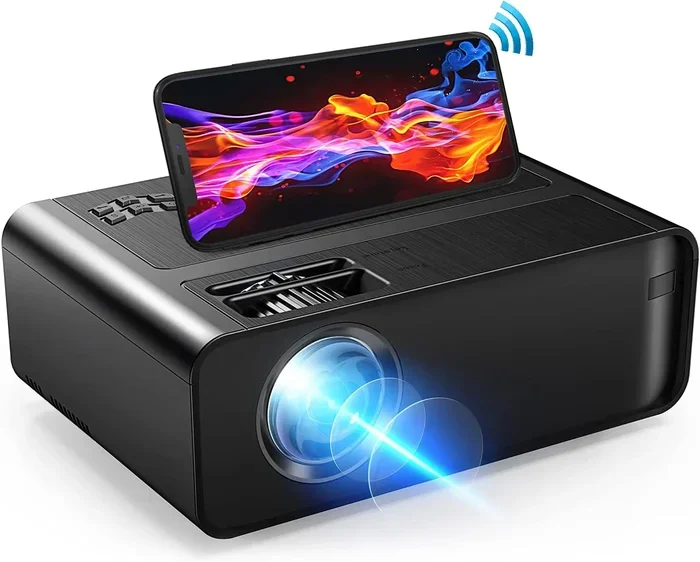
Wireless screen mirroring is the most popular way to cast your phone to a projector. Most modern mini projectors come with built-in Wi-Fi and support screen mirroring protocols. This means you do not need any extra cables or adapters.
Here is how it works. First, make sure your phone and the projector are on the same Wi-Fi network. Open the screen mirroring feature on your phone. On Android, this is usually called “Smart View” or “Screen Cast.” On iPhone, it is called “Screen Mirroring.” Select your projector from the list of available devices.
Within seconds, your phone screen appears on the projected image. Open any movie app and start watching. The video plays on the big screen while your phone acts as the remote control. You can pause, rewind, and adjust the volume from your phone.
Quick Tip: If the connection is slow or laggy, move closer to the router. A strong Wi-Fi signal makes a big difference in wireless display performance.
Method 2: Bluetooth Connection
Some mini projectors support Bluetooth pairing. This method is great if you only want to stream audio through the projector’s speakers. You connect your phone to the projector via Bluetooth and play content from your phone. The sound comes through the projector while the image displays on the screen.
However, Bluetooth alone does not send video to the projector. You would need a separate method for the video signal. Some users pair Bluetooth for audio and use an HDMI cable for video at the same time. This dual setup gives you great sound and picture quality.
Method 3: HDMI Adapter or Cable
For the most reliable connection, use an HDMI adapter. This is the go-to method for people who want zero lag and crystal-clear picture quality. You simply plug an adapter into your phone’s charging port and connect an HDMI cable from the adapter to the projector.
There are two main types of adapters you will need. If you have an iPhone with a Lightning port, get a Lightning to HDMI adapter. If you have a newer iPhone or Android phone with a USB-C port, a USB-C to HDMI adapter works perfectly.
This wired method is excellent for projector compatibility with older phones that do not support wireless mirroring. It also avoids any Wi-Fi interference or lag issues. The picture is smooth and responsive.
Method 4: Using a Streaming Device or Casting Stick
Another option is to use a small casting device like a Chromecast or Roku Streaming Stick. You plug the device into the projector’s HDMI port. Then you cast content from your phone to the streaming stick. This method is helpful if your projector does not have built-in Wi-Fi or screen mirroring support.
The casting stick handles all the wireless connectivity. Your phone just sends the signal. This can be a great workaround for older projectors or budget models that lack smart features. It is also useful if you want access to apps that are not available on your projector’s built-in system.
Best Mini Projectors for Phone Movie Streaming
Not all mini projectors are created equal. Some are better suited for phone to projector movie streaming than others. Let us look at what to look for when choosing the right one.
Key Features to Consider
- Brightness (Lumens): Look for at least 200 ANSI lumens for indoor use. For outdoor movie nights, aim for 500 lumens or more. Brighter projectors produce clearer images even in rooms with some light.
- Resolution: A native 720p or 1080p resolution gives you sharp and detailed images. Avoid projectors that only advertise “supported” 1080p, as they usually have lower native resolution.
- Battery Life: A built-in battery is essential for portability. Look for at least 2 to 3 hours of battery life. This gives you enough time for a full movie without needing a power outlet.
- Built-In Speakers: Some mini projectors have decent speakers built in. Others require external speakers or Bluetooth audio devices. Check the speaker quality before you buy.
- Operating System: Smart projectors with Android TV built in can run apps directly. This means you do not always need your phone to stream content. But if you prefer using your phone, any projector with screen mirroring will work.
Comparison Table: Top Mini Projectors for Phone Use
| Projector Model | Brightness | Resolution | Battery Life | Wireless Mirroring | Price Range |
|---|---|---|---|---|---|
| Anker Nebula Capsule 3 | 300 lumens | 1080p | 2.5 hours | Yes | 300-400 |
| XGIMI MoGo 2 | 400 lumens | 1080p | 2 hours | Yes | 400-500 |
| AAXA P300 | 250 lumens | 720p | 3 hours | Yes | 150-200 |
| Wanbo T6 Max | 550 lumens | 1080p | 2 hours | Yes | 200-250 |
| ViewSonic M1 Mini | 150 lumens | 720p | 4 hours | Yes | 100-150 |
Each of these portable projectors works well with phones. The right one for you depends on your budget and how you plan to use it. For the best overall experience, the Anker Nebula Capsule 3 and the XGIMI MoGo 2 are top picks. They offer bright, clear images and easy phone connectivity.
Tips for the Best Movie Viewing Experience
Setting up your phone and mini projector is only half the battle. To truly enjoy mini projector for movies sessions, you need to think about the environment and settings. Here are some practical tips that make a huge difference.
Control Ambient Light
Mini projectors work best in dim or dark rooms. Ambient light washes out the projected image and makes colors look faded. Close your curtains or blinds before starting a movie. If you are outside, use a pop-up canopy or wait until after sunset.
If you must project in a bright room, choose a projector with higher lumens. A brighter projector fights ambient light better and produces a more visible image. Also, try to project onto a light-colored wall or a dedicated projection screen. Dark or textured walls absorb light and reduce image quality.
Focus and Keystone Correction
Most mini projectors have automatic focus and keystone correction. These features adjust the image so it looks sharp and rectangular. Place your projector on a flat surface directly facing the wall or screen for the best results.
If the image looks tilted, use the keystone setting to straighten it. Some projectors also allow manual focus adjustment. Take a few minutes to fine-tune these settings before your movie starts. A little effort upfront saves you from squinting at a blurry image later.
Use a Portable Projection Screen
While projecting onto a wall works fine, a portable screen makes a big difference. A good screen provides a smooth, white surface that enhances brightness and color accuracy. Portable screens are lightweight and easy to set up. They fold up and fit in a bag, so they are perfect for outdoor use.
You do not need an expensive screen either. Even a simple white bedsheet stretched tight works well in a pinch. Just make sure there are no wrinkles, as they distort the image. A wrinkle-free surface gives you the clearest picture possible.
Optimize Your Phone Settings
Before you start projecting, adjust a few settings on your phone. Turn off auto-brightness so your phone screen stays consistent. Disable notifications during the movie to avoid interruptions. You can also put your phone in airplane mode to prevent calls or messages from disrupting the experience.
Another helpful tip is to keep your phone plugged in during long movie sessions. Screen mirroring uses extra battery power. Having a charger nearby ensures your phone does not die halfway through the film.
Common Mistakes to Avoid
Setting up a phone-to-projector system is simple, but small mistakes can ruin the experience. Here are the most common errors people make and how to avoid them.
Placing the Projector Too Close or Too Far
Every mini projector has a recommended throw distance. This is the distance between the projector and the screen or wall. If you place the projector too close, the image appears small and blurry. If it is too far, the image becomes dim and distorted.
Check your projector’s manual for the ideal throw distance. Most mini projectors work best when placed 3 to 8 feet from the wall. Some models also have a zoom feature that lets you adjust the image size without moving the projector.
Ignoring Audio Quality
Built-in speakers on mini projectors are small and often lack depth. While they work for casual viewing, they do not deliver the immersive sound you get from a proper home theater setup. If sound quality matters to you, consider connecting Bluetooth speakers or headphones to your projector or phone.
Some projectors have a 3.5mm audio output jack. This lets you connect any pair of wired headphones or external speakers. For wireless audio, Bluetooth speakers pair easily with most projectors and phones alike.
Using the Wrong Adapter
Not all HDMI adapters work with all phones. Using the wrong adapter can cause connection problems or no signal at all. Make sure you buy the correct adapter for your phone model. Lightning adapters are for older iPhones. USB-C adapters work with newer iPhones and most Android phones.
Also, look for adapters that support video output. Not all charging adapters can send a video signal. Check the product description carefully before purchasing. A good adapter ensures a stable and clear connection every time.
Expert Insights on Phone-to-Projector Movie Nights
We asked a few tech enthusiasts and home theater experts about their tips for using mini projectors with phones. Here is what they had to say.
Sarah M., home entertainment blogger: “I use my Anker Nebula projector every weekend for movie nights. The wireless mirroring is seamless. I just open Netflix on my phone, cast it to the projector, and the kids love it. The key is to keep the Wi-Fi strong in the room where you project.”
David R., tech reviewer: “If you are buying a mini projector specifically for phone use, prioritize models with built-in smart features. Projectors with Android TV let you download apps directly. This means you can use the projector without your phone most of the time. But having your phone as a backup remote is always handy.”
Lisa T., camping enthusiast: “My portable projector has become an essential part of every camping trip. I bring a small folding screen and a Bluetooth speaker. We watch movies under the stars every night. It is a simple setup that creates unforgettable memories.”
These real-world insights show that using a mini projector with your phone is not just a technical possibility. It is a practical and enjoyable way to enhance your entertainment setup. Whether at home or outdoors, the experience is worth the small effort of setup.
Frequently Asked Questions
Can any phone connect to a mini projector?
Most modern phones can connect to a mini projector. Both Android and iPhone devices support wireless screen mirroring and wired HDMI connections. The method you use depends on your phone model and the projector’s features. Check your projector’s manual for specific compatibility details.
Do I need Wi-Fi to mirror my phone to a projector?
Many mini projectors support Wi-Fi-based screen mirroring, which requires both devices to be on the same network. However, some projectors also offer Bluetooth or HDMI wired connections that do not need Wi-Fi at all. If Wi-Fi is not available, a simple HDMI adapter solves the problem completely.
What is the best mini projector for watching movies with a phone?
The best projector depends on your budget and needs. The Anker Nebula Capsule 3 and XGIMI MoGo 2 are top-rated for phone movie streaming. They offer bright images, full HD resolution, and easy wireless mirroring. For a budget-friendly option, the AAXA P300 delivers solid performance at an affordable price.
Can I use my phone while it is connected to a projector?
Yes, you can continue using your phone while it is mirroring to a projector. Your phone acts as a remote control for the projected content. You can pause, skip, or adjust volume from your phone. However, some apps may block screen mirroring due to copyright restrictions, like Netflix in certain regions.
How big of a picture can a mini projector display?
Most mini projectors can display images between 50 and 120 inches. The actual size depends on how far you place the projector from the wall or screen. Closer distances produce smaller images, while moving the projector back increases the size. Check your projector’s specifications for the recommended throw distance for each image size.
Are mini projectors good for outdoor movie nights?
Mini projectors work well for outdoor use, especially in dark or dim settings. Battery-powered models let you set up anywhere without a power outlet. For the best results, use a portable screen and bring a Bluetooth speaker for better sound. A canopy or open-sided tent helps block ambient light and creates a cozy viewing environment.
Final Thoughts
Using a mini projector with your phone for movies is one of the best ways to upgrade your entertainment experience. It is simple, affordable, and incredibly fun. Whether you are at home, in the backyard, or out in nature, you can enjoy big-screen content from the device you already carry every day.
The connection methods are straightforward. Wireless mirroring gives you freedom from cables. HDMI adapters provide a rock-solid connection. Bluetooth adds flexibility for audio. And streaming sticks offer a smart workaround for any projector. You have options, and that is a great thing.
Pick the right mini projector for your needs. Follow the setup tips in this guide. Avoid the common mistakes we highlighted. And most importantly, enjoy the experience. There is something special about watching a movie on a big screen with friends and family. A mini projector makes that moment effortless and memorable.
So go ahead. Set up your phone to projector connection tonight. Pop some popcorn, dim the lights, and press play. Your own movie theater awaits, and it fits in the palm of your hand.