Can You Use A Headset On Nintendo Switch For Better Sound
Yes, you can use a headset on Nintendo Switch for better sound. Whether you prefer wireless Bluetooth options or a simple wired connection, the Switch supports multiple headset types. This guide covers every method, compatible headsets, and step-by-step setup tips so you can enjoy immersive audio during your gaming sessions.
Gamers love the Nintendo Switch for its portability and versatility. But one thing that often gets overlooked is audio quality. Whether you are battling enemies in Zelda or chatting with friends in Mario Kart, sound makes or breaks the experience. That is why so many players ask the same question: can you use a headset on Nintendo Switch for better sound?
The short answer is yes. You absolutely can. But the full answer depends on the type of headset you own and how you want to connect it. Some headsets plug in with a simple cable. Others need a little extra gear. And then there are those that simply will not work at all. In this guide, we walk you through every option so you can find the best setup for your gaming needs.
We will cover wired connections, wireless options, Bluetooth workarounds, and even USB headsets. By the end, you will know exactly how to get the best audio out of your Switch. No guesswork. No frustration. Just clear, practical steps you can follow right now.
Key Takeaways
- Multiple connection types work: You can use wired, wireless, and Bluetooth headsets on the Nintendo Switch with the right setup.
- Bluetooth support requires a workaround: The Switch does not natively support Bluetooth audio, but you can use a compatible Bluetooth adapter.
- The 3.5mm jack is your best friend: Most headsets plug directly into the Switch dock or controller for instant audio.
- USB headsets offer plug-and-play convenience: Many USB gaming headsets work seamlessly with the Switch dock.
- Chat and game audio can be split: You can adjust audio settings to balance in-game sound and voice chat independently.
- Compatibility varies by headset type: Not all headsets work perfectly, so check compatibility before buying.
- Setup takes only minutes: Connecting a headset to your Switch is quick and requires no technical expertise.
📑 Table of Contents
- Can You Use A Headset On Nintendo Switch With A Wired Connection
- Using Wireless And Bluetooth Headsets On The Switch
- USB Headsets And Alternative Audio Solutions
- Setting Up Voice Chat With Your Headset
- Common Headset Connection Issues And How To Fix Them
- Expert Tips For The Best Audio Experience
- Final Thoughts
Can You Use A Headset On Nintendo Switch With A Wired Connection
The easiest and most reliable way to connect a headset to your Switch is through a wired connection. It requires no extra accessories and works with most standard gaming headsets. If you already own a headset with a 3.5mm audio jack, you are in luck.
How To Connect A Wired Headset
There are two places you can plug in a wired headset on the Nintendo Switch. The first is the bottom of the Switch dock. Look for the 3.5mm combo jack on the front of the dock. Simply plug your headset cable in there, and audio will route through your headset instead of the TV speakers.
The second option is the Switch Pro Controller. It has a built-in 3.5mm headphone jack on the bottom edge. This is perfect for handheld mode when you do not want to deal with the dock. Just plug your headset directly into the controller and you are ready to play.
Both methods deliver the same audio quality. The dock connection is more stable, while the controller jack offers more freedom of movement. Choose whichever fits your play style.
Which Wired Headsets Work Best
Most standard gaming headsets with a 3.5mm plug work great on the Switch. Here are some popular options that players love:
- HyperX Cloud Stinger 2: Lightweight, comfortable, and affordable. A great all-around choice.
- SteelSeries Arctis 1: Clean sound and a detachable cable for easy storage.
- Turtle Beach Recon 50: Budget-friendly with solid bass and clear mids.
- Sony MDR-7506: A classic studio headset that delivers accurate audio.
You can also use regular earbuds or headphones with a 3.5mm plug. They may not offer the same surround sound as gaming headsets, but they work perfectly fine for casual play. Just remember that some headsets have separate mic and audio jacks. The Switch only supports a single combo jack, so you may need a splitter cable in that case.
Using Wireless And Bluetooth Headsets On The Switch
This is where things get a little tricky. The Nintendo Switch does not support Bluetooth audio natively. That means you cannot simply pair your Bluetooth headset to the console the way you would with a phone or laptop. But that does not mean Bluetooth headsets are completely off the table.
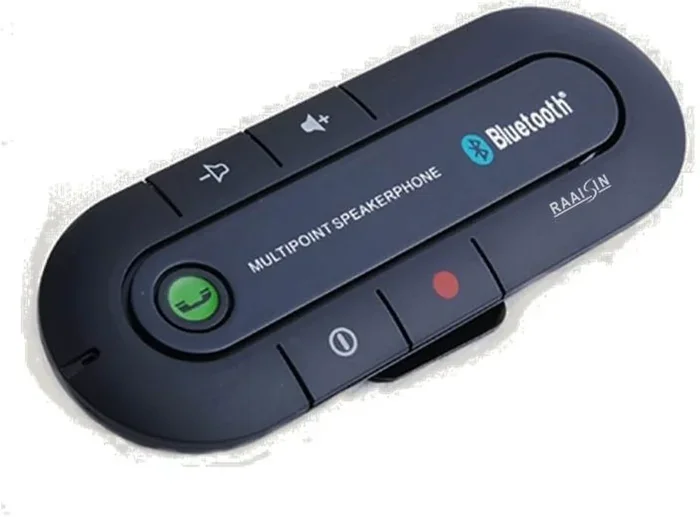
If you want to know can you use a headset on Nintendo Switch wirelessly, the answer is yes, but with a small workaround. You need a Bluetooth audio adapter that connects to the Switch dock or controller. These adapters plug into the USB port on the dock and broadcast a Bluetooth signal your headset can connect to.
Top Bluetooth Adapters For The Switch
- Genki Bluetooth Adapter: Designed specifically for the Switch. It fits right into the dock USB port and offers low-latency audio.
- 8BitDo Bluetooth Adapter: Compact and affordable. Works well with most Bluetooth headsets.
- TaoTronics Bluetooth 5.0 Transmitter: A versatile option that also works with TVs and other devices.
Keep in mind that Bluetooth adapters add a small amount of latency. For most games, this is barely noticeable. But if you play fast-paced competitive games where timing is everything, you might notice a slight delay. For casual gaming, story-driven adventures, and online chat, Bluetooth adapters work just fine.
Can You Use Bluetooth Headphones With Other Devices
If you already use Bluetooth headphones with other consoles or devices, you might wonder if they will work with the Switch. The short answer is yes, as long as you have the right adapter. Many players ask about can you use Bluetooth headphones with PS5 or other consoles. The same adapter principle applies. A good Bluetooth transmitter opens up wireless audio options across multiple devices.
Some players also ask whether they can use AirPods with the Switch. AirPods and other true wireless earbuds can connect through a Bluetooth adapter. The connection is stable and works well for both game audio and voice chat. Just make sure your adapter supports the audio profile your headset uses.
USB Headsets And Alternative Audio Solutions
If you prefer a USB connection, there are options available for the Nintendo Switch as well. USB headsets plug directly into the dock and often come with their own sound cards. This means better audio quality and sometimes even surround sound support.
USB Headset Compatibility
Not all USB headsets work with the Switch. The console supports USB audio devices that follow specific standards. Here is what you need to know:
- USB-A headsets: These plug into the USB ports on the Switch dock. Many gaming headsets with USB connectors work right out of the box.
- USB-C headsets: The Switch dock has USB-C ports, but support for USB-C audio devices can be limited. Check compatibility before purchasing.
- USB sound cards: If your favorite headset only has a 3.5mm plug, you can use a USB sound card adapter to convert the connection.
One thing to keep in mind is that the Switch has limited USB bandwidth. This means you should not connect too many USB devices at once. If you are using a USB headset, avoid plugging in other USB accessories that might interfere with audio performance.
Using The Switch Dock For Audio Output
The Switch dock does more than just output video to your TV. It also serves as a central hub for audio. When you plug a headset into the dock, it overrides the TV speakers. This is great for late-night gaming sessions when you do not want to disturb anyone in the house.
You can also adjust audio settings directly on the Switch. Go to System Settings > Sound and you will find options to control volume, audio output, and mic input. These settings let you fine-tune your audio experience without needing extra software.
Setting Up Voice Chat With Your Headset
One of the biggest reasons players use headsets on the Switch is voice chat. Whether you are teaming up with friends in Splatoon or coordinating strategies in Fortnite, clear communication makes a huge difference.
Nintendo Switch Online Voice Chat
To use voice chat on the Switch, you need a Nintendo Switch Online membership. This service lets you chat with friends while playing supported games. The Switch app on your phone acts as a voice chat hub. Your headset connects to the Switch, and the Switch routes your voice through the app.
Here is how to set it up:
- Make sure you have a Nintendo Switch Online subscription.
- Download the Nintendo Switch Online app on your phone.
- Connect your headset to the Switch using a wired or wireless method.
- Open the app and select the game you are playing.
- Adjust your mic settings and test your audio before jumping into a match.
Voice chat works best with headsets that have a built-in microphone. If your headset does not have a mic, you can use a separate mic or a headset with a detachable boom mic. Just make sure the mic input is enabled in the Switch sound settings.
Common Headset Connection Issues And How To Fix Them
Even with the right setup, you might run into audio problems from time to time. Here are the most common issues and how to solve them quickly.
No Sound From The Headset
If you plug in your headset and hear nothing, try these steps:
- Check that the headset is fully plugged into the dock or controller jack.
- Make sure the Switch audio output is set to the headset, not the TV.
- Test the headset on another device to rule out a hardware problem.
- Try a different cable or adapter if you are using one.
Microphone Not Working
If your mic is not picking up your voice, the issue is often a setting rather than a hardware problem. Go to System Settings > Sound > Microphone and make sure the input is set correctly. Also check that the mic is not muted on the headset itself. Some headsets have a physical mute button that can accidentally get switched on.
Bluetooth Audio Cutting Out
For wireless Bluetooth connections, interference is the most common culprit. Keep your Bluetooth adapter close to the Switch dock. Avoid placing the adapter near other wireless devices like routers or microwaves. If you experience dropouts, try switching to a different Bluetooth channel in your adapter settings.
Expert Tips For The Best Audio Experience
Getting the most out of your headset on the Switch is about more than just plugging it in. Here are some expert tips that make a real difference.
Use a USB hub with the dock. If you need to connect multiple USB devices, a powered USB hub gives you more ports and stable power delivery. This prevents audio dropouts that can happen when the Switch dock is overworked.
Adjust EQ settings in-game. Many Switch games let you tweak audio settings directly. Experiment with equalizer presets to find the sound profile that suits your preferences. Boosting the mids and highs often makes voice chat clearer.
Keep your firmware updated. If you use a wireless headset or adapter, make sure the firmware is up to date. Manufacturers often release updates that improve connectivity and audio quality.
Consider a dedicated chat headset. If you mostly use the Switch for online multiplayer, a simple chat headset with a boom mic can be more practical than a full gaming headset. They are lightweight, comfortable for long sessions, and deliver clear voice communication.
Test your setup before a big match. Nothing is worse than discovering audio problems mid-game. Take a few minutes before every session to test your headset, mic, and volume levels. This small habit saves a lot of frustration.
Final Thoughts
So, can you use a headset on Nintendo Switch for better sound? Absolutely. The Switch offers more audio flexibility than many people realize. You can go wired for reliability, use a Bluetooth adapter for wireless freedom, or plug in a USB headset for premium sound quality. Each method has its strengths, and the best choice depends on your personal preferences and gaming setup.
The key is to start with what you already have. If you own a standard 3.5mm headset, plug it into the dock or Pro Controller and test it out. If you want wireless audio, invest in a quality Bluetooth adapter. Either way, you will immediately notice a difference in sound quality compared to using the Switch speakers or TV audio.
Take the time to explore your options. Try different headsets. Experiment with settings. Find what works best for your ears and your games. Once you experience immersive, high-quality audio on your Switch, you will never go back to default speakers again.
Now that you know how to set up a headset on your Nintendo Switch, it is time to put that knowledge into action. Grab your headset, fire up your favorite game, and enjoy every sound detail the game has to offer. Happy gaming.
Frequently Asked Questions
Can You Use Any Headset On Nintendo Switch?
Most headsets with a 3.5mm jack work on the Nintendo Switch. USB headsets and Bluetooth headsets with an adapter also work. However, some headsets with proprietary connections may not be compatible. Always check the headset specifications before buying.
Does The Nintendo Switch Support Bluetooth Audio?
The Switch does not support Bluetooth audio natively. You need a Bluetooth audio adapter that connects to the dock or controller. Once paired, your Bluetooth headset will work wirelessly with the Switch for both game audio and voice chat.
Can I Use My AirPods With The Nintendo Switch?
Yes, you can use AirPods with the Nintendo Switch through a Bluetooth adapter. The adapter plugs into the Switch dock and creates a wireless connection. Keep in mind that there may be a slight audio delay compared to wired connections.
Why Is My Headset Not Working On The Switch?
If your headset is not working, first check the physical connection. Make sure the cable is fully inserted into the dock or controller jack. Then verify the audio output settings on the Switch. If you are using Bluetooth, ensure the adapter is properly paired and within range.
Can I Use A Headset And Play Audio On The TV At The Same Time?
The Switch does not support simultaneous audio output to a headset and TV speakers through the standard 3.5mm jack. However, some third-party docks and adapters enable split audio. You can also use the TV speakers when the headset is unplugged and switch between them easily.
What Is The Best Headset For Nintendo Switch?
The best headset depends on your needs and budget. For wired connections, the HyperX Cloud Stinger 2 is a popular choice. For wireless, a USB headset paired with a quality Bluetooth adapter works well. Comfort, sound quality, and mic clarity are the top factors to consider when choosing.