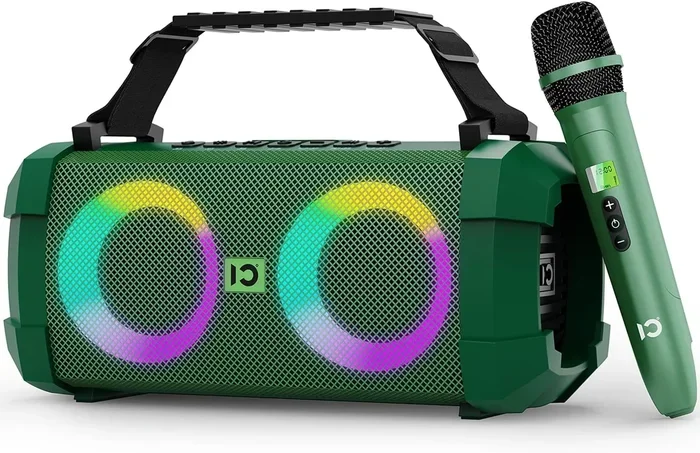
Can You Use A Bluetooth Speaker With A Microphone Today
Yes, you can use a Bluetooth speaker with a microphone, but the method depends on your speaker model and what you want to do. Whether you need a wireless speaker microphone combo for karaoke, conferencing, or outdoor events, there are several ways to make it work. This guide covers every method, tip, and common mistake so you get great sound every time.
Can you use a Bluetooth speaker with a microphone? The short answer is yes. But the real question is how, and that answer depends on what kind of speaker you have and what you want to do with it.
Maybe you want to host a backyard party with a karaoke setup. Maybe you need a wireless speaker microphone combo for a work presentation. Or perhaps you just want to make hands-free calls through a bigger, louder speaker. Whatever your reason, this guide has you covered.
In this article, we will walk through every method, every compatibility concern, and every pro tip you need to know. We will also cover common mistakes people make so you can avoid them. By the end, you will know exactly how to set up your Bluetooth speaker with microphone like a pro.
Key Takeaways
- Bluetooth speakers with built-in microphones exist and are great for calls and karaoke.
- You can connect an external microphone to most Bluetooth speakers using aux cables or adapters.
- Not all Bluetooth speakers support microphone input, so check your model before buying.
- Audio quality varies based on the speaker size, microphone type, and connection method.
- Karaoke and conferencing setups work best with speakers that have a dedicated mic input port.
- Common mistakes include using incompatible cables and ignoring feedback issues.
📑 Table of Contents
- What Is a Bluetooth Speaker With a Microphone?
- How to Connect a Microphone to a Bluetooth Speaker
- Best Uses for a Bluetooth Speaker With a Microphone
- Compatibility: Which Speakers Work With Microphones?
- Common Mistakes and How to Avoid Them
- Expert Tips for the Best Audio Quality
- Can You Use a Bluetooth Speaker as a Speakerphone?
- Final Thoughts
What Is a Bluetooth Speaker With a Microphone?
A Bluetooth speaker with a microphone is a device that can both play audio and capture sound. Some speakers come with a built-in microphone. Others let you plug in an external mic. Both types serve different purposes, and knowing the difference matters.
The built-in mic models are usually designed for speakerphone calls or casual use. They work great for quick conference calls or streaming announcements. The external mic models give you more control over audio quality and are ideal for professional setups.
Built-In Microphone Speakers
Many portable Bluetooth speakers today include a built-in microphone. Brands like JBL, Bose, and Anker often include this feature. You can answer phone calls directly through the speaker. The speaker picks up your voice and transmits it to the other person.
These speakers are convenient. You do not need any extra equipment. But the microphone quality is usually basic. It works fine for casual calls. It may not cut it for professional conferencing or live performances.
External Microphone Support
Some Bluetooth speakers offer an aux input or a dedicated microphone port. This lets you connect a higher-quality external mic. The sound quality is noticeably better. You get more control over volume, clarity, and pickup pattern.
If you want to use your speaker for karaoke or public speaking, this is the way to go. You can connect a wired or wireless microphone and get studio-quality results. Just make sure your speaker supports audio input, not just audio output.
How to Connect a Microphone to a Bluetooth Speaker
Connecting a microphone to a Bluetooth speaker is easier than most people think. There are a few different methods depending on your equipment. Let us walk through each one step by step.
Method 1: Using a 3.5mm Aux Cable
The simplest way is to use a 3.5mm aux cable. Plug one end into your microphone’s output. Plug the other end into your speaker’s aux input. This works with most portable speakers and basic microphones.
Here is what you need:
- A microphone with a 3.5mm output jack
- A 3.5mm aux cable (male to male)
- A Bluetooth speaker with an aux input port
Once connected, your speaker will play the microphone’s audio. You may need to adjust the volume on both devices. This method works well for small gatherings and casual karaoke nights.
Method 2: Using a Bluetooth Adapter
If your microphone does not have a wired output, you can use a Bluetooth adapter. Plug the adapter into your microphone’s charging port or audio output. Then pair the adapter with your speaker. This creates a wireless connection between the mic and speaker.
This method is great for wireless microphone setups. You get more freedom of movement on stage or at events. The downside is a slight audio delay, which can be noticeable during live performances.
Method 3: Using a USB Connection
Some Bluetooth speakers support USB audio input. You can connect a USB microphone directly to the speaker. This method offers the best audio quality for most setups.
However, not all speakers support USB input. Check your speaker’s manual or product page to confirm. If it does support USB, you can plug in a USB condenser mic or USB dynamic mic right away.
Method 4: Using a Wireless Microphone System
For the best experience, consider a wireless microphone system. These include a transmitter and a receiver. You plug the receiver into your speaker. The transmitter connects to your microphone.
This setup is common in professional events and live performances. You get crystal-clear audio with no wires holding you back. It is also the most expensive option, but the quality is worth it.
Best Uses for a Bluetooth Speaker With a Microphone
Now that you know how to connect things, let us talk about what you can actually do with a Bluetooth speaker microphone setup. The possibilities are wider than you might think.
Karaoke Nights
Karaoke is one of the most popular uses for a speaker with a mic. You can connect a karaoke microphone to your Bluetooth speaker and sing your heart out. Most people use a 3.5mm aux cable or a wireless mic system for this.
Pro tip: Place the speaker on a stable surface at ear level. This reduces echo and improves sound clarity. Also, keep the mic at least six inches from the speaker to avoid feedback.
Work Presentations and Meetings
Need to present to a group? A Bluetooth speaker with a mic can be a game-changer. You can walk around the room while speaking, and everyone hears you clearly. This is especially useful in large conference rooms or outdoor meetings.
For the best results, use a lapel microphone or a directional mic. These pick up your voice clearly even in noisy environments. You can also pair your speaker with a phone or laptop to share audio from presentations.
Outdoor Events and Parties
Outdoor parties, barbecues, and events benefit greatly from a speaker with a mic. You can make announcements, play music, and host games all with one device. The portability of Bluetooth speakers makes them perfect for these situations.
Just remember that outdoor settings can be noisy. Use a microphone with good noise cancellation. And position the speaker upwind from the microphone to reduce wind interference.
Church Services and Small Gatherings
Many small churches and community groups use Bluetooth speakers with microphones for services. The setup is simple and affordable. You can connect a wireless mic system and amplify your voice to the entire room.
This is also a great use case for portable Bluetooth speakers that support aux input. You get reliable sound without the complexity of a full PA system.
Compatibility: Which Speakers Work With Microphones?
Not every Bluetooth speaker can accept a microphone input. Understanding compatibility saves you time, money, and frustration. Here is what to look for.
Speakers With Aux Input
The most common type of audio input is the 3.5mm aux port. Many portable speakers include this. Look for a small hole labeled “AUX” or “Line In” on your speaker. If it has one, you can connect a microphone directly.
Speakers With USB Input
USB input is less common but offers better audio quality. Some higher-end speakers include a USB port that supports audio input. This lets you connect USB microphones directly without any adapters.
Speakers With No Audio Input
Some Bluetooth speakers only support audio output. They can play music from your phone but cannot accept a mic signal. If your speaker does not have an aux or USB input, you will need a different solution.
In these cases, you might consider using a Bluetooth speaker with a built-in microphone. These speakers can both play and capture audio. They are not ideal for professional use, but they work for basic needs.
Common Mistakes and How to Avoid Them
Setting up a Bluetooth speaker with a microphone can be tricky if you do not know what to watch out for. Here are the most common mistakes and how to fix them.
Using the Wrong Cable
Not all aux cables are the same. Some cables are designed for audio output only. Using the wrong cable can result in no sound or very low volume. Make sure your cable supports audio input if your speaker has a line-in port.
Ignoring Feedback and Echo
Feedback happens when the microphone picks up sound from the speaker and loops it back. This creates that awful screeching noise. To avoid feedback, keep the microphone away from the speaker. Also, reduce the speaker volume when the mic is active.
Forgetting to Enable the Right Input Mode
Some speakers have multiple input modes. You may need to manually switch to the aux or USB input. Check your speaker’s controls or manual to find the input selection button. Without switching modes, the speaker will only play Bluetooth audio.
Overlooking Battery Drain
Using a speaker with a microphone connected drains the battery faster. The speaker has to power both the Bluetooth receiver and the audio input. Keep your speaker charged, and consider using a power strip or portable charger for long events.
Expert Tips for the Best Audio Quality
Want to get the most out of your setup? Here are some expert tips that make a real difference.
- Use a directional microphone for better sound pickup and less background noise.
- Keep the mic cable away from the speaker cable to avoid interference and buzzing.
- Test your setup before the event to check for feedback and volume levels.
- Place the speaker on a soft surface to reduce vibration and improve clarity.
- Use a mic stand or holder to keep the microphone steady and at the right height.
- Adjust the EQ settings on your speaker if it supports equalizer controls.
These small adjustments can dramatically improve your audio experience. Whether you are hosting a party or leading a meeting, clear sound makes everything better.
Can You Use a Bluetooth Speaker as a Speakerphone?
Many people ask this question, and the answer is yes. Bluetooth speakers with built-in microphones work well as speakerphones. You can answer calls through the speaker and hear the other person clearly.
The range is usually good. Most Bluetooth speakers have a range of 30 feet or more. You can walk around your office or living room while on a call. Just make sure the speaker is charged and within range of your phone.
For the best speakerphone experience, look for speakers with noise-canceling microphones. These reduce background noise and make your voice clearer on the other end. Some speakers also support multipoint pairing, which lets you connect to two devices at once.
Final Thoughts
So, can you use a Bluetooth speaker with a microphone? Absolutely. Whether you choose a speaker with a built-in mic or connect an external microphone, the setup is straightforward and affordable. The key is knowing your speaker’s capabilities and choosing the right connection method.
From karaoke nights to professional presentations, a Bluetooth speaker with a microphone opens up a world of possibilities. Just remember to check compatibility, avoid common mistakes, and follow the expert tips we shared.
With the right setup, your Bluetooth speaker becomes more than just a music player. It becomes a versatile audio tool for calls, events, and entertainment. So go ahead, connect that microphone, and make your speaker do more than you ever thought possible.
Frequently Asked Questions
Can any Bluetooth speaker work with a microphone?
Not all Bluetooth speakers support microphone input. Speakers with an aux port or USB input can accept a microphone. Speakers with only Bluetooth output cannot. Always check your speaker’s specs before buying a microphone.
Can I use a wireless microphone with a Bluetooth speaker?
Yes, you can. You need a wireless microphone system with a receiver. Plug the receiver into your speaker’s aux or USB port. The transmitter connects to the microphone wirelessly. This gives you freedom of movement during performances or presentations.
Will using a microphone with my Bluetooth speaker drain the battery faster?
Yes, it will. Running both Bluetooth playback and audio input uses more power. For long events, keep your speaker plugged into a charger or use a portable power bank. This ensures you do not run out of battery mid-event.
Can I use my Bluetooth speaker for karaoke with a microphone?
Absolutely. Many people use Bluetooth speakers for karaoke at home. Connect a karaoke microphone using an aux cable or wireless system. Just make sure to manage feedback by keeping the mic away from the speaker and lowering the volume when singing.
What is the best type of microphone to use with a Bluetooth speaker?
A directional microphone works best for most setups. It picks up your voice clearly and reduces background noise. For karaoke, a wired handheld mic is simple and reliable. For presentations, a wireless lapel mic gives you freedom to move around.
Can I connect multiple microphones to one Bluetooth speaker?
Most standard Bluetooth speakers only support one audio input at a time. You cannot easily connect multiple mics to a single speaker. For multi-mic setups, you would need a mixer or a PA system designed for multiple inputs.