Can You Leave Your Laptop In A Sleeve At TSA Checkpoint
Yes, you can leave your laptop in a sleeve at the TSA checkpoint, but there are important rules you need to know. TSA officers may still ask you to remove your laptop for separate screening, even if it stays in a sleeve. Using a TSA checkpoint-friendly laptop sleeve can speed up the process and keep your device safe. Understanding TSA laptop rules saves you time and stress at the airport. This guide covers everything you need to know about traveling with your laptop in a sleeve.
Traveling with a laptop can feel stressful enough without worrying about airport security. You want to get through the TSA checkpoint quickly and safely. One question many travelers ask is whether they can leave their laptop in a sleeve at the TSA checkpoint. The answer is not always a simple yes or no.
TSA rules for laptops have changed over the years. Understanding these rules helps you pack smarter and move faster through security. In this guide, we break down everything you need to know about leaving your laptop in a sleeve at TSA. We cover the official rules, common mistakes, and practical tips that actually work.
Whether you travel for work or pleasure, knowing the TSA laptop screening process makes a big difference. You will feel more confident walking up to the security checkpoint. Let us dive into the details so you can travel smarter starting today.
Key Takeaways
- You can keep your laptop in a sleeve: TSA generally allows laptops to stay in sleeves during screening, but officers may request separate inspection.
- Checkpoint-friendly sleeves help: Using a TSA-approved laptop sleeve can make the screening process faster and smoother.
- TSA officers have final say: Even if your sleeve is compliant, a TSA officer may still ask you to remove the laptop.
- TSA PreCheck changes things: If you have TSA PreCheck, you usually do not need to remove your laptop from your bag or sleeve.
- Common mistakes slow you down: Overstuffed sleeves, non-checkpoint-friendly bags, and unprepared travelers cause delays at the airport.
- Prepare before you reach the checkpoint: Having your laptop ready saves time and reduces stress during security screening.
- Know the rules before you travel: Staying updated on TSA laptop policies ensures a hassle-free airport experience every time.
📑 Table of Contents
- What Are TSA Rules for Laptops in Sleeves?
- Can You Keep Your Laptop in a Sleeve Through Security?
- TSA Laptop Sleeve Requirements and Guidelines
- Tips for Smooth Laptop Screening at the Airport
- Common Mistakes Travelers Make with Laptops at TSA
- TSA PreCheck and Laptops in Sleeves
- Understanding the TSA Laptop Screening Process
- Expert Insights on Traveling with Laptops Through TSA
- Frequently Asked Questions
- Conclusion
What Are TSA Rules for Laptops in Sleeves?
The Transportation Security Administration sets the rules for what you can and cannot bring through airport security. When it comes to laptops, the main goal is clear screening. TSA officers need to get a good look at your device using X-ray machines.
So, can you leave your laptop in a sleeve at TSA? The short answer is yes. TSA allows laptops to remain in sleeves, pouches, or dedicated laptop compartments. However, there is an important catch. The sleeve or bag must allow for clear, unobstructed X-ray imaging of the laptop.
Why TSA Cares About Laptop Screening
TSA officers screen laptops to detect hidden threats. Electronics can hide items that pose security risks. A clear X-ray image helps officers identify anything unusual inside or around your device. This is why they sometimes ask you to remove your laptop from a bag or sleeve.
If your laptop sleeve is too thick, has too many pockets, or blocks the X-ray view, TSA may ask you to take the laptop out. This is the most common reason travelers get stopped at the checkpoint. A checkpoint-friendly laptop bag is designed to avoid this problem.
The Difference Between a Sleeve and a Bag
Many people use the words sleeve and bag interchangeably. But they are not the same thing when it comes to TSA screening rules.
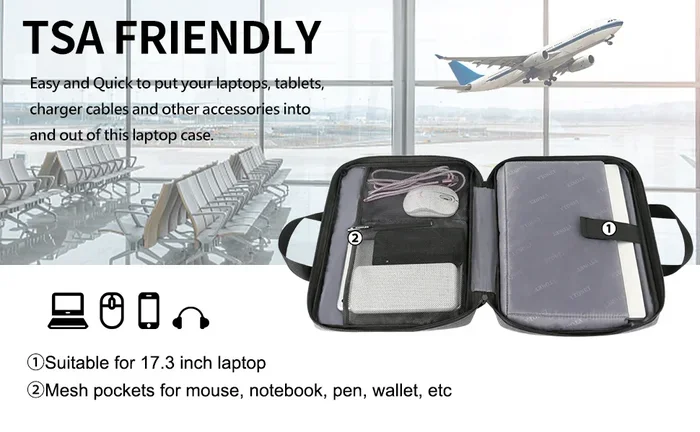
- A laptop sleeve is a slim, padded cover that wraps around your laptop. It usually has no extra compartments.
- A laptop bag is a larger carry-on with multiple pockets, compartments, and sometimes a dedicated laptop section.
Both can work at the TSA checkpoint, but the key factor is how well the X-ray machine can see through them. A thin, simple laptop sleeve TSA officers can see through clearly is your best bet. Thick, heavily padded bags may trigger additional screening.
Can You Keep Your Laptop in a Sleeve Through Security?
Yes, you can keep your laptop in a sleeve while going through airport security. But there are some important guidelines to follow. TSA does not require you to remove your laptop from a sleeve in most cases. However, officers do have the authority to request it.
When You Can Keep Your Laptop in the Sleeve
You can usually keep your laptop in the sleeve if:
- The sleeve is thin and does not block X-ray imaging.
- The laptop is easily visible on the screening belt.
- The sleeve has no metal objects or thick padding that obscures the image.
- You are using a checkpoint-friendly laptop bag with a dedicated laptop section.
These conditions make it easy for TSA officers to inspect your laptop quickly. When the X-ray image is clear, the officer can usually wave you through without asking you to remove anything.
When TSA Will Ask You to Remove the Laptop
Sometimes, TSA officers will ask you to take the laptop out of the sleeve anyway. This can happen for several reasons:
- The X-ray image appears unclear or obstructed.
- The sleeve is unusually thick or has too many layers.
- The officer needs to perform a physical inspection of the device.
- Your bag triggers an alert during screening.
This is not personal. TSA officers follow strict procedures to keep all travelers safe. If they ask you to remove the laptop, simply do so and place it in the TSA bin for laptops. Being cooperative and prepared makes the process much smoother.
TSA Laptop Sleeve Requirements and Guidelines
Not all laptop sleeves are created equal when it comes to airport security. Some sleeves are designed specifically to meet TSA requirements and make screening easier. Understanding these requirements helps you choose the right sleeve for travel.
What Makes a TSA-Approved Laptop Sleeve?
A TSA-approved laptop sleeve is one that allows clear X-ray imaging without needing the laptop removed. Here is what to look for:
- Thin material: The sleeve should be slim enough for X-rays to pass through clearly.
- No excessive padding: Thick padding can obscure the X-ray image of your laptop.
- Minimal pockets: Extra pockets with electronics or metal can cause confusion during screening.
- Dedicated laptop compartment: A separate, clearly marked section helps TSA officers identify the laptop quickly.
Many brands now sell TSA checkpoint-friendly bags that meet these standards. Look for bags labeled as checkpoint-friendly or TSA-compliant. These products are tested to ensure they pass through security without extra hassle.
Recommended Sleeve Materials for Airport Travel
The material of your laptop sleeve matters more than you might think. Here are some common materials and how they affect TSA screening:
- Neoprene: Thin, flexible, and X-ray friendly. This is one of the best materials for travel sleeves.
- Polyester: Lightweight and easy to see through on X-rays. A solid choice for frequent travelers.
- Leather: Can be too thick depending on the style. Thin leather sleeves usually work fine.
- Silicone: Flexible and thin, but can sometimes retain heat. Good for short trips.
Avoid sleeves with metal zippers, heavy embellishments, or extra compartments filled with chargers and cables. These can trigger additional screening and slow you down at the checkpoint.
Tips for Smooth Laptop Screening at the Airport
Nobody wants to be the person holding up the TSA line. With a little preparation, you can breeze through airport security screening with your laptop in its sleeve. Here are practical tips that make a real difference.
Prepare Before You Reach the Checkpoint
The best way to speed through TSA is to be ready before you get to the front of the line. Here is what to do:
- Take out any loose cables or chargers from your laptop sleeve before reaching the checkpoint.
- Make sure the sleeve is not overstuffed with papers, wallets, or other items.
- Keep your laptop sleeve easily accessible at the top of your carry-on bag.
- Wear slip-on shoes and have your liquids ready so you can focus on the laptop screening.
These small steps add up. They help TSA officers inspect your items quickly and get you moving.
What to Do If TSA Asks You to Remove the Laptop
Even with the best sleeve, TSA may still ask you to remove the laptop. Do not get frustrated. Here is how to handle it gracefully:
- Stay calm and polite. TSA officers are just doing their job.
- Remove the laptop quickly and place it in the designated bin.
- Have your boarding pass and ID ready for inspection.
- If the officer asks you to open the laptop, cooperate fully.
Remember that TSA officers have the final say at the checkpoint. Being respectful and prepared makes the experience better for everyone in line.
Quick Tips for Frequent Travelers
If you travel often, these quick tips will save you time and stress:
- Invest in a checkpoint-friendly laptop bag that TSA officers recognize immediately.
- Consider enrolling in TSA PreCheck to skip the laptop removal step entirely.
- Keep a separate small pouch for your laptop charger and mouse.
- Label your laptop sleeve clearly so officers can identify it fast.
- Arrive at the airport with enough time so you are never rushed at the checkpoint.
Common Mistakes Travelers Make with Laptops at TSA
Even experienced travelers make mistakes when it comes to TSA laptop screening. Avoiding these common errors can save you time and frustration at the airport.
Overstuffing the Laptop Sleeve
This is the number one mistake travelers make. They stuff the laptop sleeve with chargers, cables, notebooks, and even snacks. When TSA officers X-ray the bag, the extra items block the view of the laptop. This almost always results in a request to remove the laptop for separate screening.
Keep your laptop sleeve clean and simple. Only the laptop should go inside. Put other items in different compartments of your carry-on bag.
Using Non-Checkpoint-Friendly Bags
Not every bag with a laptop compartment is TSA-friendly. Some bags have thick padded sections that obscure the X-ray image. Others have too many metal elements that trigger alerts. Always check if your bag is labeled as checkpoint-friendly or TSA-compliant before you travel.
Forgetting to Remove the Laptop for International Flights
Here is something many travelers overlook. International flights sometimes have different TSA laptop rules than domestic flights. TSA officers at international airports may have stricter screening procedures. Always be prepared to remove your laptop, even if you think you can keep it in the sleeve.
Not Knowing About TSA PreCheck
If you have TSA PreCheck, you generally do not need to remove your laptop from your bag or sleeve. This is one of the biggest perks of the program. If you travel frequently, enrolling in TSA PreCheck is well worth the investment. It saves you significant time and hassle at the airport.
TSA PreCheck and Laptops in Sleeves
TSA PreCheck is a program that allows eligible travelers to enjoy a faster, simpler security screening experience. One of the best benefits is that you usually do not need to remove your laptop from your bag or sleeve.
How TSA PreCheck Works with Laptops
When you have TSA PreCheck, you keep your shoes, belt, light jacket, and laptop in your bag. You walk through the TSA checkpoint without unpacking most of your items. This includes keeping your laptop in its sleeve or dedicated bag compartment.
However, even with TSA PreCheck, officers may occasionally ask you to remove your laptop. This is rare but possible. Always be prepared just in case.
How to Enroll in TSA PreCheck
Enrolling in TSA PreCheck is straightforward. Here is the basic process:
- Apply online through the TSA website or at a participating enrollment center.
- Pay the application fee, which is typically $78 for five years.
- Schedule an appointment for fingerprinting and a background check.
- Receive your Known Traveler Number (KTN) once approved.
- Add your KTN to your airline reservation to get the PreCheck designation on your boarding pass.
The process takes about a few weeks. Once approved, you can enjoy faster airport security screening for five years. It is one of the best investments for frequent travelers who carry laptops regularly.
Understanding the TSA Laptop Screening Process
Knowing what happens behind the scenes at the TSA checkpoint helps you understand why certain rules exist. The screening process is designed to be efficient and thorough.
Step-by-Step: What Happens to Your Laptop at TSA
- You place your carry-on bag on the conveyor belt.
- If your laptop is in a sleeve or bag, TSA officers may or may not ask you to remove it.
- The bag and laptop go through the X-ray machine.
- If the image is clear, you walk through the detector and collect your items.
- If the image is unclear, a TSA officer may pull your bag aside for additional screening.
- In some cases, the officer may physically inspect your laptop and sleeve.
Understanding these steps helps you feel more prepared and less anxious at the checkpoint. When you know what to expect, the process feels much less intimidating.
What TSA Officers Look For During Laptop Screening
TSA officers are trained to look for specific things during laptop screening:
- Hidden compartments or false bottoms in the laptop or sleeve.
- Unusual objects attached to or hidden inside the device.
- Signs of tampering or modification to the laptop.
- Metal objects or electronics that should not be in the screening bin.
Keeping your laptop and sleeve clean and free of extra items helps officers do their job quickly. It also gets you through the checkpoint faster.
Expert Insights on Traveling with Laptops Through TSA
We spoke with experienced travelers and TSA professionals to get their top advice on traveling with laptops through airport security. Here is what they had to say.
Sarah M., a business traveler who flies weekly: “I always keep my laptop in a thin neoprene sleeve inside my carry-on. I have never been asked to remove it. The key is keeping the sleeve simple and uncluttered.”
James T., a former TSA officer: “The sleeves and bags that cause the most delays are the ones with too many layers and pockets. Keep it simple. If the X-ray can see your laptop clearly, you will move through faster.”
Lisa R., a travel consultant: “Invest in a checkpoint-friendly bag if you travel often. It pays for itself in the time you save at the airport. And always have TSA PreCheck if you can get it.”
These insights come from real experience. They show that the right preparation and the right sleeve make all the difference.
Frequently Asked Questions
Do I have to remove my laptop from its sleeve at TSA?
In most cases, no. TSA allows laptops to stay in sleeves and bags during screening. However, TSA officers may ask you to remove the laptop if the X-ray image is unclear. Keeping your sleeve thin and simple reduces the chances of this happening.
Can I use any laptop sleeve for TSA screening?
Not all sleeves work equally well. Thin, simple sleeves made of neoprene or polyester are the best for TSA screening. Avoid sleeves with thick padding, metal elements, or excessive pockets that can block the X-ray image.
Does TSA PreCheck allow laptops to stay in sleeves?
Yes. TSA PreCheck travelers usually do not need to remove their laptops from bags or sleeves at all. You keep your laptop in its sleeve and walk through the checkpoint without unpacking most items. This is one of the biggest benefits of the program.
What happens if TSA asks me to remove my laptop from the sleeve?
If TSA asks you to remove your laptop, simply do so calmly and place it in the designated bin. This is a routine part of the screening process and does not mean anything is wrong. Cooperating with the officer ensures a smooth experience for everyone.
Are there specific TSA-approved laptop sleeves I should buy?
TSA does not officially endorse specific brands, but many bags and sleeves are labeled as checkpoint-friendly or TSA-compliant. Look for products with thin materials, dedicated laptop compartments, and minimal extra pockets. Brands like Tom Bihn, Tumi, and Samsonite offer popular options.
Can I keep my laptop in a sleeve on international flights?
Generally yes, but international airports may have slightly different screening procedures. Always be prepared to remove your laptop if asked. The rules are similar to domestic flights, but officers at some international airports may be more thorough during screening.
Conclusion
So, can you leave your laptop in a sleeve at TSA? The answer is yes, with a few important conditions. Use a thin, simple laptop sleeve that allows clear X-ray imaging. Keep the sleeve free of extra items and clutter. Know that TSA officers can still ask you to remove the laptop if needed. And if you travel often, consider enrolling in TSA PreCheck for an even smoother experience.
Understanding TSA laptop rules empowers you to travel with confidence. You will spend less time at the checkpoint and more time at your destination. Preparation is the key to stress-free airport security screening.
Next time you pack for a trip, take a moment to evaluate your laptop sleeve. Make sure it meets TSA guidelines and keeps your device safe and accessible. A little planning goes a long way toward a smooth journey through every TSA checkpoint you encounter.
Safe travels, and may your next trip through airport security be quick and hassle-free.