Can The Hdmi Port On A Ps5 Be Fixed Without Replacing
The HDMI port on your PS5 can often be fixed without replacing the entire port. Loose connections, dust buildup, and bent pins are common causes that you can troubleshoot at home. This guide covers every repair option from simple cleaning to professional soldering, so you can get your console back up and running.
You settle in for a gaming session. You grab your controller. You turn on the PS5. And then you see it — no picture on your TV. The screen stays black. Or maybe you get a flickering image that comes and goes. Your heart sinks. Could your PS5 HDMI port be the problem?
It is a frustrating situation. You just want to get back to playing. But before you panic or start looking at replacement costs, take a breath. Can the HDMI port on a PS5 be fixed? The short answer is yes. In most cases, you can repair or work around the problem without spending a fortune. Sometimes you can even fix it yourself at home.
This guide walks you through every angle. We will cover the most common PS5 HDMI port problems, what causes them, and exactly how to fix them. Whether you are a beginner or someone who has opened up electronics before, you will find practical steps here. Let us get your console back to working order.
Key Takeaways
- Yes, you can fix the HDMI port: Many HDMI port issues on the PS5 are repairable without buying a new port or console.
- Start with simple fixes: Cleaning the port and checking your cable solves a surprising number of problems.
- DIY soldering is possible: If you have basic tools and patience, you can re-solder loose HDMI port connections yourself.
- Professional repair costs vary: Expect to pay between $50 and $150 for a technician to fix your PS5 HDMI port.
- Prevention matters: Proper cable handling and port care can extend the life of your PS5 HDMI port significantly.
- Know when to replace: Severe physical damage may require a full HDMI port replacement rather than a simple fix.
📑 Table of Contents
- Understanding the HDMI Port on Your PS5
- Common HDMI Port Problems on PS5
- How to Diagnose Your PS5 HDMI Port Issue
- DIY Fixes for a Damaged PS5 HDMI Port
- Professional Repair Options for PS5 HDMI Port Issues
- When to Replace the HDMI Port Entirely
- Preventing HDMI Port Damage on Your PS5
- Final Thoughts on Fixing Your PS5 HDMI Port
Understanding the HDMI Port on Your PS5
The HDMI port on your PS5 is where the magic happens. It is the connection point between your console and your television or monitor. Without a working port, your PS5 is essentially a very expensive paperweight.
Here is what you should know about this port:
- HDMI 2.1 support: The PS5 uses an HDMI 2.1 port. This means it can handle 4K resolution at 120Hz and even 8K in some cases.
- Physical design: The port has 19 pins inside a small metal housing. These pins carry video, audio, and control signals.
- Fragility factor: Despite being built into a premium console, the HDMI port is one of the more vulnerable parts. It takes a lot of physical stress over time.
- Common wear points: The port can loosen, collect dust, or suffer from bent pins. All of these lead to connection issues.
Understanding how the port works helps you understand why problems happen. The port is not just a simple plug-in point. It is a precision connection with many tiny parts working together. When one of those parts fails, your PS5 HDMI connection suffers.
Why the HDMI Port Matters So Much
Think of the HDMI port as the bridge between your PS5 and your screen. If that bridge has cracks, the signal gets interrupted. You might see a black screen, a flickering image, or no signal at all. Some people experience audio cutting out while the video stays. Others get a “check HDMI cable” error message on their TV. All of these point back to the same source — the port itself or the connection between the port and the cable.
Knowing the basics gives you confidence when troubleshooting. You are not guessing blindly. You understand what you are looking at and what could go wrong.
Common HDMI Port Problems on PS5
Not every HDMI issue means your port is broken. Some problems are simple. Others are more serious. Let us look at the most common PS5 HDMI port issues that players face.
Loose or Wobbly HDMI Cable Connection
This is the number one complaint. You plug in the HDMI cable, but it feels loose. The cable falls out easily. Or the connection only works when you hold it at a certain angle. A loose port usually means the internal clips or tension springs have weakened. Over time, repeated plugging and unplugging wears down these components.
Sometimes the port itself is fine, but the cable is the problem. A worn-out cable connector can mimic a bad port. Always test with a different cable first before assuming the port is at fault.
No Signal or Black Screen
You turn on the PS5. The light comes on. Your TV stays black. This is one of the most alarming symptoms. But it does not always mean the port is dead. A PS5 no signal issue can come from a faulty cable, an incorrect TV input setting, or a software glitch. However, if you have ruled all of those out, the port is likely the culprit.
Flickering or Intermittent Display
The image works sometimes but not others. You might get a flickering screen that goes in and out. This usually points to a partial connection inside the port. Maybe a pin is bent. Maybe there is dust or debris blocking the contact. Either way, the signal is not getting through consistently.
Bent or Broken Pins Inside the Port
This is a more serious issue. If you have ever accidentally hit the port with something or forced a cable in at an angle, you might have bent the pins. Bent pins prevent proper contact with the HDMI cable. You will need to inspect the port closely, often with a magnifying glass, to spot this damage.
HDMI Port Not Recognizing 4K or High Refresh Rates
Sometimes the port works but does not deliver the full quality you expect. You might get a 1080p signal when you should be getting 4K. Or the refresh rate drops to 60Hz instead of 120Hz. This can happen when the port has internal damage that affects specific signal lanes. It is a less obvious problem, but still a sign of port trouble.
How to Diagnose Your PS5 HDMI Port Issue
Before you start any repair, you need to know exactly what you are dealing with. Jumping straight into fixes without diagnosing the problem wastes time and can make things worse. Here is a step-by-step approach to diagnosing your PS5 HDMI troubleshooting issue.
Step 1: Rule Out the Cable
Start with the simplest thing. Swap your HDMI cable with a different one. Use a high-quality HDMI 2.1 cable rated for 48Gbps bandwidth. If the new cable fixes the problem, your original cable was the issue, not the port. This is the most common fix people overlook.
Step 2: Test on a Different TV or Monitor
Plug your PS5 into a different display. If the problem follows the console to another TV, the port is likely the issue. If the problem disappears on the other display, your original TV or its HDMI input might be the problem.
Step 3: Inspect the Port Visually
Use a flashlight and a magnifying glass. Look inside the HDMI port on your PS5. Check for dust, lint, or debris. Look for bent pins. Check if the port feels loose when you gently wiggle a connected cable. Any of these observations tell you something about the nature of the damage.
Step 4: Try a Different HDMI Port on Your TV
Sometimes the problem is not the PS5 at all. Try plugging the cable into a different HDMI port on your television. This eliminates the TV as the variable.
Step 5: Check the PS5 Software and Settings
Go to Settings, then Sound and Screen, then Video Output. Make sure your resolution and refresh rate settings are correct. Sometimes a software reset fixes display issues that look like hardware problems. You can also try rebuilding the database in Safe Mode.
After going through these steps, you should have a clear picture of what is wrong. If the port itself is the problem, it is time to look at your repair options.
DIY Fixes for a Damaged PS5 HDMI Port
Not every HDMI port problem requires a technician. Some fixes are simple enough for anyone to try at home. Here are the most effective PS5 HDMI port fix methods you can do yourself.
Fix 1: Clean the HDMI Port
Dust and debris are the enemies of any port connection. Over time, lint from pockets, dust from your room, and tiny particles can build up inside the HDMI port. This blocks the pins from making proper contact.
Here is how to clean it safely:
- Unplug the PS5 from power.
- Use a flashlight to look inside the port.
- Gently blow compressed air into the port. Hold the can upright to avoid moisture.
- Use a soft-bristled brush, like a clean toothbrush, to lightly sweep away debris.
- For stubborn particles, use a wooden toothpick — never a metal one — to carefully dislodge anything stuck.
- Plug the cable back in and test the connection.
This simple cleaning fixes a surprising number of PS5 HDMI connection problems. It takes less than five minutes and costs nothing.
Fix 2: Re-Seat the HDMI Cable
Sometimes the cable just needs to be pushed in firmly and at the right angle. Try plugging the cable in while the PS5 is off. Push it in until it clicks. Then turn the console back on. A loose fit can cause intermittent signal loss that looks like a broken port.
Fix 3: Use an HDMI Extender or Adapter
If the port is slightly loose but not broken, an HDMI extender can help. This small adapter plugs into the PS5 HDMI port and provides a tighter connection for your cable. It is not a permanent fix, but it can buy you time until you can do a proper repair.
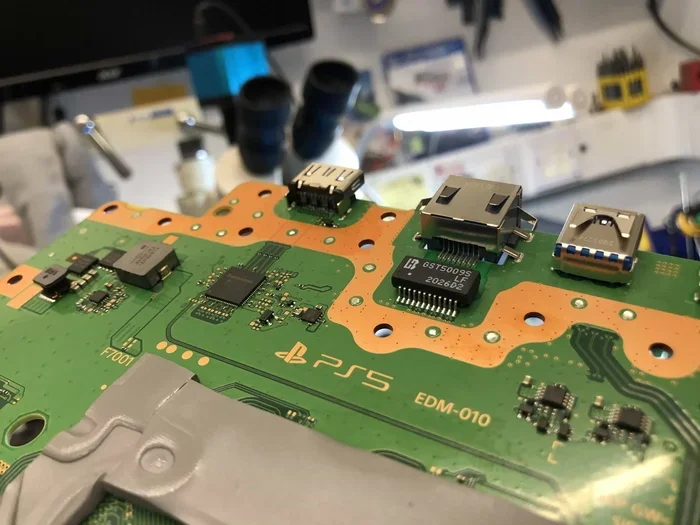
Fix 4: Re-Solder the HDMI Port
This is the more advanced fix. If the port is physically loose on the motherboard, you can re-solder it. You will need a soldering iron, solder wire, flux, and a steady hand. Here is the general process:
- Open the PS5 casing carefully.
- Locate the HDMI port on the motherboard.
- Heat the existing solder joints and remove the old solder.
- Apply fresh flux to the pads.
- Position the port correctly.
- Apply new solder to each joint, one at a time.
- Let it cool completely before testing.
Warning: Re-soldering requires skill and patience. If you are not comfortable with this, do not attempt it. You could damage the motherboard further. Watch several tutorials and practice on scrap electronics first.
Quick Tips for DIY Repairs
- Always work on a clean, dry surface.
- Use an anti-static wrist strap to protect sensitive components.
- Take photos before disassembling anything so you can remember how things go back together.
- Never force a cable into the port. This makes problems worse.
- Keep your workspace well-lit so you can see small components clearly.
Professional Repair Options for PS5 HDMI Port Issues
If DIY fixes do not work, professional repair is your next step. There are several options available, each with different costs and turnaround times.
Option 1: Authorized Sony Service Center
The safest route is an authorized Sony repair center. They have genuine parts and trained technicians. The downside is cost and wait time. You might pay more than with a third-party shop, but you get the peace of mind that your console is in expert hands.
Option 2: Third-Party Repair Shops
Many local electronics repair shops handle PS5 HDMI port repair. They typically charge less than Sony’s service center. Look for shops that specialize in console repair and have good reviews. Ask about their warranty on the repair before handing over your console.
Option 3: Mail-In Repair Services
Several online services let you mail in your PS5 for repair. You ship the console, they diagnose and fix it, then ship it back. This is convenient but comes with risks. Make sure the service is reputable and offers insurance during shipping. Also, ask about their turnaround time — some take two to three weeks.
How Much Does HDMI Port Repair Cost?
The cost varies depending on the severity of the damage and the repair method. Here is a general breakdown:
| Repair Type | Estimated Cost | Time to Complete |
|---|---|---|
| HDMI Port Cleaning | Free (DIY) or $20-$40 (professional) | 10 minutes to 1 hour |
| Cable Replacement (not port) | $15-$50 for a new HDMI 2.1 cable | Immediate |
| HDMI Port Re-Soldering | $50-$100 | 1-3 hours |
| Full HDMI Port Replacement | $100-$150 | 1-3 days |
| Motherboard Replacement | $200-$350 | 3-7 days |
As you can see, fixing the port is almost always cheaper than replacing the entire motherboard. Always get a quote before authorizing any repair.
What to Ask Before Sending Your PS5 for Repair
- What is the exact diagnosis?
- Do you offer a warranty on the repair?
- What happens if the repair does not fix the problem?
- How long will the repair take?
- Will I be charged if you cannot fix it?
When to Replace the HDMI Port Entirely
Sometimes repair is not enough. If the HDMI port is physically cracked, severely bent, or has damaged solder pads on the motherboard, a simple fix will not work. In these cases, you need a full HDMI port replacement.
Signs that you need a full replacement include:
- The port is visibly cracked or broken.
- Multiple pins are bent beyond repair.
- The solder pads on the motherboard are damaged or lifted.
- Previous repair attempts have failed.
- The port wiggles freely and is not seated properly on the board.
Replacing the port involves removing the damaged port, desoldering it from the motherboard, and soldering a new one in place. This is a skilled job that requires precision. If you are not experienced with soldering, leave this to a professional.
On the bright side, a successful port replacement restores your PS5 to full working condition. You get the same 4K 120Hz performance you had before the problem started. It is like getting a new console for a fraction of the price.
Can You Replace the HDMI Port Yourself?
Technically, yes. But it is not easy. You need a precision soldering iron, fine-tipped solder, flux, tweezers, and a steady hand. The HDMI port pads on the PS5 motherboard are small and close together. One wrong move can damage nearby components. If you have never soldered before, this is not the project to start with.
However, if you enjoy electronics work and have done similar repairs, it is a satisfying fix. Just make sure you have the right tools and a good tutorial to follow.
Preventing HDMI Port Damage on Your PS5
Prevention is always better than repair. Once you fix your HDMI port, you want to keep it working. Here are simple habits that protect your PS5 HDMI port from future damage.
- Always pull the cable by the head, not the wire. Yanking the cable wears out the port over time.
- Keep the console in a stable position. If the PS5 is vertical and gets bumped, the HDMI port takes the stress.
- Use a cable management solution. Avoid letting cables dangle or pull on the port.
- Keep dust away from the port area. Dust covers or a clean gaming setup help a lot.
- Do not force the cable in. If it does not fit easily, check for debris or a bent pin first.
- Use high-quality HDMI cables. Cheap cables with loose connectors put extra stress on the port.
- Avoid frequent plugging and unplugging. Each connection cycle adds wear to the internal clips.
These small habits add up over time. They keep your HDMI port in great shape for years of gaming.
Expert Insight: The Most Overlooked Cause of HDMI Port Failure
Many people do not realize that heat can weaken the solder joints inside the HDMI port over time. If your PS5 runs hot or sits in a poorly ventilated space, the heat expands and contracts the metal parts. After months or years, this thermal cycling can cause the port to become loose or develop micro-fractures in the solder. Keeping your PS5 well-ventilated and using a cooling stand can help prevent this slow, hidden form of damage.
Final Thoughts on Fixing Your PS5 HDMI Port
Dealing with a broken HDMI port on PS5 is stressful, but it is rarely the end of the road for your console. Most HDMI port problems can be fixed. Whether it is a simple cleaning, a re-soldering job, or a full port replacement, the solution is almost always more affordable than buying a new PS5.
Start with the basics. Clean the port. Try a different cable. Test on another TV. These steps solve many issues without any repair work at all. If those do not work, move on to more involved fixes. And if you are not comfortable doing it yourself, professional repair is a reliable option that keeps your console in good hands.
The key takeaway is this: do not assume your PS5 is done for just because the HDMI port has a problem. Can the HDMI port on a PS5 be fixed? Yes, it can. With the right approach and a little patience, you can get back to gaming in no time.
Take action today. Diagnose the problem, try the fixes that match your skill level, and do not be afraid to seek professional help when needed. Your PS5 is worth the effort.
Frequently Asked Questions
How much does it cost to fix the HDMI port on a PS5?
The cost depends on the repair method. Cleaning the port is free if you do it yourself. Professional re-soldering typically costs between $50 and $100. A full HDMI port replacement runs from $100 to $150. Always get a quote before committing to any repair service.
Can I use my PS5 without the HDMI port working?
Yes, but only for audio. You can connect your PS5 to your TV using an optical audio cable or Bluetooth to a compatible sound system. However, you will not see the video output, so you cannot play games on the TV. This is only a temporary workaround until the port is repaired.
How long does a PS5 HDMI port repair take?
Simple fixes like cleaning take just a few minutes. Re-soldering a loose port takes one to three hours at a repair shop. A full port replacement usually takes one to three days, including shipping time if you use a mail-in service.
What causes the HDMI port on a PS5 to become loose?
The most common causes are repeated plugging and unplugging, physical impact or bumps, dust accumulation, and thermal cycling from heat exposure over time. The internal clips and springs that hold the cable in place can wear down with regular use.
Is it worth repairing a PS5 HDMI port instead of buying a new console?
Absolutely. A PS5 costs around $500 or more. Even a full HDMI port replacement costs a fraction of that price. Repairing the port is almost always the smarter financial choice unless the console has other major issues.
Can a bent HDMI pin be straightened at home?
Yes, if you are careful. Use a magnifying glass and a thin metal tool like a sewing needle to gently bend the pin back into position. Apply very light pressure and take your time. If the pin is too fragile or broken, you will need a full port replacement instead.
=== CONCLUSION ===
Your PS5 HDMI port is a critical connection point, and when it fails, it can feel like your gaming world stops. But as this guide has shown, most HDMI port problems are fixable. From simple cleaning and cable swaps to re-soldering and full port replacement, you have options at every skill level and budget.
Start with the easiest fixes. Clean the port. Try a different cable. Test on another TV. If those do not work, move to the more advanced steps. And if you are not comfortable doing it yourself, professional repair is always a solid choice.
The most important thing is to act quickly. A loose or damaged port will not fix itself, and the problem usually gets worse over time. Address it now, and you save yourself from bigger headaches down the road.
With the right knowledge and the right approach, you can absolutely fix the HDMI port on your PS5. Get back to gaming and enjoy every moment your console was built for.