Can I Use The Roku Camera Without The Subscription
Yes, you can use the Roku Camera without a subscription. The Roku Camera offers several free features that let you monitor your home, capture video, and stay connected without paying a monthly fee. However, some advanced features require a paid plan, so knowing what is free and what is not helps you make the best choice.
If you own a Roku Camera or are thinking about buying one, you might wonder whether you need to pay a monthly fee to use it. The short answer is no. You can absolutely use the Roku Camera without a subscription. But like most tech products, there is a catch. Some features work for free, while others lock behind a paywall. Let me walk you through everything you need to know.
In this guide, I will break down exactly what you get for free, what you miss without a subscription, and how to set everything up step by step. Whether you want a simple home monitoring tool or a full security setup, this article covers it all. I will keep things simple and straight to the point. No fluff. No jargon. Just clear, honest info about the Roku Camera and its subscription options.
Key Takeaways
- Free to Use: The Roku Camera works without any subscription, giving you basic live viewing and motion alerts at no cost.
- Core Features Included: You get live streaming, two-way audio, motion detection, and cloud clips without paying extra.
- Advanced Features Cost Money: Cloud storage, extended video history, and person detection need a paid subscription.
- Easy Setup: Setting up the Roku Camera without a subscription is simple and takes only a few minutes.
- Great for Budget Users: If you just need basic home monitoring, the free plan covers most everyday needs.
- Subscription Is Optional: You are never forced to pay. The camera works fully as a standalone device without a plan.
- Check Your Needs: Decide whether the free features meet your security goals before spending on a subscription.
📑 Table of Contents
- What Is the Roku Camera and How Does It Work
- Can You Use the Roku Camera Without a Subscription
- Features You Get With the Roku Camera for Free
- How to Set Up the Roku Camera Without a Subscription
- Limitations of Using the Roku Camera Without Paying
- Is a Subscription Worth It for the Roku Camera
- Tips to Get the Most Out of Your Roku Camera Without a Subscription
- Common Mistakes People Make With the Roku Camera
- How the Roku Camera Compares to Other Budget Cameras
- Final Thoughts on Using the Roku Camera Without a Subscription
What Is the Roku Camera and How Does It Work
The Roku Camera is a smart home device made by Roku. It connects to your Wi-Fi network and lets you view live video from your phone, tablet, or TV. The camera works with the Roku Channel and the Roku app. You can check in on your home from anywhere with an internet connection.
Roku is best known for its streaming devices like the Roku Stick and Roku Express. But the company has expanded into smart home tech. The Roku Camera fits right into that ecosystem. It works with Roku smart TVs and streaming players. This makes it a handy option if you already use Roku devices in your home.
How the Roku Camera Connects to Your Home
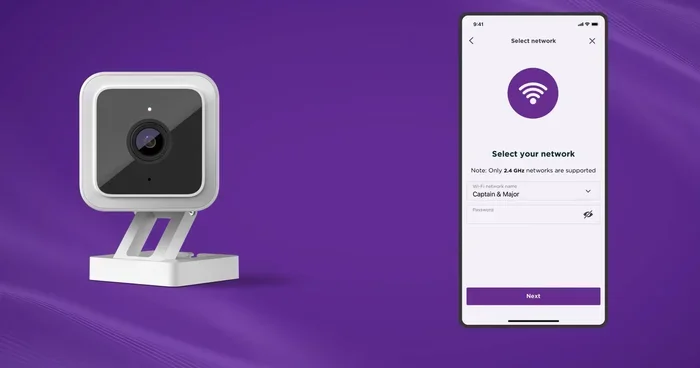
Setting up the camera is straightforward. You plug it in, connect it to your Wi-Fi, and download the Roku app on your phone. The camera uses a wireless connection to send video to your devices. It does not need a separate hub or base station. Everything runs through your home network.
The camera supports both 2.4 GHz and 5 GHz Wi-Fi bands. This means it can work with most home routers. If your Wi-Fi signal is strong where you place the camera, you should have no trouble streaming live video. The camera connectivity is stable and easy to manage through the app.
Can You Use the Roku Camera Without a Subscription
Yes, you can use the Roku Camera without a subscription. The camera ships ready to use right out of the box. You do not need to enter any payment information to get started. All basic features work without a paid plan. This is a big deal because many competing cameras push subscriptions hard from day one.
Roku takes a different approach. The company lets you use the Roku Camera for free and gives you enough features to make it useful. You are never locked into a contract. You never get billed automatically. If you decide later that you want more features, you can always add a subscription. But it is entirely up to you.
What the Free Plan Includes
The free plan for the Roku Camera covers the essentials. Here is what you get without paying a dime:
- Live video streaming — Watch real-time footage from your camera anytime.
- Two-way audio — Talk and listen through the camera using the app.
- Motion detection alerts — Get notified on your phone when movement is detected.
- Cloud video clips — Access short video clips stored in the cloud.
- Night vision — See clear video even in low-light conditions.
- Basic camera settings — Adjust brightness, sensitivity, and other options.
That is a solid list of features for a free plan. For most people who just want to keep an eye on their home, this is more than enough. You can check on pets, watch deliveries, and get alerts when someone approaches your door. All without spending a single dollar on a camera subscription.
Features You Get With the Roku Camera for Free
Let me dive deeper into the free features of the Roku Camera. Understanding what is included at no cost helps you decide if it fits your needs.
Live Streaming Without Limits
Live streaming is the backbone of any home camera. With the Roku Camera, you get unlimited live viewing at no cost. Open the app, tap the camera, and you see what the camera sees in real time. There is no time limit on how long you can watch. There is no delay that makes it unusable. The stream is smooth and responsive as long as your internet connection is decent.
This feature is especially useful for checking on kids, pets, or elderly family members. You can peek in while you are at work or running errands. The live streaming works on both Wi-Fi and cellular data, so you are not stuck at home.
Two-Way Audio Communication
The Roku Camera includes a built-in microphone and speaker. This lets you talk through the camera and listen to responses. You can use this to speak to a delivery person, call your dog inside, or warn someone to stay off your property. The audio quality is clear and works well in most environments.
Two-way audio is one of those features that makes a camera feel truly interactive. Without a subscription, you still get full access to this feature. That is a nice perk that some other camera brands gate behind a paywall.
Motion Detection and Alerts
Motion detection is another key free feature. The Roku Camera uses built-in sensors to detect movement in its field of view. When it spots something moving, it sends a push notification to your phone. You can then open the app and check the live feed.
You can adjust the motion sensitivity in the app settings. If your camera is near a tree that moves in the wind, you can lower the sensitivity to avoid false alerts. This helps you focus on real activity and reduces unnecessary notifications. The motion detection works 24/7 without any extra cost.
Night Vision Capability
The Roku Camera comes with built-in infrared LEDs for night vision. This means you can see in the dark without any additional lighting. The camera switches to night mode automatically when the light drops below a certain level.
Night vision quality is decent for the price point. You will not get crystal-clear color footage at night, but the black-and-white infrared image is sharp enough to identify people and objects. Best of all, this feature is completely free and does not require a subscription.
How to Set Up the Roku Camera Without a Subscription
Setting up the Roku Camera without a subscription is quick and painless. You do not need any technical skills. Follow these steps and you will be up and running in minutes.
Step-by-Step Setup Guide
- Unbox the camera. Take the Roku Camera out of the packaging and make sure all parts are included.
- Plug in the camera. Connect the power adapter and insert it into a wall outlet near your Wi-Fi router.
- Download the Roku app. Go to the App Store or Google Play Store and install the free Roku app on your phone.
- Create a Roku account. Open the app and sign up for a free account if you do not already have one.
- Add the camera. Tap the “Add Device” option in the app and follow the on-screen prompts to connect the camera to your Wi-Fi.
- Position the camera. Place the camera where you want it. Make sure it has a clear view of the area you want to monitor.
- Test the connection. Open the live feed in the app to make sure everything is working properly.
That is it. No subscription required. No credit card needed. The Roku Camera setup is designed to be simple so anyone can do it. If you run into issues, the Roku support page has helpful troubleshooting tips.
Quick Tips for a Smooth Setup
- Place the camera within range of your Wi-Fi router for the strongest signal.
- Use the 2.4 GHz band if your router supports both bands, as it offers better range.
- Keep the camera away from heat sources and direct sunlight.
- Make sure your phone is on the latest version of the Roku app.
- Restart your router if the camera fails to connect during setup.
Limitations of Using the Roku Camera Without Paying
The free plan is great, but it is not perfect. Understanding the limitations helps you set realistic expectations. Here is what you will miss out on without a subscription.
Limited Cloud Storage
Without a subscription, the Roku Camera offers limited cloud storage for video clips. You can only save a small number of clips before older ones get deleted. If you want to keep videos for longer or store more of them, you need a paid plan. This is the biggest limitation of the free tier.
For many users, this is not a dealbreaker. If you only need short clips to check what happened when you got a motion alert, the free storage is enough. But if you want to review footage from days or weeks ago, you will need to upgrade.
No Extended Video History
The free plan does not include extended video history. This means you cannot scroll back through hours or days of recorded footage. You only get access to recent clips. If continuous recording is important to you, a subscription becomes more appealing.
No Advanced Detection Features
Features like person detection and package detection are typically reserved for paid plans. These smart detection features can tell the difference between a person, an animal, or a passing car. Without a subscription, you get basic motion alerts that do not distinguish between different types of movement.
Lower Video Resolution on Some Plans
While the free plan provides standard definition and high definition streaming, some advanced resolution options may be locked behind a paywall. The free stream is still clear enough for most monitoring purposes, but power users who want the sharpest image may want to consider a subscription.
Is a Subscription Worth It for the Roku Camera
This is the question most people ask after learning about the free features. The answer depends on your needs. Let me break it down for you.
Who Should Stick With the Free Plan
The free plan is perfect for people who just want basic home monitoring. If you fall into any of these categories, you do not need a subscription:
- You want to check on pets or kids while you are away.
- You only need occasional live views of your home.
- You get alerts when motion is detected and watch the live feed to investigate.
- You do not need to store long videos or review old footage.
- You are on a tight budget and do not want recurring charges.
For these users, the Roku Camera without a subscription is a smart choice. You get a functional, reliable camera that serves its purpose without costing you anything each month.
Who Should Consider a Subscription
On the other hand, some users will benefit from a paid plan. Consider a subscription if:
- You want to store video clips for weeks or months.
- You need advanced detection features like person or package alerts.
- You want continuous recording instead of motion-triggered clips.
- You are using the camera as a primary security tool and need reliable footage storage.
- You manage multiple cameras and need a unified storage solution.
Before you commit, compare the subscription cost with what you actually need. If you only use the camera occasionally, the free plan saves you money. But if you rely on it for daily security, a subscription adds real value.
Comparing Free vs. Paid Plans
| Feature | Free Plan | Paid Plan |
|---|---|---|
| Live Streaming | Yes | Yes |
| Two-Way Audio | Yes | Yes |
| Motion Alerts | Yes | Yes |
| Cloud Clips | Limited | Extended |
| Night Vision | Yes | Yes |
| Person Detection | No | Yes |
| Video History | Short-term | Long-term |
| Monthly Cost | $0 | Varies |
This comparison shows that the free plan covers the essentials. The paid plan adds storage and smart features that make the camera more powerful. But again, the paid plan is completely optional.
Tips to Get the Most Out of Your Roku Camera Without a Subscription
Want to maximize the free features of your Roku Camera? Here are some practical tips that help you get the most value without spending a dime.
Optimize Your Wi-Fi Signal
A strong Wi-Fi connection makes a huge difference in camera performance. Place your router close to the camera or use a Wi-Fi extender if needed. A stable connection means smoother live streaming and faster alert delivery. If your signal is weak, the video may lag or disconnect.
Adjust Motion Sensitivity
Tuning the motion sensitivity settings reduces false alerts. If your camera is near a busy street or a tree, lower the sensitivity so you only get notified about real activity. This keeps your free cloud clips from filling up with useless footage and helps you focus on what matters.
Check Clips Regularly
Since the free plan offers limited cloud storage, make it a habit to review and download important clips. If you see something worth keeping, save it to your phone before it gets deleted from the cloud. This simple habit ensures you do not lose important footage.
Use the Camera with Your Roku TV
If you have a Roku smart TV, you can view the camera feed directly on your television. This is a great way to monitor your home on a big screen without needing your phone. The Roku Camera integrates seamlessly with Roku TVs, making it easy to check in from any room.
Keep Your Firmware Updated
Roku regularly releases updates that improve camera performance and add new features. Keep your firmware up to date through the app or the Roku device settings. Updates can fix bugs, improve video quality, and sometimes unlock new free features.
Common Mistakes People Make With the Roku Camera
Avoiding common mistakes helps you get the best experience with your Roku Camera. Here are a few pitfalls to watch out for.
Assuming All Features Are Free
The biggest mistake is assuming every feature comes at no cost. While the basic features are free, advanced features like extended storage and person detection require a subscription. Read the fine print so you are not surprised when a feature is locked.
Placing the Camera in a Poor Location
Where you place the camera matters a lot. Avoid spots with direct sunlight, heat sources, or obstructed views. A poorly placed camera gives you bad video quality and more false motion alerts. Take a few minutes to find the right spot before you set it up.
Ignoring Wi-Fi Weak Spots
If your camera is too far from the router, you will experience lag and disconnections. Do not just place the camera wherever looks convenient. Test the Wi-Fi signal in the area first. A weak signal ruins the whole experience and makes the free live streaming frustrating.
Forgetting to Review Cloud Storage Limits
The free cloud storage fills up fast if you do not manage it. Forgetting to check your clips means older footage gets overwritten automatically. Make it a routine to review and save important videos regularly.
How the Roku Camera Compares to Other Budget Cameras
The Roku Camera competes with several budget-friendly options on the market. Let me share how it stacks up against the competition.
Many budget cameras from brands like Wyze, Blink, and Ring offer free tiers too. But the Roku Camera stands out because it integrates with the Roku ecosystem. If you already use a Roku TV or streaming device, the camera fits naturally into your setup. You do not need a separate app or account system.
Some competing cameras offer more free features but require more complex setups. The Roku Camera keeps things simple. The trade-off is fewer advanced features on the free tier. But for most everyday users, the simplicity and integration make it a solid choice.
If you are already in the Roku ecosystem, the Roku Camera is a natural fit. It works seamlessly with your existing devices and does not require a separate subscription to function. That alone makes it a compelling option for budget-conscious users.
Final Thoughts on Using the Roku Camera Without a Subscription
The Roku Camera is a capable, user-friendly device that works well without a subscription. You get live streaming, two-way audio, motion alerts, night vision, and cloud clips all at no cost. These features cover most everyday monitoring needs. You can keep an eye on your home, family, and pets without spending a dime each month.
The paid subscription adds value for users who need more storage, advanced detection, and longer video history. But it is entirely optional. Roku gives you the freedom to use the camera exactly how you want. No contracts. No forced payments. No hidden fees.
If you are looking for an affordable way to add a camera to your home, the Roku Camera is worth serious consideration. Start with the free plan, explore the features, and only upgrade if you find you need more. That is the smart, no-pressure approach to home monitoring.
Give the Roku Camera a try and see for yourself. With a solid setup and the right expectations, it delivers a great experience without ever asking you to open your wallet. That is a win in my book.
Frequently Asked Questions
Do I need to pay to set up the Roku Camera?
No, setting up the Roku Camera is completely free. You do not need to enter any payment information during the setup process. The camera works right away with just a Wi-Fi connection and the free Roku app.
What happens if I cancel my Roku Camera subscription?
If you decide to cancel, you simply lose access to the premium features like extended cloud storage and person detection. All the basic free features continue to work normally. You can always resubscribe later if your needs change.
Can I use the Roku Camera on multiple devices without a subscription?
Yes, you can view the camera feed on multiple devices using the same Roku account. The free plan supports live streaming and two-way audio on any device connected to your account. There is no limit on the number of devices you can use to access the camera.
Is the Roku Camera good for security without a subscription?
The Roku Camera works well for basic home security without a subscription. You get motion alerts, live viewing, and night vision. However, it lacks advanced features like continuous recording and person detection that are available with a paid plan.
Can I save videos from the Roku Camera without paying?
You can save short cloud clips for free, but the storage is limited. For longer-term storage, you would need to manually download clips to your phone or use an external storage solution. The free plan does not support automatic long-term video saving.
Does the Roku Camera require an internet connection to work without a subscription?
Yes, the Roku Camera needs an active internet connection to stream live video, send motion alerts, and access cloud features. Without the internet, the camera cannot transmit footage to your devices regardless of whether you have a subscription or not.
=== CONCLUSION ===
The Roku Camera proves that you do not need to pay a monthly fee to get a useful home monitoring device. With free live streaming, motion alerts, two-way audio, and night vision, the camera delivers real value out of the box. The optional subscription adds features for power users, but it is never required. If you are exploring home security options or just want a simple way to keep an eye on things, the Roku Camera without a subscription is a smart, budget-friendly choice that works exactly as promised.