Can I Use Optical Instead Of HDMI ARC For Better Sound
Many people wonder if they can use optical instead of HDMI ARC for better sound. The short answer is yes, but with trade-offs. HDMI ARC supports richer audio formats and two-way communication, while optical audio delivers solid digital sound with fewer features. Understanding the differences helps you pick the right connection for your TV, soundbar, and home theater setup.
Setting up your home theater can feel overwhelming. You have cables, ports, remotes, and settings that all seem to compete for your attention. One question that comes up again and again is this: can I use optical instead of HDMI ARC? The answer is not as simple as yes or no. It depends on what devices you own, what kind of sound you want, and how much control you need over your audio setup.
Think of it this way. Just like the 7 basic elements of photography — light, composition, and color — all work together to create a great image, every part of your home audio system needs to work in harmony too. The connection type you choose is one of those key elements. It shapes the sound quality, the features you can use, and how smoothly everything runs.
In this guide, we will break down everything you need to know. We will compare HDMI ARC and optical audio side by side. We will look at when each option makes sense. And by the end, you will feel confident choosing the right connection for your TV, soundbar, or receiver. Let us dive in.
Key Takeaways
- HDMI ARC offers two-way audio communication and supports advanced formats like Dolby Atmos and eARC.
- Optical audio (TOSLINK) is reliable and widely compatible but lacks some modern audio features.
- You can use optical instead of HDMI ARC in most cases, but you may lose certain sound quality and control features.
- Your choice depends on your devices, audio setup, and what you value most.
- Setting up either connection is simple with the right cables and a little patience.
- Understanding both options empowers you to build the best home theater experience.
📑 Table of Contents
- What Is HDMI ARC and Why Does It Matter
- What Is Optical Audio and How Does It Work
- HDMI ARC vs Optical: Head-to-Head Comparison
- Can You Really Use Optical Instead of HDMI ARC
- When to Choose HDMI ARC Over Optical
- Setting Up Your Audio Connection for Best Results
- Which Connection Type Is Right for You
- Final Thoughts
What Is HDMI ARC and Why Does It Matter
HDMI ARC stands for Audio Return Channel. It is a special feature built into HDMI cables that allows audio to travel in both directions. This means your TV can send sound to your soundbar or receiver, and your soundbar can send commands back to your TV. It is a two-way street, and that changes everything.
Most modern TVs and audio devices come with HDMI ARC built in. You just need an HDMI cable that supports ARC. Once connected, you can control your soundbar with your TV remote. You can also access advanced audio formats that make movies and music sound incredible.
How HDMI ARC Works in Practice
Here is a simple example. You are watching a movie on your TV. The audio plays through your soundbar instead of the TV speakers. When you press the volume button on your TV remote, the soundbar responds. That is HDMI ARC at work. No extra remote. No extra steps. It just works.
But there is more. HDMI ARC also supports something called eARC, which stands for enhanced Audio Return Channel. eARC can handle lossless audio formats like Dolby Atmos and DTS:X. These formats deliver surround sound that makes you feel like you are inside the movie. Regular HDMI ARC cannot do this. That is why eARC matters so much for serious home theater fans.
The audio return channel also supports CEC, or Consumer Electronics Control. This lets you control multiple devices with one remote. So if you turn on your TV, your soundbar turns on too. It is a small feature that makes a big difference in your daily routine.
What Is Optical Audio and How Does It Work
Optical audio uses a cable called TOSLINK to send digital sound from one device to another. The cable has a small square plug on each end. Inside the cable, light pulses carry the audio signal from your TV to your soundbar or receiver. It is a simple and proven technology that has been around for decades.
Optical cables are not fancy. They do not have the sleek design of HDMI cables. But they get the job done. They deliver clean digital audio without interference from electrical signals. This makes them a reliable choice for many setups.
What Formats Does Optical Support
Optical audio supports several common audio formats. These include Dolby Digital and DTS. These formats provide good surround sound for most movies and TV shows. However, optical cables have a bandwidth limit. They cannot carry uncompressed or lossless audio formats.
This means you will not get Dolby Atmos or DTS:X over a standard optical connection. For casual viewing, this might not matter. But if you are an audiophile or a movie lover who wants the full experience, this limitation can be frustrating.
Another thing to know is that optical audio does not support two-way communication. Your soundbar cannot send commands back to your TV through an optical cable. You will need to use your soundbar remote for volume control and other settings.
HDMI ARC vs Optical: Head-to-Head Comparison
Now let us put both options side by side. This comparison will help you see the real differences between HDMI ARC and optical audio. Use this table as a quick reference guide.
| Feature | HDMI ARC | Optical Audio |
|---|---|---|
| Two-Way Communication | Yes | No |
| Max Audio Format | Dolby Atmos (with eARC) | Dolby Digital |
| Cable Type | HDMI Cable | TOSLINK Cable |
| Remote Control | TV Remote Works | Soundbar Remote Needed |
| Bandwidth | High | Moderate |
| Setup Complexity | Easy | Easy |
| Device Compatibility | Most Modern Devices | Nearly All Devices |
| Interference Risk | Low | Very Low |
As you can see, HDMI ARC has more features. But optical audio has its own strengths. It is compatible with almost every device ever made with a digital audio output. If you have an older TV or a basic soundbar, optical might be your best bet.
When thinking about audio formats and connection types, it helps to remember that the best choice depends on your specific setup. Just like choosing the right lens for a photo depends on the subject, choosing the right audio cable depends on what you want to achieve.
Can You Really Use Optical Instead of HDMI ARC
The direct answer is yes, you can use optical instead of HDMI ARC in most situations. If your TV has an optical output and your soundbar has an optical input, you can connect them and enjoy good digital sound. You will not get the advanced features of HDMI ARC, but the basic audio experience will be solid.
Here are some common scenarios where switching to optical makes sense:
- Your TV does not have HDMI ARC. Some older models simply do not support it. Optical is your next best option.
- Your HDMI port is already in use. If you have a gaming console, streaming device, or Blu-ray player connected to your TV, you might not have an extra HDMI port available.
- You want a simple setup. Optical cables are straightforward. Plug them in and go. No need to fuss with settings.
- Your soundbar does not support HDMI ARC. Many budget soundbars only offer optical input.
In these cases, using an optical connection is a perfectly valid choice. You will still get digital surround sound through Dolby Digital or DTS. Your movies and shows will sound much better than through your TV speakers alone.
What You Lose When You Switch to Optical
There are real trade-offs when you choose optical over HDMI ARC. First, you lose two-way communication. Your TV remote will not control the soundbar volume. You will need to use the soundbar remote or the soundbar buttons.
Second, you lose access to high-resolution audio formats. No Dolby Atmos, no DTS:X, and no uncompressed audio. For most casual viewers, this might not be noticeable. But for those who care about sound quality, it matters.
Third, you lose CEC functionality. This means no automatic power-on and power-off. No single-remote convenience. Each device will need its own remote.
When to Choose HDMI ARC Over Optical
There are clear situations where HDMI ARC is the better choice. If you want the best possible sound and the most convenient setup, HDMI ARC wins every time.
You should choose HDMI ARC if any of these apply to you:
- You want Dolby Atmos or DTS:X support. These formats deliver immersive, three-dimensional sound. You need eARC to get them.
- You want one-remote control. HDMI ARC with CEC lets you use your TV remote for everything.
- You have a modern home theater system. If you invested in a quality soundbar or AV receiver, HDMI ARC unlocks its full potential.
- You want future-proofing. Newer audio formats are always on the horizon. HDMI ARC and eARC are ready for them.
The bottom line is this: if your devices support it, HDMI ARC is the smarter long-term choice. It gives you more features, better audio quality, and a simpler user experience.
How to Check If Your TV Supports HDMI ARC
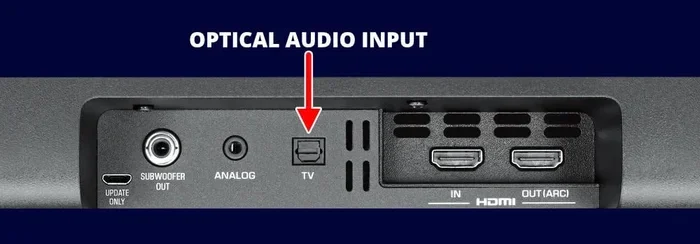
Checking for HDMI ARC is easy. Look at the back or side of your TV. Find the HDMI ports. Some ports will be labeled “ARC” or “eARC.” If you see this label, your TV supports the feature. You can also check your TV settings. Go to the audio or sound settings menu and look for HDMI ARC or Audio Return Channel. If the option is there, you are good to go.
If your TV does not have HDMI ARC, do not worry. Optical audio will still give you a great upgrade over built-in TV speakers. You will be surprised how much better sound can be with just one cable.
Setting Up Your Audio Connection for Best Results
Whether you choose HDMI ARC or optical, proper setup makes all the difference. A well-configured audio connection can transform your viewing experience. Here are some practical tips for both options.
Setting Up HDMI ARC
Start by connecting one end of your HDMI cable to the ARC port on your TV. Connect the other end to the HDMI ARC port on your soundbar or receiver. Once the cable is plugged in, go to your TV settings and enable HDMI ARC. This is usually found under Sound Settings or General Settings.
Next, make sure your soundbar is set to the correct input source. Most soundbars have a button or menu option to switch between inputs. Select the HDMI ARC input. Your TV and soundbar should now communicate with each other.
Test the setup by playing a movie or TV show. Use your TV remote to adjust the volume. If the soundbar responds, everything is working correctly. If not, try unplugging the HDMI cable and plugging it back in. Sometimes a simple reset fixes the issue.
Setting Up Optical Audio
Optical setup is just as straightforward. Plug one end of your TOSLINK cable into the optical output on your TV. Plug the other end into the optical input on your soundbar or receiver. Go to your TV audio settings and select “Optical” or “Digital Out” as the audio output.
Make sure the digital audio format on your TV is set correctly. Most TVs let you choose between different formats like PCM, Dolby Digital, or Bitstream. For the best compatibility, choose “Auto” or “Bitstream.” This lets your soundbar or receiver decode the audio format.
One quick tip: keep your optical cable as straight as possible. Sharp bends can damage the light signal inside the cable and reduce sound quality. A gentle curve is fine, but avoid tight loops or kinks.
Common Setup Mistakes to Avoid
Here are some mistakes that trip up many people during setup:
- Using the wrong HDMI port. Not all HDMI ports support ARC. Always use the port labeled ARC.
- Forgetting to enable ARC in settings. Even with the right port, ARC is off by default on some TVs. Check your settings.
- Bending the optical cable too sharply. This can weaken the light signal and cause audio dropouts.
- Using a damaged cable. A frayed or bent cable can cause poor sound quality or no sound at all. Always inspect your cables.
- Ignoring firmware updates. Both your TV and soundbar may need firmware updates to support the latest audio formats.
Avoiding these simple mistakes will save you time and frustration. Your audio setup will work smoothly and reliably.
Expert Tips for Better Sound Quality
No matter which connection you choose, you can improve your sound with a few simple adjustments. Place your soundbar at ear level when you are seated. Keep it centered in front of your TV. If your soundbar supports surround speakers or a subwoofer, set them up according to the manufacturer’s instructions.
Also, consider the room acoustics. Soft surfaces like carpets and curtains absorb sound and reduce echo. Hard surfaces like tile and glass reflect sound and can make it noisy. A little attention to your room layout goes a long way.
Finally, take time to explore your soundbar’s audio settings. Most soundbars have different modes for movies, music, and sports. Switching between them can make a noticeable difference in how your content sounds.
Which Connection Type Is Right for You
Choosing between HDMI ARC and optical audio comes down to your needs and your equipment. Here is a quick guide to help you decide.
Choose HDMI ARC if: You have a modern TV and soundbar. You want Dolby Atmos or other advanced audio formats. You prefer using one remote for everything. You want the best possible sound quality and the most features.
Choose Optical Audio if: Your TV or soundbar does not support HDMI ARC. You have an older setup that still works well. You want a simple, reliable connection. You are happy with Dolby Digital sound and do not need the latest formats.
Some people even use both connections at the same time. They connect their TV to the soundbar using both HDMI ARC and optical. This gives them a backup option if one connection has issues. It is not the most common setup, but it works well for those who want maximum flexibility.
Remember, the goal is to enjoy your content. Whether you watch movies, listen to music, or play video games, the right audio connection makes everything more immersive. Do not let cable confusion get in the way of a great experience.
Final Thoughts
So, can you use optical instead of HDMI ARC? The answer is a clear yes. Both connections deliver digital audio that is far better than your TV’s built-in speakers. HDMI ARC gives you more features and better audio quality. Optical audio gives you simplicity and wide compatibility. Both are excellent choices depending on your setup.
Think about what matters most to you. Do you want the latest audio formats and one-remote convenience? Go with HDMI ARC. Do you want a plug-and-play connection that works with almost anything? Go with optical. Either way, you are making your audio setup better than it was before.
Take the time to set up your connection properly. Follow the tips in this guide. And enjoy the rich, immersive sound that a great home theater setup delivers. Your ears will thank you.
Just as mastering the 7 basic elements of photography helps you capture stunning images, understanding your audio connection options helps you create the perfect sound experience. Both are about knowing your tools and using them to their full potential.
Frequently Asked Questions
Can I use optical audio for Dolby Atmos?
No, standard optical cables cannot carry Dolby Atmos. Dolby Atmos requires the higher bandwidth of HDMI eARC. If you want Dolby Atmos sound, you will need to use HDMI ARC or eARC for your connection.
Is optical audio better than HDMI ARC?
Neither is universally better. Optical audio is simpler and more compatible with older devices. HDMI ARC offers more features, better audio formats, and two-way control. The best choice depends on your devices and what you need from your setup.
Can I control my soundbar with my TV remote using optical?
No, optical audio does not support CEC or two-way communication. You will need to use your soundbar’s own remote to control volume and settings when using an optical connection.
What is the maximum length for an optical cable?
Most optical cables work well up to about 5 meters or 16 feet. Longer cables can weaken the light signal and cause audio dropouts. If you need a longer run, consider using an optical signal booster or a different connection type.
Do all smart TVs have HDMI ARC?
Most modern smart TVs support HDMI ARC, but not all of them. Check your TV’s specifications or look at the HDMI ports on the back. A port labeled “ARC” or “eARC” means your TV supports the feature.
Can I connect multiple audio devices using HDMI ARC?
HDMI ARC typically supports one audio device at a time. If you have a soundbar and a receiver, you may need to choose which one connects via ARC. Some AV receivers allow you to chain devices, but this depends on your specific setup.
=== CONCLUSION ===
Choosing between optical audio and HDMI ARC does not have to be confusing. Both options deliver real improvements over your TV’s built-in speakers. HDMI ARC gives you the most features and the best audio quality. Optical audio gives you simplicity and broad compatibility. The right choice depends on your devices, your preferences, and what you want from your home theater experience.
Take a look at your setup. Check your TV ports. Look at your soundbar inputs. Then make the choice that fits your needs best. You will enjoy better sound, a more immersive experience, and a setup that works the way you want it to. Happy listening.