Can I Convert Hdmi To Av Easily With These Simple Tips
Yes, you can convert HDMI to AV easily with the right HDMI to AV converter. This guide walks you through signal conversion, the best adapters, and common mistakes to avoid. Whether you own an older TV or vintage devices, you will get clear, practical steps to make it work.
Have you ever stared at a brand-new device with only an HDMI output and an old TV with nothing but AV inputs? It is a frustrating situation many people face every day. The good news is that you can convert HDMI to AV without spending a fortune or hiring a technician.
This guide breaks everything down into simple, actionable steps. You will learn what HDMI to AV conversion actually means, why people need it, and exactly how to do it. We also share the best converters on the market and the mistakes most people make. By the end, you will feel confident hooking up any device to any screen.
Key Takeaways
- Easy Conversion: You can convert HDMI to AV using a simple active converter box or adapter.
- Multiple Options: RCA cables, SCART adapters, and HDMI-to-composite converters all work for different setups.
- Watch for Mistakes: Avoid passive adapters that do not actually convert the signal.
- Check Compatibility: Make sure your older TV or AV receiver supports the input you are using.
- Quality Matters: Active converters provide better video quality than cheap passive adapters.
- Quick Setup: Most conversions take less than 10 minutes with the right gear.
📑 Table of Contents
- What Is HDMI to AV Conversion and Why Does It Matter
- When You Need to Convert HDMI to AV
- How to Convert HDMI to AV in Simple Steps
- Best HDMI to AV Converters You Can Buy
- Common Mistakes People Make When Converting HDMI to AV
- Expert Tips for Better HDMI to AV Conversion Results
- Frequently Asked Questions
- Conclusion
What Is HDMI to AV Conversion and Why Does It Matter
HDMI stands for High-Definition Multimedia Interface. It carries both audio and video signals through a single cable. AV, on the other hand, stands for audio and video. AV connections use separate cables, usually RCA plugs in red, white, and yellow.
The difference between digital and analog signals is at the heart of this conversion. HDMI sends a digital signal. AV uses an analog signal. Your devices speak different languages, so you need a translator. That translator is the converter box or adapter.
Here is why this matters. Many older TVs, projectors, and AV receivers only have AV inputs. Retro gaming consoles, vintage DVD players, and some older cameras still use HDMI output. Without a way to bridge the gap, those devices are useless on modern screens or old displays alike.
Digital vs Analog Signals Explained Simply
Think of a digital signal like a crisp photograph. It stores information in precise numbers. An analog signal is more like a handwritten letter. It carries the same message but with some natural variation. When you convert HDMI to AV, you are translating a crisp digital photo into a handwritten letter format.
The converter does this in real time. It takes the digital HDMI signal from your device and turns it into an analog signal your old TV can read. This process is called signal conversion. A good converter makes this transition smooth and nearly invisible.
When You Need to Convert HDMI to AV
People convert HDMI to AV for all kinds of reasons. Let us look at the most common situations where this conversion becomes essential.
Using a New Device with an Older TV
If you bought a modern streaming stick, a Blu-ray player, or a game console, it likely has only HDMI output. But if your living room TV is from the early 2000s or older, it may only have AV inputs. You cannot plug an HDMI cable directly into an AV input. You need a converter.
Setting Up a Retro Gaming Station
Retro gamers love using original consoles like the Nintendo Wii, PlayStation 2, or older arcade boards. These devices use HDMI or component outputs. Many people want to play them on CRT TVs for the authentic experience. Converting HDMI to composite video makes this possible.
Connecting a Laptop to an Older Projector
Some projectors in classrooms, meeting rooms, and home theaters only accept AV inputs. If your laptop has HDMI output, a simple converter lets you share your screen without buying a new projector.
Using Vintage Cameras or Camcorders
Old camcorders and cameras often output through HDMI. If you want to view footage on an older monitor or VCR with AV inputs, you will need a converter.
How to Convert HDMI to AV in Simple Steps
Converting HDMI to AV is easier than most people think. Follow these steps and you will be up and running in minutes.
Step 1: Check Your Devices
First, look at the back of your TV or display. What inputs does it have? If you see yellow, red, and white RCA ports, you have AV inputs. Next, check your source device. Does it have an HDMI output? If yes, you are ready for step two.
Step 2: Choose the Right Converter
You need an active HDMI to AV converter. Do not buy a passive adapter. Passive adapters do not convert the signal. They just reroute it, which will not work between HDMI and AV. Look for a converter that explicitly says it converts digital HDMI to analog AV output.
Here is a quick comparison of popular options:
| Converter Type | Price Range | Best For | Signal Quality |
|---|---|---|---|
| Active HDMI to AV Converter | $10 – $30 | Most home setups | Good |
| HDMI to Component Converter | $15 – $40 | Higher quality needs | Very Good |
| HDMI to SCART Adapter with Converter | $12 – $35 | European TVs | Good |
| HDMI Splitter with AV Output | $15 – $50 | Multiple displays | Varies |
Step 3: Connect the Cables
Plug the HDMI cable from your source device into the HDMI input on the converter. Then connect the RCA cables from the converter to your TV. Match the colors: yellow for video, white and red for audio. It really is that simple.
Step 4: Power the Converter
Most active converters need their own power source. Plug the USB or power cable into the converter and connect it to a wall adapter or USB port. Without power, the converter cannot do its job of converting the signal.
Step 5: Switch Your TV Input
Turn on your TV and switch to the AV input channel. You should see your device on the screen. If you do not, double-check all cable connections and make sure the converter is powered on.
Quick Tips for a Smooth Setup
- Use short, high-quality RCA cables for the best video quality.
- Keep the converter close to the TV to avoid signal loss.
- Test with a known working device first to rule out other issues.
- Update the firmware on your converter if the manufacturer provides updates.
- Label your cables so you always know which goes where.
Best HDMI to AV Converters You Can Buy
Not all converters are created equal. Some deliver excellent resolution conversion while others produce a fuzzy picture. Here are the types of converters worth your money.
Top-Rated Active Converters
Active converters do the heavy lifting of changing digital signals to analog. They include built-in chipsets that handle the conversion process. Look for brands that offer clear audio and stable video output. Popular models include compact boxes that fit right between your HDMI cable and AV cables.
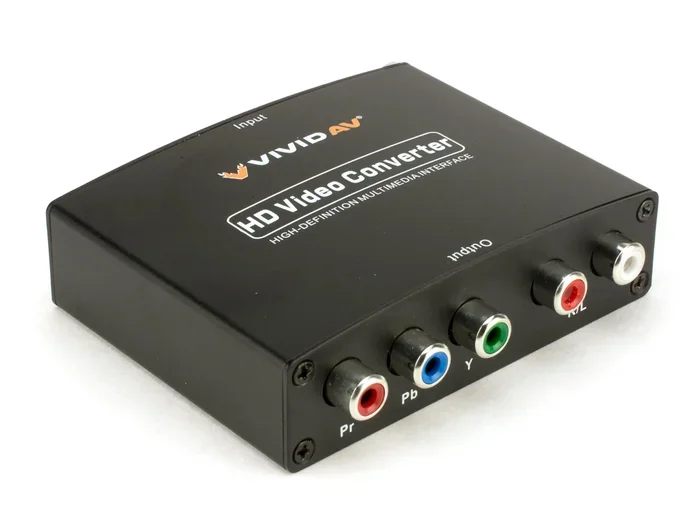
HDMI to Component Converters
If your display supports component video inputs, this is the best option. Component video uses three separate cables for better image quality than composite. These converters cost a bit more but deliver noticeably sharper pictures.
HDMI to SCART Converters
In Europe and some other regions, SCART connectors are common. A dedicated SCART adapter with built-in conversion handles this perfectly. These adapters often include multiple output options in one box.
HDMI Splitters with AV Output
Need to send the same signal to two screens? An HDMI splitter with AV output lets you do that. You get one HDMI input, and the splitter sends a copy to HDMI output and AV output at the same time. This is great for setups where you want to use both a modern and an older display.
Expert Insight: What to Look for When Buying
When shopping for a converter, pay attention to these details. First, check if it supports the resolution of your source device. Second, make sure it has the right output ports for your TV. Third, read reviews from real buyers. A converter that works well for one person may not work for another depending on their devices.
Display compatibility is key. Some older TVs only handle certain resolutions. A good converter lets you adjust the output resolution to match your display.
Common Mistakes People Make When Converting HDMI to AV
Even with the right gear, people still run into problems. Here are the most common mistakes and how to avoid them.
Buying a Passive Adapter Instead of an Active Converter
This is the number one mistake. A passive adapter does not convert signals. It only changes the physical shape of the connector. If you buy a cheap passive HDMI-to-AV cable and expect it to work, you will be disappointed. Always buy an active converter with a chip that does the actual conversion.
Ignoring Power Requirements
Many active converters need external power. If you skip the power supply or use a weak USB port, the converter may not work properly. Always use the power adapter that comes with your converter or a reliable USB power source.
Using Low-Quality Cables
Cheap RCA cables can degrade your picture and sound quality. Invest in decent cables. A $5 cable set makes a big difference compared to a $1 set from an unknown brand.
Not Checking Audio Channel Support
Some converters only support stereo audio. If you need surround sound, check the specs before buying. Most AV setups use stereo, but it is worth confirming.
Mismatched Resolutions
If your source device outputs at 1080p and your old TV only handles 480i, you may see no picture or a distorted one. Use the converter’s resolution settings to match your TV’s capabilities.
Common Mistakes at a Glance
- Buying passive adapters instead of active converters
- Forgetting to power the converter
- Using damaged or low-quality RCA cables
- Ignoring resolution compatibility
- Not switching the TV to the correct input channel
- Overlooking audio channel requirements
Expert Tips for Better HDMI to AV Conversion Results
Want the best possible experience when you convert HDMI to AV? Follow these expert-backed tips.
Upscale Your Source Content
Some converters include upscaling features. This means they can take a lower-resolution signal and boost it before converting. This helps improve the picture on your older TV. Check if your converter supports upscaling before purchasing.
Keep Your Cables Short and Organized
Longer cables can introduce signal loss. Keep your HDMI and RCA cables as short as practical. Use cable ties or clips to keep them neat and prevent accidental disconnections.
Test Each Connection Separately
If something is not working, test each part of the chain separately. Try the HDMI cable with another device. Try the RCA cables with another source. This helps you isolate the problem quickly.
Update Converter Firmware
Some smart converters receive firmware updates that improve compatibility and performance. Check the manufacturer’s website or app for updates after purchase.
Use an AV Receiver for Better Sound
If you care about audio quality, connect the converter to an AV receiver. The receiver can process the analog audio signal and send it to better speakers. This makes a noticeable difference in sound clarity.
Key Takeaways for Better Results
- Always use an active converter, not a passive adapter
- Match resolution settings to your TV’s capabilities
- Use short, quality cables for the best signal
- Power your converter properly
- Consider an AV receiver for improved audio
- Update firmware when available
- Test connections one at a time when troubleshooting
Frequently Asked Questions
Can I Convert HDMI to AV Without a Converter Box?
No, you cannot convert HDMI to AV without a converter box or active adapter. The HDMI signal is digital, and the AV signal is analog. You need a device with a built-in chip to translate between the two. Any cable that claims to do this without a box is a passive adapter and will not work.
Will Converting HDMI to AV Reduce Video Quality?
Yes, there is usually a slight reduction in quality because you are converting from digital to analog. However, a good HDMI to AV converter minimizes this loss. The picture will still look clear on most older TVs. The quality drop is much less noticeable than you might expect.
Can I Use an HDMI to AV Converter with a Computer Monitor?
Yes, as long as the monitor has AV inputs or you use the right adapter. Most modern computer monitors only have HDMI or DisplayPort inputs. But if you have an older monitor with composite or component inputs, a converter will work perfectly.
Do I Need a Special Cable for HDMI to AV Conversion?
You need two types of cables. A standard HDMI cable from your device to the converter, and RCA cables (yellow, white, red) from the converter to your TV. The converter box itself handles the conversion. No special magic cable is required.
Can I Convert HDMI to AV for Gaming Consoles?
Absolutely. Many people use HDMI to AV converters with retro gaming consoles like the Nintendo Wii, PlayStation 2, or Sega Dreamcast. The converter lets you play on older CRT TVs for that classic look and feel. Just make sure your converter supports the console’s resolution.
How Much Does a Good HDMI to AV Converter Cost?
A reliable active converter costs between $10 and $40. Budget options around $10 work fine for basic use. Mid-range converters between $20 and $30 offer better build quality and video quality. High-end models with upscaling cost more but deliver the best results for demanding setups.
Conclusion
So, can you convert HDMI to AV easily? The answer is a clear yes. With the right HDMI to AV converter, a few cables, and about five minutes of your time, you can connect any HDMI device to any AV display. The process is straightforward and does not require technical expertise.
Remember to always choose an active converter over a passive adapter. Check your device compatibility before buying. Use quality cables and power your converter properly. Avoid the common mistakes we covered, and you will enjoy a smooth, reliable connection every time.
Whether you are setting up a retro gaming station, connecting a new streaming device to an old TV, or sharing a presentation on a legacy projector, this guide has you covered. Convert HDMI to AV with confidence. Pick the right converter, follow the steps, and enjoy your content on any screen you own.