Can I Charge My Laptop With A 12v Charger Right Now
You can charge your laptop with a 12v charger in some cases, but it depends on your laptop’s power needs. Most modern laptops require higher voltage or specific wattage, so using a 12v charger may not work for every device. Understanding your laptop’s charging requirements helps you avoid damage and find the right power solution.
Have you ever been stuck with a dead laptop and only a 12v charger on hand? Maybe your regular charger broke, or you are traveling and forgot the right one. The question “Can I Charge My Laptop With A 12v Charger” pops up a lot, and the answer is not as simple as yes or no.
The truth is, it depends on several factors. Your laptop model, its power requirements, and the type of charger all play a role. In this article, we will walk you through everything you need to know. You will learn how laptop charging works, when a 12v charger is safe, and what risks you should watch out for. By the end, you will know exactly what to do the next time you need a backup power source.
Key Takeaways
- Not all laptops can use a 12v charger: Check your laptop’s voltage and wattage needs first.
- Using the wrong charger risks damage: Too much or too little voltage can harm your battery.
- A voltage regulator can help: It steps up or steps down power to match your laptop’s needs.
- USB-C charging is a safer alternative: Many modern laptops support USB-C power delivery.
- Always match the connector type: Even with the right voltage, the wrong plug won’t work.
- Check the wattage rating: Your charger must meet or exceed your laptop’s power draw.
- When in doubt, use the original charger: It is always the safest option for your device.
📑 Table of Contents
- Understanding How Laptop Charging Works
- Can You Charge a Laptop With a 12v Charger?
- Common Laptop Charging Requirements
- Risks of Using the Wrong Charger
- How to Charge a Laptop With a 12V Charger Safely
- Better Alternatives to a 12V Charger
- Expert Insights and Practical Tips
- Common Mistakes People Make When Charging Laptops
- The Bottom Line
Understanding How Laptop Charging Works
Before we dive into whether a 12v charger works, let us talk about how your laptop actually charges. It is not as simple as plugging anything in and hoping for the best. Your laptop has specific power needs that must be met for safe and efficient charging.
What Your Laptop Needs to Charge
Every laptop has a power requirement listed on the bottom of the device or on the original charger. This information tells you the voltage and wattage your laptop needs. Voltage is the electrical pressure, and wattage is the total power consumed.
Most laptops use either a barrel connector or a USB-C port for charging. The barrel connector is the round plug you see on older laptops. USB-C is the newer, smaller connector found on most modern devices. Both types carry power, but they handle it differently.
Your laptop’s power adapter converts AC power from the wall into DC power your laptop can use. This conversion happens inside the charger brick. The output voltage and current must match what your laptop expects.
How Voltage and Wattage Work Together
Voltage and wattage go hand in hand. Wattage equals voltage multiplied by current (amps). So if your laptop needs 19 volts at 3.42 amps, it requires about 65 watts of power.
A 12v charger provides 12 volts of DC power. For some laptops, this is close enough to work. For others, it is too low or too high. The key is matching the voltage your laptop was designed to receive.
Using a charger with the wrong voltage can cause serious problems. Too much voltage can fry your motherboard. Too little voltage means your laptop might not charge at all or might charge very slowly.
Can You Charge a Laptop With a 12v Charger?
The short answer is: it depends on your laptop. Some laptops can charge with a 12v source, while others absolutely cannot. Let us break this down so you know exactly where you stand.
When a 12V Charger Works
Some laptops are designed to run on lower voltages. Smaller laptops, netbooks, and certain ultrabooks may only need 12 volts to charge properly. If your laptop’s charger specifications list 12 volts as the output, then a 12v charger is a perfect match.
For example, some older Acer and Asus models use 12v power supplies. Certain Chromebooks also work well with a 12v charger. If you find a 12 volt power supply that matches your laptop’s connector type and wattage, you are in good shape.
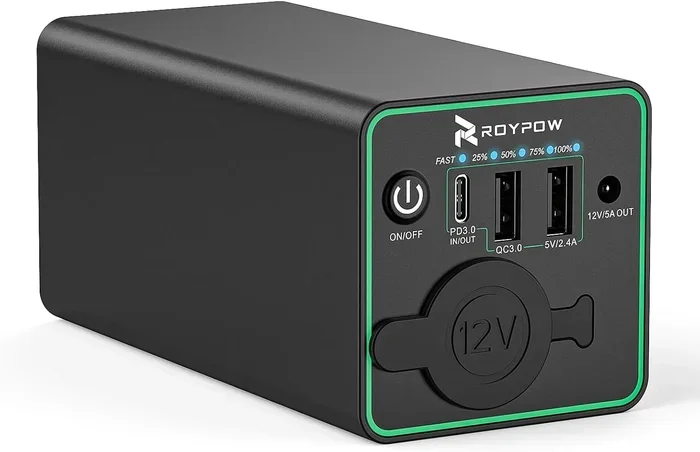
Another situation where a 12v charger works is when you use a voltage regulator. This device adjusts the incoming voltage to match your laptop’s requirements. It acts as a middleman between the charger and your laptop, ensuring safe power delivery.
When a 12V Charger Won’t Work
Most modern laptops need between 15 and 20 volts to charge. If your laptop requires 19 volts and you plug in a 12v charger, it likely will not work. The power supply is simply not strong enough to meet your laptop’s demands.
Gaming laptops and performance machines are especially power-hungry. They often need 100 watts or more. A 12v charger usually cannot deliver that kind of power. Even if it does connect, your laptop might not turn on or might drain the battery while plugged in.
Using a 12v charger on a laptop that needs higher voltage can also cause the charger to overheat. The charger works overtime trying to deliver power it cannot provide. This shortens the life of both the charger and your battery.
Common Laptop Charging Requirements
Every laptop brand has different charging needs. Understanding these requirements helps you choose the right charger and avoid potential problems. Let us look at some common scenarios.
Typical Voltages for Popular Laptop Brands
Different brands use different voltage standards. Here is a quick look at what common laptop brands typically require:
- Dell: Most Dell laptops use 19.5 volts, though some models use 20 volts.
- HP: HP laptops commonly use 18.5 or 19.5 volts depending on the model.
- Lenovo: Many Lenovo laptops run on 20 volts, especially the ThinkPad series.
- Apple MacBook: MacBooks use 20 volts through their USB-C charging system.
- Acer: Acer laptops often use 19 or 20 volts, but some budget models use 12 volts.
- ASUS: ASUS laptops typically require 19 or 20 volts.
As you can see, most mainstream laptops need more than 12 volts. This is why a standard 12v charger does not work for most modern laptops. Always check your specific model before trying any alternative charger.
How to Find Your Laptop’s Power Needs
Finding your laptop’s power requirements is easy. Flip your laptop over and look for a sticker or label. It will list the input and output specifications. You are looking for the output voltage and amperage.
You can also check your laptop’s manual or visit the manufacturer’s website. Search for your model number and look up the power specifications. The adapter specs will tell you exactly what charger you need.
Another way to check is through your laptop’s operating system. On Windows, go to Device Manager and look under “Batteries.” On macOS, click the Apple menu and select “About This Mac.” Both methods give you helpful power information.
Risks of Using the Wrong Charger
Using a charger that does not match your laptop’s requirements is risky. It is tempting to just plug something in when you are in a pinch, but the consequences can be serious. Let us explore what can go wrong.
Damage to Your Battery
Your laptop battery is one of the most sensitive components. It needs a steady, consistent power supply to charge properly. A 12v charger that does not match your laptop’s voltage can undercharge or overcharge the battery.
Undercharging means your laptop never gets enough power. The battery stays low even when plugged in. Overcharging can cause the battery to swell, leak, or lose capacity over time. Neither situation is good for the longevity of your device.
Lithium-ion batteries, which most modern laptops use, are especially sensitive to voltage fluctuations. Even small mismatches can degrade battery health over time. You might notice shorter battery life or your laptop not holding a charge as well as it used to.
Other Potential Problems
Beyond battery damage, using the wrong charger can cause other issues. Your laptop’s motherboard could be at risk. Too much voltage can burn out circuits. Too little voltage might cause your laptop to shut down unexpectedly.
Overheating is another concern. A mismatched charger often runs hotter than it should. This heat can damage internal components over time. In rare cases, it can even pose a fire hazard.
There is also the risk of voiding your warranty. Most laptop manufacturers will not cover damage caused by using unauthorized chargers. If your laptop breaks after using a 12v charger that was not meant for it, you might be paying for repairs out of pocket.
How to Charge a Laptop With a 12V Charger Safely
If you find yourself in a situation where you must use a 12v charger, there are ways to do it safely. The key is ensuring your laptop gets the right amount of power without any surprises.
Using a Voltage Regulator
A voltage regulator is your best friend when using a non-standard charger. This device takes the 12v input and converts it to the voltage your laptop needs. You can find step-up regulators that boost 12v to 19v or higher.
When shopping for a voltage regulator, look for one that matches your laptop’s wattage requirements. Make sure it can handle the current your laptop draws. A good regulator will also protect against short circuits and overheating.
Connect the 12v charger to the voltage regulator, then connect the regulator to your laptop’s charging port. This setup ensures your laptop receives the correct power. It adds a layer of safety between the charger and your device.
Matching the Right Connector
Voltage is only half the battle. You also need the right connector to fit your laptop’s charging port. A barrel connector has specific inner and outer diameters that must match exactly.
Using the wrong connector can damage your charging port. It might not fit properly or could come loose during use. Some connectors look similar but have different polarities, which can cause serious damage.
Check the polarity of your charger before connecting it. The center pin should be positive for most laptops. If the polarity is reversed, do not use that charger. You can find polarity information on your laptop’s label or in the manual.
Better Alternatives to a 12V Charger
If a 12v charger is not the ideal solution for your laptop, what should you use instead? There are several safer and more reliable options available. Let us explore the best alternatives.
USB-C Power Delivery
USB-C has changed the game for laptop charging. Many modern laptops now support USB-C power delivery, which allows you to charge through a USB-C cable. These chargers can deliver anywhere from 60 to 100 watts of power.
A USB-C charger is more versatile than a traditional charger. You can use it to charge your laptop, phone, tablet, and other USB-C devices. This makes it a great all-in-one charging solution for travel and everyday use.
When choosing a USB-C charger, look for one that supports power delivery protocols. This ensures your laptop receives the correct voltage and wattage automatically. Most laptops will negotiate the right power level with a compatible USB-C charger.
Universal Laptop Chargers
A universal laptop charger is another excellent option. These chargers come with interchangeable tips that fit most laptop brands and models. You simply select the right tip for your laptop and you are ready to go.
Universal chargers typically support multiple voltage settings. You can adjust the output to match your laptop’s requirements. This makes them much safer than using a fixed 12v charger on a laptop that needs a different voltage.
When buying a universal charger, check that it supports your laptop’s voltage and wattage. Make sure the tips included fit your charging port. A quality universal charger is a great investment for anyone who works with multiple devices.
Expert Insights and Practical Tips
Charging your laptop with anything other than the original charger requires some knowledge and caution. Here are some expert tips to keep in mind.
Always check the wattage first. Your charger must deliver at least as many watts as your laptop needs. If your laptop draws 65 watts, a charger that only provides 45 watts will not cut it. Your laptop might charge slowly or not at all.
Watch the connector size. Even if the voltage is correct, the wrong connector will not work. Measure the inner and outer diameter of your charging port before buying any replacement charger.
Do not leave your laptop unattended while charging with a non-standard charger. If something goes wrong, you want to catch it early. Unplug the charger if you notice excessive heat or unusual behavior.
Invest in a quality charger. Cheap knockoff chargers often do not meet safety standards. They might not regulate voltage properly, which puts your laptop at risk. Stick with reputable brands and certified products.
Keep your original charger when possible. Even if you use an alternative charger occasionally, keep the original one safe. It is always the most reliable option for your specific laptop model.
Common Mistakes People Make When Charging Laptops
There are several common mistakes people make when trying to charge a laptop with an alternative charger. Avoiding these mistakes can save you time, money, and frustration.
- Assuming all 12v chargers are the same: Different chargers have different amperage ratings. A 12v charger that provides 2 amps is not the same as one that provides 5 amps.
- Ignoring polarity: Reversed polarity can destroy your charging port. Always verify the correct polarity before connecting any charger.
- Using a charger with lower wattage: A lower wattage charger might work temporarily but can overheat and fail over time.
- Forgetting about the connector type: Even with the right voltage and wattage, the wrong connector will not make a proper connection.
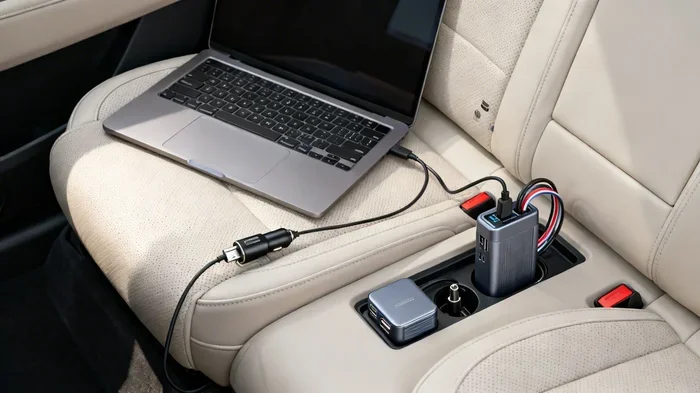
- Relying on a 12v car charger for extended use: Car chargers are designed for short bursts, not continuous charging. They can overheat with prolonged use.
These mistakes are easy to avoid with a little research and care. The most important thing is knowing your laptop’s power requirements before you try any alternative charging method.
The Bottom Line
So, can I charge my laptop with a 12v charger? The answer is yes, but only under the right conditions. Your laptop must be compatible with 12 volts, and the charger must match the correct wattage and connector type. For most modern laptops, a 12v charger alone will not be enough.
If your laptop needs higher voltage, use a voltage regulator or invest in a proper charger that matches your laptop’s specifications. USB-C power delivery and universal chargers offer safe and versatile alternatives that work with a wide range of devices.
Charging your laptop safely should always be a priority. Taking a few minutes to understand your laptop’s power needs can prevent costly damage and extend the life of your device. The next time you find yourself without the right charger, you will know exactly what to do.
Remember, your laptop is a significant investment. Treat its charging needs with the care they deserve, and your device will serve you well for years to come.
Frequently Asked Questions
Can I charge my laptop with a 12v car charger?
Yes, but only if your laptop supports 12 volts and the car charger provides enough wattage. Many car chargers output 12v but may not deliver sufficient power for larger laptops. Check your laptop’s power requirements before relying on a car charger for extended use.
What happens if I use a 12v charger on a 19v laptop?
Your laptop likely will not charge at all, or it will charge very slowly. The charger does not provide enough voltage to meet the laptop’s power needs. In some cases, using a mismatched charger can cause overheating or damage to the battery over time.
Do all laptops use the same charger voltage?
No, different laptops require different voltages. Most mainstream laptops use between 15 and 20 volts. Budget laptops and netbooks sometimes use 12 volts. Always check your specific laptop model to find the correct voltage requirement.
Can a voltage regulator help me charge my laptop with a 12v charger?
Yes, a voltage regulator can step up 12 volts to the higher voltage your laptop needs. This allows you to safely charge a laptop that requires more than 12 volts. Make sure the regulator can handle the wattage your laptop demands.
Is it safe to use a third-party 12v charger for my laptop?
It can be safe if the charger matches your laptop’s voltage, wattage, and connector specifications. Look for chargers from reputable brands and check for safety certifications. Avoid cheap, uncertified chargers that may not regulate power properly.
How can I find my laptop’s exact charging requirements?
Check the label on the bottom of your laptop or on the original power adapter. The output voltage and amperage will be listed there. You can also visit the manufacturer’s website and search for your laptop model to find the official specifications.