How Can I Charge My Laptop From a Car Charger Type C
Yes, you can charge your laptop from a car charger Type C if you have the right adapter and enough wattage. This guide covers everything you need to know about USB-C car charging, compatible devices, and step-by-step setup. Keep your laptop powered on the road without any hassle.
Ever been stuck on a long road trip with a dying laptop? Maybe you are heading to a remote work site or driving to a cabin in the woods. Either way, the last thing you want is a dead battery. The good news is that charging your laptop from a car charger Type C is totally possible. It is simpler than most people think, and it can save you a lot of stress. In this guide, we will walk you through everything you need to know. From what gear to buy to how to set it up correctly, we have you covered.
USB Type C has changed the way we charge devices. It is fast, reversible, and widely supported. Many new laptops come with USB-C ports that can handle charging. This means you can use a car charger to power up your laptop while driving. But not all car chargers are created equal. Some will charge your laptop quickly, while others will barely make a difference. Understanding how this works is the first step to staying powered on the road.
Key Takeaways
- Type C car chargers work: Most modern laptops with USB-C ports can charge directly from a car charger Type C.
- Wattage matters a lot: You need at least 45W to 65W for most laptops to charge properly while driving.
- USB-C PD is key: Look for a charger that supports Power Delivery (PD) protocol for fastest and safest charging.
- Check your laptop first: Not all laptops support car charging via USB-C. Verify your device specs before buying.
- GaN chargers are best: Gallium Nitride car chargers are smaller, cooler, and more efficient than traditional options.
- Avoid common mistakes: Using low-wattage chargers or wrong cables can damage your laptop or fail to charge it.
📑 Table of Contents
- What Is a Type C Car Charger and How Does It Work?
- Can You Really Charge Your Laptop From a Car Charger Type C?
- What You Need to Charge Your Laptop in Your Car
- Step-by-Step Guide to Charging Your Laptop From a Car Charger Type C
- Best Car Chargers Type C for Laptops
- Common Problems and How to Fix Them
- Expert Tips for Safe and Efficient Charging on the Road
- Key Takeaways
- Conclusion
What Is a Type C Car Charger and How Does It Work?
A Type C car charger is a device that plugs into your car’s power outlet, also called a cigarette lighter socket. It converts the car’s 12V DC power into the USB-C power your laptop needs. The charger sends electricity through a USB-C cable to your laptop. The key technology behind this is called USB Power Delivery, or USB-C PD for short.
USB-C PD is a charging protocol that allows devices to negotiate the right amount of power. This means your laptop and charger talk to each other. They agree on the safest and fastest charging speed. A good car USB-C power delivery charger can output anywhere from 18W to 100W or more. Higher wattage means faster charging for power-hungry laptops.
How USB-C PD Charging Works in Cars
Here is how the process works in simple terms. Your car battery provides 12V DC power. The car charger takes this power and converts it. It then sends it through the USB-C cable to your laptop. The power delivery protocol ensures the voltage and current match what your laptop needs. This prevents overheating and protects your battery.
The entire negotiation happens in milliseconds. Your laptop tells the charger what it needs. The charger responds with the right amount of power. This is why using a compatible laptop charger that supports PD is so important. Without it, your laptop may not charge at all or will charge very slowly.
Why Type C Is Better Than Older Charging Methods
Older laptops used barrel-style chargers. These were bulky and often got lost easily. USB-C chargers are small, reversible, and can charge multiple devices. You can use one portable car charger for your phone, tablet, and laptop. This makes road trips much more convenient. Plus, USB-C cables are widely available and affordable.
Can You Really Charge Your Laptop From a Car Charger Type C?
The short answer is yes. But there are some important conditions. Charging your laptop in a vehicle via USB-C works only if your laptop supports it. Not every laptop can charge through USB-C. Some laptops use USB-C only for data transfer, not for power input. You need to check your laptop’s specifications first.
Most modern laptops from brands like Dell, HP, Lenovo, Apple, and ASUS support USB-C charging. If your laptop has a USB-C port and supports PD, you are good to go. However, older laptops or budget models might not have this feature. Always check your user manual or the manufacturer’s website to confirm.
Laptops That Support USB-C Charging
Here are some popular laptops that can charge via USB-C:
- MacBook Pro and MacBook Air (all models with USB-C)
- Dell XPS 13 and XPS 15
- HP Spectre and HP Envy series
- Lenovo ThinkPad X1 Carbon and newer models
- Microsoft Surface Laptop (4th gen and newer)
- ASUS ZenBook series
- Google Pixelbook
If your laptop is not on this list, do not worry. You can still use a DC to USB-C converter or a car power inverter. These devices convert your car’s 12V power into the right format for your laptop. We will talk more about this later.
What You Need to Charge Your Laptop in Your Car
Before you start, you need the right equipment. Charging your laptop from a car charger Type C is not complicated, but using the wrong gear can cause problems. Let me walk you through exactly what you need.
1. A USB-C Car Charger With Enough Wattage
This is the most important piece of gear. You need a car charger Type C that outputs enough wattage for your laptop. Most laptops need at least 45W to charge while in use. Some powerful laptops need 65W or even 100W.
Here is a simple rule of thumb. Check your laptop’s original charger wattage. Buy a car charger that matches or exceeds that number. For example, if your laptop charger is 65W, get a car charger that outputs 65W or more. Using a lower-wattage charger will either charge very slowly or not charge at all while you use the laptop.
2. A High-Quality USB-C Cable
The cable matters just as much as the charger. A cheap or thin cable can limit charging speed. It might even overheat. Look for a USB-C cable rated for Power Delivery and high amperage. A good cable should support at least 3A or 5A current. Braided cables tend to last longer and handle higher power better.
Avoid using the cable that came with your phone for laptop charging. Phone cables are usually rated for lower power. They may work for a quick top-up but will not charge your laptop efficiently.
3. Your Car’s Power Outlet
Most cars have a 12V power outlet, commonly called a cigarette lighter socket. This is where your car charger plugs in. Make sure the socket is clean and not loose. A loose connection can cause intermittent charging or no charging at all.
4. Optional: A Car Power Inverter
If your laptop does not support USB-C charging, you can use a car power inverter. This device converts 12V DC power from your car into AC power. You can then plug in your regular laptop charger. Inverters are bulkier and less efficient, but they work with almost any laptop.
Step-by-Step Guide to Charging Your Laptop From a Car Charger Type C
Now that you have the right gear, let me show you exactly how to set everything up. The process is quick and easy once you know the steps.
Step 1: Plug the Car Charger Into the Cigarette Lighter Socket
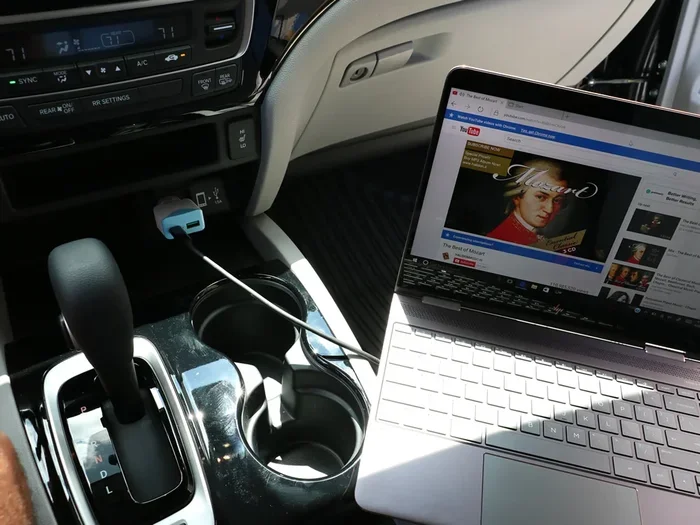
Start by inserting your USB-C car charger into the car’s power outlet. Make sure it fits snugly. Some car chargers have multiple USB ports, which is great if you want to charge other devices too.
Step 2: Connect the USB-C Cable to the Charger
Plug one end of your USB-C PD cable into the car charger. Make sure it clicks in securely. A loose connection is one of the most common reasons for charging problems.
Step 3: Connect the Other End to Your Laptop
Plug the other end of the cable into your laptop’s USB-C port. If your laptop has multiple USB-C ports, check the manual to see which one supports charging. Some ports are for data only.
Step 4: Check the Charging Indicator
Most laptops show a charging icon when they are receiving power. Look for the battery icon in your taskbar or menu bar. If you see the charging symbol, you are all set. If not, try a different cable or port.
Step 5: Monitor Charging Speed and Temperature
While driving, keep an eye on how your laptop charges. If the laptop gets very hot, the charger might not be providing enough power or the cable might be faulty. Fast charging in car should feel warm, not hot. If it feels excessively hot, unplug and check your equipment.
Quick Tips for Best Results
- Turn off unnecessary apps while charging to speed things up
- Keep your laptop plugged in while using it for best performance
- Use a charger with built-in cooling fans for long trips
- Avoid charging your laptop while the car engine is off
- Keep the car charger in a well-ventilated area
Best Car Chargers Type C for Laptops
Not all car chargers are the same. Some are designed for phones and will not work well with laptops. Here are some things to look for when choosing the best USB Type C car charger for your needs.
Wattage Requirements by Laptop Type
Different laptops need different amounts of power. Here is a quick comparison to help you choose:
- Ultrabooks and thin laptops: 45W to 65W
- Gaming laptops: 65W to 100W or more
- MacBook Air: 30W to 65W
- MacBook Pro: 60W to 100W
- Chromebooks: 30W to 45W
Top Features to Look For
- USB-C PD support for safe and fast charging
- Multiple ports so you can charge other devices too
- GaN technology for smaller size and less heat
- Built-in safety features like overcurrent and overvoltage protection
- Compact design for easy portability
Why GaN Car Chargers Are Worth It
GaN car chargers use Gallium Nitride semiconductors. These are more efficient than traditional silicon chips. GaN chargers are smaller, produce less heat, and charge faster. They are a bit more expensive, but the benefits are worth it. If you charge your laptop often in the car, a GaN charger is a smart investment.
Common Problems and How to Fix Them
Even with the right equipment, you might run into some issues. Here are the most common problems people face when they try to charge my laptop from car charger Type C, and how to solve them.
Laptop Not Charging at All
This usually happens when the charger does not support Power Delivery. Try a different cable or make sure the car charger is firmly plugged in. Also, check if your laptop’s USB-C port supports charging. Some laptops have dedicated charging ports and data-only ports.
Charging Is Very Slow
Slow charging often means your car charger does not have enough wattage. A 15W phone charger will not cut it for most laptops. Upgrade to a charger with at least 45W or higher. Also, make sure your cable supports high current.
Laptop Gets Too Hot While Charging
Heat can build up when charging and using your laptop at the same time. Try reducing your workload while charging. Also, make sure the car charger is not blocked by fabric or other items. Good airflow helps keep temperatures down.
Charger Keeps Disconnecting
A loose connection is usually the culprit. Clean the car’s power socket with a small brush or compressed air. Also, check that the charger fits snugly. Some people use a socket adapter to get a tighter fit.
Charging Works Only When the Car Is Running
This is normal behavior. Most cars shut off the power outlet when the ignition is off. If you want to charge with the engine off, you may need a car charger with a battery backup or a different power source.
Expert Tips for Safe and Efficient Charging on the Road
Charging your laptop in the car is convenient, but you should do it safely. Here are some expert-backed tips to keep your devices and your car in great shape.
Invest in a Quality Charger
Cheap car chargers might seem like a good deal, but they can be dangerous. Poorly made chargers can overheat, damage your laptop battery, or even cause electrical issues in your car. Stick with reputable brands that have safety certifications like UL or CE listed on the product.
Do Not Charge Your Laptop While the Car Is Off for Long Periods
Leaving your laptop charging with the car engine off can drain your car battery. If you need to charge while parked, limit the time and keep the engine running if possible. A dead car battery is the last thing you want on a road trip.
Keep Your Cables Organized
Tangled cables can cause connection issues and damage over time. Use a cable organizer or a car charger with built-in cable management. This keeps your setup clean and prevents accidental disconnections.
Monitor Your Laptop Battery Health
Frequent charging from a car charger can affect your laptop battery over time. To maintain good battery health, try not to let your battery drop below 20%. Also, avoid keeping your laptop plugged in at 100% for extended periods when you reach your destination.
Use a Surge Protector for Added Safety
Car electrical systems can experience voltage fluctuations. A small car surge protector can protect your laptop from power spikes. This is especially useful in older vehicles with less stable electrical systems.
Plan Your Charging Stops on Long Trips
Even with a great car charger, it is smart to plan ahead. If you are on a very long drive, schedule stops where you can plug in at a rest area or cafe. This gives your car battery a break and ensures your laptop stays powered throughout the journey.
Key Takeaways
- Type C car chargers work for most modern laptops: As long as your laptop supports USB-C Power Delivery, you can charge it directly from your car.
- Wattage is the most important factor: Match or exceed your laptop’s original charger wattage for best results.
- USB-C PD protocol ensures safe charging: This technology allows your laptop and charger to communicate and adjust power automatically.
- GaN chargers offer the best performance: They are compact, efficient, and produce less heat than traditional chargers.
- Use high-quality cables: A cheap cable can limit charging speed and even damage your devices.
- Avoid common mistakes: Do not use phone chargers for laptops, and do not charge for long periods with the car engine off.
- Stay safe on the road: Use surge protectors, monitor battery health, and plan your charging stops ahead of time.
Conclusion
Charging your laptop from a car charger Type C is one of the best upgrades you can make for road trips, commutes, or remote work on the go. It is convenient, effective, and easier than most people think. With the right USB-C car charger, a quality cable, and a little knowledge, you can keep your laptop powered anywhere you drive.
Remember to check your laptop’s compatibility first. Make sure your car charger supports enough wattage and the USB-C PD protocol. Invest in a GaN car charger if you want the best performance and smallest size. And always follow the safety tips we covered to protect your devices and your car.
The days of worrying about a dead laptop battery on the road are over. With a reliable car charger Type C, you can work, stream, and create from anywhere. So go ahead, gear up, and hit the road with confidence. Your laptop will stay charged and ready for whatever comes your way.
Frequently Asked Questions
Can I charge any laptop with a car charger Type C?
Not all laptops support USB-C charging. Check your laptop’s specifications to confirm it has USB-C Power Delivery support. If it does, a car charger Type C will work perfectly. If not, you may need a DC to USB-C converter or a car power inverter.
What wattage car charger do I need for my laptop?
You need a charger that matches or exceeds your laptop’s original charger wattage. Most ultrabooks need 45W to 65W, while gaming laptops may need 65W to 100W. Check your laptop manual or the label on your original charger to find the right wattage.
Will charging my laptop from the car drain the car battery?
Charging your laptop while the car engine is running will not drain the battery significantly. However, charging with the engine off for extended periods can drain your car battery. Keep the engine running while charging, and avoid long charging sessions when the car is parked.
Can I use a phone car charger to charge my laptop?
Most phone car chargers output only 10W to 18W, which is not enough for most laptops. You need a charger with at least 45W output that supports USB-C Power Delivery. Using a phone charger may charge your laptop very slowly or not at all.
Is it safe to leave my laptop charging in the car overnight?
It is not recommended. Leaving your laptop charging overnight with the car off can drain your car battery completely. Even with the engine running, extended charging periods are unnecessary and can put stress on your laptop battery. Unplug your laptop when you reach your destination.
What is the difference between a USB-C car charger and a regular car charger?
A regular car charger usually has USB-A ports designed for phones and tablets. A USB-C car charger has a USB-C port that supports Power Delivery, making it capable of charging laptops. USB-C chargers also tend to charge phones and tablets faster than standard USB-A chargers.