Does Moca Slow Down Internet Speed Here Is What To Know
MoCA adapters can slightly reduce your internet speed due to signal processing and hop limitations, but they still deliver excellent performance for most homes. If you are using MoCA 2.5, you can expect speeds up to 2.5 Gbps, which is more than enough for streaming, gaming, and working from home. Understanding how MoCA works helps you set up your network the right way and avoid common speed bottlenecks.
This is a comprehensive guide about Does Moca Slow Down Internet.
Key Takeaways
- MoCA adapters add a small speed reduction: Each hop through a MoCA device can reduce throughput by 10-20%, but the impact is usually minimal.
- MoCA 2.5 offers the fastest speeds: With up to 2.5 Gbps, MoCA 2.5 handles most home internet plans with ease.
- Coaxial cable quality matters: Old or damaged coax wiring can hurt MoCA performance more than the adapter itself.
- Limit MoCA hops to two or fewer: Each additional hop adds latency and reduces speed.
- MoCA is better than Wi-Fi extenders: MoCA provides a wired backhaul that is more stable and faster than wireless repeaters.
- Check your ISP plan: Your internet speed from your provider may be the real bottleneck, not MoCA.
- You can buy your own MoCA gear: Using a personal router or adapter gives you more control over your home network.
[FEATURED_IMAGE_PLACEHOLDER]
Does MoCA slow down internet speed? This is one of the most common questions homeowners ask when they start setting up a mesh network or extending their home network using MoCA adapters. MoCA, which stands for Multimedia over Coax Alliance, lets you use your existing coaxial cables to create a fast and reliable wired network throughout your home. It is a great alternative to running Ethernet cables through walls or relying solely on Wi-Fi.
Many people worry that adding a MoCA adapter will slow things down. The truth is more nuanced than a simple yes or no. A MoCA adapter does introduce a small amount of speed loss because the signal has to be processed and translated. However, modern MoCA technology, especially MoCA 2.5, is so fast that even with this small reduction, you will still get excellent performance for almost everything you do online.
In this article, we will break down exactly how MoCA affects your internet speed. We will look at how the technology works, what causes speed drops, and what you can do to get the best performance. By the end, you will know everything you need to make an informed decision about using MoCA in your home.
What Is MoCA and How Does It Work?
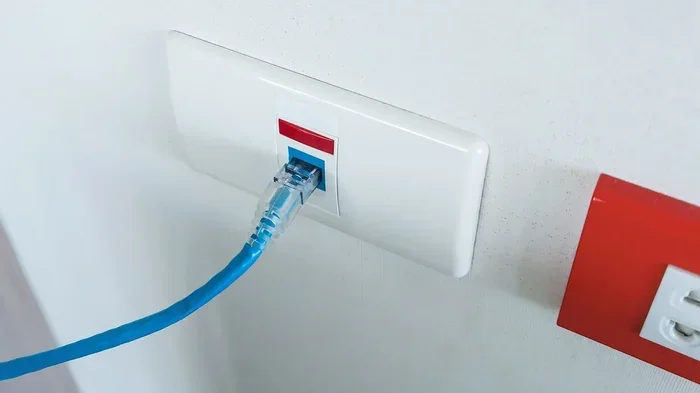
MoCA is a networking technology that sends data signals through your home’s existing coaxial cables. These are the same cables that deliver cable TV to your rooms. Instead of running new Ethernet wires or relying only on Wi-Fi, MoCA turns your coax wiring into high-speed data lines. This means you can get a wired Ethernet-like connection in rooms where you do not have a network jack.
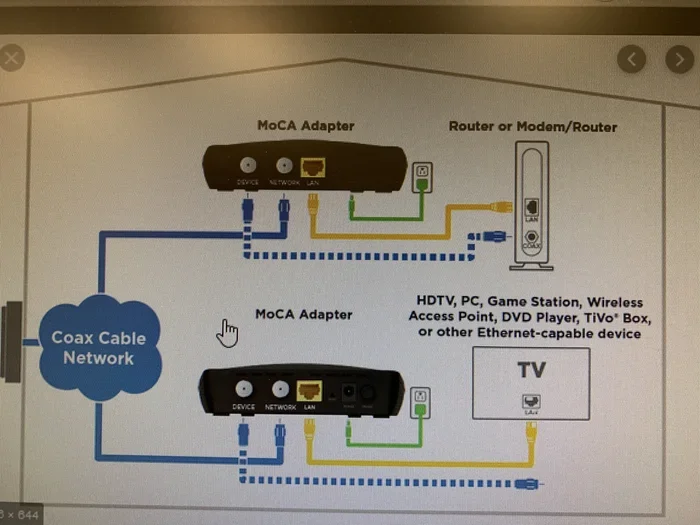
The way it works is simple. You plug a MoCA adapter into a coax outlet near your router. Then you plug another MoCA adapter into a coax outlet in the room where you need better coverage. The adapters talk to each other through the coax wiring and create a private, high-speed network. Because it is a wired connection, you get much lower latency and more stability than Wi-Fi alone.
MoCA Versions and Their Speeds
There are different versions of MoCA, and each one offers different maximum speeds. Here is a quick look at the main versions:
- MoCA 1.0: Max speed of 100 Mbps. This older version is fine for basic browsing but not ideal for heavy use.
- MoCA 2.0: Max speed of 1 Gbps. This is a solid choice for most households with moderate internet usage.
- MoCA 2.5: Max speed of 2.5 Gbps. This is the latest and fastest version, perfect for 4K streaming, online gaming, and large file transfers.
- MoCA 3.0 (upcoming): Expected to offer even higher speeds, though it is not yet widely available.
The version you choose matters a lot when it comes to speed. If you have a fast internet plan, using MoCA 2.5 ensures you do not lose much performance. Older versions like MoCA 1.0 will bottleneck your connection more noticeably.
Does MoCA Slow Down Internet Speed?
This is the big question, and the answer is both yes and no. Let us break it down. Every time a data signal passes through a MoCA adapter, it has to be encoded, transmitted, decoded, and then re-encoded for the next leg of the journey. This processing takes a small amount of time and reduces the total throughput slightly. So yes, there is a small speed reduction compared to a direct Ethernet connection.
However, the reduction is usually small enough that most people do not even notice it. If your internet plan gives you 500 Mbps, a MoCA 2.5 connection might deliver 450 to 480 Mbps in real-world use. That is still extremely fast. The bigger speed killers are usually old coax wiring, too many MoCA hops, or electrical interference on the coax line.
How Much Speed Do You Actually Lose?
The actual speed loss depends on several factors. Here are the main ones:
- Number of hops: Each MoCA hop reduces speed. One hop is fine. Two hops is manageable. Three or more hops can cause noticeable slowdowns.
- Coax cable quality: Old or damaged coax cables lose signal strength, which reduces MoCA performance.
- Distance: Longer coax runs mean more signal loss and lower speeds.
- Electrical interference: Other devices on the same electrical circuit can create noise on the coax line.
- MoCA version: Newer versions handle interference better and maintain higher speeds.
The bottom line is that MoCA does slow your internet down a little, but it is still one of the best ways to get a strong wired connection in every room without tearing up your walls.
MoCA vs. Other Network Extension Methods
To really understand how MoCA affects speed, it helps to compare it with other popular ways to extend your home network. Each method has pros and cons, and the right choice depends on your home and your needs.
MoCA vs. Wi-Fi Extenders
Wi-Fi extenders repeat your wireless signal to reach farther areas of your home. They are easy to set up, but they cut your speed in half because they use the same radio to receive and send data. MoCA adapters, on the other hand, use a wired coax connection, so they do not suffer from the same speed loss. A MoCA connection is also much more stable and has lower latency than a Wi-Fi extender.
If you are choosing between a Wi-Fi extender and MoCA, MoCA is almost always the better choice for speed and reliability.
MoCA vs. Powerline Adapters
Powerline adapters send data through your home’s electrical wiring. They are convenient, but their speeds can be very inconsistent. Electrical noise, old wiring, and the distance between outlets all affect performance. MoCA adapters generally deliver faster and more consistent speeds because coax cables are designed for data transmission, unlike electrical wiring.
MoCA vs. Running New Ethernet Cables
Running new Ethernet cables gives you the best possible speed and lowest latency. Nothing beats a direct wired connection. But it is expensive and invasive. You may need to drill holes, run cables through walls, and hire a professional. MoCA gives you most of the benefits of a wired connection without the hassle. For most homeowners, MoCA is the best balance of performance and convenience.
Quick Comparison Table
| Method | Speed Loss | Stability | Ease of Setup | Latency |
|---|---|---|---|---|
| MoCA 2.5 | Low (10-20%) | Very High | Easy | Very Low |
| Wi-Fi Extender | High (50%) | Medium | Very Easy | Medium |
| Powerline Adapter | Medium-High | Low-Medium | Easy | Medium-High |
| New Ethernet Cable | None | Highest | Difficult | Lowest |
Common Reasons MoCA Speed Drops Happen
If you have noticed your internet slowing down after installing MoCA adapters, there are a few common culprits. Understanding these can help you fix the problem and get your speeds back up.
Too Many MoCA Hops
A MoCA hop is when your data signal passes through one MoCA adapter. Each hop adds a small delay and reduces throughput. If you have three or four MoCA adapters daisy-chained together, the cumulative effect can be significant. The best practice is to limit your setup to two MoCA hops or fewer. If you need coverage in many rooms, consider adding a second MoCA network or using a MoCA-enabled router.
Old or Damaged Coax Wiring
Many homes have coax wiring that has not been updated in decades. Old cables, loose connections, and corroded outlets all degrade the signal. Before installing MoCA, it is worth checking your coax wiring. Replace any damaged cables and make sure all connections are tight. A quick internet speed test before and after installing MoCA can help you identify whether the wiring is the problem.
Electrical Interference
Electrical devices like microwaves, baby monitors, and even fluorescent lights can create interference on your coax line. This interference shows up as noise in the MoCA signal, which reduces speeds. To minimize interference, keep MoCA adapters away from large electrical appliances and use MoCA filters or splitters designed to block out noise.
ISP Speed Limits
Sometimes the problem is not MoCA at all. Your internet service provider may be delivering slower speeds than your plan promises. Before blaming MoCA, run a speed test directly on your modem without any MoCA adapters in the chain. If your speeds are already slow, the issue is with your ISP plan or connection, not MoCA.
How to Get the Best MoCA Speeds
The good news is that you can take several steps to minimize speed loss and get the most out of your MoCA setup. Here are some practical tips that really make a difference.
- Use MoCA 2.5 adapters. The newer versions offer much higher speeds and handle interference better than older models. If you are buying new gear, go with MoCA 2.5.
- Keep hops to a minimum. Try to use no more than two MoCA hops in your network path. Each hop adds latency and reduces throughput.
- Check your coax wiring. Replace old or damaged cables. Make sure all connections are clean and tight. Good wiring makes a huge difference.
- Use high-quality splitters. Cheap splitters can weaken your MoCA signal. Look for splitters that are rated for broadband and have low signal loss.
- Keep adapters away from interference sources. Do not plug MoCA adapters into the same power strip as large appliances or devices that create electrical noise.
- Update your adapter firmware. Manufacturers often release firmware updates that improve performance and fix bugs. Check for updates regularly.
- Run speed tests regularly. Test your speed with and without MoCA in the chain to understand exactly how much impact the adapters have on your setup.
Quick Tips for Optimal MoCA Performance
- Always use MoCA filters on your TV outlets to prevent signal interference.
- Place your primary MoCA adapter as close to your router as possible.
- Use a MoCA-enabled router for the best integration and performance.
- If your ISP provides a gateway router, check if it has built-in MoCA support before buying a separate adapter.
- Consider your internet plan speed. If you have a 100 Mbps plan, MoCA will not be a bottleneck. If you have a 5 Gbps plan, you may want to explore other options.
When MoCA Is the Right Choice for Your Home
MoCA is not for everyone, but it is an excellent solution in many situations. Here are some scenarios where MoCA really shines.
You Have Coax Wiring Already
If your home already has coax outlets in multiple rooms, MoCA is the easiest and most cost-effective way to extend your network. You do not need to run new cables or drill holes. Just plug in the adapters and you are good to go.
You Need Low Latency for Gaming
Online gaming demands a fast and stable connection with low latency. Wi-Fi can be unpredictable, but MoCA gives you a wired connection that is almost as good as a direct Ethernet line. If you are a serious gamer, MoCA is a great way to improve your online experience.
Your Wi-Fi Does Not Reach Every Room
If you have dead spots in your home where Wi-Fi does not reach, MoCA can help. By placing a MoCA adapter in a room with a coax outlet and connecting it to a Wi-Fi access point or second router, you can extend your network coverage without losing speed.
You Want a More Reliable Connection Than Wi-Fi
Wi-Fi is convenient, but it is susceptible to interference from walls, other devices, and neighboring networks. MoCA provides a dedicated wired connection that is not affected by these issues. If reliability is your priority, MoCA is a strong choice.
Can You Be Your Own Internet Provider with MoCA?
Some people wonder if they can use MoCA technology to set up their own internet service. While MoCA is excellent for creating a local network within your home, it does not replace your internet service provider. To get internet access, you still need a connection from an ISP. However, using MoCA to build an incredibly fast and reliable local network can complement any ISP connection beautifully. If you are curious about whether you can be your own internet provider, you can explore that topic further.
Frequently Asked Questions
Does MoCA slow down Wi-Fi speeds?
MoCA itself does not directly slow down your Wi-Fi speeds. However, if your MoCA adapter is connected to a router and the router’s Wi-Fi performance is affected by the adapter’s processing, you might see a slight reduction. In most cases, the Wi-Fi speed loss is minimal and is far outweighed by the benefit of having a stable wired backhaul through MoCA.
How many MoCA hops are too many?
Two MoCA hops is generally the recommended maximum. Beyond that, each additional hop adds latency and reduces throughput. If you need coverage in more than two rooms, consider using a MoCA-enabled router or mesh system that supports MoCA backhaul instead of daisy-chaining multiple adapters.
Can I use MoCA if I do not have coaxial cables in my home?
No, MoCA requires coaxial cables to work. If your home does not have coax wiring, you will need to either run new coax cables or use an alternative like Ethernet or powerline adapters. In some cases, you can get internet in your home without a phone line or coax by using fixed wireless or fiber options.
Will MoCA work with any router?
Not all routers are MoCA-compatible. Some routers have built-in MoCA support, while others require a separate MoCA adapter. You can also buy your own MoCA adapter and connect it to any router with an Ethernet port. Check your router’s specifications or contact the manufacturer to confirm MoCA compatibility.
Does MoCA reduce internet speed for other devices on the network?
MoCA does introduce a small speed reduction for all devices connected through it, but the reduction is typically minor. MoCA 2.5 can deliver speeds up to 2.5 Gbps, which is more than enough for most households. The devices that are most affected are those that are far from the router or connected through multiple MoCA hops.
Is MoCA better than Ethernet for home networking?
Ethernet provides the best possible speed and lowest latency, but it requires running cables through your home. MoCA delivers nearly the same performance as Ethernet without the hassle of new wiring. For most homeowners, MoCA is the best compromise between performance and convenience.
Final Thoughts
So, does MoCA slow down internet speed? The short answer is yes, but only slightly. The speed reduction from a MoCA adapter is small enough that most users never notice it in everyday use. With MoCA 2.5 delivering up to 2.5 Gbps, even after accounting for the small processing overhead, you will still have more than enough bandwidth for streaming, gaming, video calls, and everything else you do online.
The key to getting the best MoCA performance is to use the right hardware, keep your wiring in good condition, and limit the number of hops in your network. Follow the tips in this article, and you will enjoy a fast, reliable home network that covers every room.
If you are still deciding whether MoCA is right for you, remember that it is one of the easiest and most effective ways to improve your home network without the cost and hassle of running new cables. Give it a try, and you will likely be impressed with the results. Your home network will feel faster, more stable, and more reliable than ever before.
Frequently Asked Questions
What is Does Moca Slow Down Internet?
Does Moca Slow Down Internet is an important topic with many practical applications.