Does B650 Plus Have Wi Fi Built In Or Do You Need An Adapter
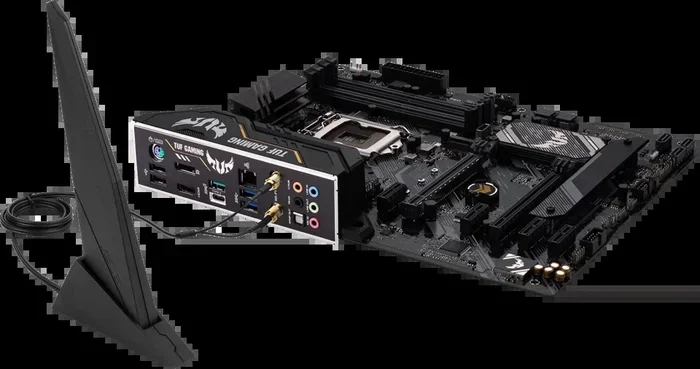
The MSI B650 Plus comes in both WiFi and non-WiFi versions. The WiFi variant includes built-in wireless 6 support right out of the box. If you have the standard model, you will need a PCIe WiFi card or USB adapter to go wireless.
Building a new PC or upgrading an old one? One question keeps popping up in forums and comment sections everywhere: does B650 Plus have WiFi? The answer is not as simple as yes or no. It depends on which version of the board you buy. The MSI B650 Plus line includes both a WiFi model and a standard model. Each one serves different needs and budgets. This guide breaks down everything you need to know about wireless connectivity on the B650 Plus platform.
Whether you are a casual user browsing the web or a hardcore gamer chasing low-latency connections, built-in WiFi is a huge convenience. No extra cables. No dongles hanging off the back of your PC. Just clean, reliable wireless performance right from the motherboard. But not every B650 Plus board includes this feature. Let us dive into the details so you know exactly what you are getting.
Key Takeaways
- B650 Plus WiFi Version Exists: The MSI B650 Plus WiFi comes with built-in wireless 6 support.
- Non-WiFi Version Needs an Adapter: The standard B650 Plus board has no wireless hardware installed.
- WiFi 6 is the Standard: Built-in WiFi on the B650 Plus uses the fast WiFi 6 (802.11ax) wireless standard.
- Multiple Adapter Options: You can use a PCIe WiFi card, USB adapter, or even check if your Wi-Fi card fits your needs.
- Setup is Simple: Installing a WiFi adapter on the B650 Plus takes only a few minutes.
- Check Your Model Number: Always verify the exact model name before purchasing to avoid confusion.
📑 Table of Contents
- What Is the MSI B650 Plus?
- Does B650 Plus Have WiFi Built In?
- What If Your B650 Plus Does Not Have WiFi?
- How to Set Up WiFi on the B650 Plus
- WiFi and Bluetooth on the B650 Plus
- Common Mistakes When Setting Up WiFi on the B650 Plus
- Expert Insights on B650 Plus WiFi Performance
- Should You Choose the WiFi Version or Add an Adapter Later?
- Final Thoughts
What Is the MSI B650 Plus?
The MSI B650 Plus is an AM5 socket motherboard designed for AMD Ryzen processors. It sits in the mid-range tier, offering solid features without breaking the bank. The board supports DDR5 memory, PCIe Gen 5 for graphics cards and NVMe drives, and robust VRM cooling. It is a popular choice for budget-conscious builders who still want modern performance.
But here is the catch. MSI releases many variants of the same motherboard line. Some include built-in WiFi. Others do not. The B650 Plus is one of those lines where both versions exist. You need to read the product name carefully before you buy.
B650 Plus WiFi vs B650 Plus (Standard)
The difference between these two boards is small but important. The B650 Plus WiFi includes a wireless module soldered onto the board. The standard B650 Plus does not have this module. Everything else — the CPU support, RAM slots, PCIe lanes, USB ports — stays the same.
Here is a quick side-by-side look at the two versions:
- B650 Plus WiFi: Includes built-in wireless 6 module. Comes with a WiFi antenna. Slightly higher price.
- B650 Plus (Standard): No wireless hardware. Requires a separate adapter for WiFi. Lower price point.
The price difference between the two is usually around $15 to $30. For many builders, paying a little extra for the WiFi version is worth it. It saves you from buying a separate adapter. It also keeps your PC clean and cable-free.
Does B650 Plus Have WiFi Built In?
This is the big question, and the answer is yes — but only on the WiFi variant. The MSI B650 Plus WiFi board ships with a wireless 6 (802.11ax) module already integrated. You open the box, install the board, connect the included antennas, and you are ready to connect to your wireless network without any extra hardware.
The built-in WiFi module on the B650 Plus supports the latest wireless standards. This means you get fast speeds and strong signal strength in most home environments. Let us look at the specific WiFi specs you get with this board.
WiFi 6: What Does It Mean for Your Connection?
WiFi 6, also known as 802.11ax, is the current mainstream wireless standard. It offers faster speeds, better efficiency, and improved performance in crowded networks. If your router also supports WiFi 6, you will see a real boost in network speed and stability.
Here are some key benefits of WiFi 6 on the B650 Plus:
- Faster wireless speeds: Up to 2.4 Gbps on the 5 GHz band.
- Better multi-device handling: WiFi 6 handles many connected devices more efficiently.
- Lower latency: Great for online gaming and video calls.
- Improved range: Stronger wireless coverage compared to older WiFi standards.
Most modern routers now support WiFi 6, so pairing it with the B650 Plus WiFi board makes a lot of sense. You get a wireless connection that is fast, stable, and future-proof.
What If Your B650 Plus Does Not Have WiFi?
Maybe you already own the standard B650 Plus board. Or perhaps you bought the cheaper version to save money. Either way, you are not stuck. You have several options to add wireless connectivity to your build. Let us walk through them.
Option 1: PCIe WiFi Card
A PCIe WiFi card is the most popular way to add wireless to a desktop motherboard. You simply plug the card into an available PCIe slot on the B650 Plus. The card comes with its own antenna, and your PC instantly gains WiFi capability.
Most PCIe WiFi cards support WiFi 5 or WiFi 6. Some even support WiFi 6E or WiFi 7 for cutting-edge speeds. Prices range from around $20 for a basic WiFi 5 card to $80 or more for a premium WiFi 6E model. If you want a reliable and fast connection, this is the best route.
One thing to watch out for: make sure you have a free PCIe slot on your board. The MSI B650 Plus has multiple expansion slots, so this is rarely an issue. If you are unsure about which card to pick, check out our guide on can I get a WiFi card for my computer for helpful tips.
Option 2: USB WiFi Adapter
A USB WiFi adapter is the easiest option. You plug it into any USB port, install the drivers, and you are connected. No opening the PC case. No technical expertise needed. This makes USB adapters great for people who want a simple fix.
However, USB adapters do have some downsides. They usually offer slower speeds than PCIe cards. They can also be less stable because they share bandwidth with other USB devices. Still, for basic browsing and light streaming, a USB adapter works just fine.
Option 3: Use Ethernet Instead
If wireless is not a dealbreaker, you can always use a wired Ethernet connection. The MSI B650 Plus includes a 2.5 Gigabit LAN port. That is plenty fast for most internet plans and online gaming. A wired connection also gives you the most stable network speed and the lowest latency.
Sometimes the simplest solution is the best one. If your router is close to your PC, just plug in an Ethernet cable and enjoy rock-solid connectivity.
How to Set Up WiFi on the B650 Plus
Setting up WiFi on the B650 Plus WiFi version is straightforward. Here is a quick step-by-step guide to get you online.
- Install the motherboard: Mount the B650 Plus in your case and connect all power and data cables.
- Attach the WiFi antennas: The B650 Plus WiFi comes with two antennas. Plug them into the WiFi module connector on the board.
- Power on and enter BIOS: Check that the WiFi module is detected in the BIOS settings.
- Install drivers: Insert the MSI driver disc or download the latest drivers from the MSI website. Install the WiFi and LAN drivers.
- Connect to your network: Click the WiFi icon in your taskbar, select your network, and enter your password.
That is it. You should now be connected to your wireless network and ready to browse, game, or stream. If you run into any issues, make sure your router is close enough and that the antennas are positioned properly for the best signal strength.
Quick Tips for Better WiFi Performance
- Place your router in a central location in your home.
- Keep the B650 Plus WiFi antennas upright and spread apart.
- Use the 5 GHz band for faster speeds and less interference.
- Update your WiFi drivers regularly for the best wireless performance.
- If you experience slow speeds, check for interference from other devices like microwaves or cordless phones.
WiFi and Bluetooth on the B650 Plus
One nice perk of the built-in WiFi module on the B650 Plus WiFi is that it usually includes Bluetooth support too. The wireless module handles both WiFi and Bluetooth signals. This means you can connect wireless keyboards, mice, headsets, and other Bluetooth devices without any extra hardware.
Some people wonder if WiFi and Bluetooth use the same frequency. They do share the 2.4 GHz band, but they operate on different channels and use different protocols. You can read more about this in our article on are WiFi and Bluetooth the same frequency. The short answer is no, they are not the same, but they can sometimes interfere with each other.
Bluetooth 5.2: What You Get
The B650 Plus WiFi board typically supports Bluetooth 5.2. This is the latest mainstream Bluetooth standard. It offers faster data transfer, better range, and lower power consumption. Whether you are connecting a wireless headset or transferring files to your phone, Bluetooth 5.2 delivers a smooth experience.
Here is what Bluetooth 5.2 brings to the table:
- Faster data rates: Quicker file transfers and smoother audio streaming.
- Longer range: Better connectivity across larger rooms.
- Lower power usage: Your Bluetooth devices last longer on a single charge.
- Better multi-device support: Connect more devices without lag.
Common Mistakes When Setting Up WiFi on the B650 Plus
Even with a straightforward setup, people make mistakes that cause frustration. Here are some common errors to avoid.
- Buying the wrong version: Always double-check the product name. The “WiFi” suffix matters a lot.
- Forgetting to install drivers: Windows may not recognize the WiFi module without the proper drivers. Always install them first.
- Poor antenna placement: Tucking the antennas behind the case or lying them flat kills your signal strength.
- Using outdated WiFi drivers: Old drivers can cause slow speeds and connection drops. Update them regularly.
- Ignoring the router: Sometimes the problem is not your motherboard. Your router might need a firmware update or a reboot.
Avoiding these simple mistakes saves you hours of troubleshooting. A little preparation goes a long way toward a smooth wireless connection.
Expert Insights on B650 Plus WiFi Performance
So how does the B650 Plus WiFi actually perform in real-world use? Based on testing and user feedback, the built-in WiFi module delivers solid performance for most home users. You can expect fast download speeds, stable connections during gaming sessions, and reliable streaming even when multiple devices are on the network.
The WiFi 6 module on the B650 Plus holds its own against many dedicated PCIe WiFi cards in the same price range. For the average user, the difference is barely noticeable. If you are a competitive gamer or need the absolute fastest speeds, a premium external adapter might edge ahead. But for everyday use, the built-in WiFi is more than enough.
One thing that sets the B650 Plus WiFi apart is its clean integration. Because the WiFi module is built into the motherboard, there are no extra cables or bulky adapters cluttering your setup. The antennas are low-profile and blend in with the rest of the build. This makes the B650 Plus WiFi a great choice for clean and minimalist PC builds.
If you are curious about how the B650 Plus WiFi performs compared to other options, check out our article on can I boost my WiFi signal outside for tips on improving range and coverage across your home.
Should You Choose the WiFi Version or Add an Adapter Later?
This is a decision every builder faces. Do you pay a little extra upfront for the B650 Plus WiFi, or do you save money and add an adapter later? Here is a quick breakdown to help you decide.
| Factor | B650 Plus WiFi | Standard + Adapter |
|---|---|---|
| Upfront Cost | Slightly higher | Lower board price |
| Installation Effort | None — ready to go | Need to buy and install adapter |
| Aesthetic Cleanliness | No extra hardware | Adapter or dongle visible |
| Performance | Built-in WiFi 6 | Depends on adapter quality |
| Flexibility | Fixed module | Can upgrade adapter anytime |
| Best For | Clean builds, casual users | Budget builders, upgraders |
Most people will benefit from just getting the WiFi version. The convenience and clean setup are worth the small price difference. However, if you are on a tight budget or plan to upgrade your wireless hardware later, the standard board plus a PCIe adapter is a solid strategy.
Final Thoughts
So, does B650 Plus have WiFi? The answer is yes — if you get the right version. The MSI B650 Plus WiFi comes with built-in wireless 6 support and Bluetooth 5.2. It is fast, reliable, and incredibly convenient. The standard B650 Plus board does not include wireless hardware, but you can easily add it later with a PCIe card or USB adapter.
No matter which route you choose, you have plenty of options for staying connected. The B650 Plus platform gives you the flexibility to build exactly the PC you need. Whether you prioritize clean aesthetics or budget savings, there is a B650 Plus board that fits your situation.
Take a moment to check your current setup. If you are still using an older router, now might be the perfect time to upgrade. A modern WiFi 6 router paired with the B650 Plus WiFi board delivers an excellent wireless experience. And if you ever want to learn more about managing your home network, our article on can I change my WiFi router has all the details you need.
Happy building, and enjoy that fast, reliable wireless connection on your B650 Plus setup!
Frequently Asked Questions
Does the MSI B650 Plus come with WiFi in the box?
Only the B650 Plus WiFi version includes built-in WiFi. The standard B650 Plus board does not have any wireless hardware. Always check the product name and model number before purchasing to make sure you get the version you need.
Can I add WiFi to the standard B650 Plus after purchase?
Yes, absolutely. You can install a PCIe WiFi card or use a USB WiFi adapter to add wireless connectivity to the standard B650 Plus board. Both options are easy to install and widely available at most electronics retailers.
What wireless standard does the B650 Plus WiFi support?
The B650 Plus WiFi supports WiFi 6, also known as 802.11ax. This is the latest mainstream wireless standard and offers fast speeds, low latency, and excellent performance with multiple connected devices.
Is the built-in WiFi on the B650 Plus good for gaming?
Yes, the built-in WiFi 6 module provides solid performance for online gaming. It offers low latency and fast speeds that are more than enough for most gaming setups. However, competitive gamers who need the absolute lowest ping may prefer a wired Ethernet connection.
Do I need to buy a separate antenna for the B650 Plus WiFi?
No, the B650 Plus WiFi board comes with two WiFi antennas included in the box. You simply attach them to the WiFi module connector on the motherboard. No extra purchases are needed for basic wireless setup.
How does the B650 Plus WiFi compare to using a USB adapter?
The built-in WiFi 6 module on the B650 Plus WiFi generally outperforms a USB adapter. PCIe-based and integrated WiFi modules offer faster speeds and more stable connections than most USB alternatives. A USB adapter can still work well for basic tasks but may struggle with heavy use.