Does Att Provide Wi Fi Service Plans And Coverage Info
Yes, AT&T provides Wi-Fi through both home internet plans and mobile hotspot options. AT&T offers fiber, fixed wireless, and 5G home internet services with varying speeds and coverage areas. Whether you need home broadband or mobile connectivity, AT&T has Wi-Fi solutions designed for different needs and budgets.
Key Takeaways
- AT&T offers multiple Wi-Fi options: including fiber internet, fixed wireless, and 5G home internet plans across the United States.
- Coverage varies by location: AT&T’s wireless and home internet availability depends heavily on your area and infrastructure.
- AT&T provides mobile hotspot Wi-Fi: allowing you to use your phone’s data connection as a portable Wi-Fi source.
- Speed tiers range widely: from basic plans for light browsing to gigabit speeds for heavy users and families.
- AT&T equipment includes routers: and you can also change your Wi-Fi router if needed for better performance.
- Data caps apply to some plans: so understanding your usage needs is important before choosing a plan.
📑 Table of Contents
- Does AT&T Provide Wi-Fi? Your Complete Guide to Plans and Coverage
- AT&T Home Internet Wi-Fi Plans
- AT&T Mobile Hotspot and Portable Wi-Fi
- AT&T Wi-Fi Coverage: What Areas Does AT&T Serve?
- AT&T Wi-Fi Speeds and Performance
- AT&T Wi-Fi Pricing and Plans
- AT&T Wi-Fi Equipment and Setup
- Common AT&T Wi-Fi Issues and How to Fix Them
- Is AT&T Wi-Fi Worth It?
Does AT&T Provide Wi-Fi? Your Complete Guide to Plans and Coverage
So, does AT&T provide Wi-Fi? The short answer is yes. AT&T offers several ways to get Wi-Fi service, from home internet plans to mobile hotspot features built into your phone. AT&T is one of the largest telecommunications companies in the United States, and their Wi-Fi services reach millions of households and businesses.
Whether you are looking for home broadband, a mobile hotspot, or wireless internet for your RV or travel needs, AT&T has options worth exploring. In this guide, we will break down everything you need to know about AT&T Wi-Fi service plans, coverage areas, speeds, pricing, and more. Let us dive in.
AT&T provides Wi-Fi through multiple service types. You can get home internet via fiber, fixed wireless, or 5G technology. You can also use AT&T’s mobile network to create a personal hotspot that acts like a portable Wi-Fi router. Each option has its own strengths, and the best choice depends on your location, usage needs, and budget.
AT&T Home Internet Wi-Fi Plans
AT&T home internet plans deliver Wi-Fi to your household through different connection types. The type of connection you get depends on what infrastructure is available in your area. Let us look at the main options.
AT&T Fiber Internet
AT&T Fiber is the company’s premium home internet service. It uses fiber-optic cables to deliver ultra-fast Wi-Fi speeds directly to your home. Fiber internet is known for its reliability and symmetrical upload and download speeds.
AT&T Fiber plans typically start at around 300 Mbps and go up to 5 Gbps in select areas. These speeds are perfect for streaming 4K video, video conferencing, online gaming, and large file uploads. Fiber internet also offers low latency, which means less lag during video calls and online gaming sessions.
Here are some key features of AT&T Fiber:
- Speeds up to 5 Gbps in available areas
- No data caps on most fiber plans
- Wi-Fi gateway router included with your service
- Static IP address available for an extra fee
- Bundled TV and phone services available
AT&T Fixed Wireless Internet
AT&T Fixed Wireless is a newer service that uses cellular towers to deliver internet to your home. It is a great option for rural areas where fiber or cable may not be available. Fixed wireless internet uses a small antenna mounted on your roof or window to connect to the nearest AT&T tower.
Speeds for AT&T Fixed Wireless typically range from 10 Mbps to 50 Mbps. While not as fast as fiber, these speeds are enough for browsing, streaming in HD, and working from home. AT&T Fixed Wireless also includes a built-in Wi-Fi router, so you get Wi-Fi coverage throughout your home right out of the box.
Some things to keep in mind about fixed wireless:
- Requires line of sight to a cell tower
- Speeds can vary based on signal strength
- Data caps may apply depending on the plan
- No long-term contract required in most cases
AT&T 5G Home Internet
AT&T 5G Home Internet uses the company’s 5G wireless network to deliver internet to your home. This service is available in select markets where AT&T has deployed its 5G network infrastructure. 5G home internet offers faster speeds and lower latency than older wireless technologies.
AT&T 5G Home Internet plans typically offer speeds between 50 Mbps and 300 Mbps. The actual speed you get depends on your distance from a 5G tower and the number of devices connected. 5G home internet is a solid middle ground between fixed wireless and fiber for many households.
AT&T Mobile Hotspot and Portable Wi-Fi
Did you know that AT&T phones can double as Wi-Fi hotspots? AT&T’s mobile network allows you to share your phone’s data connection with other devices like laptops, tablets, and gaming consoles. This feature is called a mobile hotspot, and it works like a portable Wi-Fi router in your pocket.
To use your phone as a hotspot, you simply go to your phone’s settings and turn on the hotspot feature. Other devices can then find your phone’s Wi-Fi network and connect just like they would with a home router. AT&T includes mobile hotspot data in most of its wireless plans, though the amount varies.
AT&T Unlimited Plans and Hotspot Data
AT&T offers several unlimited data plans that include mobile hotspot usage. Here is a quick look at what you can expect:
- AT&T Unlimited Starter: Includes 5 GB of hotspot data at full speeds
- AT&T Unlimited Extra: Includes 15 GB of hotspot data at full speeds
- AT&T Unlimited Elite: Includes 40 GB of hotspot data at full speeds
Once you use up your hotspot data, AT&T may slow down your speeds or charge overage fees depending on your plan. If you need more portable Wi-Fi options, you might also consider AT&T prepaid plans or dedicated mobile hotspot devices like the AT&T Nighthawk.
Using AT&T Hotspot for Travel
AT&T mobile hotspots are especially useful for travel. Whether you are road tripping in an RV or visiting a cabin in a remote area, your phone’s hotspot can keep your devices connected. Just make sure you have good cellular signal in the area for the best experience.
If you want to boost your signal while traveling, you might consider an AT&T signal booster or positioning yourself near a window to get the strongest reception. You can also boost your Wi-Fi signal outside using external antennas if you use a fixed wireless or 5G home setup.
AT&T Wi-Fi Coverage: What Areas Does AT&T Serve?
AT&T Wi-Fi coverage depends on the type of service you are looking for. Home internet coverage is different from mobile network coverage. Let us explore both.
AT&T Home Internet Coverage
AT&T home internet is available in many parts of the United States, but coverage varies significantly by location. Fiber internet is available in select cities and suburban areas, primarily in the South, West, and Midwest. Fixed wireless has expanded to many rural areas where traditional wired internet is not available.
To check if AT&T home internet is available at your address, you can visit the AT&T website and enter your zip code. The site will show you which service types and speeds are available in your area. Coverage maps are updated regularly as AT&T expands its infrastructure.
AT&T Mobile Network Coverage
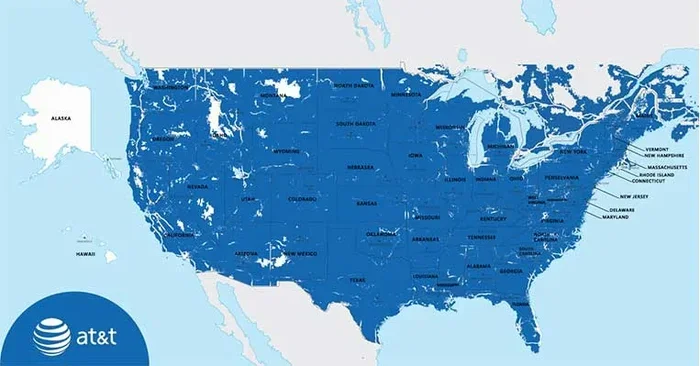
AT&T has one of the largest mobile networks in the United States. AT&T 4G LTE coverage reaches most of the country, including many rural and suburban areas. AT&T 5G coverage is growing but is currently concentrated in urban and suburban markets.
If you live in a major city or suburb, you will likely have strong AT&T mobile coverage. Rural areas may have good 4G LTE coverage but limited or no 5G access. AT&T continues to invest in expanding its network to reach more communities each year.
How to Check Your Coverage
Here are some simple steps to check AT&T coverage for your location:
- Go to the AT&T website or app
- Enter your address or zip code
- Review the available service types and speeds
- Compare plans that fit your needs
If AT&T coverage is limited in your area, you may want to explore other providers or consider AT&T fixed wireless as an alternative to traditional wired internet. You can also check if your neighbor has AT&T service to get a sense of coverage quality in your neighborhood.
AT&T Wi-Fi Speeds and Performance
Speed is one of the most important factors when choosing a Wi-Fi service. AT&T offers a range of speed tiers to match different usage needs, from casual browsing to heavy streaming and gaming.
What Speed Do You Need?
The right speed depends on how you use the internet. Here is a simple breakdown:
- Light use (1-5 Mbps): Email, web browsing, social media
- Medium use (25-50 Mbps): HD streaming on one or two devices
- Heavy use (100-300 Mbps): 4K streaming, gaming, and multiple devices
- Extreme use (500 Mbps+): Large households, smart homes, and heavy downloaders
AT&T Speed Test Tips
If you want to test your AT&T Wi-Fi speed, you can use the AT&T Smart Home Manager app or visit a speed test website. For the most accurate results, connect a device directly to your router with an Ethernet cable first. Then test over Wi-Fi to see the difference.
Several factors can affect your Wi-Fi speed, including:
- Distance from the router
- Walls and obstacles between your device and router
- Number of connected devices
- Time of day and network congestion
- Router age and quality
If you find your speeds are consistently lower than expected, you might want to boost your Wi-Fi signal or consider upgrading your equipment. Sometimes simply changing your Wi-Fi router to a newer model can make a big difference in performance.
AT&T Wi-Fi Pricing and Plans
AT&T offers Wi-Fi plans at various price points to fit different budgets. Pricing depends on the service type, speed tier, and any bundled services you choose. Here is a general overview of what you can expect.
AT&T Fiber Pricing
AT&T Fiber plans typically range from about $55 to $180 per month depending on the speed tier. The 300 Mbps plan is the most affordable option, while the 5 Gbps plan is the most expensive. AT&T often runs promotions that offer lower pricing for the first 12 months.
AT&T Fixed Wireless Pricing
AT&T Fixed Wireless plans are generally more affordable than fiber. Prices typically range from $30 to $60 per month. There are no long-term contracts for most fixed wireless plans, which gives you flexibility if your needs change.
AT&T 5G Home Internet Pricing
AT&T 5G Home Internet plans usually cost between $50 and $70 per month. These plans include a Wi-Fi gateway router and often come with no data caps or generous data allowances. 5G home internet is a competitive option for households that do not have access to fiber.
AT&T Mobile Plans with Hotspot
AT&T wireless plans start around $45 per month for unlimited data with basic hotspot allowance. Premium plans with more hotspot data cost more but offer better value for heavy mobile Wi-Fi users. You can also add line discounts and family plans to reduce the per-line cost.
AT&T Wi-Fi Equipment and Setup
Setting up AT&T Wi-Fi is straightforward. When you sign up for a home internet plan, AT&T provides a Wi-Fi gateway router that combines a modem and router in one device. This equipment handles both the internet connection and the Wi-Fi signal broadcast.
AT&T Gateway Router
The AT&T Gateway router is the centerpiece of your home Wi-Fi setup. It connects to AT&T’s network and creates a Wi-Fi network for your devices. Most AT&T gateways support dual-band Wi-Fi, which means they broadcast both 2.4 GHz and 5 GHz signals for better performance.
To set up your AT&T Wi-Fi, follow these steps:
- Connect the AT&T gateway to your phone jack or fiber outlet
- Plug in the power adapter and wait for the lights to stabilize
- Use the AT&T Smart Home Manager app to configure your network
- Set your Wi-Fi network name and password
- Connect your devices to the new Wi-Fi network
Can You Use Your Own Router with AT&T?
Yes, you can use your own router with AT&T internet service. Many users prefer to upgrade to a better router for improved coverage and faster speeds. If you want to use your own router, you can put the AT&T gateway into bridge mode and connect your router to it.
Using your own router gives you more control over your Wi-Fi settings, security features, and parental controls. Just make sure your router is compatible with AT&T’s network and supports the speeds of your plan.
Finding Your Wi-Fi Password
If you need to find your AT&T Wi-Fi password, you can check it in the AT&T Smart Home Manager app or on the back of your gateway router. The default password is printed on a sticker on the device. For security, we recommend changing the default password to something unique and strong.
If you ever need to delete unwanted Wi-Fi networks from your devices or manage your saved networks, your phone’s Wi-Fi settings make it easy. You can also find your Wi-Fi password in settings on most devices if you have connected to the network before.
Common AT&T Wi-Fi Issues and How to Fix Them
Like any Wi-Fi service, AT&T internet can sometimes have issues. Here are some common problems and simple fixes you can try at home.
Slow Wi-Fi Speeds
Slow speeds are often caused by distance from the router or too many connected devices. Try moving closer to your gateway router and disconnecting devices you are not using. Restarting your gateway can also help clear temporary issues and improve performance.
Wi-Fi Signal Drops
If your Wi-Fi signal keeps dropping, check for physical obstructions like walls or large appliances near your router. Placing your router in a central location in your home can improve coverage. You might also want to consider a Wi-Fi extender for larger homes.
Cannot Connect to Wi-Fi
If a device cannot connect, try forgetting the network and reconnecting with the correct password. Make sure your gateway router is powered on and the indicator lights show a normal connection. If the problem persists, resetting the gateway to factory settings may help.
Is AT&T Wi-Fi Worth It?
AT&T Wi-Fi is a solid choice for many households and users. The company offers a range of service types that can fit different needs, from fiber for power users to fixed wireless for rural customers. AT&T’s mobile network also provides excellent hotspot capabilities for on-the-go connectivity.
That said, AT&T is not the best option everywhere. Coverage and speed availability depend heavily on your location. Before committing to a plan, always check what services are available at your address and compare them with other providers in your area.
Overall, AT&T remains one of the top choices for Wi-Fi service in the United States. Their combination of fiber, fixed wireless, 5G home internet, and mobile hotspot options gives customers flexibility and choice that few competitors can match.
If you are considering AT&T Wi-Fi, start by checking coverage at your address, comparing plans, and reading customer reviews in your area. The right Wi-Fi service can transform how you work, play, and stay connected every day.
Frequently Asked Questions
Does AT&T offer free Wi-Fi?
AT&T does not offer completely free Wi-Fi service, but they do provide Wi-Fi hotspots at many public locations. AT&T hotspots are available at airports, cafes, and other public places. Some AT&T wireless plans also include access to AT&T Wi-Fi at no extra cost.
Can I get AT&T Wi-Fi without a contract?
Yes, AT&T offers no-contract options for fixed wireless and 5G home internet plans. However, some fiber plans may require a contract or commitment. Always check the terms before signing up to make sure you are comfortable with the agreement.
How do I check if AT&T Wi-Fi is available in my area?
You can check AT&T Wi-Fi availability by visiting the AT&T website and entering your zip code or address. The site will show you which service types, speeds, and plans are available at your specific location.
What is the difference between AT&T fiber and AT&T 5G home internet?
AT&T fiber uses underground cables to deliver internet, offering the fastest and most reliable speeds. AT&T 5G home internet uses wireless towers to deliver internet to your home. Fiber is generally faster and more stable, but 5G home internet is available in more areas.
Can I use AT&T mobile hotspot as my main Wi-Fi source?
Yes, you can use AT&T mobile hotspot as your primary Wi-Fi source, especially if you do not have access to home internet. However, keep in mind that hotspot data is limited on most plans, and speeds may be slower than a dedicated home internet connection.
Does AT&T provide a Wi-Fi router with their internet plans?
Yes, AT&T provides a Wi-Fi gateway router with all home internet plans. The gateway combines a modem and router in one device. You can also use your own router if you prefer better performance or features.
=== CONCLUSION ===
AT&T provides Wi-Fi through multiple service options that cater to a wide range of needs and locations. Whether you choose AT&T Fiber, Fixed Wireless, 5G Home Internet, or a mobile hotspot plan, AT&T has the infrastructure and coverage to keep you connected. The key is understanding your local coverage, your speed needs, and your budget before making a decision.
Take the time to explore the different AT&T plans available in your area. Compare speeds, pricing, and features side by side. And remember that AT&T’s network continues to expand each year, bringing better Wi-Fi service to more communities across the country.
With the right AT&T Wi-Fi plan, you can enjoy fast, reliable internet for streaming, working, gaming, and staying connected with family and friends. Start by checking your address for availability and take the next step toward better Wi-Fi today.