Does ATT Have Wi Fi And Internet Coverage In 2024
Yes, AT&T provides both Wi-Fi and internet services in 2024, ranging from fiber and fixed wireless to mobile hotspot options. AT&T internet covers millions of addresses across the United States with various speed tiers to fit different needs. Whether you want home broadband, portable Wi-Fi, or mobile data, AT&T has options that can work for you.
Does AT&T have Wi-Fi and internet? The short answer is yes. AT&T is one of the largest telecommunications companies in the United States, and it offers a wide range of internet and Wi-Fi services for both home and mobile use. But the full story is more detailed than a simple yes or no.
In 2024, AT&T continues to expand its internet offerings. From high-speed fiber connections to fixed wireless and mobile 5G hotspots, AT&T has built a diverse portfolio of connectivity options. Whether you are a casual internet user, a remote worker, or a family that streams movies all day, AT&T likely has a plan that fits your lifestyle.
But what exactly does AT&T offer? How does the coverage look in your area? And is AT&T internet worth the money? In this guide, we break down everything you need to know about AT&T Wi-Fi and internet coverage in 2024. We will cover plans, speeds, equipment, coverage maps, and practical tips to get the most out of your AT&T connection.
So let us dive in and explore the full picture of AT&T internet and Wi-Fi services. By the end of this article, you will have a clear understanding of what AT&T offers and whether it is the right choice for your home or business.
Key Takeaways
- AT&T offers multiple internet types: fiber, fixed wireless, DSL, and 5G mobile hotspots to suit different locations and needs.
- Wi-Fi coverage depends on your plan and equipment: AT&T provides routers, but you can also buy your own.
- AT&T internet plans range from basic to gigabit speeds: there is an option for every budget and usage level.
- Coverage is not universal: AT&T availability varies by location, so checking the coverage map is essential.
- Portable Wi-Fi options exist: AT&T mobile hotspots let you get internet on the go without a home connection.
- Boosting your signal is possible: AT&T offers tools and tips to improve Wi-Fi coverage throughout your home.
📑 Table of Contents
- What Is AT&T Wi-Fi and Internet Service?
- AT&T Internet Plans and Coverage Options
- How AT&T Wi-Fi Coverage Works
- Setting Up AT&T Wi-Fi at Home
- AT&T Internet for Mobile Devices
- Is AT&T Wi-Fi and Internet Worth It in 2024?
- Common Mistakes to Avoid with AT&T Wi-Fi
- AT&T Wi-Fi and Internet in 2024: Final Thoughts
What Is AT&T Wi-Fi and Internet Service?
AT&T provides internet access through several different technologies. Each type of service comes with its own strengths, limitations, and ideal use cases. Understanding these differences helps you choose the right plan for your needs.
AT&T Fiber Internet
AT&T Fiber is the company’s premium internet service. It uses fiber-optic cables to deliver extremely fast speeds. Fiber internet is known for its reliability, symmetrical upload and download speeds, and low latency. AT&T Fiber plans offer speeds up to 5 Gbps in select areas, making them ideal for large households, gamers, and heavy streamers.
Fiber internet also comes with a static IP address option and no data caps on most plans. This makes it a top choice for people who work from home or run businesses from their houses. AT&T Fiber is available in many metropolitan areas and continues to expand into suburban and rural regions.
AT&T Fixed Wireless Internet
Fixed wireless internet uses radio signals transmitted from a tower to a receiver at your home. AT&T offers fixed wireless as an alternative to fiber and DSL. This service is particularly useful in rural areas where laying fiber cables is not cost-effective. Fixed wireless speeds typically range from 10 Mbps to 50 Mbps, which is enough for browsing, streaming, and video calls.
One advantage of fixed wireless is that it does not require a phone line or cable connection. You just need a clear line of sight to an AT&T tower. This makes setup quick and straightforward for many households.
AT&T DSL Internet
DSL (Digital Subscriber Line) internet uses existing phone lines to deliver internet access. AT&T DSL is one of the older technologies in AT&T’s lineup, but it still serves millions of customers. DSL speeds are generally lower than fiber or fixed wireless, typically ranging from 5 Mbps to 100 Mbps depending on your distance from the central office.
DSL is widely available because it uses the same infrastructure as traditional landline phones. However, speeds can vary significantly based on your location. If you live far from the provider’s central hub, you may experience slower connections.
AT&T 5G Mobile Hotspot and Internet
AT&T also offers mobile internet through its 5G network. You can use an AT&T 5G hotspot device or your smartphone’s hotspot feature to create a Wi-Fi network on the go. This is a great option for people who travel frequently or live in areas where wired internet is not available.
AT&T’s 5G network covers large portions of the United States. Speeds can be very fast in areas with strong 5G coverage, sometimes rivaling home broadband connections. However, 5G coverage is not uniform, and speeds can drop in rural or indoor locations.
AT&T Internet Plans and Coverage Options
AT&T offers a variety of internet plans designed for different needs and budgets. Let us take a closer look at what is available in 2024.
AT&T Home Internet Plans
AT&T home internet plans fall into several categories based on the technology used. Fiber plans offer the fastest speeds and most reliable performance. Fixed wireless plans provide a solid mid-range option for rural and suburban areas. DSL plans are the most affordable but come with slower speeds.
Most AT&T home internet plans include a Wi-Fi router as part of the package. The router broadcasts a Wi-Fi signal throughout your home, allowing all your devices to connect wirelessly. AT&T also offers mesh Wi-Fi systems for larger homes that need better coverage.
When choosing a plan, consider your household’s internet usage. A single person who browses the web and checks email needs far less bandwidth than a family of five that streams 4K videos, plays online games, and works from home simultaneously.
AT&T Mobile Data and Hotspot Plans
AT&T mobile plans often include a generous amount of high-speed data. Many unlimited plans allow you to use your phone as a mobile hotspot, turning your cellular connection into a Wi-Fi network for laptops, tablets, and other devices.
AT&T also sells dedicated hotspot devices, such as the Netgear Nighthawk. These devices plug into AT&T’s cellular network and broadcast a Wi-Fi signal, giving you internet access anywhere there is AT&T coverage. This is a popular choice for RV travelers, remote workers, and people in areas without wired internet.
If you are interested in portable internet options, you might also want to check whether portable Wi-Fi devices work with AT&T’s network. Compatibility depends on the device and the network bands it supports.
AT&T Internet Availability and Coverage Map
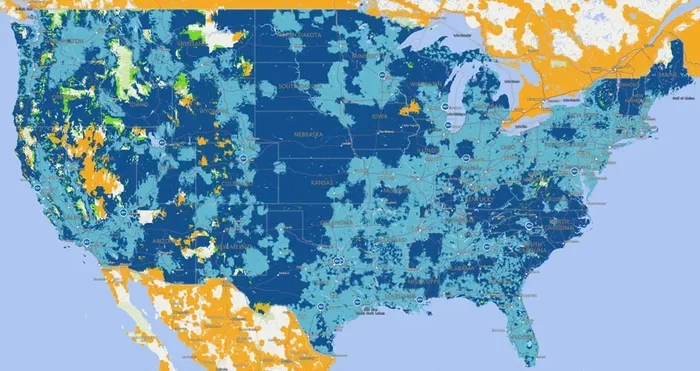
AT&T internet availability varies widely by location. Fiber internet is concentrated in urban and suburban areas, while fixed wireless and DSL have broader reach. To check if AT&T internet is available at your address, you can use the AT&T internet availability tool on their website.
The coverage map shows which technologies are available in your area and what speeds you can expect. Keep in mind that advertised speeds are typically the maximum possible, and actual speeds can vary based on network congestion, weather, and your distance from the signal source.
How AT&T Wi-Fi Coverage Works
AT&T Wi-Fi coverage depends on several factors, including the type of internet service you have, the equipment you use, and your home’s layout. Understanding these factors helps you maximize your Wi-Fi performance.
AT&T Routers and Gateway Devices
AT&T provides a gateway device that combines a modem and a Wi-Fi router in one unit. This device connects to AT&T’s network and broadcasts a Wi-Fi signal throughout your home. The standard AT&T gateway works well for small to medium-sized homes, but it may struggle in larger houses with thick walls or multiple floors.
If you find that your Wi-Fi signal does not reach every room, you have several options. You can move the gateway to a central location, add a Wi-Fi extender, or upgrade to a mesh Wi-Fi system. Some users also prefer to purchase their own router for better performance and more features.
Factors That Affect AT&T Wi-Fi Signal Strength
Several factors influence how well your AT&T Wi-Fi signal reaches different parts of your home:
- Distance from the router: The farther you are from the gateway, the weaker the signal becomes.
- Wall materials: Concrete, brick, and metal can block or weaken Wi-Fi signals significantly.
- Interference from other devices: Microwaves, baby monitors, and other electronics can interfere with Wi-Fi signals.
- Number of connected devices: More devices sharing the same connection can slow down your Wi-Fi speeds.
- Router placement: Placing the router in a central, elevated location improves coverage throughout the home.
Boosting Your AT&T Wi-Fi Signal
If you are not getting the Wi-Fi coverage you need, there are several steps you can take. First, try moving your gateway to a more central location in your home. Avoid placing it in closets, basements, or near large metal objects.
You can also add a Wi-Fi extender or mesh node to boost the signal in weak spots. For outdoor coverage, such as in your yard or garage, you may need a weatherproof access point. If you want to improve coverage outside your home, boosting your Wi-Fi signal outdoors is a common challenge that many AT&T customers face.
Setting Up AT&T Wi-Fi at Home
Setting up AT&T Wi-Fi at home is a straightforward process. Whether you are a tech novice or a seasoned user, you can get your network up and running in less than an hour.
Step-by-Step AT&T Wi-Fi Setup
- Install the gateway: Connect the AT&T gateway to your phone line, fiber line, or fixed wireless antenna, depending on your service type.
- Power on the device: Plug in the gateway and wait for the lights to stabilize. This usually takes a few minutes.
- Connect to the default Wi-Fi network: Look for the network name and password on the sticker on the bottom of the gateway.
- Access the AT&T Smart Home Manager app: This app lets you manage your Wi-Fi settings, change passwords, and check connected devices.
- Customize your network: Change the Wi-Fi name and password to something you can easily remember. Enable guest access if needed.
- Test your connection: Run a speed test to make sure you are getting the speeds you are paying for.
Tips for Optimizing Your AT&T Wi-Fi Network
- Place the gateway in a central, open area away from walls and obstructions.
- Use the 5 GHz band for faster speeds over short distances.
- Use the 2.4 GHz band for better range through walls and floors.
- Restart your gateway regularly to keep the connection stable.
- Update your gateway firmware when prompted to ensure the latest security patches.
- Limit the number of devices connected to your network if speeds drop.
AT&T Internet for Mobile Devices
AT&T is well known for its mobile network, and its internet services extend naturally to mobile devices. Whether you use an iPhone, Android phone, or tablet, AT&T offers several ways to stay connected.
AT&T Wi-Fi Calling
AT&T Wi-Fi calling lets you make phone calls over a Wi-Fi network instead of using the cellular network. This feature is especially useful in areas with weak cellular coverage but strong Wi-Fi. You can enable Wi-Fi calling in your phone’s settings, and calls will automatically switch to Wi-Fi when needed.
Using AT&T Mobile Hotspot
AT&T unlimited plans typically include mobile hotspot data. You can turn your phone into a Wi-Fi hotspot and connect laptops, tablets, and other devices. The amount of high-speed hotspot data varies by plan, so check your plan details before relying on it as your primary internet source.
For a more permanent mobile internet setup, consider a dedicated hotspot device. These devices are designed specifically for internet access and often have better battery life and stronger antennas than smartphones. If you want to use your phone and hotspot simultaneously, you might also want to explore options like using a smartwatch independently of your phone while your phone serves as the hotspot.
Connecting AT&T Wi-Fi to Your TV
Many people want to connect their TV to AT&T Wi-Fi for streaming services like Netflix, Hulu, and Disney+. Most smart TVs support Wi-Fi connections, and you can enter your AT&T Wi-Fi password directly in the TV’s settings. If your TV does not have built-in Wi-Fi, you can use a streaming device like a Roku or Chromecast to connect wirelessly.
For a more stable connection, you can also connect your TV directly to your Wi-Fi router using an Ethernet cable. This eliminates wireless interference and provides the most reliable streaming experience.
Is AT&T Wi-Fi and Internet Worth It in 2024?
Deciding whether AT&T internet is worth it depends on your location, usage needs, and budget. Let us look at the pros and cons to help you make an informed decision.
Pros of AT&T Internet
- Multiple technology options: Fiber, fixed wireless, DSL, and 5G give you flexibility based on what is available in your area.
- Fast fiber speeds: AT&T Fiber offers some of the fastest residential internet speeds available, up to 5 Gbps.
- No data caps on most plans: Many AT&T internet plans do not impose data limits, which is great for heavy users.
- Bundled services: You can combine internet with AT&T TV, phone service, and mobile plans for potential savings.
- Widespread coverage: AT&T serves millions of customers across the United States, making it one of the most accessible providers.
Cons of AT&T Internet
- Limited fiber availability: Fiber internet is not available in all areas, and expansion is still ongoing.
- Equipment rental fees: AT&T charges a monthly fee for its gateway device, which adds to your bill over time.
- Promotional pricing: Introductory rates often increase after the first year or two, so read the fine print carefully.
- Customer service reviews: Like many large ISPs, AT&T has received mixed reviews for customer service and billing practices.
- Contract requirements: Some plans require a contract commitment, which can be a drawback if you prefer flexibility.
Comparing AT&T to Other Providers
When comparing AT&T to other internet providers, several factors stand out. AT&T Fiber competes well with Verizon Fios and Google Fiber in terms of speed and reliability. In areas where fiber is not available, AT&T fixed wireless and DSL may be compared to cable internet from providers like Xfinity or Cox. Cable internet often offers higher speeds in urban areas, but AT&T’s fiber and fixed wireless options are strong alternatives, especially for rural customers.
Ultimately, the best provider for you depends on what is available at your address. Use AT&T’s coverage checker and compare plans side by side with local competitors before making a decision.
Common Mistakes to Avoid with AT&T Wi-Fi
Even with a great internet plan, poor setup and habits can hurt your experience. Here are some common mistakes AT&T customers make and how to avoid them.
- Placing the router in a corner or basement: This limits coverage to the rest of your home. Keep it central and elevated.
- Ignoring firmware updates: Outdated firmware can cause security vulnerabilities and performance issues.
- Not using the 5 GHz band: The 2.4 GHz band is crowded and slower. Use 5 GHz for devices that need speed.
- Overlooking the Smart Home Manager app: This app gives you tools to monitor and optimize your network.
- Assuming all plans include Wi-Fi equipment: Some plans require you to rent or purchase a router separately. Check your plan details.
AT&T Wi-Fi and Internet in 2024: Final Thoughts
AT&T remains a strong player in the internet and Wi-Fi market in 2024. With fiber, fixed wireless, DSL, and 5G options, the company offers something for almost every customer. Whether you need blazing-fast fiber for a busy household or a mobile hotspot for travel, AT&T has you covered.
The key to getting the most out of AT&T internet is to choose the right plan for your needs, set up your equipment properly, and take advantage of the tools AT&T provides to manage and optimize your connection. Check availability in your area, compare plans, and do not be afraid to reach out to AT&T customer service if you need help.
Internet connectivity is more important than ever in 2024. Whether you work, learn, stream, or play, a reliable Wi-Fi connection makes all the difference. AT&T has the infrastructure and the plans to deliver that reliability to millions of Americans. With the right setup and a clear understanding of your options, you can enjoy fast, dependable internet from AT&T for years to come.
Before you sign up, take a moment to review your needs, check the coverage map, and compare plans. And if you are considering buying your own router instead of renting, make sure it is compatible with AT&T’s network for the best results.
Frequently Asked Questions
Does AT&T offer Wi-Fi internet in rural areas?
Yes, AT&T offers fixed wireless and DSL internet in many rural areas. Fixed wireless uses radio signals from a tower to provide internet access without needing a phone line or cable. Check AT&T’s coverage map to see what options are available at your specific address.
Can I use my own Wi-Fi router with AT&T internet?
Yes, you can use your own router with AT&T internet. However, you may need to put AT&T’s gateway into bridge mode to avoid conflicts. Using your own router can give you more features and better performance, especially in larger homes.
What speeds does AT&T internet offer in 2024?
AT&T internet speeds range from 5 Mbps on basic DSL plans to 5 Gbps on fiber plans. Most home plans fall in the 100 Mbps to 1000 Mbps range. Mobile hotspot speeds depend on your plan and local 5G coverage.
Is AT&T Wi-Fi free with an internet plan?
AT&T includes a Wi-Fi gateway with most internet plans, but there is usually a monthly rental fee for the equipment. Some plans include the gateway at no extra cost as part of a bundle. You can also purchase your own compatible router to avoid rental fees.
How can I check AT&T internet coverage at my address?
Visit the AT&T website and use their internet availability tool. Enter your address to see which technologies and speed tiers are available at your location. You can also call AT&T customer service for a personalized check.
Does AT&T have data caps on internet plans?
Most AT&T internet plans, especially fiber plans, do not have data caps. However, some DSL and fixed wireless plans may have data limits. Always check the specific terms of your plan before signing up to avoid unexpected charges.