Are GPU Coolers A Thing That Every PC Builder Needs
GPU coolers are absolutely a thing, and they play a huge role in keeping your graphics card running smoothly. Whether you are building a new PC or upgrading an existing one, understanding GPU cooling can save you from overheating, performance drops, and even hardware failure. This guide covers everything you need to know about GPU coolers, from air and liquid options to when you actually need one.
Let us talk about something that does not get enough attention in the PC building world. GPU coolers are a real thing, and they matter more than most people think. Your graphics card is one of the most expensive parts in any computer. It also happens to be one of the hottest. Without proper cooling, your GPU will slow down, shut off, or worse, fail completely.
Whether you are a first-time builder or a seasoned PC enthusiast, understanding how GPU coolers work can change everything about your setup. This guide breaks it all down in simple terms. You will learn what types of coolers exist, when you need one, and how to pick the right one for your PC build. No jargon, no fluff, just straight-up useful info.
So grab a coffee, settle in, and let us dive into the world of GPU cooling. By the end of this article, you will know exactly what kind of cooler your graphics card needs and why it matters so much.
Key Takeaways
- GPU coolers are essential: They keep your graphics card at safe temperatures and prevent thermal throttling.
- Air coolers and liquid coolers are the two main types: Each has its own pros and cons depending on your build.
- Aftermarket coolers can boost performance: Better cooling allows for higher clock speeds and more stable overclocks.
- Not every build needs an aftermarket cooler: Stock coolers work fine for most casual users.
- Case airflow matters just as much: A great GPU cooler won’t help if your case has poor airflow.
- Thermal paste and pads are small but mighty: They make a big difference in heat transfer.
- Choosing the right cooler depends on your budget and use case: Gamers, creators, and miners have different needs.
📑 Table of Contents
What Are GPU Coolers and Why Do They Matter
A GPU cooler is exactly what it sounds like. It is the component attached to your graphics card that keeps it from overheating. Every GPU generates heat when it works. The more demanding the task, the more heat it produces. Without a cooler, your graphics card would reach dangerous temperatures in seconds.
Think of it like a car engine. Your engine needs oil and a radiator to stay at the right temperature. Your GPU needs the same kind of system. The cooler pulls heat away from the chip and moves it out of your PC case. Simple concept, but the details make a big difference.
How GPU Coolers Work
Most GPU coolers use a combination of metal and air. The heatsink sits directly on top of the GPU chip. It is usually made of copper or aluminum, both great at absorbing heat. Fans then blow air across the heatsink, carrying the heat away.
Some coolers also use thermal paste. This is a gooey material that fills tiny gaps between the GPU chip and the heatsink. Without it, air pockets would form and block heat transfer. It is a small thing, but it makes a huge difference in how well your cooling solution works.
Here is a quick look at the basic parts of a GPU cooler:
- Heatsink: The metal piece that absorbs heat from the GPU.
- Fan or fans: Moves air across the heatsink to dissipate heat.
- Thermal paste: Fills gaps for better heat transfer.
- Heat pipes: Tubes that carry heat from the chip to the fins.
- Back plate: Provides structural support and helps with heat dissipation on the back of the card.
The Role of Thermal Paste in GPU Cooling
Do not sleep on thermal paste. It is one of the most overlooked parts of any GPU cooler setup. When you install a new graphics card, the paste is already applied. But over time, it can dry out. When that happens, heat does not transfer as well.
Reapplying thermal paste is easy and cheap. A small tube costs under ten dollars and can make your GPU temperature drop by several degrees. If your card is running hot, this is one of the first things you should check.
Here are a few quick tips for working with thermal paste:
- Less is more. A small pea-sized dot in the center works perfectly.
- Do not spread it with your finger. Let the pressure of the cooler do the work.
- Clean old paste with isopropyl alcohol before applying new paste.
- Replace thermal paste every two to three years for best results.
Air Coolers vs Liquid Coolers for GPUs
When it comes to GPU coolers, you have two main options: air cooling and liquid cooling. Both do the same job, but they go about it in very different ways. Let us break down each one so you can figure out what works best for your setup.
Open-Air and Blower-Style Air Coolers
Air coolers are the most common type of GPU cooler you will find. They use fans and metal fins to move heat away from the card. There are two main styles you should know about.
Open-air coolers are the most popular. They have fans that blow air across the heatsink and push it out the sides of the card. This works great for most builds because it keeps the GPU itself cool. The downside is that it heats up the air inside your PC case. If you have a small case with poor case airflow, this can become a problem.
Blower-style coolers work differently. They push air through the heatsink and out the back of the card. This is great for multi-GPU setups because it sends hot air out of the case instead of recirculating it. Blower coolers are often used in servers and workstations. However, they tend to be louder and less efficient for single-card setups.
Liquid Cooling Solutions for GPUs
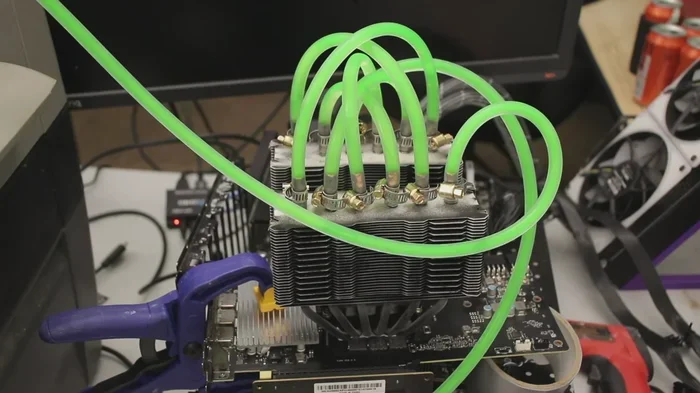
Liquid cooling for GPUs has become more popular in recent years. Instead of using fans and metal fins, liquid coolers use water or coolant to absorb heat. The liquid then travels through tubes to a radiator, where fans cool it down before cycling it back.
There are two main types of liquid GPU coolers:
- AIO (All-in-One) coolers: These are sealed systems that come pre-filled. You install them like an air cooler, but they offer much better cooling performance. AIO GPU coolers are a great middle ground between stock coolers and full custom loops.
- Custom loops: These are fully custom setups with separate pumps, radiators, reservoirs, and water blocks. They offer the best cooling possible but are expensive and complex to set up.
Here is a quick comparison of the main types of GPU coolers:
| Cooler Type | Performance | Price Range | Ease of Installation | Best For |
|---|---|---|---|---|
| Stock Air Cooler | Good | Included | Very Easy | Casual gaming and everyday use |
| Aftermarket Air Cooler | Very Good | $30 – $100 | Easy | Budget builds and moderate overclocking |
| AIO Liquid Cooler | Excellent | $80 – $200 | Moderate | High-performance builds and heavy overclocking |
| Custom Liquid Loop | Best Possible | $300+ | Difficult | Enthusiasts and extreme overclocking |
As you can see, there is a cooling solution for every budget. You do not need to spend hundreds of dollars to get good results. Even a basic aftermarket air cooler can make a noticeable difference compared to stock cooling.
How GPU Cooling Affects Your Performance
Here is something that surprises a lot of people. Your GPU cooler does not just affect temperature. It directly impacts how fast and how smoothly your graphics card performs. Let us look at why that is.
Thermal Throttling Explained
When your GPU gets too hot, it slows itself down to prevent damage. This is called thermal throttling. It is a safety feature built into every modern graphics card. The problem is that it tanks your performance when you need it most.
Imagine you are in the middle of a competitive game or rendering a video. Your frame rate drops. Your render times increase. All because your GPU temperature got too high. A good GPU cooler prevents this from happening.
Most modern GPUs start thermal throttling around 85 to 90 degrees Celsius. A well-designed cooling solution keeps your card well below that threshold. This means smoother gameplay, faster rendering, and a longer lifespan for your hardware.
Overclocking and Temperature
If you like to push your hardware beyond factory settings, cooling is everything. Overclocking means running your GPU at higher speeds than the manufacturer intended. This generates more heat and puts more stress on the chip.
A stock cooler might handle a mild overclock just fine. But if you want to push your card hard, you need an aftermarket GPU cooler that can keep up. Better cooling means higher stable clock speeds and better frame rates.
Here are some quick tips for overclocking with temperature in mind:
- Always monitor your GPU temperature during stress tests.
- Increase clock speeds in small increments.
- Stop increasing if your card hits 85 degrees Celsius.
- Use software like MSI Afterburner to fine-tune your settings.
- Invest in a quality cooling solution before attempting serious overclocks.
Quick Tip: A 10-degree drop in GPU temperature can give you an extra 5 to 10 percent performance headroom when overclocking. That is huge for gaming and rendering workloads.
When Do You Actually Need an Aftermarket GPU Cooler
This is the question most builders ask, and the answer is not always straightforward. Stock coolers that come with your graphics card are designed to work well enough for most people. But there are situations where an aftermarket GPU cooler makes a real difference.
Signs Your Current Cooler Is Not Enough
How do you know if your current cooling setup is falling short? Watch for these warning signs:
- Your GPU temperature stays above 80 degrees Celsius under normal load.
- Your fans are running loudly all the time, even during light tasks.
- You experience frame drops or stuttering during gaming sessions.
- Your PC shuts down unexpectedly under heavy load.
- Your card feels hot to the touch on the back plate or shroud.
If you notice any of these, it is time to look into upgrading your GPU coolers. Ignoring the problem can lead to long-term damage and reduced hardware lifespan.
Common Mistakes to Avoid
Even experienced builders make mistakes when it comes to GPU cooling. Here are some of the most common ones:
- Skipping thermal paste: Some people install a cooler without applying fresh paste. This leads to poor heat transfer and higher temperatures.
- Ignoring case airflow: A great GPU cooler will not help if hot air has nowhere to go. Make sure your case has good intake and exhaust fans.
- Overtightening cooler screws: Too much pressure can damage the GPU or warp the PCB. Tighten evenly and gently.
- Neglecting dust buildup: Dust clogs heatsinks and blocks fans. Clean your cooling solution every few months.
- Choosing the wrong cooler size: Not every cooler fits every card. Check dimensions and compatibility before buying.
Avoiding these mistakes will keep your graphics card running cool and quiet for years to come.
How to Choose the Right GPU Cooler for Your Build
Choosing the right GPU cooler comes down to a few key factors. Your budget, your use case, and your PC case all play a role. Let us walk through how to make the best choice.
Budget Options for Great Cooling
You do not need to spend a fortune to get excellent cooling. There are plenty of affordable GPU coolers that outperform stock solutions by a wide margin. Look for open-air aftermarket coolers in the $30 to $60 range. Brands like Arctic, Deepcool, and Xigmatek offer great options at budget-friendly prices.
For most casual and mid-range gaming setups, a solid air cooler is all you need. It will keep your GPU temperatures in check and provide quiet operation. This is the sweet spot for most builders who want good performance without breaking the bank.
Premium Cooling Solutions for Enthusiasts
If you are pushing your hardware to the limit, you need premium cooling. AIO liquid coolers for GPUs are a popular choice among enthusiasts. They offer dramatically better cooling than air solutions and look incredible in a transparent case.
For the absolute best performance, custom liquid loops are the way to go. These setups use separate components like a water block, pump, radiator, and reservoir to keep your GPU ice cold. They are expensive and require maintenance, but the results are unmatched.
Expert Insight: According to hardware reviewers at major tech outlets, aftermarket GPU coolers can reduce GPU temperatures by 10 to 25 degrees Celsius compared to stock solutions. That is a massive improvement that translates directly into better performance and longer component life.
Matching Your Cooler to Your Use Case
Different users have different cooling needs. Here is a quick guide to help you decide:
- Casual gamers: A basic aftermarket air cooler is more than enough. Your GPU will stay cool during light to moderate gaming sessions.
- Hardcore gamers: Consider a high-end air cooler or an AIO liquid cooler. These handle the heat from long gaming sessions and demanding titles.
- Content creators and 3D renderers: Liquid cooling is highly recommended. Sustained workloads generate a lot of heat, and a good cooling solution keeps your card stable.
- Overclockers: Go with a premium air cooler or AIO liquid cooler. You need every degree of cooling you can get to push your GPU past its limits.
- Crypto miners: A blower-style cooler or AIO liquid setup works best. Miners run their GPUs at full load 24/7, so cooling is critical.
No matter what your use case is, there is a GPU cooler out there that fits your needs and your budget.
Final Thoughts on GPU Coolers
GPU coolers are absolutely a thing, and they are one of the most important parts of any serious PC build. Your graphics card works hard, and it generates a lot of heat. Without proper cooling, you are leaving performance and lifespan on the table.
The good news is that you have options. From simple air coolers to full custom liquid loops, there is a cooling solution for every budget and every use case. You do not need to be an expert to make a smart choice. Just understand your needs, do a little research, and pick the right cooler for your PC build.
Take care of your GPU cooler, and it will take care of your graphics card. Keep your case airflow clean, replace thermal paste when needed, and monitor your GPU temperature regularly. These small habits add up to a longer-lasting, better-performing system.
So yes, GPU coolers are a real thing, and every PC builder should pay attention to them. Your graphics card will thank you for it.
Frequently Asked Questions
Do I need aftermarket GPU coolers if I am not overclocking?
Not necessarily. Stock coolers that come with most graphics cards work fine for everyday gaming and general use. However, if you notice high temperatures or loud fan noise, an aftermarket GPU cooler can improve thermals and reduce noise significantly.
Can I use an air cooler and a liquid cooler on the same GPU?
No, you would choose one or the other. Air coolers and liquid coolers are different types of cooling solutions for GPUs. Most users benefit from a single high-quality cooler rather than trying to combine both systems on one card.
How often should I replace thermal paste on my GPU?
Every two to three years is a good rule of thumb. If you notice your GPU temperature creeping up over time, it is likely time to reapply thermal paste. This simple maintenance step can restore cooling performance and extend your card’s lifespan.
Are blower-style GPU coolers better for multi-GPU setups?
Yes, blower-style GPU coolers are designed to push hot air out the back of the case, which makes them ideal for multi-GPU configurations. They prevent hot air from recirculating inside the PC case, keeping all cards running at safer temperatures.
Do GPU coolers make a noticeable difference in gaming performance?
Yes, they can. Better GPU coolers prevent thermal throttling, which means your graphics card can maintain higher clock speeds for longer periods. This results in smoother frame rates and more consistent performance, especially during demanding games or long gaming sessions.
Is liquid cooling for GPUs worth the extra cost?
For most users, a quality air cooler is more than sufficient. However, if you are overclocking heavily, running sustained workloads, or building a compact PC build with limited airflow, an AIO liquid cooler is absolutely worth the investment. It provides superior cooling performance and can extend the life of your graphics card.