Do Smart Locks Use Wi Fi Here Is Everything You Need To Know
Do Smart Locks Use Wi Fi? Yes, many smart locks connect to your home Wi-Fi network, but some use Bluetooth or a hub instead. Understanding how these locks work helps you choose the right one for your smart home security needs. This guide covers everything from connectivity types to setup tips and real-world performance.
Do Smart Locks Use Wi Fi? If you have been thinking about upgrading your front door, this question probably comes up a lot. The short answer is yes, many smart locks do use Wi-Fi. But not all of them do. Some rely on Bluetooth, while others need a separate hub to work. This might sound confusing at first, but it is actually quite simple once you break it down.
Smart locks have changed the way we think about home security. Instead of fumbling with keys, you can unlock your door with a tap on your phone. You can even let a delivery person in while you are at work. But how does this all work behind the scenes? And which type of smart lock is right for you?
In this guide, we will walk through everything you need to know. We will cover how Wi-Fi smart locks work, what alternatives exist, and what to look for before you buy. By the end, you will feel confident making the right choice for your home.
Key Takeaways
- Wi-Fi smart locks offer remote access: You can lock and unlock your door from anywhere with an internet connection.
- Bluetooth locks work without Wi-Fi: They connect directly to your phone and are ideal for short-range use.
- Hub-based locks need a bridge device: Brands like Zigbee or Z-Wave require a hub to connect to your network.
- Battery life varies by lock type: Wi-Fi locks tend to drain batteries faster than Bluetooth-only models.
- Installation is usually simple: Most smart locks replace your existing deadbolt in minutes.
- Security features differ across brands: Look for encryption, auto-lock, and two-factor authentication.
- Compatibility matters: Check if the lock works with Alexa, Google Home, or Apple HomeKit before buying.
📑 Table of Contents
- What Is a Smart Lock and How Does It Work?
- Do Smart Locks Use Wi Fi or Bluetooth?
- Benefits of Wi-Fi Smart Locks for Your Home
- How to Choose the Right Smart Lock
- Setting Up Your Wi-Fi Smart Lock
- Common Mistakes to Avoid with Smart Locks
- Expert Insights on Smart Lock Connectivity
- Comparison: Wi-Fi vs Bluetooth vs Hub-Based Smart Locks
- Popular Smart Lock Brands Worth Considering
- Future of Smart Lock Technology
- Final Thoughts
What Is a Smart Lock and How Does It Work?
A smart lock is a door lock that connects to your phone or home network without a traditional key. You can control it using an app, a voice assistant, or even a fingerprint. These locks replace your existing deadbolt, so the installation process is usually straightforward.
Most smart locks use one of three connection methods. The first is Wi-Fi, which connects directly to your home router. The second is Bluetooth, which pairs with your phone over short distances. The third uses a hub, which acts as a bridge between the lock and your network. Each method has its own strengths and weaknesses.
When you ask Do Smart Locks Use Wi Fi, the answer depends on the model you choose. Some locks are Wi-Fi only, while others offer multiple connection options. This gives you flexibility depending on your home setup and needs.
How Wi-Fi Smart Locks Connect to Your Network
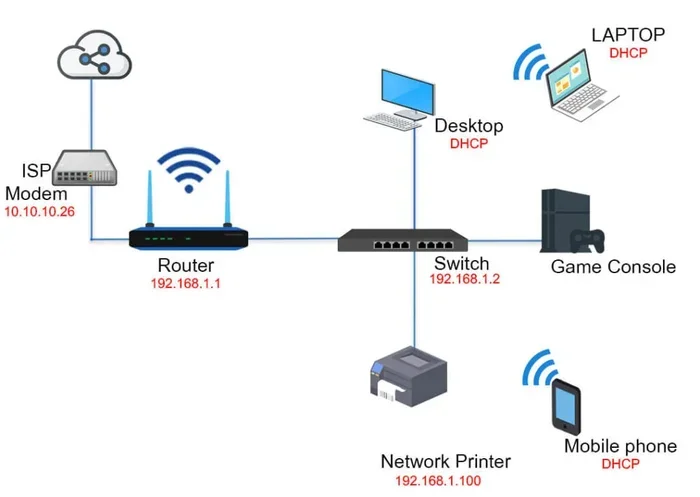
Wi-Fi smart locks connect directly to your wireless router. Once set up, they become part of your home network. This means you can control them from anywhere with an internet connection. You do not need to be within Bluetooth range to lock or unlock your door.
The setup process usually involves downloading the lock app, connecting to the lock through Bluetooth first, and then linking it to your Wi-Fi network. After that, the lock stays connected to your router at all times. This constant connection is what enables remote access and real-time notifications.
Do Smart Locks Use Wi Fi or Bluetooth?
This is one of the most common questions people ask. The truth is, both Wi-Fi and Bluetooth smart locks exist, and they serve different purposes. Let us look at how each one works and when you might prefer one over the other.
Wi-Fi Smart Locks
Wi-Fi smart locks connect directly to your home router. This gives you the ability to control the lock from anywhere in the world. You can check if your door is locked while you are on vacation. You can unlock it for a friend who is standing at your front door.
Because Wi-Fi smart locks stay connected at all times, they send real-time alerts to your phone. You get notified every time someone locks or unlocks the door. This level of monitoring is a big reason people choose Wi-Fi models for their smart home security setup.
However, Wi-Fi locks tend to use more battery power. Since they maintain a constant connection to the router, the batteries can drain faster than with Bluetooth-only locks. Most Wi-Fi smart locks still last several months on a single set of batteries, but you will need to replace them more often than with other types.
Bluetooth Smart Locks
Bluetooth smart locks pair directly with your phone. They do not need a Wi-Fi connection to function. When you walk up to your door, the lock detects your phone and unlocks automatically. This is called proximity unlocking, and it works really well for daily use.
The main limitation of Bluetooth locks is range. Bluetooth typically works within about 30 feet. If you are at the grocery store and want to let someone into your house, a Bluetooth lock will not help. You need to be within range for the lock to respond.
Bluetooth locks also tend to last longer on a single charge. Because they do not maintain a constant internet connection, they use less power. Some Bluetooth smart locks go up to a year or more between battery replacements.
Hub-Based Smart Locks
Hub-based locks use protocols like Zigbee or Z-Wave. They connect to a bridge device, which then links to your Wi-Fi network. The hub talks to the lock, and the lock talks to the hub, which talks to your router.
This setup is popular in homes that already use a smart home hub like Samsung SmartThings or Wink. The hub handles the communication between the lock and your network, so the lock itself uses very little power. Hub-based locks often have excellent battery life.
The downside is the extra hardware. You need to buy and set up a hub, which adds cost and complexity. If you do not already have a smart home hub, this might not be the best option for you.
Benefits of Wi-Fi Smart Locks for Your Home
Now that we have answered Do Smart Locks Use Wi Fi, let us look at why Wi-Fi smart locks are worth considering. There are several real benefits that make them stand out from traditional locks and Bluetooth-only models.
Remote Access and Control
The biggest advantage of a Wi-Fi smart lock is remote access. You can lock or unlock your door from any location. Forgot to lock up before leaving for work? No problem. Just open the app and tap the lock icon. You can also grant temporary access to guests, cleaners, or dog walkers from anywhere.
This feature is especially helpful for families. Parents can let their kids inside after school. Couples can share access without copying keys. And you can revoke access at any time without changing the locks.
Real-Time Notifications
Wi-Fi smart locks send instant alerts to your phone. You know exactly when someone locks or unlocks your door. This gives you peace of mind, especially when you are not at home. If an unexpected unlock event happens, you will know about it right away.
Integration with Smart Home Ecosystems
Wi-Fi smart locks work well with voice assistants like Alexa, Google Assistant, and Siri. You can lock your door just by speaking. Better yet, you can create automations. For example, when you say “goodnight,” your lock can auto-lock, turn off the lights, and arm your security system.
This level of integration is what makes a Wi-Fi smart lock feel truly smart. It becomes part of a larger home automation system rather than a standalone device.
Keyless Entry Options
Most Wi-Fi smart locks offer multiple ways to unlock the door. You can use the app, a keypad, a fingerprint, or even a physical backup key. Some locks support temporary codes that expire after a set time. This is perfect for Airbnb hosts or anyone who needs to give short-term access.
How to Choose the Right Smart Lock
With so many options on the market, choosing the right smart lock can feel overwhelming. Here are the key factors to consider before you make a purchase.
Check Your Door Compatibility
Not every smart lock fits every door. Most smart locks work with standard American doors that have a single cylinder deadbolt. Measure your door thickness and check the backset (the distance from the edge of the door to the center of the lock hole). Most smart locks fit doors with a 2-3/8 inch or 2-3/4 inch backset.
Some locks also work with deadbolts that have a thumb turn on the inside. If your door has a unique setup, check the product specifications carefully before buying.
Consider Your Connectivity Needs
Think about how you want to use the lock. If remote access is important to you, go with a Wi-Fi model. If you only need the lock to work when you are near home, Bluetooth might be enough. And if you already have a smart home hub, a hub-based lock could be a great fit.
Some locks offer all three connection types. These hybrid models give you the most flexibility. They can switch between Wi-Fi, Bluetooth, and hub connections depending on what is available.
Battery Life and Power Options
Smart locks run on batteries, usually AA or AAA cells. Wi-Fi locks tend to use more power because of the constant connection. Bluetooth locks are more energy-efficient and can last up to a year on a single set of batteries.
Look for locks that give you low-battery warnings. Most models send a notification when the battery is running low. Some also have a USB backup port, so you can charge them with a power bank in an emergency.
Security Features to Look For
Security should be your top priority when choosing a smart lock. Look for these features:
- Encryption: The lock should use AES-128 or AES-256 encryption to protect your data.
- Auto-lock: The lock should automatically lock after you close the door.
- Two-factor authentication: This adds an extra layer of security when accessing the lock remotely.
- Tamper alerts: The lock should notify you if someone tries to force it open.
- Locking code: A master code that lets you lock the door from the keypad even if your phone is not nearby.
Setting Up Your Wi-Fi Smart Lock
Setting up a Wi-Fi smart lock is easier than most people expect. You do not need to be a tech expert. Here is a general overview of the process.
Step-by-Step Installation
Most smart locks replace your existing deadbolt. The process usually takes about 10 to 15 minutes. Start by removing your old lock following the instructions that come with the new lock. Then mount the new lock in place and secure it with the provided screws. That is the hardware part done.
Next, download the lock app on your phone. Follow the on-screen prompts to pair the lock with your device. The app will guide you through connecting the lock to your Wi-Fi network. Once connected, you can start customizing settings, creating user codes, and enabling notifications.
Quick Tips for a Smooth Setup
- Make sure your Wi-Fi signal reaches your front door. If the signal is weak, consider moving your router or adding a mesh Wi-Fi extender.
- Keep your phone close during the initial setup. Bluetooth pairing usually happens first, then the Wi-Fi connection is established.
- Update the lock firmware as soon as it becomes available. Firmware updates often include security patches and new features.
- Test the lock thoroughly before relying on it as your primary lock. Make sure the app, keypad, and physical key all work correctly.
Common Mistakes to Avoid with Smart Locks
Even though smart locks are user-friendly, people sometimes make mistakes that cause problems. Here are a few to watch out for.
Ignoring Battery Replacement
It is easy to forget about battery replacement until the lock stops working. Set a reminder every few months to check the battery level. Some locks let you know when it is time, but do not rely solely on those alerts.
Skipping the Backup Key
Every smart lock comes with a physical key as a backup. Do not throw that key away. If the batteries die or the electronics fail, the physical key is your only way in. Keep a backup key somewhere safe outside your home.
Choosing the Wrong Lock for Your Setup
Not all smart locks work with all doors. Measure your door carefully and check compatibility before purchasing. A lock that does not fit properly will not work well, no matter how many smart features it has.
Neglecting Security Updates
Smart locks receive firmware updates that fix security vulnerabilities. If you ignore these updates, your lock could become an easy target for hackers. Check for updates regularly and install them promptly.
Expert Insights on Smart Lock Connectivity
We spoke with home security experts to get their take on Wi-Fi smart locks. Here is what they had to say.
“Wi-Fi smart locks are the most convenient option for most homeowners,” says a smart home specialist. “The ability to control your lock from anywhere gives you unmatched flexibility. Just make sure your Wi-Fi network is secure and your passwords are strong.”
Another expert adds, “Bluetooth locks are great for people who want simplicity and long battery life. But if you want the full smart home experience, Wi-Fi is the way to go. You get real-time alerts, remote access, and seamless integration with other smart devices.”
The consensus among experts is clear. The best smart lock for you depends on your specific needs and home setup. There is no one-size-fits-all answer. But understanding your options puts you in a great position to make the right choice.
Comparison: Wi-Fi vs Bluetooth vs Hub-Based Smart Locks
| Feature | Wi-Fi Smart Lock | Bluetooth Smart Lock | Hub-Based Smart Lock |
|---|---|---|---|
| Connection Type | Direct Wi-Fi | Bluetooth to phone | Hub connects to Wi-Fi |
| Remote Access | Yes | No | Yes |
| Range | Anywhere with internet | About 30 feet | Anywhere with internet |
| Battery Life | Moderate (3-6 months) | Long (6-12 months) | Long (6-12 months) |
| Setup Complexity | Easy | Very Easy | Moderate |
| Smart Home Integration | Good | Limited | Excellent |
| Price Range | $$$ | $$ | $$$-$$$$ |
This comparison should help you see the differences clearly. Wi-Fi smart locks offer the most features, but they come at a higher price. Bluetooth locks are affordable and simple. Hub-based locks are ideal for smart home enthusiasts who already have a hub set up.
Popular Smart Lock Brands Worth Considering
The smart lock market has grown a lot in recent years. Here are some popular brands that offer Wi-Fi smart locks with strong features and reliable performance.
- August: Known for easy retrofit installation and solid app integration. Their Wi-Fi models work well with Alexa and Google Assistant.
- Schlage: A trusted name in home security. Schlage smart locks offer robust build quality and strong encryption.
- Yale: Yale offers sleek designs and reliable connectivity. Their Wi-Fi models are a great choice for modern homes.
- Kwikset: Kwikset locks are known for user-friendly setup and affordable pricing. Their Halo series is particularly popular.
- Ultraloq: Ultraloq offers innovative features like fingerprint scanning and UV sanitization at competitive prices.
When comparing smart lock brands, look at the connection type, battery life, security features, and smart home compatibility. Reading user reviews can also help you understand real-world performance and any common issues.
Future of Smart Lock Technology
The smart lock industry is evolving fast. New features and improvements come out every year. Here are some trends to watch.
One exciting development is the use of Matter, a new universal smart home standard. Matter aims to make all smart devices work together seamlessly, regardless of brand. This means future smart locks will be even easier to set up and integrate into your home.
Another trend is improved battery technology. Some manufacturers are exploring rechargeable batteries and even solar-powered smart locks. These innovations could eliminate the need for battery replacements altogether.
Security is also getting better. Biometric authentication, like fingerprint and facial recognition, is becoming more common in smart locks. These features add an extra layer of convenience and security to your front door.
Final Thoughts
So, do smart locks use Wi-Fi? The answer is yes, many of them do, and the benefits are hard to ignore. Wi-Fi smart locks give you remote access, real-time notifications, and seamless integration with your smart home devices. They make your home more secure and your daily routine more convenient.
But Wi-Fi is not the only option. Bluetooth locks offer simplicity and long battery life. Hub-based locks provide excellent smart home integration for those who already have a hub. The right choice depends on your needs, your budget, and your home setup.
Take your time to research and compare options. Read reviews, check compatibility, and think about how you actually want to use the lock. When you find the right fit, a smart lock can truly transform the way you think about home security and access.
Whether you are a tech enthusiast or just someone who wants to stop losing keys, a smart lock is a worthwhile investment. Start with the basics, explore the features, and enjoy the peace of mind that comes with a smarter front door.
Frequently Asked Questions
Do all smart locks need Wi-Fi to work?
No, not all smart locks need Wi-Fi. Some smart locks use Bluetooth and connect directly to your phone without any internet connection. Others use a hub that bridges the lock to your Wi-Fi network. Only Wi-Fi smart locks connect directly to your router for remote access.
Can I use a smart lock without internet?
Yes, you can use a smart lock without internet if it supports Bluetooth. Bluetooth smart locks work within about 30 feet of your phone. You can still lock and unlock your door, but you will not get remote access or real-time notifications without an internet connection.
How long do Wi-Fi smart lock batteries last?
Wi-Fi smart lock batteries typically last between 3 to 6 months. Because Wi-Fi locks maintain a constant connection to your router, they use more power than Bluetooth or hub-based models. Most locks will send a low-battery warning through the app before they run out completely.
Are Wi-Fi smart locks secure from hackers?
Most reputable Wi-Fi smart locks use strong encryption like AES-128 or AES-256 to protect your data. They also offer features like two-factor authentication and auto-lock. To stay safe, always use strong passwords, keep your firmware updated, and buy locks from trusted brands.
Can I install a smart lock myself?
Yes, most smart locks are designed for DIY installation. You simply remove your existing deadbolt and mount the new lock in its place. The process usually takes 10 to 15 minutes and requires only basic tools. If your door has an unusual setup, you may want to consult a locksmith.
Which smart lock is best for a rental property?
For rental properties, a Wi-Fi smart lock with temporary access codes is ideal. It lets you grant and revoke access quickly without copying keys. Look for a durable model with a solid battery life and strong security features. The August Wi-Fi Smart Lock and Kwikset Halo are popular choices for this use case.
=== CONCLUSION ===
Do Smart Locks Use Wi Fi? Yes, many smart locks do use Wi-Fi, and they bring a level of convenience and security that traditional locks simply cannot match. Whether you choose a Wi-Fi model for remote access, a Bluetooth lock for simplicity, or a hub-based lock for full smart home integration, the key is finding the right fit for your home and lifestyle.
Take the time to compare your options, check your door compatibility, and prioritize security features. A smart lock is more than just a cool gadget. It is a practical upgrade that makes your home safer and your daily routine smoother. Start exploring your options today and take the first step toward a smarter, more connected home.