Do Hdmi And Displayport Do The Same Thing Yes And No
Do HDMI and DisplayPort do the same thing? The short answer is yes and no. Both transmit high-definition video and audio, but they differ in bandwidth, refresh rates, and use cases. Understanding these differences helps you choose the right cable for your needs.
You plug in a cable. You expect a picture. Simple, right? But not all cables are created equal. If you have ever stared at the back of your computer or TV and wondered about those different ports, you are not alone. Do HDMI and DisplayPort do the same thing? It is a question that confuses a lot of people. Let us break it down in plain language.
The truth is, both cables carry video and audio from one device to another. But underneath the surface, they work very differently. One is better for gaming. The other is better for watching movies. And some devices only work with one or the other. By the end of this guide, you will know exactly which cable to pick and why. We will cover everything from basic differences to technical specs. No jargon. No fluff. Just clear, helpful information.
Key Takeaways
- HDMI and DisplayPort both carry video and audio signals but serve different purposes and devices.
- DisplayPort offers higher bandwidth and is better for multi-monitor setups and high-refresh-rate gaming.
- HDMI is more universally compatible with TVs, consoles, and streaming devices.
- Version matters — HDMI 2.1 and DisplayPort 2.1 support 4K at 120Hz and beyond.
- Choosing the right cable depends on your device, resolution needs, and whether you game or stream.
- Adapters can bridge the gap between HDMI and DisplayPort when needed.
- Cable length and signal quality affect performance more than people realize.
📑 Table of Contents
What Is HDMI and Why Does It Matter?
HDMI stands for High-Definition Multimedia Interface. It is the most common cable you will find on TVs, gaming consoles, and streaming boxes. You probably have at least one HDMI cable lying around your house right now. HDMI has been around since 2003 and has gone through many updates over the years.
Here is what makes HDMI so popular. It carries both video and audio through a single cable. That means fewer cables cluttering your setup. You plug one end into your Blu-ray player and the other into your TV. Done. You also get support for 4K resolution, HDR, and even 8K in the latest versions. HDMI is the go-to choice for home entertainment systems.
Different Versions of HDMI
Not all HDMI cables are the same. The version matters a lot. Here is a quick look at what each version brings to the table.
- HDMI 1.4: Supports 4K at 30Hz. Good for basic 4K content.
- HDMI 2.0: Handles 4K at 60Hz. Great for smooth video playback.
- HDMI 2.1: Supports 4K at 120Hz and 8K at 60Hz. Built for next-gen gaming and high-end displays.
The latest HDMI 2.1 standard also includes features like Variable Refresh Rate (VRR) and Auto Low Latency Mode (ALLM). These are huge for gamers. They reduce screen tearing and improve responsiveness. If you own a PS5 or Xbox Series X, you want an HDMI 2.1 cable.
What Is DisplayPort and What Makes It Different?
DisplayPort is a digital display interface developed by VESA. It is the favorite connector for PC monitors, especially among gamers and professionals. You will find DisplayPort on most high-end computer monitors and graphics cards. While less common on TVs, it is slowly gaining popularity.
DisplayPort was designed with one goal in mind: delivering the highest possible image quality. It focuses on PC use cases where resolution, refresh rate, and color accuracy matter most. The latest DisplayPort 2.1 standard offers massive bandwidth improvements over older versions.
DisplayPort Versions Explained
Just like HDMI, DisplayPort has evolved over time. Here is what you need to know about each version.
- DisplayPort 1.2: Supports 4K at 60Hz. A solid standard for most PC monitors.
- DisplayPort 1.4: Adds support for HDR and DSC (Display Stream Compression). Great for color-accurate work.
- DisplayPort 2.0 and 2.1: Offer insane bandwidth. Think 8K at 165Hz or even 16K in the future. These are built for extreme performance.
One standout feature of DisplayPort is Multi-Stream Transport (MST). This lets you daisy-chain multiple monitors from a single port. Instead of plugging three monitors into three separate outputs, you connect them in a chain. It is a game-changer for productivity setups.
Do Hdmi And Displayport Do The Same Thing
Now we get to the heart of the question. Do HDMI and DisplayPort do the same thing? The answer is more nuanced than a simple yes or no. Both cables transmit digital video and audio. Both support high resolutions. Both can deliver stunning picture quality. But they are built for different ecosystems and priorities.
HDMI is the king of consumer electronics. It is on virtually every TV, soundbar, game console, and streaming stick. It was designed for simplicity and broad compatibility. DisplayPort is the king of PC performance. It was built for professionals and enthusiasts who need the highest bandwidth and most advanced features.
Think of it this way. HDMI is like a Swiss Army knife. It does many things well and works with almost everything. DisplayPort is like a specialized power tool. It excels at specific tasks but is not as versatile in a living room setting. Both are excellent. They just serve different masters.
When it comes to connecting devices like TVs and streaming setups, you might also want to explore alternatives to Dish Network and DirectTV that work seamlessly with either HDMI or DisplayPort setups depending on your display and streaming hardware.
Where They Overlap
There is significant overlap between these two standards. Both support:
- High-definition video output up to 4K and beyond
- Audio transmission through the same cable
- HDR (High Dynamic Range) for richer colors and contrast
- Digital signal transmission with no quality loss
- Adaptive sync technologies to reduce screen tearing
So yes, at a basic level, they do the same thing. They get picture and sound from your device to your screen. But the details matter, and that is where the differences become important.
HDMI vs DisplayPort: A Detailed Comparison
Let us put these two head to head. This comparison table breaks down the key differences in a clear, easy-to-read format.
| Feature | HDMI 2.1 | DisplayPort 2.1 |
|---|---|---|
| Max Bandwidth | 48 Gbps | 80 Gbps (UHBR 20) |
| Max Resolution | 10K (theoretical) | 16K (with DSC) |
| 4K at 120Hz | Yes | Yes |
| Multi-Monitor Daisy Chain | No | Yes (MST) |
| Audio Return Channel (ARC) | Yes | No |
| Consumer Device Compatibility | Excellent | Limited |
| Locking Connector | No | Yes (most versions) |
| Best For | TVs, Consoles, Streaming | PC Monitors, Gaming, Workstations |
As you can see, each standard has clear strengths. HDMI wins on compatibility and convenience. It is the universal language of home entertainment. DisplayPort wins on raw performance and flexibility. It gives PC users the tools they need for demanding workloads.
Bandwidth: Why It Matters
Bandwidth is the amount of data a cable can carry per second. Think of it like a highway. A wider highway allows more cars to travel at once. A higher bandwidth cable can carry more pixels, more color data, and more audio channels. DisplayPort 2.1 has significantly more bandwidth than HDMI 2.1. This means it can handle higher resolutions and refresh rates with ease.
For most people, this difference does not matter in daily use. But for professional video editors, 3D designers, and competitive gamers, every bit of bandwidth counts. They need the fastest data transfer possible to avoid lag, artifacts, and dropped frames.
Connector Design and Physical Differences
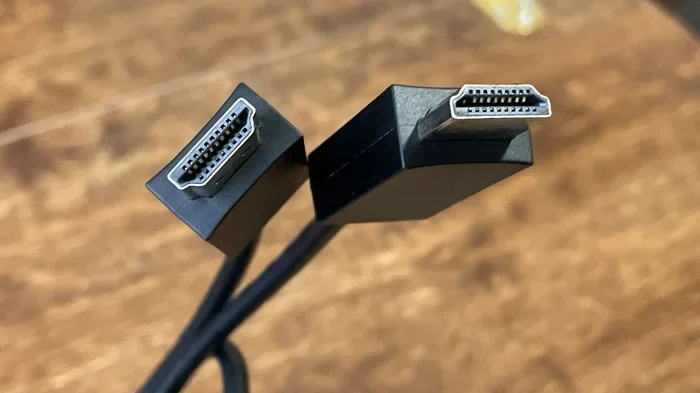
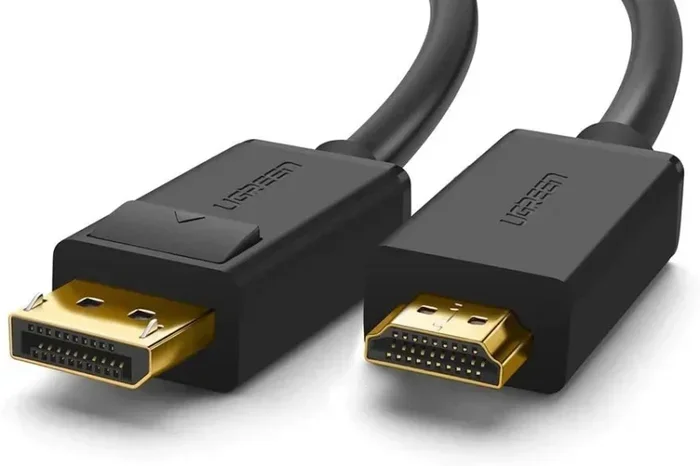
You can tell HDMI and DisplayPort apart just by looking. HDMI connectors are smaller and do not lock into place. They rely on friction to stay connected. DisplayPort connectors are slightly larger and often have a locking mechanism that clicks into place. This prevents accidental disconnections, which is especially useful for desktop setups.
There is also the Mini DisplayPort and Micro DisplayPort variants. Apple famously used Mini DisplayPort in older MacBooks. USB-C with Thunderbolt support can also carry DisplayPort signals, adding even more versatility to modern laptops and devices.
Which Connection Should You Choose?
Choosing between HDMI and DisplayPort depends on what you are doing. There is no single “best” cable. The best cable is the one that fits your specific needs. Let us walk through some common scenarios to help you decide.
Choose HDMI If…
- You are connecting a gaming console like PlayStation or Xbox
- You want to hook up a streaming device to your TV
- You need a simple, universal connection for your home theater
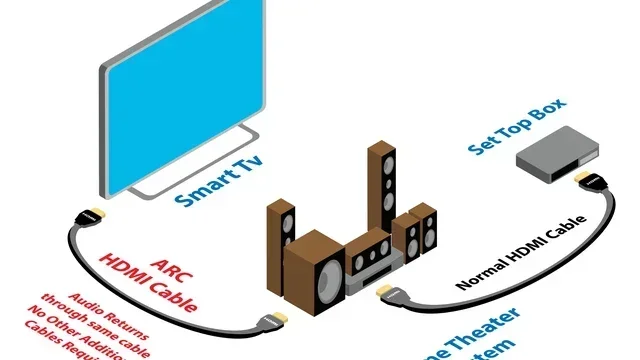
- You are using a soundbar or AV receiver with HDMI ARC
- You want plug-and-play compatibility with minimal setup
Choose DisplayPort If…
- You are building a PC gaming setup with a high-refresh-rate monitor
- You need to connect multiple monitors in a daisy-chain arrangement
- You are a creative professional who needs color accuracy and high resolution
- You want the highest possible bandwidth for future-proofing
- You are using a graphics card that has DisplayPort outputs
For most casual users, HDMI is the easiest choice. It works with almost everything out of the box. For power users and enthusiasts, DisplayPort offers features that HDMI simply cannot match. Consider your setup carefully before making a decision.
The Role of Adapters
Do not have the right port? Do not worry. Adapters exist for nearly every combination. You can get DisplayPort to HDMI adapters and HDMI to DisplayPort converters. These small devices let you connect mismatched equipment. Just keep in mind that adapters can sometimes limit resolution or refresh rate. Always check the specifications before buying.
Quick Tips and Common Mistakes
Here are some practical tips to help you get the most out of your cables and connections.
Quick Tips
- Always check the version of your cable, not just the type. An old HDMI cable may not support 4K.
- Buy certified cables from reputable brands to avoid signal issues.
- Keep cables as short as possible for the best signal quality. Long cables can degrade the signal.
- Update your device drivers and firmware to ensure full compatibility with newer standards.
- Test your setup before mounting everything on the wall. It saves a lot of frustration.
Common Mistakes to Avoid
- Assuming all HDMI cables are the same. An HDMI 1.4 cable cannot do what an HDMI 2.1 cable can.
- Ignoring refresh rate requirements. If you want 120Hz at 4K, you need the right cable and the right ports.
- Using cheap, unverified adapters. They can cause flickering, signal loss, or no signal at all.
- Overlooking eARC support. If you want advanced audio formats from your TV, make sure your cable and devices support it.
- Forgetting about USB-C alt mode. Many modern laptops support DisplayPort over USB-C. You may not need a dedicated DisplayPort cable at all.
Expert Insights: What the Pros Say
We asked a few tech professionals about their take on the HDMI vs DisplayPort debate. Here is what they had to say.
Mark, a PC building enthusiast: “For my gaming rig, DisplayPort is a no-brainer. The higher refresh rates and daisy-chaining capability make it the clear winner for multi-monitor setups.”
Sarah, a home theater installer: “HDMI is the standard for a reason. Every TV, every console, every soundbar uses it. My clients do not want to deal with adapters. HDMI just works.”
David, a video editor: “I use both. DisplayPort for my primary editing monitor because of the color accuracy and resolution support. HDMI for my secondary display and TV output. Each has its place.”
These real-world perspectives show that the answer to do HDMI and DisplayPort do the same thing depends entirely on your use case. Professionals and enthusiasts often use both standards in the same setup.
Key Takeaways
- HDMI and DisplayPort both transmit video and audio but are optimized for different devices and use cases.
- HDMI is the universal standard for TVs, consoles, and streaming devices and offers excellent compatibility.
- DisplayPort delivers superior bandwidth and features for PC gaming, multi-monitor setups, and professional work.
- Version numbers matter more than ever — always check HDMI 2.1 or DisplayPort 2.1 for the latest capabilities.
- Adapters can bridge the gap between the two standards when needed.
- The right choice depends on your specific setup, devices, and performance needs.
- Both standards will continue to evolve as display technology advances toward higher resolutions and refresh rates.
Conclusion
So, do HDMI and DisplayPort do the same thing? Yes, at their core, they both move video and audio from your device to your screen. But they are not interchangeable in every situation. HDMI is your best friend for home entertainment. It is simple, universal, and works with virtually everything. DisplayPort is your best choice for PC performance. It offers higher bandwidth, multi-monitor support, and features that serious users demand.
The next time you are setting up a new monitor, choosing a cable, or building a home theater, you will know exactly what to look for. Do not let the different ports confuse you. Now you have the knowledge to make the right call every time. Pick the cable that fits your needs, and enjoy your display experience to the fullest.
Whether you are a casual viewer, a competitive gamer, or a creative professional, there is a perfect connection for you. And with both HDMI and DisplayPort continuing to evolve, the future of display connectivity looks brighter than ever.
Frequently Asked Questions
Can I use an HDMI cable for a PC monitor?
Yes, you can. Most modern PC monitors come with HDMI inputs. However, if you want the highest refresh rates or advanced features like daisy-chaining, DisplayPort is the better choice. HDMI works perfectly fine for everyday use and casual gaming.
Is DisplayPort better than HDMI for gaming?
For PC gaming, DisplayPort generally has the edge. It offers higher bandwidth, supports adaptive sync technologies like FreeSync and G-Sync more natively, and allows multi-monitor daisy-chaining. For console gaming, HDMI is the standard and the better option.
Does cable length affect HDMI and DisplayPort performance?
Yes, it does. Longer cables can lead to signal degradation, especially at higher resolutions and refresh rates. For best results, keep your cables under 6 feet. If you need longer runs, consider active cables or signal boosters.
Can I connect a DisplayPort monitor to an HDMI output?
You can, using a DisplayPort to HDMI adapter or cable. Just be aware that you may lose some features, such as adaptive sync or the highest refresh rates, depending on the adapter quality and the versions of both ports.
What is the difference between DisplayPort and USB-C?
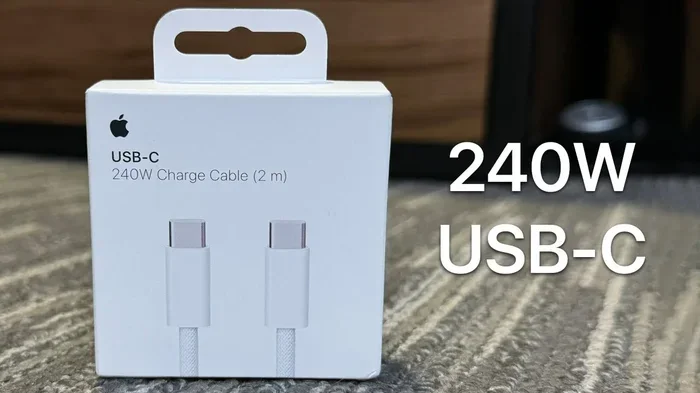
USB-C is a connector shape, not a signal standard. USB-C can carry DisplayPort signals through Alt Mode. Thunderbolt 3 and 4 also use USB-C connectors and support DisplayPort output. They are not the same thing, but they can work together.
Do I need HDMI 2.1 for 4K gaming?
For 4K at 60Hz, HDMI 2.0 is sufficient. For 4K at 120Hz or higher, you need HDMI 2.1. If you own a PS5, Xbox Series X, or a high-end PC, HDMI 2.1 ensures you get the full gaming experience with VRR and low latency features.
=== CONCLUSION ===
Do HDMI and DisplayPort do the same thing? They share the same basic purpose but serve different needs. HDMI wins for simplicity and compatibility. DisplayPort wins for performance and features. Now you know the difference. Use that knowledge to build a better setup, enjoy sharper visuals, and get the most out of your devices. The right cable makes all the difference.