Do Dvi To Hdmi Adapters Work With Flat Screen TVs
Do DVI to HDMI adapters work? Yes, they do. These simple adapters let you connect older DVI devices to modern flat screen TVs. You get a clear digital picture without buying new equipment.
Do DVI to HDMI adapters really work with flat screen TVs? The short answer is yes. If you have an older device with a DVI port and a modern TV with an HDMI input, an adapter solves the problem fast. You do not need to replace your old laptop, desktop, or media player just because your TV changed.
Many people think they need expensive new cables or a whole new setup. That is not true. A simple DVI to HDMI adapter bridges the gap between old and new technology. You plug it in, adjust a few settings, and your screen lights up with a sharp picture. In this guide, we will walk through everything you need to know. You will learn how these adapters work, which types to buy, and how to avoid common mistakes.
Whether you are setting up a home office, connecting a gaming console, or just watching movies on a bigger screen, this article has you covered. We will break down the technical stuff into plain language. No jargon. No confusing manuals. Just clear steps and honest advice.
Key Takeaways
- DVI to HDMI adapters work reliably: They convert digital DVI signals to HDMI with no loss in quality.
- You need the right adapter type: DVI-D and DVI-I adapters work best, while DVI-A needs a different approach.
- Audio may need a separate cable: Standard DVI does not carry sound, so you need an extra audio connection.
- Flat screen TVs support DVI input: Most modern TVs accept HDMI, and adapters bridge the gap easily.
- HDCP compatibility matters: Make sure your adapter supports HDCP for protected content like Netflix and Blu-ray.
- Setup is simple and affordable: No special tools or technical skills are needed to get started.
📑 Table of Contents
- What Is a DVI to HDMI Adapter?
- How Do DVI to HDMI Adapters Work?
- Types of DVI Connectors You Need to Know
- Do DVI to HDMI Adapters Work With Flat Screen TVs?
- Common Problems and How to Fix Them
- Tips for Getting the Best Results
- DVI to HDMI Adapters vs. Other Connection Options
- Expert Insights on DVI to HDMI Adapters
- Frequently Asked Questions
- Conclusion
What Is a DVI to HDMI Adapter?
A DVI to HDMI adapter is a small device that lets you connect a DVI output to an HDMI input. Think of it as a translator between two different connection types. Your old device speaks DVI. Your TV speaks HDMI. The adapter helps them understand each other.
DVI stands for Digital Visual Interface. It was a popular connection standard in the early 2000s. HDMI stands for High Definition Multimedia Interface. It is the modern standard for audio and video connections. The adapter takes the digital signal from DVI and converts it so HDMI devices can read it.
Most adapters are small and compact. They plug directly into the DVI port on your device and then connect to an HDMI cable on the other end. Some adapters come as a single cable with DVI on one side and HDMI on the other. Others are separate dongles that you pair with your own cables. Both styles work well.
Why Do People Need These Adapters?
Technology changes fast. Devices that were top of the line five years ago now have older ports. Many computers, projectors, and monitors still use DVI. But flat screen TVs and newer monitors only have HDMI ports. Without an adapter, you would be stuck with no connection.
Here are common situations where a DVI to HDMI adapter comes in handy:
- Connecting an older desktop computer to a new flat screen TV.
- Setting up a second monitor that only has DVI output.
- Hooking up a legacy media player or game console to a modern display.
- Using a laptop with DVI output in a conference room with HDMI projectors.
- Moving a DVI device into a living room setup without buying a new device.
How Do DVI to HDMI Adapters Work?
The way these adapters work is actually pretty simple. DVI sends a digital video signal through its pins. HDMI carries both digital video and audio signals. When you use a DVI to HDMI adapter, the adapter passes the video signal from DVI into the HDMI cable. The picture shows up on your TV just like it would with a native HDMI connection.
The signal conversion happens inside the adapter. There is no complex processing involved. It is a direct digital-to-digital transfer. That means you do not lose any picture quality. The resolution stays the same. Colors stay sharp. Details stay clear.
One thing to keep in mind is that standard DVI does not carry audio. HDMI does. So if you want sound, you need a separate audio connection. We will cover that in more detail later. For now, just know that the video part works perfectly on its own.
The Role of Digital Signal Conversion
Inside every DVI to HDMI adapter, there is a small chip that handles the signal path. This chip reads the DVI signal and re-formats it for the HDMI connector. The process is fast and seamless. You do not notice any delay or lag during normal use.
For most users, the conversion is invisible. You plug in the adapter, and the TV detects the signal right away. The adapter handles everything behind the scenes. You just enjoy the picture.
Types of DVI Connectors You Need to Know
Not all DVI connectors are the same. There are three main types, and knowing which one you have makes a big difference. Let us break them down.
DVI-D (Digital Only)
DVI-D carries a fully digital signal. This is the best type for use with a DVI to HDMI adapter. Since HDMI is also digital, the conversion is clean and direct. You get the best possible picture quality with no signal loss.
If your device has a DVI-D port, you are in luck. Any standard DVI to HDMI adapter will work perfectly. Just plug it in and go.
DVI-A (Analog Only)
DVI-A carries an analog signal. This is the oldest type of DVI connection. It is not compatible with HDMI in the same way. You would need a different kind of converter, not just a simple adapter. If you have a DVI-A port, check the specifications carefully before buying an adapter.
DVI-I (Integrated Digital and Analog)
DVI-I supports both digital and analog signals. This is the most versatile type. A DVI to HDMI adapter works great with DVI-I because it has the digital pins needed for HDMI output. You can use these adapters without any issues.
Quick Comparison Table
| DVI Type | Signal Type | Works with HDMI Adapter? | Audio Support? |
|---|---|---|---|
| DVI-D | Digital | Yes | No (needs separate cable) |
| DVI-A | Analog | No (needs converter) | No |
| DVI-I | Digital + Analog | Yes | No (needs separate cable) |
As you can see, DVI-D and DVI-I are the types that work best with a standard DVI to HDMI adapter. If you are unsure which type you have, look at the port on your device. DVI-D has only flat pins. DVI-A has only rounded pins. DVI-I has a mix of both.
Do DVI to HDMI Adapters Work With Flat Screen TVs?
This is the big question, and the answer is a clear yes. Do DVI to HDMI adapters work with flat screen TVs? Absolutely. Most flat screen TVs made in the last 15 years have HDMI inputs. Your older device with a DVI output connects to the TV through the adapter. The TV receives the signal and displays it just like any other HDMI source.
You do not need a special TV or a fancy model. Any flat screen TV with an HDMI port will work. Whether you have a budget LED TV or a high-end 4K display, the adapter handles the connection the same way.
One thing to watch for is the resolution. Older DVI devices may max out at 1080p. Newer TVs support 4K and beyond. The adapter will output the highest resolution your DVI source supports. So if your device outputs 1080p, that is what you will see on the TV. You will not get 4K from a DVI connection, but 1080p looks great on most flat screen TVs.
Setting Up Your Adapter With a TV
Setting up a DVI to HDMI adapter with a flat screen TV is easy. Follow these simple steps:
- Plug the adapter into the DVI port on your device.
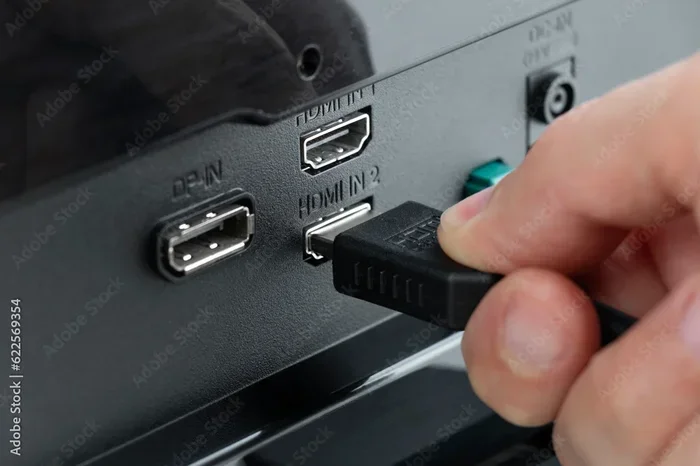
- Connect an HDMI cable from the adapter to the TV.
- Turn on the TV and select the correct HDMI input.
- Go to your device display settings and adjust the resolution if needed.
- Add an audio cable if you want sound through the TV speakers.
That is it. Five simple steps and you are watching on a big screen. No software to install. No drivers to update. The connection works right out of the box.
What About Audio?
Here is the one catch with DVI to HDMI adapters. Standard DVI does not carry audio. The adapter only passes the video signal. So your TV may show a perfect picture but have no sound.
There is an easy fix. You can connect a separate audio cable from your device to the TV. Use a 3.5mm headphone jack cable or an RCA audio cable. Most laptops and desktops have a headphone output. Plug that into the TV audio input, and you get both picture and sound.
Some newer adapters include a built-in audio extractor. These adapters have a 3.5mm jack or RCA outputs right on the adapter itself. They make the setup even simpler. If audio matters to you, look for an adapter with audio support built in.
Common Problems and How to Fix Them
While DVI to HDMI adapters work well, you might run into a few issues. Let us talk about the most common problems and how to solve them.
No Signal on the TV
If your TV shows no signal, the first thing to check is the connection. Make sure the adapter is fully plugged in on both ends. A loose connection is the most common cause. Try unplugging and plugging the adapter back in firmly.
Next, check the HDMI input on your TV. Make sure you have selected the right input source. TVs often have multiple HDMI ports labeled HDMI 1, HDMI 2, and so on. Use the remote to switch to the correct one.
If those steps do not work, try a different HDMI cable. Sometimes the cable itself is the problem. A new cable often fixes the issue instantly.
Poor Picture Quality
If the picture looks fuzzy or blurry, check your resolution settings. Go to your device display settings and set the output resolution to match your TV. For most flat screen TVs, 1080p is the sweet spot. Setting it too high or too low can cause display issues.
Also, check the cable quality. Cheap cables can cause signal interference. A well-made HDMI cable ensures a clean, sharp picture every time.
HDCP Errors
HDCP stands for High-bandwidth Digital Content Protection. It is a copy protection system used by streaming services and Blu-ray players. If your adapter does not support HDCP, you may get an error when trying to watch protected content.
Make sure your DVI to HDMI adapter supports HDCP. Most quality adapters include this feature. Check the product description before you buy. If you see HDCP listed, you are good to go.
Intermittent Signal Dropouts
If the picture flickers or cuts out occasionally, the adapter may be overheating. Small adapters can get warm during long use sessions. Give it some airflow and make sure it is not covered by other equipment.
Also, check that all connections are secure. A slightly loose fit can cause intermittent dropouts. Unplug everything and reconnect firmly.
Tips for Getting the Best Results
Want the best experience with your DVI to HDMI adapter? Follow these quick tips for a smooth setup every time.
Buy a Quality Adapter
Not all adapters are created equal. Cheap adapters may save you a few dollars, but they can cause problems. Look for adapters from reputable brands. Check reviews before you buy. A good adapter lasts longer and gives you a more reliable connection.
Keep Cables Short and Organized
Longer cables can weaken the signal. Keep your HDMI cable as short as possible while still reaching your TV. If you need a longer run, use a high-quality active HDMI cable that boosts the signal.
Update Your Display Drivers
If you are connecting a computer, make sure your graphics drivers are up to date. Updated drivers help the TV and adapter communicate properly. This is especially important for resolution and refresh rate settings.
Check for Firmware Updates on Your TV
Some flat screen TVs receive firmware updates that improve HDMI compatibility. Check your TV manufacturer’s website for the latest updates. A simple firmware update can fix connection issues you did not even know you had.
Use an Adapter with Audio if You Need Sound
If you want both picture and sound from a single cable solution, get an adapter with audio support. These adapters have a built-in 3.5mm jack or RCA outputs. They save you from running a separate audio cable across the room.
Consider Alternatives for Newer Setups
If you are still using a lot of older devices, you might also explore alternatives to Dish Network and DirectTV that work with modern HDMI setups. Many newer streaming devices eliminate the need for older connections entirely. But if you have DVI devices you love, an adapter is the best way to keep using them.
DVI to HDMI Adapters vs. Other Connection Options
How do DVI to HDMI adapters compare to other ways of connecting devices to a TV? Let us look at the main alternatives.
VGA to HDMI Converters
VGA is an even older connection type. It carries an analog signal. VGA to HDMI converters do more work than DVI to HDMI adapters because they must convert analog to digital. This can sometimes result in slight quality loss. DVI to HDMI adapters are simpler and cleaner because they work with digital signals directly.
Component Video to HDMI Converters
Component video uses three separate cables for video. Converters that change component video to HDMI are bulkier and more expensive. They also convert analog to digital, which can introduce noise. DVI to HDMI adapters avoid this problem entirely.
DisplayPort to HDMI Adapters
DisplayPort is a modern connection found on many computers. DisplayPort to HDMI adapters work similarly to DVI to HDMI adapters. Both pass digital video signals. The main difference is the connector shape and the source device. If your device has DisplayPort instead of DVI, you need a different adapter.
For DVI devices, a DVI to HDMI adapter remains the simplest and most affordable solution. It does one job well and does it without any fuss.
Expert Insights on DVI to HDMI Adapters
Technology experts agree that DVI to HDMI adapters are one of the most useful and underrated accessories for home setups. They solve a real problem that many people face when upgrading their TVs or monitors.
One common misconception is that adapters degrade the signal. In reality, a quality DVI to HDMI adapter passes the digital signal without any degradation. The picture you see on your TV is identical to what the source device outputs. There is no compression or quality loss.
Another myth is that these adapters only work with certain TV brands. That is not true. Any flat screen TV with an HDMI input works with a DVI to HDMI adapter. Samsung, LG, Sony, TCL, Vizio, and every other brand accepts HDMI signals the same way.
For users who are connecting older devices and want the best experience, experts recommend choosing an adapter with HDCP support and audio output options. These features ensure compatibility with streaming services and give you flexibility with sound setup.
How to Choose the Right Adapter
When shopping for a DVI to HDMI adapter, keep these factors in mind:
- DVI type compatibility: Make sure it matches your DVI port (DVI-D or DVI-I).
- HDCP support: Essential for streaming protected content.
- Audio support: Look for adapters with built-in audio outputs if you need sound.
- Build quality: Metal housings last longer than plastic ones.
- Brand reputation: Stick with well-known brands for reliability.
- Price: Good adapters cost between $5 and $20. You do not need to spend more.
Frequently Asked Questions
Do DVI to HDMI adapters work with all flat screen TVs?
Yes, they do. As long as your TV has an HDMI input, a DVI to HDMI adapter will work. Flat screen TVs from the last 15 years all use HDMI. You just plug the adapter into your DVI device, connect an HDMI cable to the TV, and select the right input. The setup works with every major TV brand.
Does a DVI to HDMI adapter carry audio?
Standard DVI to HDMI adapters do not carry audio. DVI only transmits video signals. If you need sound, you must connect a separate audio cable from your device to the TV. Some adapters include a built-in audio jack to make this easier. Look for adapters labeled with audio support if sound matters to you.
Will a DVI to HDMI adapter work with 4K TVs?
Yes, the adapter will work with 4K TVs. However, the resolution you get depends on your source device. DVI has a maximum resolution of about 1080p or 2560×1600 depending on the version. Your 4K TV will display the signal at the resolution your DVI device outputs. You will not get true 4K from a DVI connection, but 1080p looks excellent on a 4K screen.
Do I need to install drivers for a DVI to HDMI adapter?
No, you do not need to install any drivers. DVI to HDMI adapters are plug-and-play devices. They work automatically without any software. Just connect the adapter, plug in the HDMI cable, and your TV detects the signal. No downloads or installations are required.
Can I use a DVI to HDMI adapter for gaming?
Yes, you can use a DVI to HDMI adapter for gaming. DVI supports high refresh rates and fast response times. For most casual and competitive gaming, the adapter works great. Just make sure your adapter and HDMI cable support the resolution and refresh rate your game requires. For the best experience, use a quality adapter from a reputable brand.
How much does a good DVI to HDMI adapter cost?
A quality DVI to HDMI adapter costs between $5 and $20. You do not need to spend more than that. Avoid adapters that cost less than $3, as they may have poor build quality. Spending around $10 to $15 gets you a reliable adapter with HDCP support and good signal transfer. Check reviews online to find the best option for your budget.
Conclusion
So, do DVI to HDMI adapters work with flat screen TVs? The answer is a resounding yes. These small, affordable adapters bridge the gap between older DVI devices and modern HDMI TVs. You get a clear, sharp picture without spending money on new equipment.
The setup is simple. The connection is reliable. And the results are exactly what you expect. Whether you are connecting a desktop computer, a media player, or any other DVI device, a DVI to HDMI adapter gets the job done.
Remember to check your DVI type before buying. Make sure your adapter supports HDCP if you plan to stream content. And do not forget the audio connection if you want sound through your TV speakers.
With the right adapter and a basic understanding of how it works, you can enjoy your favorite content on a big flat screen TV. No hassle. No confusion. Just a simple plug-and-play connection that works every time.
Grab a DVI to HDMI adapter today and bring your older devices into the modern era. Your TV will thank you, and your wallet will stay happy too.