Do All Hp Ink Cartridges Fit All Printers Here Is The Answer
Not all HP ink cartridges fit all printers. HP uses different cartridge types and model numbers for each printer series. You must match your cartridge to your specific printer model to get the best results.
This is a comprehensive guide about Do All Hp Ink Cartridges Fit All Printers.
Key Takeaways
- HP ink cartridges are not universal: Each printer model requires a specific cartridge type and number.
- Always check your printer model number: This is the easiest way to find the right cartridge.
- HP uses different cartridge families: Like HP 305, HP 63, HP 952, and more for different printer lines.
- High-yield and standard cartridges differ: XL versions print more pages but cost more upfront.
- Using the wrong cartridge can damage your printer: It may cause print errors or hardware issues.
- The HP Smart app helps: You can quickly look up compatible cartridges for your printer.
- Compatible and OEM cartridges both work: But OEM cartridges offer the most reliable performance.
[FEATURED_IMAGE_PLACEHOLDER]
Have you ever stood in front of a shelf of HP ink cartridges and felt completely confused? You are not alone. Many people assume that all HP ink cartridges fit all HP printers. The truth is far more complicated than that simple assumption.
The world of HP printing involves many different cartridge types, model numbers, and printer series. A cartridge that works perfectly in one HP printer may not fit or function in another. Understanding this difference can save you time, money, and a lot of frustration.
In this guide, we will break down everything you need to know about HP ink cartridge compatibility. We will look at how HP organizes its cartridges, why not all cartridges fit all printers, and how you can find the right one every single time.
Do All Hp Ink Cartridges Fit All Printers?
The short answer is no. Not all HP ink cartridges fit all printers. HP designs different cartridge families for different printer lines. A cartridge made for an HP DeskJet will not always work in an HP OfficeJet or HP Envy printer.
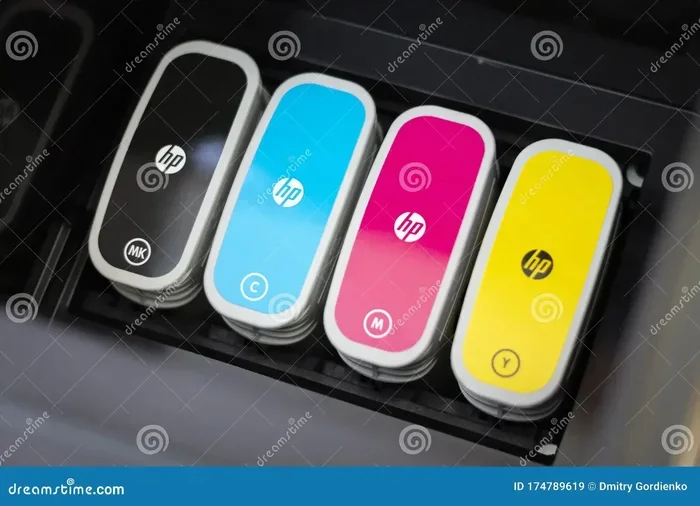
HP uses a system of model numbers and cartridge codes to keep things organized. Each cartridge has a specific number that tells you exactly which printers it supports. For example, the HP 305 cartridge is different from the HP 63 cartridge. They look different, fit different slots, and work with different printers.
Here is why this matters. Putting the wrong cartridge into your printer can cause several problems. You might see error messages on your screen. The printer might refuse to print. In some cases, forcing the wrong cartridge can damage the printhead or other internal parts.
How HP Organizes Its Cartridge Families
HP groups its ink cartridges into families based on printer type and release date. Older printers use cartridges from earlier families. Newer printers use the latest cartridge designs. Each family has its own shape, size, and chip technology.
Some cartridge families are designed for home use. Others are built for heavy office printing. HP also creates special cartridges for photo printing and high-volume tasks. This variety is great for performance but can make shopping confusing.
Here are the main HP cartridge families you will encounter:
- HP 305 and HP 305XL: Used in newer HP DeskJet and some HP Envy printers.
- HP 63 and HP 63XL: Common in older HP DeskJet and OfficeJet models.
- HP 952 and HP 952XL: Found in HP OfficeJet Pro printers for business use.
- HP 302 and HP 302XL: Used in select HP Envy and HP Smart Tank printers.
- HP 304 and HP 304XL: Compatible with certain HP Envy and OfficeJet models.
Each of these cartridge families is built for a specific group of printers. They are not interchangeable across families. This is the main reason why not all HP ink cartridges fit all printers.
Why Printer Model Numbers Matter So Much
Your printer model number is the key to finding the right cartridge. Every HP printer has a unique model number printed on the device. It is usually located on the back, bottom, or side panel of the printer.
The model number tells you exactly which cartridges your printer needs. For example, an HP DeskJet 2755e uses HP 305 cartridges. An HP DeskJet 3755 uses HP 63 cartridges. Even though both are HP DeskJet printers, they use different cartridges.
Here is a simple way to think about it. HP printers are like cars. Different car models need different sized fuel tanks and engines. You cannot put a truck engine into a compact car. The same logic applies to HP ink cartridges and printers.
Where to Find Your Printer Model Number
Finding your printer model number is easy. Look at the front panel of your printer. The model number is usually displayed on the screen or printed on a label. You can also check the back or bottom of the printer.
Another way is to check the HP Smart app on your phone or computer. The app shows your printer model right on the home screen. You can also visit the HP website and enter your printer name in the search bar.
Once you have your model number, you can look up the exact cartridge it needs. This takes the guesswork out of buying replacement cartridges. It also helps you avoid costly mistakes.
Understanding HP Cartridge Types and Sizes
HP offers cartridges in different sizes and capacities. The two main types are standard cartridges and high-yield cartridges. High-yield cartridges are also called XL cartridges.
Standard cartridges cost less upfront. They contain less ink and print fewer pages. High-yield cartridges cost more but print significantly more pages. For most home users, standard cartridges work fine. For heavy printing, high-yield cartridges save money in the long run.
Here is a quick comparison of standard vs. high-yield HP cartridges:
| Feature | Standard Cartridge | High-Yield (XL) Cartridge |
|---|---|---|
| Upfront Cost | Lower price | Higher price |
| Page Yield | Around 100-200 pages | Around 300-800 pages |
| Best For | Light printing | Heavy or frequent printing |
| Cost Per Page | Higher | Lower |
| Size | Smaller and lighter | Larger and heavier |
Keep in mind that HP 305 and HP 305XL are not interchangeable with HP 63 and HP 63XL. Even within the same cartridge family, the standard and XL versions have different ink volumes. But they fit the same printer.
HP Cartridge Chips and Compatibility
Modern HP cartridges have tiny chips built into them. These chips communicate with your printer. They tell the printer the cartridge type, ink levels, and authenticity.
HP uses these chips to ensure you use genuine HP cartridges. Some third-party cartridges also include chips. However, HP regularly updates its chip technology. This can sometimes cause compatible cartridges to stop working after a firmware update.
This is another reason why cartridge compatibility is not universal. Even if a cartridge physically fits, the chip may not communicate properly with your printer. Always check for chip compatibility before purchasing.
Common HP Printer Series and Their Cartridges
HP has many printer series, each designed for different needs. Home users often use HP DeskJet printers. Small businesses prefer HP OfficeJet printers. Creative professionals may choose HP Envy printers.
Each series has its own cartridge requirements. Let us look at some of the most popular HP printer series and the cartridges they use.
HP DeskJet Series
The HP DeskJet series is one of the most popular home printer lines. These printers are affordable and easy to use. They come in many different models, each with its own cartridge needs.
Older HP DeskJet models often use HP 63 cartridges. Newer models use HP 305 cartridges. Some DeskJet models also support HP 305XL high-yield cartridges. Always check the specific model number before buying.
HP OfficeJet Series
HP OfficeJet printers are designed for small offices and home offices. They offer faster printing and higher volume capacity. These printers typically use HP 952 or HP 952XL cartridges.
Some older OfficeJet models use HP 63 or HP 63XL cartridges. The HP OfficeJet Pro 9015e, for example, uses HP 952 cartridges. The HP OfficeJet 3830 uses HP 63 cartridges. The model number determines everything.
HP Envy Series
HP Envy printers are known for their sleek design and high-quality prints. They are popular among creative professionals and students. HP Envy printers may use HP 304, HP 305, or HP 63 cartridges depending on the model.
The HP Envy 6055 uses HP 305 cartridges. The HP Envy 5530 uses HP 63 cartridges. This shows how even within one printer series, different models use different cartridges.
Using the Wrong Cartridge: What Can Go Wrong
Using the wrong HP ink cartridge can lead to several problems. Some issues are minor and easy to fix. Others can cause serious damage to your printer.
Here are common problems that happen when you use the wrong cartridge:
- Error messages on the display: Your printer will show a warning or error code.
- Cartridge not recognized: The printer fails to detect the cartridge at all.
- Poor print quality: Colors may be faded, streaky, or misaligned.
- Ink leaks: A wrong cartridge may not seal properly and can leak ink.
- Printhead damage: Forcing an incompatible cartridge can harm the printhead.
- Voided warranty: Using non-compatible cartridges may void your printer warranty.
These risks are real and common. This is why it is so important to verify cartridge compatibility before you buy. Taking a few extra minutes to check can save you from expensive repairs.
How to Avoid Cartridge Mistakes
The best way to avoid cartridge mistakes is to follow a simple checklist. First, find your printer model number. Second, look up the compatible cartridge list for that model. Third, double-check the cartridge number on the packaging before purchasing.
You can also use the HP Smart app. It automatically detects your printer and shows compatible cartridges. This removes all guesswork and makes the process effortless.
Another tip is to keep your old cartridge packaging. The box usually lists the printer models it works with. This is a quick reference guide you can use when buying replacements.
OEM vs Compatible Cartridges: What Is the Difference
When shopping for HP ink cartridges, you will see two main options. The first is OEM cartridges, which stands for Original Equipment Manufacturer. These are cartridges made by HP itself. The second is compatible cartridges, made by third-party companies.
OEM cartridges are designed specifically for HP printers. They offer the best print quality and reliability. They also come with HP’s warranty and support. Compatible cartridges are cheaper but may vary in quality.
Both OEM and compatible cartridges come in different model numbers. A compatible HP 305 cartridge will still only work in printers that accept HP 305 cartridges. Compatibility is not about brand. It is about matching the cartridge number to your printer model.
Here are some quick tips for choosing between OEM and compatible cartridges:
- Choose OEM if: You want the highest print quality and reliability.
- Choose compatible if: You want to save money and print less important documents.
- Check reviews: Read user feedback before buying any compatible cartridge.
- Buy from reputable sellers: This reduces the risk of receiving a poor-quality product.
Regardless of which type you choose, always match the cartridge number to your printer model. This rule applies to both OEM and compatible cartridges.
How to Find the Right HP Ink Cartridge for Your Printer
Finding the right cartridge does not have to be difficult. HP makes the process simple if you know where to look. There are several easy methods you can use.
Method 1: Check the HP website. Go to HP’s official support page. Enter your printer model number in the search bar. The results will show you the exact cartridges your printer uses.
Method 2: Use the HP Smart app. Open the app on your phone or computer. Select your printer from the list. The app will display compatible cartridges right away.
Method 3: Check the printer display. Many HP printers have a touchscreen. You can navigate to the cartridge or supplies section. The screen will show which cartridges are installed and which replacements are available.
Method 4: Look at the old cartridge. The cartridge label has the model number printed on it. Match that number to a new cartridge when shopping. This is the fastest method if you still have the old cartridge.
Using any of these methods ensures you buy the right cartridge the first time. It eliminates confusion and helps you avoid returns or wasted money.
Frequently Asked Questions
Can I Use HP 305 Cartridges in a Printer That Takes HP 63 Cartridges?
No, you cannot. HP 305 cartridges and HP 63 cartridges are different sizes and shapes. They are designed for different printer models. Putting the wrong cartridge into your printer will not work and may cause errors. Always check your printer model number before purchasing cartridges.
Are HP High-Yield Cartridges Worth the Extra Cost?
Yes, for most people who print frequently, high-yield cartridges are worth it. They cost more upfront but print many more pages. This lowers the cost per page significantly. If you only print occasionally, standard cartridges may be the better choice.
Can I Use Compatible Cartridges Instead of OEM HP Cartridges?
Yes, compatible cartridges can work in HP printers. They are made by third-party companies and are usually much cheaper. However, quality can vary between brands. Always buy from trusted sellers and check user reviews before purchasing compatible cartridges.
Will Using the Wrong Cartridge Damage My HP Printer?
In some cases, yes. Using the wrong cartridge can cause printhead damage, ink leaks, or internal errors. HP printers are designed to detect incompatible cartridges and may refuse to print. To avoid damage, always use the correct cartridge model for your printer.
How Do I Know Which HP Cartridge My Printer Needs?
The easiest way is to check your printer model number and visit the HP support website. You can also use the HP Smart app or look at the label on your old cartridge. All of these methods will tell you the exact cartridge number your printer requires.
Do HP Ink Cartridges Expire?
Yes, HP ink cartridges do have an expiration date. The date is printed on the cartridge packaging. Unopened cartridges can last for one to two years. Once installed, a cartridge typically lasts several months depending on how often you print. Store cartridges in a cool, dry place to extend their shelf life.
Final Thoughts on HP Ink Cartridge Compatibility
The answer to whether all HP ink cartridges fit all printers is clear. They do not. HP designs different cartridges for different printer models and series. Each cartridge has a specific number that matches certain printers. Using the right cartridge ensures the best print quality and protects your printer.
Always start by finding your printer model number. Use the HP Smart app, the HP website, or your old cartridge packaging. These simple steps take seconds and save you from costly mistakes.
Whether you choose OEM or compatible cartridges, matching the cartridge number to your printer is the golden rule. Keep this in mind every time you buy replacement ink. Your printer will thank you with clearer prints and longer life.
Now that you understand HP ink cartridge compatibility, you can shop with confidence. You know exactly what to look for and why it matters. Share this guide with friends and family who still believe all HP cartridges are universal. The truth is simple once you know where to look.
Frequently Asked Questions
What is Do All Hp Ink Cartridges Fit All Printers?
Do All Hp Ink Cartridges Fit All Printers is an important topic with many practical applications.