Do All Hdmi Cables Look The Same Or Are There Differences
Do All HDMI Cables Look The Same? The short answer is no. While they may appear identical on the outside, HDMI cable differences matter a lot for your viewing experience. From HDMI cable types to HDMI versions, picking the right one ensures you get the best 4K HDMI cable performance for your TV, gaming console, or home theater setup.
Have you ever looked at a pile of HDMI cables and wondered if they were all the same? They plug into the same port, they look almost identical, and they all carry video and audio. So why do some cost two dollars and others cost fifty? The truth is, do all HDMI cables look the same is a question many people ask. And the answer might surprise you.
On the surface, most HDMI cables really do look the same. They have the same rectangular connector. They come in similar sizes. They all fit into the same port on your TV, monitor, or gaming console. But underneath the plastic shell, there are big differences. The internal wiring, the shielding, the bandwidth capacity, and the version support all vary from cable to cable.
Understanding these differences can save you money. It can also make sure your entertainment setup works the way it should. Whether you are watching movies, playing video games, or setting up a home theater, choosing the right cable matters more than you think.
Key Takeaways
- Not all HDMI cables look the same inside: Different HDMI cable categories support different speeds and resolutions.
- HDMI versions matter: HDMI 2.0 vs HDMI 2.1 cables handle bandwidth and features like 4K at 120Hz very differently.
- Cable length and build quality affect signal strength and overall HDMI cable performance.
- Gold plated connectors help reduce signal loss and corrosion over time.
- Expensive cables do not always mean better quality: Many premium cables cost more because of branding, not performance.
- Always match your cable to your device needs: A basic cable works fine for older TVs, but gaming and 4K setups need faster cables.
📑 Table of Contents
What Makes HDMI Cables Different From Each Other
When people ask do all HDMI cables look the same, they are usually thinking about the outer appearance. And yes, most HDMI cable types share a similar design. But the differences go far deeper than what meets the eye. Let us break down what really sets them apart.
Internal Wiring and Bandwidth
Every HDMI cable has internal wires that carry data from your device to your screen. The number of wires and how they are arranged determines how much data the cable can handle at once. This is called bandwidth. Higher bandwidth means the cable can carry more information. This leads to better picture quality and smoother video.
A basic cable might handle standard definition or 1080p video just fine. But if you want to watch 4K content or play games at high frame rates, you need a cable with more advanced internal wiring. The difference is real, even if you cannot see it.
Connector Types and Sizes
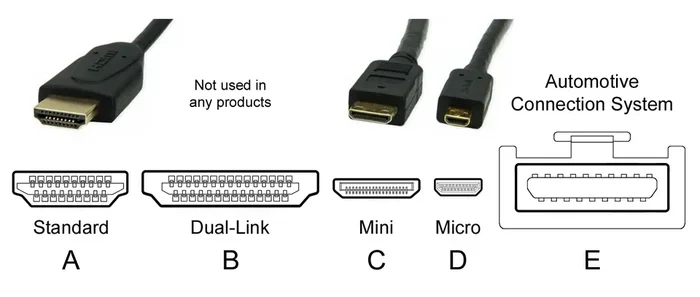
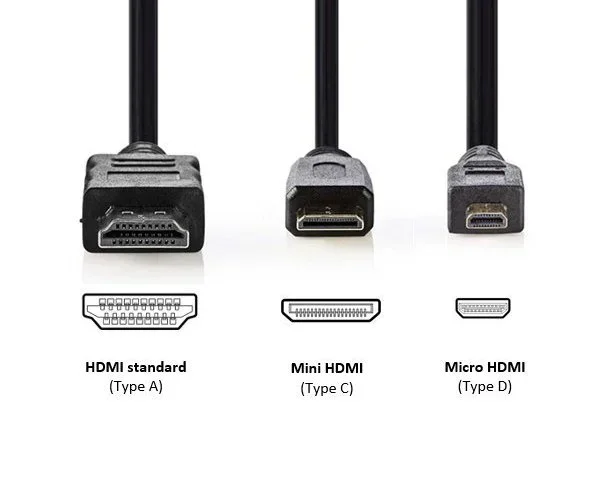
Not all HDMI connectors are the same size either. The standard HDMI connector is the one you see on most TVs and monitors. But there are also mini HDMI and micro HDMI versions. These smaller connectors are used with cameras, tablets, and some laptops.
Even though these connectors look different from each other, they all carry the same signal. The size just depends on the device you are using. Make sure you buy the right connector size for your setup.
Shielding and Build Quality
Good HDMI cable quality also depends on how well the cable is shielded. Shielding protects the internal wires from interference. Without proper shielding, you might notice flickering, signal drops, or audio issues. Premium cables use better shielding materials. They also tend to feel more durable and well-built.
Cheaper cables often skip on shielding to save money. For short runs under six feet, this might not be a problem. But for longer cable runs, shielding becomes very important for maintaining a clean signal.
The Different HDMI Cable Types and Categories
The HDMI cable categories were created to help consumers understand what each cable can do. These categories are based on the cable’s capabilities, not just how it looks. Let us walk through the main types you will encounter.
Standard HDMI Cable
The standard HDMI cable is the most basic type. It supports resolutions up to 1080i or 720p. This type works well for older TVs and basic setups. If you have an older DVD player or a standard definition cable box, a standard cable will get the job done.
These cables are usually very affordable. They are great for simple connections where you do not need high resolution or advanced features. But they will not support modern 4K or 8K content.
High-Speed HDMI Cable
High-speed HDMI cables are designed for higher resolutions. They support 4K content, 3D video, and deeper color depths. If you have a modern TV or a gaming setup, this is the type of cable you want. Most cables sold today fall into this category.
High-speed cables handle more data per second. This means they can deliver crisp, clear images even at higher resolutions. They also support features like HDR, which makes colors look more vivid and true to life.
Premium High-Speed HDMI Cable
The premium high-speed HDMI cable is the top tier for most consumers. These cables are certified to handle the heaviest data loads. They support 4K at 120Hz, 8K content, and the latest HDMI 2.1 features. If you have a PS5, Xbox Series X, or a high-end home theater, this is the cable you need.
Premium cables go through strict testing. They are guaranteed to handle the bandwidth required for the latest content. Look for the official premium certification label on the packaging.
Ultra High-Speed HDMI Cable
The newest addition to the HDMI family is the ultra high-speed HDMI cable. This is the cable designed for the future. It supports the full capabilities of HDMI 2.1. This includes 4K at 120Hz, 8K at 60Hz, and even 10K resolutions in the future.
If you are building a cutting-edge setup, this is the cable to invest in. These cables have the highest bandwidth capacity available right now. They also support features like variable refresh rate and auto low latency mode, which are important for serious gamers.
HDMI Versions: What You Need to Know
The HDMI version of a cable tells you what features it supports. Each new version brings improvements in bandwidth, resolution, and functionality. Understanding these versions helps you pick the right cable for your needs.
HDMI 1.4
HDMI 1.4 was a big step forward when it came out. It introduced support for 4K resolution at 30Hz. It also added the Ethernet channel, which lets devices share an internet connection through the HDMI cable. Many older devices still use this version, and cables that support HDMI 1.4 are still widely available.
If you have an older TV or a basic streaming device, an HDMI 1.4 cable will work well. Just know that it has limitations for modern high-end content.
HDMI 2.0
HDMI 2.0 brought major upgrades. It supports 4K at 60Hz, which makes motion much smoother. It also expanded the color range and added support for simultaneous audio and video streams. This version is the sweet spot for many current 4K TVs and monitors.
When you see a cable labeled as HDMI 2.0, it means it can handle the bandwidth needed for 4K content at smooth frame rates. This is a great choice for most home entertainment setups today.
HDMI 2.1
HDMI 2.1 is the latest and greatest version. It supports bandwidth up to 48 gigabits per second. This allows for 4K at 120Hz, 8K at 60Hz, and features like dynamic HDR, eARC, and variable refresh rate. If you are a serious gamer or a home theater enthusiast, HDMI 2.1 cables are essential.
Not all devices need HDMI 2.1 yet. But if you own a PS5, Xbox Series X, or a high-end gaming monitor, an HDMI 2.1 cable will unlock the full potential of your gear. It is also forward-compatible, meaning it will work with future devices that support even higher resolutions.
Quick Comparison of HDMI Versions
| HDMI Version | Max Resolution | Max Refresh Rate | Key Features |
|---|---|---|---|
| HDMI 1.4 | 4K | 30Hz | Ethernet channel, 3D support |
| HDMI 2.0 | 4K | 60Hz | Expanded color, dual audio streams |
| HDMI 2.1 | 10K | 120Hz at 4K | VRR, eARC, dynamic HDR, 48Gbps bandwidth |
How to Choose the Right HDMI Cable for Your Setup
Choosing the right cable does not have to be complicated. Start by thinking about what devices you are connecting. Then consider what resolution and features you need. Here are some simple guidelines to follow.
Match the Cable to Your Device
Think about what your TV or monitor can display. If you have a 1080p TV, a standard or high-speed cable will work perfectly. If you have a 4K TV, you want at least a high-speed or premium high-speed cable. For 4K gaming at 120Hz or 8K content, go with an ultra high-speed HDMI cable.
Also consider your source device. A basic streaming stick might not need a premium cable. But a PS5 or a high-end Blu-ray player will benefit greatly from a better cable.
Consider Cable Length
HDMI cable length matters more than most people realize. Longer cables can lose signal strength, especially at higher resolutions. For runs under 10 feet, almost any quality cable will work fine. For runs between 10 and 30 feet, look for cables with better shielding. For runs over 30 feet, consider an active HDMI cable or a signal booster.
It is always better to buy a slightly shorter cable than a longer one. Shorter cables mean less signal degradation and a more reliable connection.
Look for Certifications
Not all cables are created equal. Look for official HDMI certifications on the packaging. The Premium High-Speed and Ultra High-Speed labels mean the cable has been tested and certified. These labels give you confidence that the cable will perform as advertised.
Avoid cables that make exaggerated claims without any certification. A cable that says “supports 8K” but has no certification is probably not telling the truth.
Gold Plated Connectors
Many HDMI cables feature gold plated connectors. The gold plating does not improve the signal itself. But it does help prevent corrosion and oxidation over time. This means the connection stays clean and reliable for longer. Gold plated connectors are a nice feature, especially if you plug and unplug cables frequently.
Common Myths About HDMI Cables
There is a lot of misinformation out there about HDMI cables. Let us clear up some of the most common myths so you can make informed decisions.
Myth 1: More Expensive Cables Sound Better
This is one of the biggest myths in the electronics world. A fifty-dollar cable does not sound better than a ten-dollar cable if they both support the same HDMI cable version. Digital signals are digital. The cable either works or it does not. There is no in-between with sound quality.
What you are paying for with expensive cables is often better build quality, thicker shielding, and brand reputation. The actual audio and video performance is usually the same.
Myth 2: Thicker Cables Are Always Better
A thick cable can sometimes mean better shielding and more durable construction. But thickness alone does not determine performance. A thin cable with good internal wiring and proper shielding can outperform a thick, poorly made cable every time.
Do not judge a cable by its size. Look at the specifications and certifications instead.
Myth 3: All HDMI Cables Support 4K
This is simply not true. Only high-speed HDMI cables and newer versions support 4K resolution. A standard HDMI cable from years ago will not carry a 4K signal. Always check the cable specifications before assuming it can handle 4K.
Myth 4: You Need a New Cable for Every New TV
You do not always need to replace your cables when you buy a new TV. If your current cable supports the resolution and features of your new TV, it will continue to work just fine. You only need a new cable if your new device requires a higher HDMI cable bandwidth than your old cable can handle.
Do Expensive HDMI Cables Make a Difference
This is a question that comes up a lot. And the honest answer is: it depends. For most people, a mid-range certified cable works just as well as an expensive one. The differences between a twenty-dollar cable and a two-hundred-dollar cable are often negligible for everyday use.
However, there are situations where premium cables shine. If you are running a cable over a long distance, the better shielding in a premium cable can prevent signal loss. If you are using HDMI 2.1 features like 4K at 120Hz, a certified ultra high-speed cable ensures you get the full experience.
For most home setups, a well-certified mid-range cable is the best value. You get reliable performance without paying for a brand name premium.
When to Spend More on a Cable
- You are running cables longer than 25 feet
- You are using HDMI 2.1 features like VRR or ALLM
- You need 8K support for future-proofing
- You are setting up a professional or commercial installation
- You live in an area with lots of electromagnetic interference
When to Save Money
- You have a simple 1080p setup
- Your cable run is under 10 feet
- You are connecting basic devices like a DVD player or older game console
- You just need a backup or spare cable
Key Takeaways
- Not all HDMI cables look the same inside: Different HDMI cable categories support different speeds and resolutions.
- HDMI versions matter: HDMI 2.0 vs HDMI 2.1 cables handle bandwidth and features like 4K at 120Hz very differently.
- Cable length and build quality affect signal strength and overall HDMI cable performance.
- Gold plated connectors help reduce signal loss and corrosion over time.
- Expensive cables do not always mean better quality: Many premium cables cost more because of branding, not performance.
- Always match your cable to your device needs: A basic cable works fine for older TVs, but gaming and 4K setups need faster cables.
Conclusion
So, do all HDMI cables look the same? From the outside, yes. They all have the same basic shape and connector. But inside, there is a world of difference. The HDMI cable types, versions, bandwidth capabilities, and build quality all vary significantly. These differences affect everything from picture quality to compatibility with the latest devices.
The good news is that choosing the right cable does not have to be confusing. Start by understanding what your devices need. If you have a 4K TV and a modern gaming console, a high-speed or premium HDMI cable will serve you well. If you are building a cutting-edge setup with HDMI 2.1 features, invest in an ultra high-speed cable. And remember, you do not need to spend a fortune to get great performance.
Take a few minutes to check your current setup. Make sure your cables match your devices and your entertainment goals. A small upgrade to the right HDMI cable can make a big difference in your viewing and gaming experience. The right cable is out there. You just need to know what to look for.
FAQs
Can I use any HDMI cable for 4K TV?
Not all cables support 4K. You need at least a high-speed HDMI cable or higher. Standard cables will not carry a 4K signal. Always check the cable specifications before purchasing to make sure it supports the resolution you need.
Does HDMI cable length affect picture quality?
For short runs under 10 feet, length usually does not affect quality. For longer runs, signal can weaken, especially at higher resolutions. Using a certified cable with good shielding helps maintain quality over longer distances.
What is the difference between HDMI 2.0 and HDMI 2.1 cables?
HDMI 2.0 supports 4K at 60Hz and expanded color. HDMI 2.1 supports 4K at 120Hz, 8K, and features like VRR and eARC. The cable versions also differ in bandwidth capacity, with HDMI 2.1 offering much higher speeds.
Are gold plated HDMI cables better?
Gold plated connectors help prevent corrosion and maintain a clean connection over time. They do not improve picture or sound quality directly. But they are a good feature for durability, especially if you plug and unplug cables often.
Do I need an expensive HDMI cable for gaming?
For most gaming setups, a certified high-speed or premium HDMI cable is all you need. If you are gaming on a PS5 or Xbox Series X and want to use features like 4K at 120Hz, an ultra high-speed HDMI cable is the best choice. Expensive does not always mean better, but certification matters.
Can old HDMI cables damage new devices?
No, old cables cannot damage new devices. They may simply not support all the features of newer equipment. If a cable is too old or too basic, it might not carry a signal at the highest resolution or refresh rate your device is capable of. But it will not cause any harm.