Can You Use Wireless Hdmi For Gaming Without Any Issues
Yes, you can use wireless HDMI for gaming, but there are important factors to consider before you buy. Wireless HDMI for gaming lets you cut the cord and enjoy your favorite titles on a big screen without messy cables. However, latency, range, and signal quality can impact your experience. This guide covers everything you need to know about wireless HDMI for gaming before you make a purchase.
So, can you use wireless HDMI for gaming without running into problems? The short answer is yes, but the full answer depends on a few key factors. Wireless HDMI for gaming has come a long way in recent years, and more players are ditching cables in favor of clean, clutter-free setups. Whether you want to stream your console to another room or eliminate cable mess from your desk, wireless HDMI offers a convenient solution. But is it truly reliable for gaming? Let us dive deep into everything you need to know.
Wireless HDMI for gaming has become a hot topic among gamers who want flexibility without sacrificing quality. Many people wonder if going wireless means sacrificing performance. The truth is, modern wireless HDMI transmitters and receivers have improved significantly. They offer low latency, high resolution support, and easy plug-and-play setup. Still, not all wireless HDMI systems are created equal, and understanding the differences can save you from frustration.
If you have ever dealt with connection problems on your desktop, you know how annoying it can be. For those using an Acer Desktop Pc Wireless Connection Troubleshooting guide, you already understand how wireless signals can sometimes act up. The same principles apply to wireless HDMI for gaming. Your environment, hardware, and settings all play a role in how well your wireless HDMI system performs.
Key Takeaways
- Wireless HDMI for gaming works well for casual and moderate gaming, but competitive gamers may notice input lag.
- Latency is the biggest concern with wireless HDMI, and it varies by brand and model.
- Range and obstacles affect signal quality, so placement matters a lot.
- 4K wireless HDMI options exist, but they often cost more and may compress the signal.
- Setting up wireless HDMI is simple and usually takes less than 10 minutes.
- Using a dedicated wireless HDMI adapter is better than screen mirroring for gaming.
- Check your router and wireless environment to avoid interference with your wireless HDMI signal.
📑 Table of Contents
- What Is Wireless HDMI for Gaming?
- Benefits of Using Wireless HDMI for Gaming
- Potential Issues and Limitations You Should Know
- How to Choose the Right Wireless HDMI for Gaming
- Setting Up Wireless HDMI for Your Gaming System
- Expert Tips for a Lag-Free Wireless Gaming Experience
- Wireless HDMI vs. Traditional HDMI Cables: A Comparison
- The Future of Wireless HDMI for Gaming
- Final Thoughts on Wireless HDMI for Gaming
What Is Wireless HDMI for Gaming?
Wireless HDMI for gaming refers to a system that sends high-definition audio and video from a source device to a display without using a physical HDMI cable. Instead, it uses radio frequency or Wi-Fi-based technology to transmit the signal. This allows you to place your TV, monitor, or projector anywhere within range of the transmitter.
How Wireless HDMI Technology Works
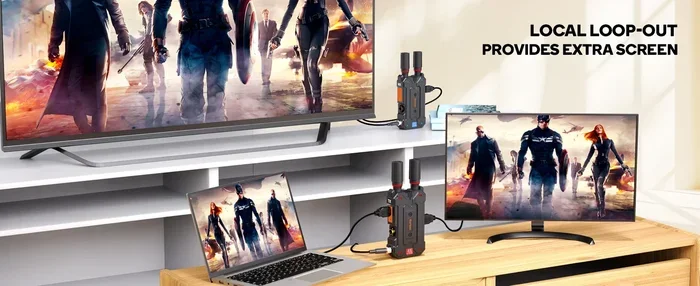
At its core, a wireless HDMI system includes two main parts. The first is a transmitter, which connects to your gaming device. The second is a receiver, which connects to your TV or monitor. The transmitter sends the HDMI signal wirelessly, and the receiver picks it up and displays it on your screen.
Most systems use a dedicated wireless frequency band, often around 5 GHz. This helps reduce interference from other devices. Some cheaper options use standard Wi-Fi, which can be less reliable for gaming. The dedicated systems tend to offer lower latency and better picture quality.
Think of it like this. Your wireless HDMI transmitter is like a radio station sending a signal. Your receiver is like the radio picking up that signal. This is similar to how 5G towers deliver wireless internet using radio frequencies to reach your phone. If there are too many obstacles or other signals interfering, the quality drops. This is why placement and environment matter so much for wireless HDMI for gaming.
Common Wireless HDMI Brands and Devices
Several brands dominate the wireless HDMI market. Some of the most popular include:
- IOGEAR – Known for reliable transmitters with low latency
- Amazinglink – Offers affordable wireless HDMI kits
- Toshiba – Makes premium wireless HDMI systems
- Avantree – Popular for long-range wireless HDMI
- Nyrius – Budget-friendly options for casual gaming
Each brand offers different features, range, and latency specs. When choosing a system for wireless HDMI for gaming, always check the latency rating first. Lower latency means less delay between your controller input and what appears on screen.
Benefits of Using Wireless HDMI for Gaming
There are many reasons gamers choose wireless HDMI over traditional cables. Let us look at the biggest advantages.
Freedom of Placement
With wireless HDMI, you are not tied to a specific spot. You can move your TV or monitor to any room without running cables through walls. This is perfect for gamers who want flexibility in their setup. You can game in the living room today and the bedroom tomorrow without unplugging anything.
Cleaner, Clutter-Free Setup
Nothing ruins a nice gaming desk like a tangle of cables. Wireless HDMI eliminates the need for long HDMI cables stretching across your room. Your setup looks cleaner and more organized. A clean setup also makes it easier to clean around your equipment and rearrange your space whenever you want.
Easy to Set Up
Most wireless HDMI kits are plug-and-play. You connect the transmitter to your source device and the receiver to your display. That is it. No software to install, no drivers to update. You can be up and running in minutes. This makes wireless HDMI for gaming a great choice for people who are not tech-savvy.
Support for High Resolutions
Many modern wireless HDMI systems support 4K resolution at 60Hz. This means you can enjoy crisp, detailed visuals without a cable. Some even support HDR content for richer colors and contrast. If you have a 4K TV or monitor, you can still get the full visual experience wirelessly.
Multi-Room Streaming
Want to game in the bedroom while your console sits in the living room? Wireless HDMI makes this possible. You can stream your gaming signal to any room with a receiver and a display. This is a huge advantage for families sharing a single gaming console across multiple TVs.
Potential Issues and Limitations You Should Know
While wireless HDMI for gaming has many benefits, there are also some real limitations you need to understand before buying.
Latency and Input Delay
This is the number one concern for gamers. Latency is the delay between your input and the action appearing on screen. With a wired HDMI cable, latency is virtually zero. With wireless HDMI, there is always some delay, even if it is very small.
For casual gaming, this delay is usually unnoticeable. But for competitive or fast-paced games, even a few milliseconds can matter. If you are playing a shooting game or a racing game, you might notice the difference. This is especially true if you are used to a wired connection and suddenly switch to wireless.
Range Limitations
Most wireless HDMI systems work best within a certain range. Typical range is between 10 and 30 feet. Some premium systems can reach up to 100 feet or more. But walls, furniture, and other obstacles can reduce the effective range significantly.
If you are trying to send a signal through multiple walls, you may experience signal drops or quality loss. This is similar to how wireless signals work in general. The more obstacles in the way, the weaker the signal becomes. Always measure your space before buying a wireless HDMI system.
Signal Interference
Other wireless devices in your home can interfere with your wireless HDMI signal. Wi-Fi routers, Bluetooth devices, and even microwaves can cause problems. If you live in a crowded apartment building, interference can be a real issue.
One way to reduce interference is to use a dedicated wireless HDMI band rather than standard Wi-Fi. Dedicated systems operate on their own frequency, so they are less likely to be affected by other devices. This is a key advantage of investing in a quality wireless HDMI system for gaming.
Compression and Quality Loss
Some wireless HDMI systems compress the video signal to transmit it wirelessly. This compression can lead to a slight loss in image quality. For most gamers, this is not noticeable. But if you are a perfectionist who cares about every pixel, it might bother you.
Always check whether a wireless HDMI system is lossless or uses compression. Lossless systems preserve the full quality of the original HDMI signal but tend to be more expensive. For the best wireless HDMI for gaming experience, look for systems that advertise lossless transmission.
How to Choose the Right Wireless HDMI for Gaming
Choosing the right wireless HDMI system can feel overwhelming with so many options available. Here are the key factors to consider before making your purchase.
Check the Latency Rating
Latency is the most important spec for gaming. Look for systems with latency under 10 milliseconds for casual gaming. For competitive gaming, aim for systems under 5 milliseconds. Some brands advertise their latency clearly, so check the product details before buying. Lower latency equals a smoother, more responsive gaming experience.
Consider the Resolution You Need
Do you game in 1080p or 4K? Make sure the wireless HDMI system you choose supports your desired resolution. Keep in mind that 4K wireless HDMI systems tend to be more expensive and may have slightly higher latency than 1080p options. Match your system to your display capabilities for the best results.
Look at the Range
Measure the distance between your gaming device and your TV or monitor. Choose a wireless HDMI system with a range that exceeds that distance. Always account for walls and obstacles in your space. A little extra range gives you flexibility to move around while gaming.
Read Reviews and User Feedback
Before buying any wireless HDMI product, read real user reviews. Look for feedback about latency, connection stability, and picture quality. This will give you a realistic picture of what to expect. Pay special attention to reviews from other gamers, as they will test the system under real gaming conditions.
Budget Considerations
Wireless HDMI systems range from around $50 to over $300. Budget options are fine for casual gaming, but serious gamers may want to invest in a premium system. Remember, you often get what you pay for when it comes to wireless HDMI for gaming. Spending a little more upfront can save you from frustration later.
Setting Up Wireless HDMI for Your Gaming System
Setting up a wireless HDMI system is straightforward, but a few tips can help you get the best results right from the start.
Step-by-Step Setup Guide
- Unbox your wireless HDMI transmitter and receiver.
- Connect the transmitter to your gaming device using an HDMI cable.
- Connect the receiver to your TV or monitor using another HDMI cable.
- Power on both the transmitter and receiver.
- Wait for the devices to pair automatically.
- Check the display on your TV or monitor for a signal.
- Adjust settings if needed for resolution and audio.
That is it. Most systems pair within seconds and start working right away. The entire wireless HDMI for gaming setup process is designed to be simple and frustration-free.
Best Practices for Placement
- Place the transmitter and receiver in open areas with a clear line of sight.
- Keep them away from other wireless devices to reduce interference.
- Avoid placing them behind thick walls or metal objects.
- Elevate the devices for a stronger signal.
Following these simple placement tips can make a big difference in your wireless HDMI for gaming experience. A clear line of sight between the transmitter and receiver is the single most important factor for a stable connection.
Troubleshooting Common Setup Issues
If your wireless HDMI system is not working properly, try these steps. First, make sure both devices are powered on and paired correctly. Second, check that your HDMI cables are firmly connected. Third, move the transmitter and receiver closer together. Fourth, reduce other wireless devices in the area.
If you are still having trouble, it may be related to your broader wireless setup. For those dealing with general wireless connection problems, checking resources like an Acer Desktop Pc Wireless Connection Troubleshooting guide can help you identify common issues that affect all types of wireless signals, including HDMI.
Expert Tips for a Lag-Free Wireless Gaming Experience
Want to get the most out of your wireless HDMI for gaming? Here are some expert tips that can help.
Use a Dedicated 5 GHz Band
Many wireless HDMI systems operate on the 5 GHz band. This band is less crowded than the 2.4 GHz band and offers faster, more stable connections. If your system allows you to choose, always pick the 5 GHz option. This small change can significantly reduce interference and improve your gaming experience.
Keep Firmware Updated
Manufacturers often release firmware updates that improve performance and reduce latency. Check for updates regularly and install them as soon as they become available. This small step can make a big difference in how smoothly your wireless HDMI for gaming setup runs.
Minimize Obstacles Between Transmitter and Receiver
The fewer obstacles between your transmitter and receiver, the better your signal will be. Try to maintain a clear path between the two devices. Even moving a small piece of furniture can improve your connection. Think of the signal like a beam of light, and keep it as unobstructed as possible.
Close Unnecessary Background Apps
On your gaming device, close any apps or programs that are not needed. This frees up system resources and can help reduce any processing delay in the wireless HDMI signal chain. A cleaner system means a smoother wireless HDMI gaming experience.
Test Your Setup Before Important Gaming Sessions
Before a big tournament or a long gaming session, test your wireless HDMI setup. Make sure the connection is stable and the latency is acceptable. It is much better to fix problems before you need your setup to perform at its best. A quick five-minute test can save you from a frustrating experience during an important gaming moment.
Wireless HDMI vs. Traditional HDMI Cables: A Comparison
How does wireless HDMI compare to a good old-fashioned HDMI cable? Let us break it down side by side.
| Feature | Wireless HDMI | Traditional HDMI Cable |
|---|---|---|
| Latency | Slight delay (1-15ms) | Virtually zero |
| Setup Ease | Plug and play | Plug and play |
| Cable Clutter | None | Can be messy |
| Range | 10-100+ feet | Limited by cable length |
| Image Quality | Slight compression possible | Full lossless quality |
| Cost | $50-$300+ | $5-$30 |
| Mobility | High | Low |
| Signal Interference | Possible | None |
As you can see, both options have their strengths. For pure performance, a wired HDMI cable wins. For convenience and flexibility, wireless HDMI for gaming is hard to beat. The best choice depends on your specific needs and gaming style.
The Future of Wireless HDMI for Gaming
The technology behind wireless HDMI is improving every year. Newer systems offer lower latency, higher resolutions, and better range. Some cutting-edge systems now support 8K resolution and even faster refresh rates. The future of wireless HDMI for gaming looks very promising.
In the near future, we can expect wireless HDMI to become even more reliable. As wireless technology evolves, the gap between wired and wireless will continue to shrink. For now, wireless HDMI for gaming is a great option for most players, especially those who value a clean setup and flexibility.
The way people consume media at home is changing. More gamers are choosing to stream content, and the demand for wireless solutions is growing. This means manufacturers are investing heavily in improving wireless HDMI technology. The best is likely yet to come.
Final Thoughts on Wireless HDMI for Gaming
So, can you use wireless HDMI for gaming without any issues? Yes, you absolutely can. Wireless HDMI for gaming offers a convenient, clutter-free way to enjoy your favorite games on a big screen. The key is to choose the right system, set it up properly, and manage your expectations.
If you are a casual gamer who plays for fun, wireless HDMI will serve you well. If you are a competitive gamer who needs every millisecond advantage, a wired connection might still be your best bet. But for most people, the difference is small enough that it does not really matter.
Give wireless HDMI a try. You might be surprised at how much you enjoy a cable-free gaming setup. Just remember to check your latency, placement, and signal strength before you buy. With the right system, wireless HDMI for gaming can deliver a fantastic experience every time. Now that you know the ins and outs of this technology, you are ready to make an informed decision. Happy gaming.
Frequently Asked Questions
Is wireless HDMI good for competitive gaming?
Wireless HDMI can work for competitive gaming, but it may introduce slight latency compared to a wired connection. If you are a professional or serious competitive gamer, a wired HDMI cable is still the safest choice for zero delay.
Does wireless HDMI support 4K gaming?
Yes, many wireless HDMI systems support 4K resolution at 60Hz. However, 4K wireless HDMI systems tend to be more expensive and may have slightly higher latency than 1080p options. Always check the specs before purchasing to ensure compatibility with your gaming setup.
How far can wireless HDMI reach?
Most wireless HDMI systems work best within 10 to 30 feet. Premium systems can reach up to 100 feet or more. Keep in mind that walls and obstacles can reduce the effective range significantly, so measure your space before buying.
Can wireless HDMI cause input lag?
Yes, all wireless HDMI systems introduce some level of input lag. The amount varies by brand and model. Look for systems with latency under 10 milliseconds for the best gaming experience, especially if you play fast-paced games.
Do I need a special router for wireless HDMI?
No, most dedicated wireless HDMI systems do not need a router. They use their own wireless frequency to transmit the signal. However, keeping your Wi-Fi router away from the wireless HDMI devices can help reduce interference and improve performance.
Are wireless HDMI systems easy to set up?
Absolutely. Most wireless HDMI kits are plug-and-play. You simply connect the transmitter to your source device and the receiver to your display, and they pair automatically within seconds. No technical expertise is required.
=== CONCLUSION ===
Wireless HDMI for gaming is a practical and convenient option for most gamers. It offers freedom, clean setups, and easy installation. While there are some limitations like latency and range, modern systems have made great strides in minimizing these issues. By choosing the right system and following the tips in this guide, you can enjoy a great wireless gaming experience.
The future of wireless HDMI for gaming looks bright, and now is a great time to explore what this technology has to offer. Give it a try, and you might just find that going wireless is the best decision you make for your gaming setup. Happy gaming.