Can You Get Internet Through Hdmi And Stream Anything
Can you get internet through HDMI? Yes, HDMI can carry internet data using a feature called HDMI Ethernet Channel. This guide explains how to get internet through HDMI, stream anything, and what you need to know. Read on to find out if HDMI internet is right for you.
Have you ever wondered if you can get internet through HDMI? It sounds like something from a tech movie, but it’s real. HDMI cables do more than carry video and sound. They can also deliver internet to your devices. This means you might not need a separate Ethernet cable in some setups.
Many people ask, “Can you get internet through HDMI?” The answer is yes, thanks to a feature called HDMI Ethernet Channel. It lets two HDMI devices share an internet connection over one cable. You can use this to stream movies, play games, or browse the web. In this guide, we will show you how it works and what you need.
We will cover the basics of HDMI internet. You will learn about HDMI Ethernet Channel, HDMI-CEC, and HDMI extenders. We will also look at streaming anything through HDMI. By the end, you will know if HDMI internet fits your home.
Key Takeaways
- HDMI Ethernet Channel (HEC) lets you send internet data over a standard HDMI cable.
- Not all HDMI cables support HEC – you need a high-speed HDMI cable with Ethernet.
- HDMI-CEC can control devices but does not provide internet access.
- HDMI extenders and HDMI-over-IP systems can share internet across long distances.
- Streaming 4K content is possible if your HDMI cable and devices support the right bandwidth.
- Common issues like no internet over HDMI often come from cable or port problems.
- HDMI internet is convenient but traditional Ethernet is still faster and more reliable.
📑 Table of Contents
Can You Get Internet Through HDMI?
The short answer is yes. HDMI can carry internet data between devices. This happens through a built-in feature called HDMI Ethernet Channel. It was added to the HDMI specification to let devices share a single internet connection. You only need one HDMI cable to send both video and data.
What Is HDMI Ethernet Channel?
HDMI Ethernet Channel (HEC) is a technology built into some HDMI cables. It allows two HDMI devices to share an internet connection. One device connects to the internet, like a cable box or a router. The other device, like a TV or soundbar, gets that internet through the HDMI cable. No extra Ethernet cable is needed.
HEC works at 100 Mbps speeds. That is enough for most streaming needs. You can watch HD or even 4K content without buffering. However, not all HDMI cables support HEC. You need a high-speed HDMI cable that specifically lists “with Ethernet” on the package.
How Does HDMI Ethernet Channel Work?
HDMI Ethernet Channel uses the HDMI cable’s twisted pairs. These are wires inside the cable that are normally unused. HEC turns those wires into a data link. The internet source device sends data through the cable. The receiving device gets that data and uses it as its internet connection.
The process is simple. You plug one end of the HDMI cable into your internet source. The other end goes into your TV or AV receiver. The devices then talk to each other and share the connection. It is like a tiny network built right into the cable.
Which Devices Support HDMI Internet?
Not every HDMI device has HEC support. Many modern TVs, Blu-ray players, and soundbars do. Check the product specs for “HDMI Ethernet Channel” or “HEC.” Here are common devices that often support it:
- Smart TVs from brands like Samsung, LG, and Sony
- AV receivers and soundbars
- Cable boxes and streaming sticks
- Game consoles with HDMI output
If your device does not support HEC, you can still use HDMI for video and audio. You just won’t get internet over that cable. In that case, you might need a different solution.
How to Set Up Internet Over HDMI
Setting up internet through HDMI is easy when you have the right gear. There are a few methods you can use. Each method fits different needs and setups. Let’s look at the most common ways.
Using HDMI-CEC for Network Control
HDMI-CEC stands for Consumer Electronics Control. It lets you control multiple HDMI devices with one remote. Many people confuse HDMI-CEC with HDMI internet. HDMI-CEC does not give you internet. It just allows devices to talk and control each other.
For example, you can turn on your TV and soundbar with one button. HDMI-CEC also lets you switch inputs automatically. It is a handy feature, but it is not about data or internet. You still need a separate way to get online.
HDMI Extenders and Ethernet
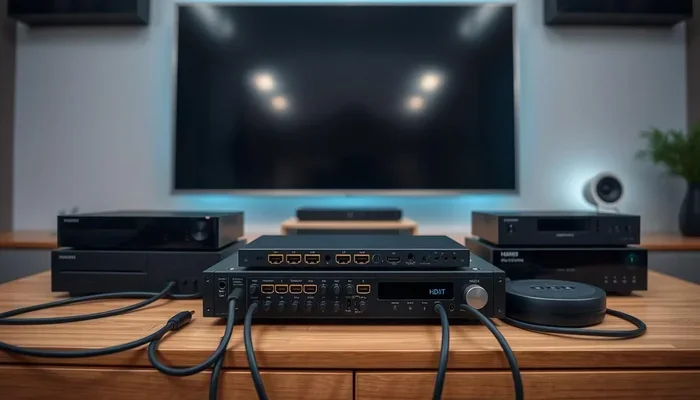
An HDMI extender can send HDMI signals over long distances. Many HDMI extenders also carry Ethernet. You can use them to stretch your HDMI internet connection across a room or a building. The extender plugs into your internet source and your TV. An Ethernet cable connects the extender to your router or modem.
HDMI extenders are great for setups where the TV is far from the router. You get HDMI video and internet in one go. Look for an extender that supports 4K and HDMI Ethernet Channel. This ensures you get the best quality and speed.
HDMI-over-IP Solutions for Home Networks
HDMI-over-IP is a more advanced way to send HDMI signals over a network. It uses your existing Ethernet infrastructure. You send HDMI video and audio as data packets over your local network. This method can also carry internet data to remote displays.
HDMI-over-IP systems use encoders and decoders. The encoder plugs into your HDMI source. The decoder plugs into your TV. They talk over your home network. This lets you stream HDMI content to any room. It also allows you to share internet connections across multiple TVs.
Can You Stream Anything Through HDMI?
Yes, you can stream almost anything through HDMI. HDMI is the standard for high-quality video and audio. Whether you want to watch Netflix, play games, or mirror your screen, HDMI can handle it. The key is having the right HDMI cable and devices.
Streaming 4K and 8K Content
To stream 4K content, you need an HDMI 2.0 or later cable. For 8K, you need HDMI 2.1. These cables have more bandwidth. They can carry the large amounts of data that 4K and 8K video requires. If you want to stream anything in high resolution, check your cable’s version.
A high-speed HDMI cable with Ethernet is ideal. It gives you both the video bandwidth and the internet connection. You can plug one cable into your streaming device and your TV. You get stunning picture quality and a shared internet link.
Gaming with Low Latency
Gamers love HDMI because it offers low latency and high refresh rates. HDMI 2.1 supports 4K at 120Hz and even 8K at 60Hz. This makes games look smooth and responsive. You can also use HDMI to share internet with your gaming console. Your console gets online through the HDMI cable, reducing clutter.
HDMI-CEC can also help gamers. It lets you turn on your TV and console with one remote. Some TVs support HDMI-CEC features like “One Touch Play.” This means your console starts up and switches to the right input automatically.
Multi-Room Streaming with HDMI
You can use HDMI to stream content to multiple TVs in your home. HDMI-over-IP systems make this easy. You can send the same HDMI signal to several rooms. Each TV can also get its own internet connection through the network. This is great for whole-home entertainment.
Imagine watching a movie in the living room and a different show in the bedroom. Both TVs share the same HDMI source and internet. You control everything from one device. HDMI makes multi-room streaming simple and reliable.
HDMI vs. Ethernet: Which Is Better for Streaming?
HDMI Ethernet Channel and standard Ethernet both have their strengths. They serve different purposes. Let’s compare them to help you choose the best option for your setup.
Speed and Bandwidth Comparison
HDMI Ethernet Channel offers up to 100 Mbps speeds. Standard Ethernet can go much faster. Gigabit Ethernet gives you 1,000 Mbps. That is ten times faster than HDMI Ethernet. For most streaming, 100 Mbps is plenty. But if you need the fastest speeds for large file transfers, Ethernet wins.
Reliability and Setup Ease
HDMI internet is very convenient. You use one cable for video, audio, and data. It reduces the number of cables you need. Standard Ethernet requires a separate cable. That can make your setup messier. However, Ethernet is more reliable over long distances. HDMI signals can degrade if the cable is too long.
When to Choose HDMI Internet
Choose HDMI internet when you want a clean, simple setup. It is perfect for streaming boxes, soundbars, and TVs that are close together. It is also great when you don’t have an extra Ethernet port nearby. If you need the highest speeds or long cable runs, go with standard Ethernet.
| Feature | HDMI Ethernet Channel | Standard Ethernet |
|---|---|---|
| Max Speed | 100 Mbps | 1,000 Mbps (Gigabit) or more |
| Cable Type | High-speed HDMI with Ethernet | Cat5e, Cat6, or Cat6a |
| Distance | Up to 50 feet (15 m) reliably | Up to 328 feet (100 m) |
| Setup Difficulty | Very easy, one cable | Requires extra cable and ports |
| Common Use | TVs, soundbars, streaming devices | Routers, computers, long runs |
Common HDMI Internet Problems and How to Fix Them
Even with the right gear, you might run into issues. HDMI internet is not perfect. Here are common problems and their solutions.
No Internet Over HDMI
If your TV says “No Internet” over HDMI, check a few things. First, make sure both devices support HDMI Ethernet Channel. Look for the “HEC” logo on the cable or device specs. Next, try a different high-speed HDMI cable. A faulty cable can break the connection. Finally, restart both devices. Unplug them for 30 seconds and plug them back in.
Slow Streaming or Buffering
Slow streaming over HDMI can be annoying. It often happens when the cable is too long or damaged. Use a shorter, high-quality HDMI cable. Also, check your internet speed. If your home internet is slow, HDMI will be slow too. Try moving the internet source closer to the TV. A HDMI extender with a built-in Ethernet port can also help.
HDMI-CEC Connection Issues
HDMI-CEC issues can make your devices act strangely. One device might not turn on with the others. This is not an internet problem. It is a control problem. Go into your TV’s settings and look for HDMI-CEC or “SimpLink” or “Bravia Sync.” Turn it on for all connected devices. Use the same brand name for the setting if possible. This often fixes the issue.
Final Thoughts
So, can you get internet through HDMI? Yes, you can. HDMI Ethernet Channel makes it possible to share internet between devices with a single cable. You can stream anything from 4K movies to online games. HDMI internet is convenient and keeps your setup tidy. Just remember to use the right cable and check your device specs.
If you want the fastest and most reliable connection, pair HDMI with a good home network. Use HDMI extenders or HDMI-over-IP systems for bigger setups. With the right knowledge, you can turn any HDMI connection into a powerful streaming hub. Start exploring your options today and enjoy seamless internet through HDMI.
Frequently Asked Questions
Can any HDMI cable carry internet?
No, only high-speed HDMI cables that specifically support HDMI Ethernet Channel can carry internet. Look for the “with Ethernet” label on the cable packaging to be sure.
Does HDMI-CEC give you internet?
HDMI-CEC lets you control devices with one remote, but it does not provide an internet connection. You still need a separate way to get online, like HDMI Ethernet Channel or a Wi-Fi connection.
Can I stream 4K content over HDMI internet?
Yes, you can stream 4K content if you have an HDMI 2.0 or 2.1 cable and devices that support the bandwidth. A high-speed HDMI cable with Ethernet is ideal for this.
What is HDMI-over-IP?
HDMI-over-IP sends HDMI signals as data packets over your home network using Ethernet cables. It lets you stream HDMI content to any TV on the network and can also share internet connections.
Is HDMI internet faster than Wi-Fi?
HDMI Ethernet Channel offers a wired connection, which is generally more stable and less prone to interference than Wi-Fi. However, its max speed of 100 Mbps is lower than a good Wi-Fi 6 or Ethernet connection.
Can I use HDMI to share internet between two TVs?
Yes, you can share internet between two TVs using HDMI Ethernet Channel or an HDMI-over-IP system. One TV gets the internet from your router, and the other TV gets it through the HDMI link or network.