Can You Deliver Power Over Hdmi Cable Without Extra Gear
You can deliver power over HDMI cable to some devices, but not all. HDMI cables carry both video and audio signals, and certain pins can provide limited power through a feature called HDMI-CEC or hot-plug detect. However, delivering meaningful power without extra gear depends on your cable version, device compatibility, and the amount of power needed. This guide breaks down exactly what is possible, what is not, and how to make it work for your setup.
Have you ever plugged in an HDMI cable and wondered if it was doing more than just sending video and audio? Maybe you noticed a small device powering up through its HDMI port. Or perhaps you are trying to simplify your desk setup and want to know if one cable can handle both power and signal. The idea of delivering power over HDMI cable without extra gear is tempting. It sounds simple. It sounds convenient.
The truth is, HDMI cables do carry a small amount of power. But that power is very limited. It is not like plugging a phone into a wall charger. Understanding what HDMI can and cannot do when it comes to power delivery is key. This guide will walk you through everything you need to know. We will cover how HDMI power works, which cables support it, and when you will still need extra gear.
Whether you are setting up a home theater, building a compact workspace, or just curious about your cables, this article has you covered. Let us dive into the world of HDMI power delivery and see what is really possible.
Key Takeaways
- HDMI Can Provide Limited Power: HDMI cables use specific pins to deliver a small amount of power for hot-plug detection and CEC functions.
- Power Is Not Designed for Charging: The power delivered through standard HDMI is minimal and not meant to charge laptops or large devices.
- HDMI-CEC Enables Device Control: Consumer Electronics Control allows connected devices to share basic power commands and signals.
- Active HDMI Cables Offer More: Some active cables include built-in power management but still require external power for longer runs.
- USB-C to HDMI Is a Better Power Option: USB-C Alt Mode can deliver both video and significantly more power than standard HDMI.
- Check Your Devices First: Not all HDMI ports support power delivery. Always verify specs before relying on HDMI alone.
- Extra Gear Is Often Needed: For reliable power and video together, HDMI extenders, adapters, or docking stations are usually necessary.
📑 Table of Contents
- How HDMI Power Delivery Works
- Can You Actually Deliver Power Over HDMI?
- HDMI Cable Types and Their Power Capabilities
- When You Need Extra Gear for HDMI Power
- Alternatives to HDMI for Power and Video
- Quick Tips for HDMI Power Delivery
- Common Mistakes People Make with HDMI Power
- Expert Insights on HDMI Power and Future Developments
- Final Thoughts
How HDMI Power Delivery Works
HDMI cables are designed primarily for one job. They transmit high-definition video and multi-channel audio from a source to a display. But inside that cable, there are more pins than you might think. A standard HDMI connector has 19 pins. Each pin has a specific role. Some carry video data. Some carry audio data. And some handle power-related functions.
The power that HDMI provides comes from a few specific pins. These pins supply voltage for hot-plug detection. Hot-plug detection is the process that tells your TV or monitor a device has been connected. It also powers the HDMI-CEC feature. CEC stands for Consumer Electronics Control. This feature lets devices like a Blu-ray player or a streaming box turn on your TV automatically. It also allows one remote to control multiple devices.
The Role of Hot-Plug Detect
Hot-plug detect is one of the most important power functions in HDMI. When you plug a cable into a device, the hot-plug detect pin sends a small signal. This signal tells the source device, like a laptop or a game console, that a display is ready. The source device then knows to start sending video. Without this pin, devices would not know when to begin or stop transmitting a signal.
The voltage on this pin is very low. It is typically around 5 volts. The current is also very small. We are talking about milliamps, not the amps your phone charger delivers. So while this power is essential for signaling, it is not enough to charge anything meaningful.
HDMI-CEC Power Sharing
HDMI-CEC is another way HDMI cables share power and commands between devices. Different brands call CEC by different names. Samsung calls it Anynet+. LG calls it Simplink. Sony calls it BRAVIA Sync. But they all do the same basic thing. They let connected devices communicate over the HDMI cable.
Through CEC, a TV can send a small amount of power to a connected device. This is how your TV remote can turn on a soundbar or a streaming stick. The power is minimal. It is just enough to wake a device from standby mode. It is not enough to power a device during full use.
Can You Actually Deliver Power Over HDMI?
The short answer is yes, but with big limitations. The longer answer is more nuanced. Standard HDMI cables can deliver a small amount of power through specific pins. This power is meant for signaling and control, not for running devices. If you want to power a laptop or a large monitor through HDMI alone, you will be disappointed.
However, there are some scenarios where HDMI power delivery is useful. Small devices like HDMI switches, audio extractors, and certain capture cards can draw power from the HDMI connection itself. These devices need very little energy. The hot-plug detect pin can sometimes provide just enough to keep them running. But this is not guaranteed. It depends on the source device and its HDMI port design.
What Devices Can Receive HDMI Power?
Not all devices are created equal when it comes to HDMI power. Some devices are designed to draw power from HDMI. Others are not. Here are some common examples:
- HDMI switches and splitters: Some models draw power from the HDMI input. These are often passive or semi-passive devices.
- Soundbars with HDMI-CEC: Many soundbars receive standby power through HDMI and turn on automatically.
- Streaming devices: Devices like Chromecast or Fire TV Stick use CEC to receive wake signals.
- Capture cards: Some external capture cards for streaming can get basic power through HDMI.
- USB-C docks with HDMI: These are different. They use the USB-C connection for power, not HDMI alone.
If you are hoping to power a large display or a computer through HDMI, that is not realistic. HDMI simply does not carry enough wattage. A standard HDMI port outputs very little power. We are talking about fractions of a watt in most cases.
HDMI Cable Types and Their Power Capabilities
Not all HDMI cables are the same. Different cable types support different bandwidths, resolutions, and features. But when it comes to power delivery, the differences are subtle. Let us look at the most common HDMI cable types and what they can do.
Standard HDMI Cable
The standard HDMI cable, also known as Category 1, supports resolutions up to 1080p. It has 19 pins and provides the basic hot-plug detect and CEC functions. The power delivery on this cable is minimal. It is only enough for signaling purposes. You cannot rely on it to power any external device.
High Speed HDMI Cable
High Speed HDMI cables support resolutions up to 4K at 30Hz. They also have 19 pins and the same basic power functions. The power delivery does not increase with the cable speed rating. The speed rating only refers to bandwidth for video and audio data. So a High Speed HDMI cable does not deliver more power than a standard HDMI cable.
Premium High Speed HDMI Cable
Premium High Speed cables are certified for 4K at 60Hz and even higher with HDR. They are built with better shielding and higher-quality conductors. But again, the power delivery through the HDMI pins remains the same. The certification ensures better signal integrity, not more power.
Ultra High Speed HDMI Cable
Ultra High Speed HDMI cables, formerly called HDMI 2.1 cables, support up to 48Gbps of bandwidth. They handle 4K at 120Hz, 8K, and advanced HDR formats. These cables have the same 19-pin design. The power delivery for CEC and hot-plug detect is unchanged. The ultra high speed refers to data throughput, not electrical power.
Comparison Table: HDMI Cable Types and Power
| Cable Type | Max Resolution | Pins | Power Delivery | Power Purpose |
|---|---|---|---|---|
| Standard HDMI | 1080p | 19 | Minimal (milliwatts) | Hot-plug detect, CEC |
| High Speed HDMI | 4K at 30Hz | 19 | Minimal (milliwatts) | Hot-plug detect, CEC |
| Premium High Speed | 4K at 60Hz with HDR | 19 | Minimal (milliwatts) | Hot-plug detect, CEC |
| Ultra High Speed | 4K at 120Hz, 8K | 19 | Minimal (milliwatts) | Hot-plug detect, CEC |
As you can see from the table, no HDMI cable type delivers meaningful power. The power capabilities are identical across all categories. The differences lie in data bandwidth and supported resolutions.
When You Need Extra Gear for HDMI Power
There are many situations where HDMI power alone is not enough. In these cases, extra gear becomes necessary. Understanding when and why you need additional equipment can save you time and frustration.
Long HDMI Cable Runs
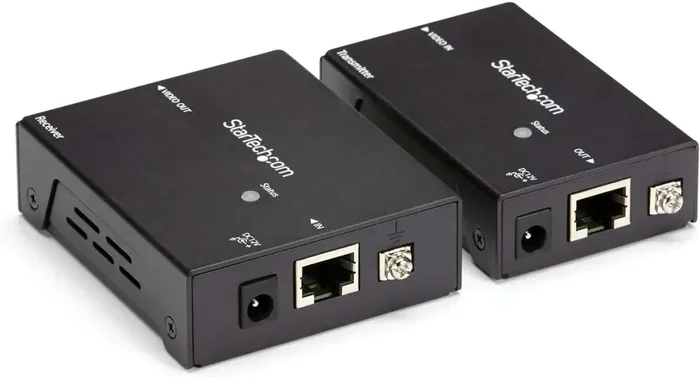
If you need to run an HDMI cable longer than 15 to 20 feet, signal degradation becomes a real problem. The longer the cable, the weaker the signal. To solve this, you need an active HDMI extender. These devices amplify the signal over longer distances. But they also need their own power source. You cannot power an HDMI extender from the cable alone. You will need a wall adapter or a USB power source.
Some HDMI extenders come with built-in repeaters. These repeaters use the HDMI connection for data but draw power from an external source. The signal stays strong, but the extender itself needs electricity. This is one of the clearest examples of when extra gear is required.
HDMI Splitters and Switches
HDMI splitters take one input and send it to multiple displays. HDMI switches let you connect multiple sources to one display. Both devices can sometimes draw power from the HDMI port. But in most cases, they need an external power adapter. Passive splitters might work without power for very simple setups. But active splitters and switches almost always require a power plug.
If you buy a splitter or switch, check the product specifications carefully. Some models are bus-powered, meaning they draw power from the HDMI connection. Others need a separate power cable. The bus-powered models work best when the source device can supply enough current through the HDMI port.
4K and 8K Setups
Higher resolutions demand more bandwidth and more stable signals. 4K and 8K HDMI cables are more sensitive to signal loss. When you use active cables or extenders for 4K and 8K setups, you almost always need external power. The cable itself cannot carry enough power to run the active electronics inside. This is a hard limitation of HDMI technology.
HDMI Adapters and Dongles
HDMI adapters, like USB-C to HDMI or DisplayPort to HDMI, often need power. The adapter itself is a small electronic device. It converts one signal type to another. This conversion process requires energy. Some adapters draw power from the source device. Others need their own power input. If you are using an adapter, do not assume it will work without checking its power requirements.
Alternatives to HDMI for Power and Video
If you want to deliver both power and video over a single cable without extra gear, HDMI is not your best option. There are other connection types that handle both tasks much better.
USB-C with Alt Mode
USB-C is the current king of single-cable convenience. A USB-C cable with Alt Mode can carry video signals and deliver significant power at the same time. USB-C Power Delivery can supply up to 100 watts. That is enough to charge a laptop while sending a 4K display signal. This is a huge advantage over HDMI.
Many modern laptops, tablets, and phones use USB-C for both charging and video output. You can plug one cable into your laptop and connect it to a monitor. The monitor gets video, and the laptop gets charged. No extra adapter or power brick is needed. This is the closest thing to delivering power and video over one cable without extra gear.
DisplayPort and USB-C
DisplayPort is another option that can carry video and some power. DisplayPort Alt Mode over USB-C works similarly to HDMI Alt Mode. But DisplayPort supports higher bandwidth in some cases. It can handle multiple monitors from a single connection. Like USB-C, it supports Power Delivery for charging.
Thunderbolt 3 and 4
Thunderbolt 3 and Thunderbolt 4 use the USB-C connector. They offer the most power and data capabilities in a single cable. Thunderbolt 4 can deliver up to 100 watts of power and support multiple 4K displays. If you want true single-cable simplicity, Thunderbolt is the gold standard. But it requires Thunderbolt-compatible devices on both ends.
Quick Tips for HDMI Power Delivery
Here are some practical tips to help you get the most out of HDMI power delivery. These tips apply to home setups, office desks, and entertainment systems.
- Check your device manual: Look up whether your source device supports HDMI-CEC and how much power it can supply through the HDMI port.
- Use short cables when possible: Shorter HDMI cables have less signal loss and can maintain better power delivery through the hot-plug detect pin.
- Do not rely on HDMI for charging: HDMI power is for signaling only. Never try to charge a laptop or tablet through an HDMI cable.
- Label your cables: If you use HDMI switches or splitters, label which cables provide power and which do not. This saves troubleshooting time later.
- Buy certified cables: Look for HDMI cables that are HDMI Licensing Administrator certified. Certified cables meet quality standards for signal and power handling.
- Keep firmware updated: Some devices improve HDMI power delivery through firmware updates. Check for updates on your TV, monitor, and source devices.
- Use a powered HDMI switch for complex setups: If you have multiple devices, a powered switch is more reliable than a bus-powered one.
Common Mistakes People Make with HDMI Power
There are several common mistakes that people make when dealing with HDMI power delivery. Avoiding these mistakes can save you from frustrating setup problems.
Assuming All HDMI Ports Provide Power
Not every HDMI port on a device can deliver power. Some ports on laptops or TVs are designed only for signal output or input. They do not have the circuitry to supply power to the hot-plug detect pin. Before assuming your HDMI port can power a device, check the specifications or test it with a compatible device.
Using HDMI to Power Large Devices
This is probably the biggest mistake. People sometimes try to use HDMI to power monitors, projectors, or even laptops. HDMI cannot do this. The power output is far too low. You will damage nothing by trying, but the device will not turn on or stay powered. Always use the correct power source for each device.
Ignoring Cable Quality
Cheap, uncertified HDMI cables may not properly carry the hot-plug detect signal. This can lead to devices not recognizing each other. In some cases, poor-quality cables can cause intermittent power issues that look like device failures. Always invest in a good-quality, certified HDMI cable.
Overlooking CEC Compatibility
HDMI-CEC is not always enabled by default. Different devices use different names for the same feature. If your devices are not communicating or powering on together, check the CEC settings in your TV and device menus. Sometimes you need to manually enable it.
Expert Insights on HDMI Power and Future Developments
Industry experts agree that HDMI power delivery will not change dramatically in the near future. The HDMI standard is focused on data bandwidth. Higher resolutions and refresh rates take priority over power delivery improvements. The HDMI Forum continues to evolve the standard, but power delivery remains a secondary concern.
Some experts believe that USB-C will eventually replace HDMI as the primary single-cable solution for power and video. USB-C Power Delivery and Alt Mode already offer superior power and video capabilities. As more devices adopt USB-C, the need for HDMI power delivery becomes less relevant.
That said, HDMI is still the dominant standard for TVs, monitors, and home theater equipment. Millions of devices use HDMI every day. The standard is not going away anytime soon. Understanding its limitations and capabilities is still very important for anyone setting up a display system.
Final Thoughts
So, can you deliver power over HDMI cable without extra gear? The answer is a qualified yes. HDMI can provide a small amount of power for signaling, hot-plug detection, and CEC functions. This power is enough to wake devices from standby and control them with a single remote. But it is not enough to charge or run devices during normal use.
If you want true power and video delivery over a single cable, look to USB-C with Power Delivery or Thunderbolt. These technologies offer far more capability in a single connection. For HDMI setups, always plan for external power when you need it. Use powered switches, extenders, and adapters when your setup demands it.
Understanding how HDMI power works helps you make better decisions about your setup. You will avoid frustration, save money on unnecessary gear, and build a system that works the way you expect. Keep these tips in mind the next time you connect devices with an HDMI cable.
The bottom line is simple. HDMI is a video and audio standard first. Power delivery is a bonus feature, not a core function. Work with that reality, and your setups will run smoothly every time.
Frequently Asked Questions
Can HDMI charge a laptop?
No, HDMI cannot charge a laptop. The power delivered through HDMI pins is far too low to charge any modern laptop. Laptops require dedicated power delivery through USB-C or a proprietary charger. Using HDMI alone will not provide the wattage needed for charging.
What is HDMI-CEC and how does it relate to power?
HDMI-CEC stands for Consumer Electronics Control. It is a feature that allows HDMI-connected devices to communicate and control each other. Through CEC, a TV can send a small wake signal to a connected device like a soundbar or streaming stick. This signal uses the HDMI cable’s power pins to transmit basic commands and standby power.
Do all HDMI cables provide the same amount of power?
Yes, all standard HDMI cables provide the same minimal power through the hot-plug detect pin. The cable type, whether standard, high speed, or ultra high speed, does not affect power delivery. Power is determined by the source device’s HDMI port design, not the cable itself.
Can an HDMI extender work without a power source?
Most HDMI extenders need an external power source. While some passive extenders can work without power for short distances, active extenders require electricity to amplify the signal. The HDMI cable alone cannot power the active electronics inside an extender. Always check the product specs before purchasing.
Is USB-C to HDMI better for power delivery than standard HDMI?
Yes, USB-C to HDMI is significantly better for power delivery. USB-C supports Power Delivery of up to 100 watts, which can charge devices while sending video. Standard HDMI only provides minimal power for signaling. If you need both power and video over one cable, USB-C is the clear winner.
Will future HDMI versions support more power delivery?
It is unlikely that future HDMI versions will focus heavily on power delivery. The HDMI Forum prioritizes bandwidth and resolution improvements. Power delivery is more likely to remain a secondary feature. USB-C and Thunderbolt continue to lead the way in combined power and data delivery.
=== CONCLUSION ===
Delivering power over HDMI cable without extra gear is possible in very limited ways. HDMI provides just enough power for signaling, hot-plug detection, and CEC control. It is not designed to charge devices or run equipment on its own. If you need real power alongside your video signal, USB-C with Power Delivery is your best bet. For HDMI setups, plan for external power when needed and always check your device specifications. Understanding these limits helps you build a better, more reliable setup every time.