Can You Buy A Plug In Wi Fi For Better Home Coverage
Yes, you can buy a plug in Wi-Fi device to fix weak signals and dead zones in your home. These compact units plug directly into any wall outlet and extend your wireless network without extra cables. Whether you need a plug in Wi-Fi extender or a mesh node, the right choice depends on your home size and budget. This guide covers everything from setup tips to the best products on the market. Read on to find the perfect plug in Wi-Fi solution for your home.
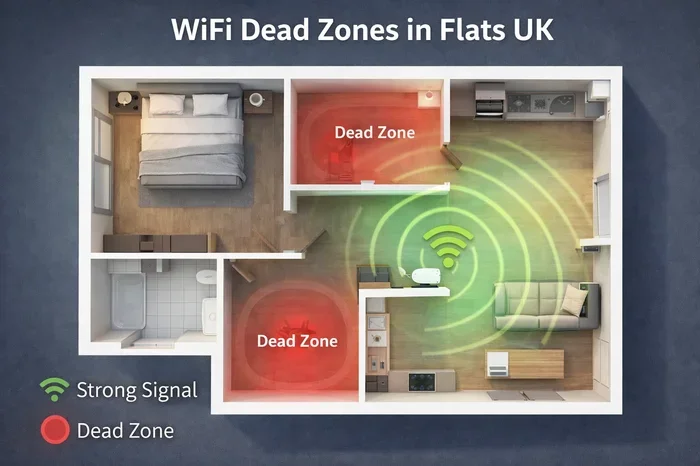
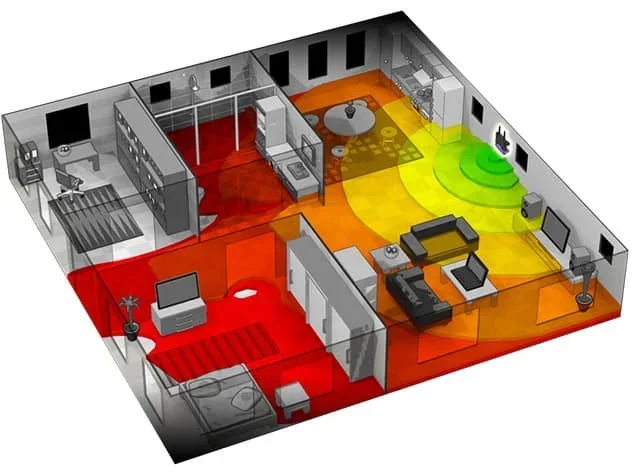
Have you ever walked into a room and noticed your Wi-Fi signal just disappears? Maybe your bedroom, basement, or backyard gets zero bars. It is a frustrating problem that almost every homeowner faces at some point. The good news is that you can buy a plug in Wi-Fi device to fix this issue without spending a fortune.
A plug in Wi-Fi extender or booster is a small gadget that plugs right into any standard wall outlet. It picks up your existing wireless signal and rebroadcasts it to areas that need better coverage. Think of it as a mini signal booster that sits quietly in the background doing its job. In this article, we will explore everything you need to know about buying a plug in Wi-Fi device for your home.
Key Takeaways
- Easy Setup: Plug in Wi-Fi devices are simple to install and require no technical expertise.
- Affordable Option: Most plug in Wi-Fi extenders cost less than traditional mesh systems.
- Eliminates Dead Zones: A plug in Wi-Fi unit can reach areas where your router signal drops.
- Compact Design: These devices are small and plug directly into any wall outlet.
- Dual Band Support: Many plug in Wi-Fi options offer dual band for faster speeds.
- Not a Replacement for Routers: A plug in Wi-Fi extender works best alongside your existing router.
- Check Compatibility: Always verify your plug in Wi-Fi device works with your current router.
📑 Table of Contents
- What Is a Plug In Wi-Fi Device?
- Can You Buy a Plug In Wi-Fi? Where to Find Them
- Benefits of Using a Plug In Wi-Fi Device
- Plug In Wi-Fi vs. Other Coverage Solutions
- How to Choose the Right Plug In Wi-Fi Device
- Common Mistakes to Avoid with Plug In Wi-Fi Devices
- Expert Tips for Getting the Best Performance from Your Plug In Wi-Fi
- Final Thoughts
What Is a Plug In Wi-Fi Device?
A plug in Wi-Fi device is a compact wireless adapter that connects to your home network through a power outlet. Unlike traditional routers that sit on a desk or shelf, these units are designed to be small and unobtrusive. You simply push them into any available wall socket, and they instantly become part of your home network.
Most plug in Wi-Fi devices work as range extenders or wireless repeaters. They receive the signal from your main router and send it out again to areas with poor coverage. Some models also act as access points, creating a new network name you can connect to. The goal is simple: improve your wireless coverage and eliminate those annoying dead zones in your house.
How Does a Plug In Wi-Fi Extender Work?
The technology behind a plug in Wi-Fi extender is straightforward. It connects to your router wirelessly and then retransmits the signal to a wider area. This process is called wireless repeating or signal boosting. The device essentially acts as a middleman between your router and your devices in far-away rooms.
Here is how the process works step by step:
- The plug in Wi-Fi unit receives the signal from your router.
- It amplifies and rebroadcasts that signal to a broader area.
- Your devices in weak coverage areas now connect to the extended signal.
- You get stronger wireless signal in rooms that previously had poor or no connection.
Some advanced plug in Wi-Fi models use dual band technology, meaning they operate on both 2.4 GHz and 5 GHz frequencies. This helps maintain better internet speed and reduces interference from other devices in your home.
Can You Buy a Plug In Wi-Fi? Where to Find Them
Absolutely, you can buy a plug in Wi-Fi device from many retailers and online stores. They are one of the most popular networking products available today. The demand for easy network coverage solutions has made these devices widely available and affordable.
You can find plug in Wi-Fi extenders at stores like Amazon, Best Buy, Walmart, and Target. Many brands specialize in wireless range booster technology. Popular names include TP-Link, Netgear, Linksys, and Wavlink. Each brand offers different features, price points, and coverage areas.
Online vs. In-Store Shopping
Buying a plug in Wi-Fi device online gives you more options and often better prices. You can read customer reviews, compare features side by side, and find deals that are hard to beat. Online shopping also lets you access a wider range of brands and models.
Shopping in-store has its perks too. You can see the product in person, ask store employees questions, and sometimes get same-day delivery. However, in-store selection is usually more limited. For the best home connectivity options, most people prefer to shop online.
| Store | Price Range | Selection | Delivery |
|---|---|---|---|
| Amazon | $15 – $100+ | Very High | Fast (Prime) |
| Best Buy | $20 – $120 | High | Store Pickup |
| Walmart | $15 – $90 | High | Free Pickup |
| Target | $20 – $100 | Medium | Same-Day |
Benefits of Using a Plug In Wi-Fi Device
There are many reasons why homeowners choose a plug in Wi-Fi solution over other options. Let us look at the biggest advantages.
1. Simple Plug-and-Play Setup
One of the best things about a plug in Wi-Fi extender is how easy it is to set up. You do not need to be a tech expert. Most devices come with a simple setup process that takes less than five minutes. You plug it in, press a button, and the device connects to your router automatically.
Many brands also offer companion apps that guide you through the router setup process step by step. The app helps you choose the best location for your plug in Wi-Fi unit and lets you manage settings from your phone. This level of simplicity is why so many people prefer plug in Wi-Fi over more complex networking solutions.
2. Compact and Space-Saving Design
Unlike bulky routers or external antennas, a plug in Wi-Fi device is incredibly small. It plugs directly into the wall outlet, so it does not take up desk space or floor area. Some models even have a built-in power outlet, so you do not lose access to a nearby socket.
This compact size makes plug in Wi-Fi perfect for apartments, small homes, and offices where space is limited. You can place one in the bedroom, living room, or even the garage without worrying about clutter.
3. Affordable Price Point
Cost is a big factor for many people when improving their home network. The good news is that plug in Wi-Fi extenders are very budget-friendly. Most models cost between $15 and $80, which is much less than a full mesh wireless network system.
If you only need to cover one or two rooms, a plug in Wi-Fi extender is the most cost-effective solution. You get better signal strength without breaking the bank. For renters or people on a tight budget, this is an excellent option.
4. No Extra Cables or Wiring
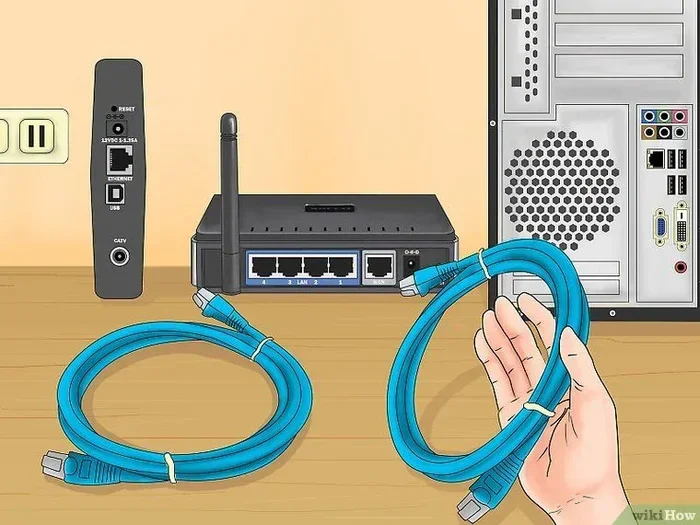
With a plug in Wi-Fi device, there is no need for Ethernet cables running through your walls. The device connects wirelessly to your router and extends the signal through the air. This makes installation clean, simple, and non-destructive to your home.
This wireless approach also means you can move the device whenever you want. Need better coverage in a different room? Just unplug it and plug it in somewhere else. The flexibility of a plug in Wi-Fi unit is a major advantage over hardwired solutions.
Plug In Wi-Fi vs. Other Coverage Solutions
When you are trying to improve your wireless coverage, you have several options. Let us compare a plug in Wi-Fi extender with other popular solutions so you can make an informed decision.
Plug In Wi-Fi vs. Mesh Wi-Fi System
A mesh network system uses multiple nodes placed around your home to create seamless network coverage. Mesh systems are more expensive but offer better performance for large homes. A plug in Wi-Fi extender is cheaper and simpler but may not cover as much area.
Mesh systems also provide a single network name, so your devices switch smoothly between nodes. Some plug in Wi-Fi extenders create a separate network name, which can be less convenient. However, for small to medium homes, a plug in Wi-Fi extender often does the job perfectly.
Plug In Wi-Fi vs. Powerline Adapter
A powerline adapter uses your home’s electrical wiring to transmit internet data. It is a different approach from a plug in Wi-Fi extender. Powerline adapters can offer more stable speeds because they use a physical connection through wiring.
However, powerline adapters are affected by the quality and age of your home’s wiring. A plug in Wi-Fi extender relies on wireless signal, which can be affected by walls and obstacles. Both options have their place, and the right choice depends on your specific situation.
Plug In Wi-Fi vs. Traditional Range Extender
A traditional range extender looks like a small box that sits on a flat surface. A plug in Wi-Fi device plugs directly into the wall. Both serve the same purpose of boosting your wireless signal, but the plug-in design is more compact and convenient.
Traditional extenders sometimes have external antennas that improve signal reception. Plug in Wi-Fi models usually have internal antennas, which is fine for most homes. The trade-off between size and performance is something to consider when choosing between the two.
| Feature | Plug In Wi-Fi | Mesh System | Powerline Adapter | Traditional Extender |
|---|---|---|---|---|
| Price Range | $15 – $80 | $100 – $400 | $30 – $100 | $20 – $90 |
| Ease of Setup | Very Easy | Moderate | Easy | Easy |
| Coverage Area | Small-Medium | Large | Medium | Small-Medium |
| Design | Compact Wall Plug | Multiple Nodes | Wall Plug + Ethernet | Desktop Box |
| Signal Stability | Good | Excellent | Very Good | Good |
| Best For | Small-Medium Homes | Large Homes | Thick Walls | Quick Boost |
How to Choose the Right Plug In Wi-Fi Device
Not all plug in Wi-Fi devices are created equal. Before you buy one, consider these important factors to make sure you get the right product for your needs.
Check Your Router Compatibility
Before purchasing a plug in Wi-Fi extender, make sure it is compatible with your current router. Most modern extenders work with any standard router that supports 802.11ac or 802.11ax (Wi-Fi 6). Check the product specifications to confirm compatibility before you buy.
Some plug in Wi-Fi devices also work well with internet service providers like Xfinity, AT&T, or Verizon. If you rent your router from your ISP, check if the plug in Wi-Fi extender is compatible with their equipment. This simple step can save you time and frustration later.
Consider the Size of Your Home
The size of your home plays a big role in choosing the right plug in Wi-Fi device. For a small apartment or single-story home, one extender may be enough. For a larger two-story house, you might need two or more plug in Wi-Fi units placed on different floors.
Think about where your internet dead spot problems are. Is it one room or multiple areas? If you have several weak spots, a mesh network might be a better long-term investment. But for one or two problem areas, a single plug in Wi-Fi extender is usually sufficient.
Look for Dual Band Support
Dual band is an important feature to look for in any plug in Wi-Fi device. A dual band extender operates on both 2.4 GHz and 5 GHz frequencies. The 2.4 GHz band offers longer range, while the 5 GHz band provides faster speeds for activities like streaming and gaming.
Single band extenders only use the 2.4 GHz frequency, which can be slower and more prone to interference. For the best home connectivity experience, choose a plug in Wi-Fi device that supports dual band. The extra cost is well worth the performance improvement.
Read Reviews and Check Ratings
Before making a purchase, take time to read customer reviews and check ratings. Real user experiences can tell you a lot about a plug in Wi-Fi device’s performance, reliability, and ease of use. Look for reviews that mention signal strength, setup experience, and long-term durability.
Pay attention to reviews that mention your specific use case. If you need a plug in Wi-Fi extender for streaming 4K video, look for reviews from other streamers. If you need it for basic browsing, focus on reviews that mention reliability and range.
Common Mistakes to Avoid with Plug In Wi-Fi Devices
Even though plug in Wi-Fi devices are easy to use, there are some common mistakes that can reduce their effectiveness. Avoiding these pitfalls will help you get the most out of your purchase.
Placing the Extender Too Far from the Router
One of the biggest mistakes is placing the plug in Wi-Fi extender too far from the router. The device needs to receive a strong signal from the router in order to rebroadcast it effectively. If the extender is too far away, it will amplify a weak signal, resulting in poor performance.
Instead, place your plug in Wi-Fi unit about halfway between your router and the area with weak coverage. This ensures it gets a good signal from the router and can effectively extend it to the problem area.
Ignoring Interference from Other Devices
Plug in Wi-Fi devices can suffer from interference if placed near other electronics. Microwaves, baby monitors, cordless phones, and Bluetooth devices can all cause signal interference on the 2.4 GHz band. Keep your plug in Wi-Fi unit away from these devices for best performance.
If you notice slow speeds or connection drops, try moving the plug in Wi-Fi extender to a different outlet in the same room. Sometimes a small change in position can make a big difference in signal strength.
Not Updating Firmware
Like any networking device, a plug in Wi-Fi extender benefits from regular firmware updates. Manufacturers release updates to improve performance, fix bugs, and add new features. If you do not update your device’s firmware, you may miss out on these improvements.
Most plug in Wi-Fi brands offer companion apps that make firmware updates easy. Check for updates every few months to keep your device running smoothly. This simple step can significantly improve your network coverage over time.
Expecting It to Replace Your Router
It is important to understand that a plug in Wi-Fi extender is not a replacement for your router. It works alongside your existing router to extend the signal. Your router still handles the main job of connecting to your internet service provider and managing your home network.
If your router is old or outdated, a plug in Wi-Fi extender will not fix all your problems. In some cases, it is better to invest in a new router first, then add a plug in Wi-Fi extender for additional coverage. This combination will give you the best results.
Expert Tips for Getting the Best Performance from Your Plug In Wi-Fi
Getting the most out of your plug in Wi-Fi device comes down to a few smart practices. Here are some expert tips that can make a real difference in your wireless coverage and internet speed.
- Restart your router regularly. A quick restart can clear up temporary issues and improve overall performance. Try restarting your router once a month for best results.
- Use the companion app. Most plug in Wi-Fi brands offer free apps that help you optimize placement and settings. Take advantage of these tools to fine-tune your setup.
- Place the extender in an open area. Avoid hiding your plug in Wi-Fi unit behind furniture or inside cabinets. Open spaces allow the signal to travel more freely.
- Update firmware regularly. As mentioned earlier, firmware updates can improve performance and fix bugs. Set a reminder to check for updates every few months.
- Use the 5 GHz band when possible. For activities that require high speed, like streaming or gaming, connect to the 5 GHz band of your plug in Wi-Fi extender.
- Experiment with outlet placement. Sometimes moving the plug in Wi-Fi unit to a different outlet on the same wall can improve signal strength. Try a few locations to find the sweet spot.
Final Thoughts
So, can you buy a plug in Wi-Fi for better home coverage? The answer is a resounding yes. These devices are affordable, easy to set up, and highly effective at eliminating dead zones in your home. Whether you live in a small apartment or a large house, a plug in Wi-Fi extender can make a noticeable difference in your wireless coverage.
The key is to choose the right device for your needs, place it in the optimal location, and avoid common setup mistakes. With the tips and guidance in this article, you are well equipped to make the best decision for your home. A plug in Wi-Fi device is one of the simplest and most cost-effective ways to improve your home network and enjoy seamless internet speed in every room.
Take action today. Browse the options available online, read a few reviews, and find the perfect plug in Wi-Fi extender for your home. Your future self will thank you for finally getting rid of those frustrating Wi-Fi dead spots. Better home connectivity is just one plug away.
Frequently Asked Questions
Can you really buy a plug in Wi-Fi device at any store?
Yes, you can buy a plug in Wi-Fi device at most major retailers and online stores. Popular options include Amazon, Best Buy, Walmart, and Target. They are widely available and come in a range of prices to fit any budget.
Does a plug in Wi-Fi extender slow down my internet speed?
A plug in Wi-Fi extender can reduce speed slightly because it rebroadcasts the signal. However, modern dual band extenders minimize this loss. The speed drop is usually small and barely noticeable for everyday tasks like browsing and streaming.
How many plug in Wi-Fi devices do I need for my home?
This depends on your home size and the number of dead zones you have. For a small apartment, one plug in Wi-Fi extender is usually enough. Larger homes with multiple weak spots may need two or more units for full network coverage.
Can I use a plug in Wi-Fi device with any router?
Most plug in Wi-Fi extenders work with any standard router that supports Wi-Fi 5 or Wi-Fi 6. Always check the product specifications for compatibility before purchasing. Some devices also work well with ISP-provided routers.
Is a plug in Wi-Fi extender the same as a mesh Wi-Fi node?
Not exactly. A plug in Wi-Fi extender boosts your existing signal, while a mesh node creates a seamless network with other mesh devices. Mesh systems are more advanced and expensive, but a plug in Wi-Fi extender is a simpler and more affordable option.
Where is the best place to put a plug in Wi-Fi extender?
The best location is about halfway between your router and the area with weak signal. Avoid placing it too far from the router or behind thick walls. An open area near a wall outlet usually gives the best signal strength and wireless coverage.