Can I Use 85w Magsafe Instead Of 45w On My Macbook
Yes, you can use an 85w MagSafe charger on a 45w MacBook safely. Apple designs its power adapters to be backward compatible, so a higher wattage charger will not damage your laptop. However, the charger will only deliver the power your Mac needs, and using an 85w adapter may offer faster charging and better performance under heavy loads.
So you have a 45w MagSafe charger for your MacBook, and you found a bigger 85w one lying around. Maybe it came with a friend’s Mac, or you spotted a great deal online. Either way, the question is simple: can you use it on your laptop? The short answer is yes. But like most tech questions, the full answer has some important details worth knowing.
Using the wrong charger can feel scary. Nobody wants to fry their laptop or ruin a battery that cost hundreds of dollars to replace. The good news is Apple has built a lot of smart safety features into its power delivery system. Your MacBook is smarter than you think when it comes to managing power. Let us walk through everything you need to know about swapping between 45w and 85w MagSafe chargers.
Whether you are a student, a creative professional, or someone who just wants to keep their MacBook running longer on the go, understanding wattage and MagSafe charging matters. This guide covers compatibility, safety, charging speed, and practical tips you can use right away.
Key Takeaways
- Safe to Use: An 85w MagSafe charger works perfectly on a 45w MacBook without causing any harm.
- Smart Power Management: Your MacBook only draws the power it needs, regardless of the charger’s maximum wattage.
- Faster Charging Possible: Under heavy workloads, the 85w adapter can charge your Mac more efficiently than the 45w version.
- Battery Health Matters: Using a higher wattage charger does not hurt your battery when done correctly.
- Check Your Model: Always verify your MacBook model and its specific power requirements before choosing a charger.
- Cable Compatibility: Make sure your MagSafe cable and connector match your MacBook generation.
- Travel Friendly: Carrying an 85w charger gives you flexibility if you ever upgrade to a more power-hungry Mac.
📑 Table of Contents
- What Is MagSafe and Why Does Wattage Matter?
- Can You Use 85w MagSafe Instead Of 45w?
- Charging Speed: Is 85w Faster Than 45w?
- Is It Safe to Use a Higher Wattage Charger?
- Benefits of Using an 85w MagSafe Charger on a 45w MacBook
- Common Mistakes People Make With MagSafe Chargers
- Quick Tips for Optimal MagSafe Charging
- How Does 85w Charging Compare to 45w Charging?
- Expert Insights on MagSafe Wattage and Compatibility
- Final Thoughts
What Is MagSafe and Why Does Wattage Matter?
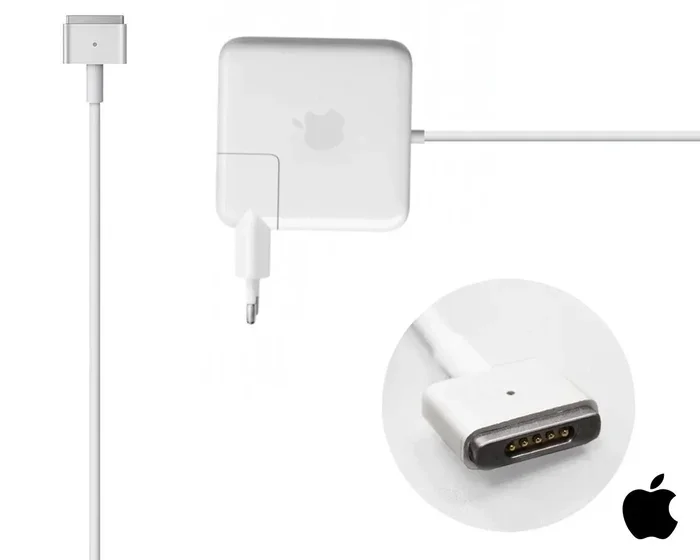
MagSafe is Apple’s magnetic charging connector that has been a staple of MacBook laptops for years. The magnetic connection makes it easy to plug in and unplug without straining the port. Over time, Apple has evolved the technology from MagSafe 2 to the newer MagSafe 3, each bringing faster power delivery and better efficiency.
Wattage refers to the amount of electrical power a charger can supply. A 45w charger delivers up to 45 watts of power. An 85w charger can deliver up to 85 watts. But here is the key point: your MacBook controls how much power it pulls. It does not just accept everything the charger offers. Think of it like a water faucet. The charger is the pipe, and your MacBook is the valve. The valve decides how much water flows through, no matter how big the pipe is.
How MagSafe Charging Works
When you connect a MagSafe charger to your MacBook, a communication process begins immediately. The charger and the laptop talk to each other through the USB Power Delivery protocol. Your MacBook tells the charger exactly how much power it needs. The charger then adjusts its output accordingly. This handshake ensures safe and efficient charging every single time.
This is why using a higher wattage charger is perfectly safe. The charger simply provides more capacity. Your MacBook takes only what it needs. It is like plugging a small appliance into a large power outlet. The appliance does not suddenly pull more electricity than it requires.
Can You Use 85w MagSafe Instead Of 45w?
The direct answer is yes. You can absolutely use an 85w MagSafe charger on a MacBook designed for a 45w charger. Apple explicitly supports this practice. The company designs its power adapters to work across a range of MacBook models, and using a higher wattage adapter is well within their guidelines.
Here is what happens when you plug in an 85w charger to a 45w MacBook. The charger will detect your laptop and deliver the appropriate amount of power. Your MacBook will charge normally. There is no risk of overloading the system. The built-in power management chip handles everything automatically.
Many users wonder if this affects their battery health. The answer is no. Apple’s charging circuitry is designed to manage power intake intelligently. Your battery will charge to 100 percent and then stop drawing power, just as it would with the original 45w charger. The magnetic connector works the same way regardless of the wattage rating.
Which MacBook Models Accept 85w Charging?
Most MacBook models that use MagSafe connectors can accept an 85w charger. This includes many older MacBook Pro models and MacBook Air laptops. Here are some general guidelines:
- MacBook Pro 13-inch: Originally designed for 60w or 85w chargers. Using an 85w charger works perfectly.
- MacBook Pro 15-inch and 17-inch: Often shipped with 85w chargers. These models benefit from the higher wattage.
- MacBook Air: Typically uses 45w chargers. An 85w charger will work but is not necessary for basic use.
- Older MacBook Models: Most MagSafe-era MacBooks accept higher wattage chargers without issues.
Always double check your specific model. You can find the exact power requirements on Apple’s website or on the label at the bottom of your laptop. This ensures you are making the right choice for your setup.
Charging Speed: Is 85w Faster Than 45w?
This is one of the most common questions people ask. And the answer depends on what you are doing while charging. Under light use like browsing the web or reading documents, you probably will not notice a difference. Both chargers will keep your battery topped up at a similar rate.
However, under heavy workloads, the 85w charger makes a noticeable impact. If you are editing video, running multiple apps, or using your MacBook while it charges, the higher wattage charger can keep up with the power demand. Your MacBook draws more power when it needs it, and the 85w charger can deliver that extra power without dropping below the required level.
With a 45w charger under heavy load, your MacBook might actually discharge while charging. This happens because the workload exceeds what the charger can provide. The 85w charger avoids this problem entirely. It gives your system enough headroom to charge even during demanding tasks.
Real World Charging Scenarios
Let us look at a few practical examples to make this clearer.
- Office Work: Writing emails, creating documents, and light browsing. Both chargers perform similarly. Your MacBook charges at a steady rate.
- Video Editing: Running Final Cut Pro or DaVinci Resolve while charging. The 85w charger maintains a faster charge rate because it can supply more power than the 45w charger.
- Gaming: Playing graphics intensive games while plugged in. The 85w charger keeps your system stable and charges the battery faster.
- Travel Charging: Using your MacBook on a plane or in a cafe. The 85w charger gives you more flexibility and faster top-ups when you have limited time.
In short, the 85w charger shines when your MacBook is working hard. For everyday light use, both chargers get the job done just fine.
Is It Safe to Use a Higher Wattage Charger?
Safety is always the number one concern when it comes to electronics. And rightfully so. A damaged charger or incompatible power adapter can cause serious problems. But the good news is that using an 85w MagSafe charger on a 45w MacBook is completely safe.
Apple engineers the charging system with multiple layers of protection. The power adapter regulates its output based on the connected device. Your MacBook’s internal circuitry manages the incoming power. Together, these systems prevent overcharging, overheating, and electrical damage.
Here are some reasons why this setup is safe:
- Automatic Power Adjustment: The charger and laptop communicate to determine the right power level.
- Overcurrent Protection: If too much current flows, the system shuts down safely.
- Thermal Management: Your MacBook monitors its temperature and adjusts charging speed if it gets too warm.
- Voltage Regulation: The charger delivers a stable voltage that matches your MacBook’s requirements.
Millions of Mac users around the world use higher wattage chargers every day without any issues. Apple supports this practice and has done so for many years. You can feel confident using an 85w charger on a 45w MacBook.
When Should You Be Cautious?
While using a higher wattage charger is safe, there are a few situations where you should exercise caution. First, always use genuine Apple chargers or certified third-party alternatives. Cheap, uncertified chargers may not have the same safety features. They could deliver unstable power that damages your laptop.
Second, inspect your charger and cable regularly. Look for frayed wires, bent connectors, or signs of wear. A damaged charger can be dangerous regardless of its wattage rating. If anything looks off, replace it immediately.
Third, avoid using your MacBook in extreme temperatures while charging. High heat combined with high power input can stress your battery. Keep your laptop in a cool, well ventilated area during charging sessions.
Benefits of Using an 85w MagSafe Charger on a 45w MacBook
Beyond safety, there are several practical benefits to using an 85w charger on a MacBook designed for 45w. Let us break them down.
1. Future Proofing Your Setup
If you plan to upgrade your MacBook in the future, having an 85w charger already means you are ready. You will not need to buy a new charger when you switch to a more power hungry model. This saves you money and reduces electronic waste.
2. Better Performance Under Load
As we discussed earlier, the 85w charger keeps your MacBook powered during heavy tasks. This means smoother performance, fewer interruptions, and faster charging when you need it most.
3. One Charger for Multiple Devices
If you have multiple Apple devices, an 85w charger can handle them all. Many MacBook Air models work fine with 85w chargers. And if you ever get a MacBook Pro that requires more power, you are already set.
4. Peace of Mind
Knowing your charger can handle any situation gives you confidence. You do not have to worry about your laptop draining while charging during a long work session. The 85w charger simply has more capacity to spare.
Common Mistakes People Make With MagSafe Chargers
Even though using an 85w charger on a 45w MacBook is safe, there are some common mistakes that people make with MagSafe chargers in general. Avoiding these pitfalls will help you get the most out of your charging setup.
Using the Wrong Connector
MagSafe 2 and MagSafe 3 connectors are different. Make sure you are using the correct connector for your MacBook model. Plugging the wrong connector into your laptop can damage the charging port or fail to charge at all.
Ignoring Cable Quality
The charger is only as good as the cable that connects it. Low quality cables can cause slow charging, intermittent connections, or even safety hazards. Always use high quality, certified cables with your MagSafe charger.
Leaving Your Laptop Plugged In All the Time
While modern MacBooks have smart battery management, constantly keeping your laptop plugged in at 100 percent can affect long term battery health. Apple recommends enabling Optimized Battery Charging, which learns your daily routine and adjusts charging to reduce battery aging.
Charging in Hot Environments
Charging your MacBook in direct sunlight or near a heat source can cause thermal throttling. Your MacBook will slow down charging to protect the battery. Move to a cooler spot for faster, safer charging.
Quick Tips for Optimal MagSafe Charging
Want to get the best performance and longevity from your MagSafe charger? Follow these simple tips.
- Use the right wattage for your needs: A 45w charger is fine for light use. An 85w charger is better for heavy workloads.
- Keep your charging port clean: Dust and debris can interfere with the magnetic connection. Use a soft brush to clean the port gently.
- Unplug during thunderstorms: Power surges can damage your charger and laptop. Unplug during electrical storms to stay safe.
- Store cables properly: Avoid wrapping cables tightly. This prevents internal wire damage and extends cable life.
- Enable battery health features: Go to System Settings and turn on Optimized Battery Charging for better long term battery care.
How Does 85w Charging Compare to 45w Charging?
To make the comparison clearer, here is a simple overview of what you can expect from each charger on a 45w MacBook.
- Charging Speed (Light Use): Both chargers perform similarly during light tasks like web browsing or document editing.
- Charging Speed (Heavy Use): The 85w charger charges faster during demanding workloads like video editing or gaming.
- Battery Health Impact: Neither charger negatively affects battery health when used properly.
- Heat Generation: The 85w charger may run slightly warmer under heavy load, but this is normal and within safe limits.
- Portability: The 85w charger is often slightly larger and heavier than the 45w version, which matters for travel.
- Cost: 85w chargers tend to cost more than 45w chargers, but the added versatility is often worth the investment.
Overall, the 85w charger offers more flexibility and better performance. If you can afford it, it is a great choice even for a MacBook that originally came with a 45w charger.
Expert Insights on MagSafe Wattage and Compatibility
Apple support specialists often field questions about charger compatibility. The consensus from Apple and authorized service providers is clear: using a higher wattage MagSafe charger is safe and supported. Apple designs its power adapters to be versatile and user friendly.
Many technicians recommend keeping a higher wattage charger on hand. It provides a safety net if you ever upgrade to a more power hungry MacBook. Think of it as insurance for your charging setup. The 85w charger works with older and newer models alike, making it a smart long term investment.
According to Apple’s official guidelines, the power adapter will only supply the amount of power that the device requires. This means your MacBook controls the charging process entirely. You are never at the mercy of the charger’s maximum output.
Final Thoughts
So, can you use 85w MagSafe instead of 45w on your MacBook? Absolutely. The answer is a clear and confident yes. Apple has designed its charging ecosystem to be flexible, safe, and user friendly. Using a higher wattage charger will not damage your laptop, harm your battery, or cause any safety issues.
The 85w charger gives you faster charging under heavy workloads, future proofing for future upgrades, and peace of mind knowing your system is always powered. Whether you are a casual user or a power user, the 85w MagSafe charger is a reliable choice that works beautifully with your 45w MacBook.
Next time you find yourself wondering about charger compatibility, remember what you have learned here. Your MacBook is smarter than you think, and the right charger makes all the difference. Charge with confidence and keep your MacBook running at its best.
And if you are interested in learning more about the fundamental principles behind how technology works, check out our guide on the 7 basic elements of photography for a deeper dive into how visual technology connects with device design and display quality.
Frequently Asked Questions
Will using an 85w MagSafe charger damage my 45w MacBook?
No, it will not. Apple designs its chargers to be backward compatible. Your MacBook only draws the power it needs, so the 85w charger will not overload or damage your laptop in any way.
Does an 85w charger charge a 45w MacBook faster?
It can, especially during heavy workloads. Under light use, the difference is minimal. But when your MacBook is working hard, the 85w charger delivers more power and keeps the battery charging at a faster rate.
Can I use any MagSafe charger with any MacBook?
Most MagSafe chargers work with most MacBooks, but you need to match the connector type. MagSafe 2 and MagSafe 3 are different and not interchangeable. Always check your MacBook model before purchasing a charger.
Is it okay to leave my MacBook plugged in with an 85w charger all the time?
Yes, it is generally safe. Modern MacBooks have smart battery management that stops charging at 100 percent. However, for optimal battery health, enable Optimized Battery Charging in your settings.
What happens if I use a 45w charger instead of an 85w charger on a MacBook Pro?
Your MacBook will still charge, but it may charge more slowly during heavy use. In some cases, the battery might even drain while running demanding applications if the 45w charger cannot keep up with the power demand.
Are third party 85w MagSafe chargers safe to use?
Certified third party chargers from reputable brands are generally safe. However, always look for MFi certification or equivalent safety standards. Cheap, uncertified chargers may lack proper safety features and could pose a risk to your device.
=== CONCLUSION ===
Using an 85w MagSafe charger on a 45w MacBook is safe, supported, and practical. Your MacBook’s intelligent power management ensures that it only draws the power it needs, making higher wattage chargers a reliable and convenient option. Whether you want faster charging, future proofing, or simply a backup charger, the 85w MagSafe adapter is an excellent choice.
Remember to always use quality chargers and cables, keep your software updated, and take advantage of Apple’s built in battery health features. With the right charging setup, your MacBook will serve you well for years to come. Charge smart, charge safely, and enjoy the freedom that comes with knowing your laptop is always powered up and ready to go.