Are Longer Hdmi Cables Actually Slower Than You Think
Are longer HDMI cables slower? The short answer is no, but the full story is more interesting. Many people worry that a longer HDMI cable will hurt their picture quality or reduce speed. In reality, signal degradation only becomes a real problem past certain distance limits. This guide breaks down everything you need to know about HDMI cable length, signal loss, and how to choose the right cable for your setup.
Have you ever stood in front of your entertainment setup and wondered, “Do longer HDMI cables actually slow things down?” It is a question that pops up all the time. Maybe you need to run a cable across the room or even through the wall. And you start to worry that extra length will hurt your picture quality or make your 4K content stutter.
The truth might surprise you. Are longer HDMI cables slower really a thing? The short answer is no. But the full answer has some important details you should know. This guide will walk you through everything step by step. You will learn how HDMI signals travel, when length actually matters, and how to pick the right cable for your needs.
By the end of this article, you will feel confident about your cable choices. No more guesswork. No more second-guessing your setup. Let us dive in and clear up the confusion once and for all.
Key Takeaways
- Longer HDMI cables do not inherently slow down your signal. Speed is determined by the cable’s version and bandwidth capacity, not its length.
- Signal degradation can occur over very long distances. Passive cables over 50 feet may experience quality loss, but active cables solve this problem.
- Fiber optic HDMI cables handle long distances best. They can stretch up to 100 feet or more without any signal loss.
- HDMI 2.0 and HDMI 2.1 cables offer different bandwidth levels. Choosing the right version matters more than length for high-resolution content.
- Signal boosters and HDMI extenders help with long runs. These devices refresh the signal and prevent quality drop-off over distance.
- Gold plated connectors reduce interference. They provide a cleaner connection and help maintain signal integrity over longer cable runs.
- Passive cables work fine for short distances. For most home setups under 25 feet, a standard passive cable is all you need.
📑 Table of Contents
- How HDMI Signals Travel Through Cables
- Does Cable Length Affect Speed?
- The Real Impact of HDMI Cable Length on Picture and Sound
- When to Use Active vs Passive HDMI Cables
- Best Practices for Choosing the Right HDMI Cable Length
- Common Myths About Longer HDMI Cables
- Quick Tips for the Best HDMI Setup
- Conclusion
How HDMI Signals Travel Through Cables
To understand why length does not slow down your signal, it helps to know how HDMI cables work. An HDMI cable carries digital audio and video signals from one device to another. Think of it like sending a message through a tube. The message either arrives fully intact or it does not. Unlike older analog cables, digital signals do not gradually fade. They either get through perfectly or they do not.
The Digital Signal Advantage
Here is the key thing to remember. Digital signals are binary. They are ones and zeros. When your audio video signal travels through an HDMI cable, it sends these tiny digital packets. If the cable is within its rated distance, every single packet arrives exactly as sent. There is no gradual quality drop like you see with old coaxial cables.
This is why a 6-foot HDMI cable and a 25-foot HDMI cable can deliver the exact same picture quality. The signal does not “get tired” from traveling a longer path. It either makes it all the way through or it does not.
What Is Signal Degradation?
Now, that does not mean signal degradation never happens. It can. But it only happens when the cable is pushed beyond its limits. Signal degradation means the signal weakens or becomes corrupted during transmission. This can cause flickering, sparkles on screen, or no signal at all.
For most standard passive HDMI cables, degradation starts to become a risk around 50 feet. For active cables and fiber optic cables, that limit is much higher. The point is that length alone does not slow anything down. It is about whether the cable can handle the distance.
Does Cable Length Affect Speed?
This is where things get really interesting. Many people confuse signal quality with speed. They think a longer cable means slower data transfer. But that is not how it works. HDMI cable speed depends on the cable’s version and its internal construction, not its length.
HDMI Bandwidth Explained Simply
HDMI bandwidth is the amount of data the cable can carry at one time. Think of it like a highway. A wider highway lets more cars pass at once. A higher bandwidth HDMI cable lets more data pass through every second. This is what determines whether you can run 4K at 60Hz or 8K at high frame rates.
Now here is the important part. Bandwidth is built into the cable design. A cable rated for 18 Gbps (HDMI 2.0) will carry that same 18 Gbps whether it is 3 feet long or 25 feet long. The length does not change the speed. It never has.
HDMI 2.0 vs HDMI 2.1: What Matters More Than Length
When you are shopping for cables, the version matters far more than the length. HDMI 2.0 cables support up to 4K at 60Hz with 18 Gbps bandwidth. HDMI 2.1 cables support up to 10K at 120Hz with 48 Gbps bandwidth. If you want the best 4K HDMI cable experience, you need the right version, not the right length.
So if you are choosing between a 10-foot HDMI 2.1 cable and a 30-foot HDMI 2.0 cable, the shorter one will actually be slower. Length was not the deciding factor. The version was.
The Real Impact of HDMI Cable Length on Picture and Sound
Let us talk about what actually happens to your picture and sound when you use a longer cable. Most people are worried about their screen going blurry or their audio dropping out. Understanding the real risks helps you make smart choices.
Picture Quality Over Long Distances
For most home setups, picture quality stays perfect no matter the cable length. If your entertainment center is 10 feet away from your TV, you have nothing to worry about. A standard passive HDMI cable will deliver flawless 4K video at that distance. Even at 25 feet, most cables perform beautifully.
But what about 50 feet? Or 100 feet? That is where things change. At very long distances, even the best HDMI cable quality can start to struggle. You might notice sparkles on the screen, brief signal drops, or a completely black screen. This is not because the cable is slow. It is because the signal is too weak to make the full journey.
Audio Quality and Long Runs
Audio follows the same rules. A longer HDMI cable does not make your sound worse. If the signal gets through, you get full, crisp audio. If it does not, you get silence or dropouts. There is no in-between with digital audio. It is perfect or it is nothing.
For most people, this means your current setup is probably fine. If you are running cables under 25 feet, focus on cable version and build quality rather than length.
When to Use Active vs Passive HDMI Cables
This is one of the most important decisions you will make. Choosing between an active HDMI cable and a passive HDMI cable can make or break your long-distance setup. Let us break down the differences clearly.
What Is a Passive HDMI Cable?
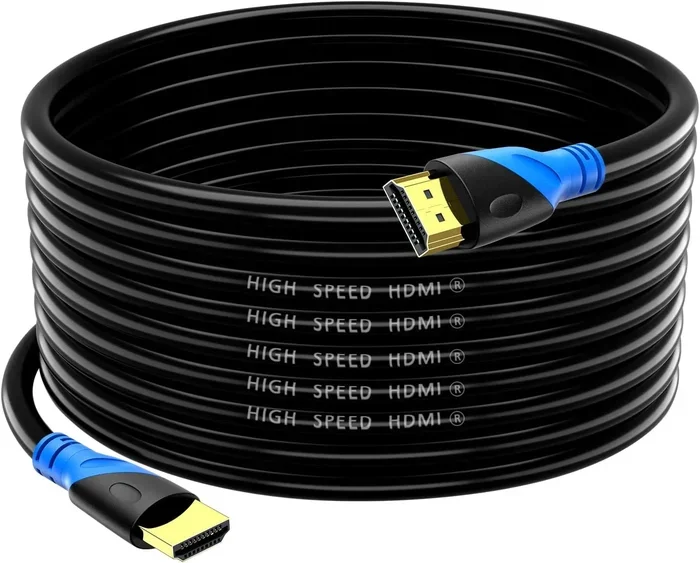
A passive HDMI cable is a standard cable with no built-in electronics. It simply carries the signal from point A to point B. These cables are affordable, widely available, and perfect for most home setups. If your devices are within 15 to 25 feet of each other, a passive cable is usually the best choice.
Passive cables have no power source. They rely entirely on the signal from your source device. This keeps things simple and keeps costs low. For a typical living room setup, they work great.
What Is an Active HDMI Cable?
An active HDMI cable has built-in electronics or a chip that boosts the signal as it travels. Think of it like a relay runner who gets a fresh burst of energy at the halfway mark. The signal stays strong even over longer distances.
Active cables can handle distances of 50 feet or more without quality loss. They require some power, usually drawn from the source device through the cable itself. This makes them slightly more expensive, but they are worth every penny for long runs.
Fiber Optic HDMI Cables: The Long-Distance Champion
If you need to run a cable 100 feet or more, nothing beats a fiber optic HDMI cable. These cables use light instead of electrical signals to transmit data. Light does not weaken over distance the way electrical signals do. A fiber optic cable can easily stretch across a large room, a basement, or even between floors.
The downside? Fiber optic cables tend to be more expensive. But for serious setups where distance is unavoidable, they are the gold standard. No other cable type comes close for long-distance reliability.
Best Practices for Choosing the Right HDMI Cable Length
Picking the right cable is not just about length. There are several factors that affect your final choice. Here are some practical tips to help you get it right every time.
Measure First, Buy Second
Always measure the distance between your devices before buying a cable. Give yourself a little extra slack, but do not buy a cable that is way too long. Excess cable length that just coils up on the floor can create a messy setup and may introduce interference.
A good rule of thumb is to add about 3 to 5 feet to your measured distance. This gives you flexibility for routing the cable without stretching it tight.
Check Your HDMI Version
Before you buy any cable, check what HDMI version your devices support. If your TV is HDMI 2.1 and your streaming box is HDMI 2.1, you need an HDMI 2.1 cable to unlock the full features. Buying a longer cable will not help if the version is wrong.
Look for Gold Plated Connectors
Connectors matter more than most people realize. Gold plated connector designs resist corrosion and provide a cleaner, more reliable connection. Over time, regular metal connectors can oxidize, especially in humid environments. Gold plating prevents this and helps maintain strong signal integrity.
Use a Signal Booster When Needed
If you need to run a cable longer than 50 feet and do not want to buy a fiber optic cable, consider using a signal booster. A signal booster is a small device that sits inline with your cable. It refreshes the signal and pushes it further without quality loss.
An HDMI extender works similarly but often uses a pair of devices, one at each end of the cable run. Both options are affordable and can save you from buying expensive long cables.
Avoid Super Long Passive Cables
This is a mistake many people make. Buying a 50-foot passive HDMI cable and hoping for the best rarely works. Passive cables are designed for short to medium distances. Going beyond their limit will lead to frustration. Always match your cable type to your distance needs.
Common Myths About Longer HDMI Cables
There are a lot of myths floating around about HDMI cables and length. Let us clear up the most common ones so you can stop worrying.
Myth: Longer Cables Reduce Resolution
This is simply not true. A 30-foot HDMI cable will deliver the same 4K resolution as a 3-foot cable, as long as both cables are the same version and quality. The cable does not “downgrade” your signal based on length.
Myth: Expensive Cables Perform Better Over Long Distances
Price does not always equal performance. A well-built mid-range active HDMI cable can outperform an expensive passive cable at long distances. What matters is the cable type and construction, not the price tag.
Myth: All HDMI Cables Are the Same
Not all cables are created equal. The version, bandwidth rating, shielding, and connector quality all vary widely. A cheap no-name cable might work fine for a short run, but it could fail at 30 feet where a quality cable would thrive.
Myth: You Need a Special Cable for 4K
You do need an HDMI 2.0 or HDMI 2.1 cable for 4K, but you do not need a special “4K cable” sold at a premium price. Any cable rated for the right bandwidth will handle 4K just fine, regardless of length.
Quick Tips for the Best HDMI Setup
- Keep passive cables under 25 feet for reliable performance without any extra equipment.
- Choose active cables for runs between 25 and 50 feet to maintain signal strength.
- Go fiber optic for distances over 50 feet for zero signal loss and perfect quality.
- Always check the HDMI version on both your source device and display before buying.
- Use cable management clips to keep long cables neat and prevent accidental pulls.
- Buy from reputable brands that list exact bandwidth ratings and version support on the packaging.
- Test your setup before installing the cable permanently. Run it for a few hours and watch for any issues.
Conclusion
So, are longer HDMI cables slower? The answer is a clear no. Cable length does not affect speed or bandwidth. What matters is the cable version, the cable type, and whether it is built for the distance you need. A short HDMI 2.0 cable will always be slower than a long HDMI 2.1 cable. Length is never the deciding factor.
For most home setups, a standard passive cable under 25 feet will work perfectly. If you need more distance, step up to an active cable or a fiber optic option. Check your HDMI version, look for quality connectors, and consider a signal booster for extreme runs.
The bottom line is simple. Do not let cable length scare you. With the right knowledge and the right cable choice, you can enjoy stunning 4K picture and crystal-clear audio no matter how far your devices are apart. Make your choice based on distance and version, not on fear of speed loss. Your setup will thank you for it.
Frequently Asked Questions
Do longer HDMI cables reduce video quality?
No, they do not. As long as the cable is within its rated distance and is the correct HDMI version, video quality stays the same. Signal loss only happens when the cable is pushed beyond its maximum distance limit.
What is the maximum recommended length for a passive HDMI cable?
Most passive HDMI cables work reliably up to about 25 feet. Beyond that, you may start to experience signal issues. For longer runs, switch to an active cable or a fiber optic HDMI cable.
Does a longer HDMI cable cause lag or input delay?
No. Input lag is caused by your display processing the signal, not by the cable length. A longer cable does not add any noticeable delay to your gaming or video experience.
Can I use an HDMI extender for long cable runs?
Yes, absolutely. An HDMI extender or signal booster can refresh your signal and push it much further than a single cable can reach. They are affordable and easy to set up.
Are fiber optic HDMI cables worth the extra cost?
If you need to run a cable over 50 feet, fiber optic HDMI cables are absolutely worth it. They carry the signal using light, which means zero signal loss over any practical distance. For shorter setups, a standard cable is fine.
Does HDMI cable length matter for 4K content?
Length does not matter for 4K quality. What matters is that the cable supports the right bandwidth. An HDMI 2.0 or HDMI 2.1 cable will deliver 4K perfectly, whether it is 3 feet or 30 feet long.
=== CONCLUSION ===
Are longer HDMI cables slower than shorter ones? The answer is a firm no. Cable length has zero effect on speed or bandwidth. Your HDMI cable version, build quality, and type are what truly matter. Choose the right cable for your distance, pick the correct version for your devices, and you will enjoy a flawless setup every single time.