Are There Security Concerns With Wifi Calling Today
Wifi calling lets you make phone calls over a wireless internet connection instead of using a traditional cellular network. While it offers convenience and better coverage, many users worry about wifi calling security and potential data privacy risks. This article breaks down the real security concerns, explains how your calls are protected, and gives you simple steps to stay safe. You will learn about encryption, common threats, and practical tips to keep your voice data secure.
Wifi calling has changed the way we stay connected. Instead of relying solely on cell towers, your phone can now send voice data through your home network or any available wireless connection. This technology is a game changer for people in areas with weak cell signals. But with all the news about data breaches and online threats, a natural question comes up. Is your wifi calling really safe?
The short answer is yes, mostly. Wifi calling uses encryption to scramble your voice data so others cannot easily listen in. However, the level of safety depends on several factors. Your network setup, the type of wireless router you use, and even the app or carrier you choose all play a role. Let us walk through everything you need to know about wifi calling security in plain, simple terms.
Key Takeaways
- Wifi calling is generally safe: Most carriers use strong encryption to protect your voice data over wireless networks.
- Public Wi-Fi networks pose the biggest risk: Unsecured networks can expose you to call interception and man-in-the-middle attacks.
- Your home network matters: A weak or poorly secured wireless router can create network vulnerability for your calls.
- End-to-end encryption is the gold standard: Some VoIP calling apps offer stronger protection than default carrier wifi calling features.
- Simple steps boost your safety: Using a VPN, updating your wireless router firmware, and avoiding public networks greatly reduces risk.
- Know when to avoid it: In high-risk situations, stick to traditional cellular calls or use a trusted encrypted calls app.
📑 Table of Contents
- What Is Wifi Calling and How Does It Work
- Common Security Risks With Wifi Calling
- How Wifi Calling Protects Your Voice Data
- Comparing Wifi Calling Security to Traditional Calls
- Practical Tips to Stay Safe When Using Wifi Calling
- When Should You Avoid Wifi Calling
- Final Thoughts on Wifi Calling Safety
What Is Wifi Calling and How Does It Work
The Basics of Voice Over Wi-Fi
Wifi calling is a feature that lets you make and receive phone calls using a Wi-Fi network instead of the standard cellular network. Your voice gets turned into digital data packets. These packets travel through your internet protocol network and reach the other person. This process is also known as VoIP calling, which stands for Voice over Internet Protocol.
Most modern smartphones support this feature. You do not need any extra apps in many cases. Your carrier builds it right into your phone settings. When you enter an area with a weak cell signal but a strong Wi-Fi connection, your phone can switch to wifi calling automatically. This keeps your calls clear and connected.
Why People Love Using It
There are several reasons why wifi calling has become so popular. Here are the main benefits people enjoy:
- Better coverage: It works in basements, rural areas, and buildings where cell signals are weak.
- No extra apps needed: Many carriers include it for free with your phone plan.
- Saves battery life: Wi-Fi uses less power than hunting for a distant cell tower.
- Clear call quality: A strong Wi-Fi connection often gives better sound than a crowded cell tower.
- International calls: It can save money when calling people in other countries.
With all these perks, it is easy to see why millions of people use wifi calling every day. But convenience does not always mean perfect safety. That is where the real questions begin.
Common Security Risks With Wifi Calling
Every technology that sends data over the internet carries some level of risk. Wifi calling is no different. Understanding these risks helps you make smart choices about when and how to use it.
Man-in-the-Middle Attacks
A man-in-the-middle attack is one of the biggest fears with any wireless communication. In this type of attack, a hacker secretly intercepts the data between two parties. They position themselves between your phone and the network. Then they can potentially listen in on your voice data or even alter it.
This risk is real but not as common as you might think. Most carriers use signal encryption to prevent this. Encryption scrambles your voice data into a code. Only the intended receiver has the key to unlock it. However, if the encryption is weak or outdated, a skilled hacker might still find a way in.
Unsecured Public Wi-Fi Networks
Free Wi-Fi at coffee shops, airports, and hotels is tempting. But these public Wi-Fi networks are often unsecured. That means there is no password protecting the connection. Anyone nearby can potentially access the same network. This creates a perfect setup for call interception and network vulnerability.
When you use wifi calling on a public network, your voice data travels through a shared space. A hacker on that same network could use simple tools to monitor traffic. This is why security experts often warn against making sensitive calls on public Wi-Fi. Your personal conversations could be exposed.
Weak Home Network Security
Even your own home network can be a source of risk. If your wireless router uses an old password or outdated security settings, it is not fully protected. A neighbor or someone nearby could potentially gain access to your network. Once they are in, they could monitor your internet traffic and potentially intercept your calls.
Another issue is outdated router firmware. Manufacturers release updates to fix security flaws. If you never update your router, those flaws stay open. This is a simple but often overlooked mobile security mistake that affects many households.
Fake Wi-Fi Networks (Evil Twin Attacks)
Hackers can set up fake Wi-Fi networks that look real. These are called evil twin networks. They might name something like “CoffeeShop_Free_WiFi” to trick you. Once you connect, all your data flows through the hacker’s device first. This includes your VoIP calling sessions and any personal information you send.
This type of attack is especially dangerous because it is hard to detect. The fake network looks legitimate. Your phone connects automatically if you have saved the network name. Always double-check the exact network name before connecting.
How Wifi Calling Protects Your Voice Data
Encryption Protocols Explained
The main way wifi calling keeps your calls safe is through encryption. Encryption is like putting your voice into a locked box. Only the person on the other end has the key to open it. Most modern carriers use strong encryption standards for their wifi calling services.
Two common encryption methods are used in wireless technology:
- SRTP (Secure Real-Time Transport Protocol): This encrypts your voice data in real time as it travels between your phone and the carrier’s network.
- AES (Advanced Encryption Standard): This is a very strong encryption method used by governments and banks worldwide. Many carriers use AES to protect wifi calling traffic.
These protocols make it extremely hard for anyone to listen in on your calls. Even if someone intercepts the data, all they will see is scrambled nonsense without the decryption key.
End-to-End Encryption and Its Role
End-to-end encryption is the strongest form of protection available. With this type of signal encryption, your voice data is encrypted on your phone. It stays encrypted all the way to the other person’s phone. No one in between, not even the carrier, can decode it.
Most carrier-built wifi calling features do not use true end-to-end encryption. The carrier can access your call data on their servers. This is different from apps like Signal or WhatsApp, which do offer full end-to-end encryption for VoIP calling. If data privacy is your top priority, this distinction matters a lot.
Authentication Protocols
Authentication protocol is another layer of protection. It ensures that only your phone can connect to your carrier’s wifi calling service. This prevents someone else from using your account to make calls or intercept your conversations. Most carriers use strong authentication methods, but it is worth checking what your provider offers.
Comparing Wifi Calling Security to Traditional Calls
Wifi Calling vs. Cellular Calls
Many people assume traditional cellular calls are safer than wifi calling. But the truth is more nuanced. Both types of calls use encryption today. Modern cellular networks use 4G and 5G encryption, which is quite strong. Wifi calling uses similar encryption standards.
The real difference lies in the network environment. A cellular network is controlled by your carrier and monitored closely. A Wi-Fi network, on the other hand, might be managed by you, your employer, or a stranger at a coffee shop. The less control you have over the network, the higher the risk.
Security Comparison at a Glance
| Factor | Wifi Calling | Traditional Cellular |
|---|---|---|
| Encryption Used | SRTP / AES | 4G/5G Network Encryption |
| Network Control | Depends on Wi-Fi owner | Carrier controlled |
| Risk on Public Networks | Higher | Lower |
| Risk on Home Network | Low (if secured) | Very Low |
| Call Interception Risk | Moderate on public Wi-Fi | Low |
| End-to-End Encryption | Rarely (carrier-based) | Not standard |
| Overall Safety | Safe on trusted networks | Very safe |
As you can see, wifi calling is safe when you use it on a trusted network. The risks go up on public or unsecured networks. Traditional cellular calls are slightly safer in unpredictable situations because you have less control over the wireless router side of things.
Practical Tips to Stay Safe When Using Wifi Calling
Secure Your Home Network
Your home network is the safest place to use wifi calling. But only if you set it up correctly. Here is how to lock down your network:
- Use WPA3 encryption on your wireless router. This is the latest and most secure Wi-Fi standard.
- Change your default router password. Many routers come with simple default passwords that hackers know.
- Update your router firmware regularly. Check for updates at least once a month.
- Disable WPS (Wi-Fi Protected Setup). This feature is convenient but has known security flaws.
- Use a strong, unique Wi-Fi password. Mix uppercase letters, lowercase letters, numbers, and symbols.
Best Practices for Safe Calling
Beyond securing your network, here are daily habits that keep your wifi calling safe:
- Avoid public Wi-Fi for sensitive calls. If you must use public Wi-Fi, use a VPN to encrypt all your traffic.
- Turn off auto-connect to open networks. This prevents your phone from secretly connecting to unknown networks.
- Keep your phone updated. Software updates often include mobile security patches that fix vulnerabilities.
- Use two-factor authentication on your carrier account. This prevents someone from hijacking your phone number.
- Monitor your network for unknown devices. Most routers let you see what is connected. Check this regularly.
Use a VPN for Extra Protection
A virtual private network (VPN) adds an extra layer of security to your wifi calling. A VPN creates a private tunnel for your data. Even on a public network, your voice data stays hidden from prying eyes. This is one of the best tools for protecting data privacy when you need to make calls on the go.
Look for a reputable VPN provider with a no-logs policy. Free VPNs are tempting, but many of them collect and sell your data. A paid VPN from a trusted company is a much safer choice for secure connection needs.
When Should You Avoid Wifi Calling
High-Risk Situations
There are times when you should skip wifi calling and use a different method. Here are situations where the risk is higher:
- On public Wi-Fi without a VPN: Coffee shops, airports, and hotels are hotspots for hacker threat activity.
- When discussing sensitive information: Financial details, medical information, or confidential work matters deserve extra protection.
- On networks you do not trust: If you are at a friend’s house and you do not know their wireless router security settings, be cautious.
- In areas with known cyber activity: Some regions have higher rates of network vulnerability and call interception.
Signs Your Connection May Be Compromised
Watch for these warning signs that something might be wrong with your wifi calling connection:
- Unexpected drops in call quality or strange background noises.
- Your phone connects to unknown networks automatically.
- Your wireless router shows devices you do not recognize.
- You notice unusual data usage on your network.
- Your carrier alerts you to suspicious account activity.
If you notice any of these signs, switch to a cellular call right away. Then check your home network security and contact your carrier if needed.
Final Thoughts on Wifi Calling Safety
Wifi calling is a powerful and convenient tool. For most people, on most networks, it is perfectly safe. The encryption used by major carriers is strong and reliable. Your voice data is well protected when you use wifi calling on your own secured home network.
The real risks come from unsecured networks and poor wireless router practices. When you take simple steps to protect your connection, the security concerns shrink dramatically. Use a strong password on your router, avoid public Wi-Fi for sensitive calls, and keep your devices updated.
Technology always evolves, and so do the threats. Staying informed is your best defense. Wifi calling will only become more common as wireless technology improves. Understanding how to use it safely ensures you get all the benefits without the worry.
Take control of your mobile security today. Check your network settings, update your router, and enjoy clear, safe calls with confidence. A few small steps now can save you from big headaches later.
Frequently Asked Questions
Is wifi calling encrypted by default?
Most carriers encrypt wifi calling using SRTP and AES protocols. This means your voice data is scrambled during transmission. However, the level of encryption can vary by carrier and device. Check with your provider to confirm what encryption standards they use for their wifi calling service.
Can someone hack my wifi calling on a public network?
It is possible but difficult. Public Wi-Fi networks without passwords are the biggest risk. A hacker on the same network could try to intercept your VoIP calling traffic. Using a VPN dramatically reduces this risk by creating a private, encrypted tunnel for all your data.
Is wifi calling safer than regular cellular calls?
Both use strong encryption, but they differ in network control. Your cellular network is managed by your carrier and is generally very secure. Wifi calling depends on the quality of your Wi-Fi network. On a trusted home network, both are very safe. On public Wi-Fi, cellular calls are typically safer.
Does using a VPN make wifi calling more secure?
Yes, a VPN adds a strong extra layer of protection. It encrypts all your internet traffic, including voice data, before it leaves your device. This is especially helpful when you must use public Wi-Fi or unfamiliar networks. Choose a reputable VPN provider for the best results.
What should I do if I suspect my wifi calling has been compromised?
Switch to a cellular call immediately. Then change your Wi-Fi password and check your router for unknown devices. Update your router firmware and contact your carrier to report any suspicious activity. Using two-factor authentication on your carrier account also helps prevent future issues.
Do all smartphones support wifi calling?
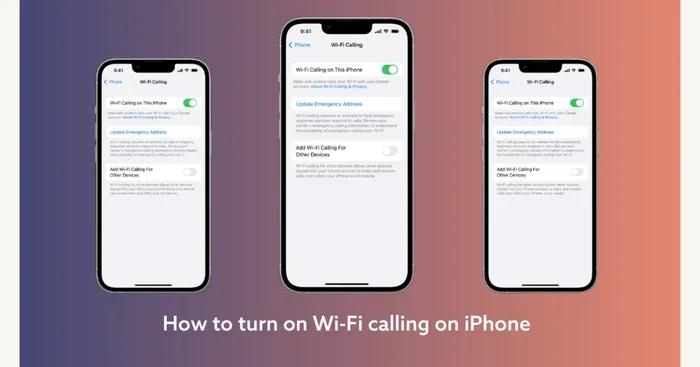
Most modern smartphones support this feature, including iPhones and Android devices from major manufacturers. You can usually find it in your phone settings under “Calls” or “Connections.” Check with your carrier to confirm availability and setup instructions for your specific device.
=== CONCLUSION ===
Wifi calling is a safe and useful feature for most people. The security concerns are real but manageable. By understanding how encryption works and following simple safety practices, you can enjoy clear calls without worry. Secure your home network, avoid risky public connections, and stay updated on mobile security best practices. Knowledge is your strongest defense, and now you have the tools to use wifi calling with confidence.