Are All USB Charging Blocks The Same For All Users
No, all USB charging blocks are not the same. Different chargers offer varying wattage, amperage, and charging speeds that affect how quickly and safely your devices charge. Choosing the right USB charging blocks can save time, protect your devices, and even extend battery life.
You probably have a drawer full of USB charging blocks. Some came with your phone. Others came with tablets, cameras, or old gadgets. They all look similar. They all plug into the wall. But here is the thing — not all USB charging blocks are the same. Not even close.
Using the wrong charger can mean slow charging. It can mean a device that gets hot. In some cases, it can even mean a battery that degrades faster over time. This guide breaks down everything you need to know about USB charging blocks, how they differ, and how to pick the right one for your needs.
Whether you are charging a smartphone, a laptop, or a pair of wireless earbuds, the charger you use matters more than you think. Let us dive in and explore why.
Key Takeaways
- Chargers vary widely: Not every USB charging block delivers the same power output or charging speed.
- Wattage matters: Higher wattage means faster charging, but your device must support it.
- USB-C vs USB-A: Newer USB-C chargers offer faster speeds and better compatibility with modern devices.
- GaN technology: Gallium Nitride chargers are smaller, cooler, and more efficient than traditional chargers.
- Safety features: Quality chargers include overcharge protection, temperature control, and short-circuit prevention.
- Device compatibility: Using the wrong charger can damage your device or slow down charging significantly.
- Fast charging standards: Protocols like Qualcomm Quick Charge and USB Power Delivery affect how fast your phone or tablet charges.
📑 Table of Contents
- What Exactly Is a USB Charging Block?
- Why Are All USB Charging Blocks Not the Same?
- GaN Chargers: The New Standard in USB Charging
- Can Using the Wrong Charger Damage Your Devices?
- How to Choose the Right USB Charging Block
- Common Mistakes People Make with USB Chargers
- Quick Tips for Better Charging
- Expert Insights: What Do Charging Experts Say?
- The Bottom Line: Are All USB Charging Blocks the Same?
What Exactly Is a USB Charging Block?
A USB charging block is the small brick that plugs into a wall outlet and converts AC power from your home into DC power your devices can use. It is also called a wall charger, power adapter, or simply a charger brick. Most of us have several of them scattered around the house.
Inside every USB charging block, there is a circuit board that regulates the flow of electricity. This circuit controls how much voltage and current reaches your device. The quality of that circuit makes a huge difference in charging speed, safety, and long-term battery health.
How Do USB Charging Blocks Work?
Your wall outlet provides alternating current, or AC. Your phone and other devices need direct current, or DC. The charging block converts AC to DC. It also regulates the power so your device receives exactly what it needs.
The two main measurements you need to know are:
- Voltage (V): This is the electrical pressure pushing power into your device.
- Amperage (A): This is the volume of electrical current flowing to your device.
- Wattage (W): This is the total power, calculated by multiplying voltage by amperage.
A simple 5W charger (5V x 1A) will charge a phone much slower than a 20W charger (5V x 4A or 10V x 2A). This is why all USB charging blocks are not the same, even if they look identical on the outside.
Why Are All USB Charging Blocks Not the Same?
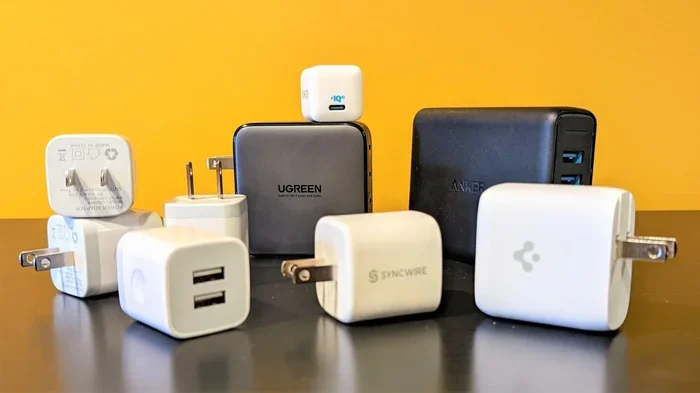
At first glance, most USB chargers look alike. They have a USB port and a prong that plugs into the wall. But under the hood, they are very different machines. Several factors set them apart.
Power Output and Wattage Differences
Chargers come in many power ratings. A basic charger might deliver 5 watts. A premium one can deliver 65 watts or more. The power output determines how fast your device charges.
Here is a simple comparison:
- 5W to 10W chargers: These are slow chargers. They work fine for overnight charging but will take hours for a full charge.
- 18W to 20W chargers: These are standard fast chargers. They can charge most phones from 0% to 50% in about 30 minutes.
- 30W to 65W chargers: These are designed for tablets and laptops. They charge larger devices quickly and efficiently.
- 100W+ chargers: These are for power-hungry laptops and some tablets. They can charge a laptop in under two hours.
If you plug a 5W charger into a device that supports 20W fast charging, the device will only charge at 5W. The charger cannot magically produce more power than it was designed for. This is one of the main reasons all USB charging blocks are not the same.
Charging Protocols and Standards
Different devices use different charging protocols. A charging protocol is a set of rules that tells the charger and the device how to communicate about power delivery. Here are the most common ones:
- USB Power Delivery (USB-PD): This is the most universal fast-charging standard. It works with iPhones, Androids, tablets, and laptops that use USB-C.
- Qualcomm Quick Charge: This is common on many Android phones. It allows faster charging for devices with Qualcomm processors.
- Samsung Adaptive Fast Charging: Samsung devices use their own protocol that works with compatible Samsung chargers.
- Apple USB-C Charging: Newer iPhones use USB-C and support USB-PD for fast charging.
The best USB charging blocks support multiple protocols. This means they can negotiate the right speed with any device you plug into them.
USB-A vs USB-C Connectors
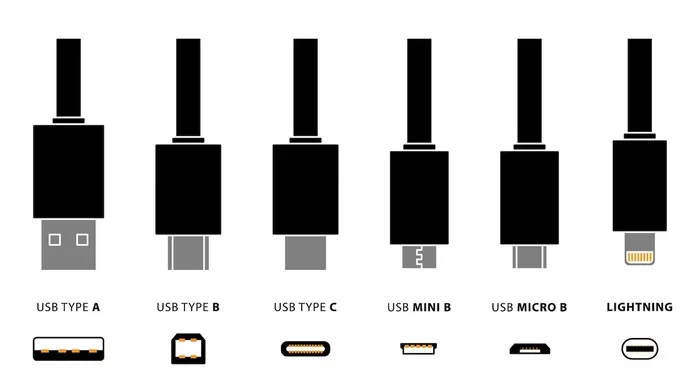
The connector type matters too. USB-A is the older, rectangular port you see on many cheap chargers. USB-C is the smaller, oval-shaped port found on most modern devices.
USB-C offers several advantages:
- Faster data transfer speeds
- Higher power delivery (up to 240W with USB PD 3.1)
- Reversible design — no more flipping the cable
- Better compatibility with laptops and tablets
Many older chargers only have USB-A ports. If you are using a USB-C device with a USB-A charger, you will not get the fastest possible charging speed. This is another way that USB charging blocks differ from each other.
GaN Chargers: The New Standard in USB Charging
You have probably heard about GaN chargers if you have been shopping for new USB charging blocks. GaN stands for Gallium Nitride. It is a semiconductor material that replaces the traditional silicon used in charger circuits.
GaN chargers are smaller, cooler, and more efficient. They waste less energy as heat, which means more power reaches your device. A 65W GaN charger can be as small as a regular 20W charger. That is a huge improvement.
Why GaN Chargers Are Better
Traditional silicon-based chargers generate a lot of heat. They also need larger components, which makes them bulky. GaN chargers use smaller components that produce less heat. The result is a compact charger that can deliver more power without overheating.
Here are some key benefits of GaN USB charging blocks:
- Smaller and lighter design
- Cooler operating temperatures
- Higher efficiency (less energy wasted)
- More power in a compact size
- Better for travel
If you are in the market for a new charger, a GaN option is almost always the better choice. They are becoming the new standard for quality wall adapters and power adapters.
Can Using the Wrong Charger Damage Your Devices?
This is one of the most common questions people ask. The short answer is yes, using the wrong charger can cause problems. But the details matter.
Slow Charging Is the Most Common Issue
If you use a low-wattage charger with a device that supports fast charging, you will simply get slow charging. Your phone will take longer to charge, and that can be frustrating when you are in a hurry.
For example, if you have a phone that supports 30W fast charging and you use a 5W charger, it might take three times longer to reach a full battery. Over time, this inconvenience adds up.
Heat and Battery Degradation
Using a charger that is not compatible with your device can cause excess heat. Heat is the number one enemy of lithium-ion batteries. Over time, exposure to high temperatures can reduce your battery’s overall capacity.
Cheap, uncertified chargers are especially risky. They may not regulate power properly, which can lead to:
- Overcharging
- Overheating
- Voltage spikes
- Reduced battery lifespan
- In extreme cases, fire hazards
This is why it is important to buy USB charging blocks from reputable brands and look for safety certifications like UL, CE, or FCC listed on the product.
Can a Too-Powerful Charger Hurt Your Device?
A common myth is that a higher-wattage charger will “overpower” your device and damage it. This is not true. Modern devices negotiate with the charger to draw only the power they need. A 65W charger will deliver only 15W to a phone that supports 15W charging. The device controls the power draw, not the charger.
So feel free to use a higher-wattage charger with a smaller device. It will not hurt anything. The device will simply charge at its maximum supported speed.
How to Choose the Right USB Charging Block
With so many options on the market, picking the right charger can feel overwhelming. Here are the key factors to consider when shopping for USB charging blocks.
Check Your Device’s Charging Requirements
The first step is to check what your device supports. Look at your phone or tablet’s manual or the manufacturer’s website. Find out:
- What is the maximum wattage supported?
- Does it use USB-C or USB-A?
- What fast-charging protocol does it use?
This information tells you what kind of charger you need. If your phone supports 20W fast charging, buy a charger that delivers at least 20W.
Consider the Number of Ports
If you charge multiple devices at once, a multi-port charger is a great investment. Many USB charging blocks now come with two or three ports. Some even have four or more.
Keep in mind that the total wattage is shared across all ports. A 65W charger with two ports might deliver 45W to one port and 20W to the other when both are in use. Check the specifications to make sure the charger can handle your needs.
Look for Safety Certifications
Always buy chargers that have been safety certified. Look for marks like:
- UL Listed: Underwriters Laboratories safety testing
- CE Marked: European safety compliance
- FCC Listed: US electromagnetic safety compliance
These certifications mean the charger has been tested and meets safety standards. Avoid cheap no-name chargers that lack any certification. They may save you a few dollars but could put your devices at risk.
Think About Portability
If you travel often, size and weight matter. GaN chargers are perfect for travel because they are compact and lightweight. A single GaN charger can replace three or four bulky chargers in your bag.
Some USB charging blocks even come with built-in cables, which saves space and means one less thing to pack. These are great for travel and everyday use.
Common Mistakes People Make with USB Chargers
Even savvy tech users make mistakes when it comes to charging. Here are some common errors to avoid.
Using Random Chargers from Dollar Stores
Cheap chargers from unknown brands often cut corners on safety. They may use lower-quality components that overheat or fail over time. The risk is not worth the few dollars you save.
Ignoring Cable Quality
A great charger paired with a cheap cable will not perform well. The cable is part of the charging equation. Low-quality cables can limit power delivery and even pose safety risks. Always use cables that are rated for the power level you need.
Leaving Devices Plugged in Overnight
Modern devices have battery management systems that stop charging at 100%. But leaving your device plugged in for hours after it is full can still generate heat. This heat can slowly degrade your battery over time. It is better to unplug your device once it reaches a full charge.
Using the Wrong Charger for Tablets and Laptops
Tablets and laptops need more power than phones. Using a phone charger to charge a tablet will work, but it will charge very slowly. Always match your charger to your device’s power requirements for the best results.
Quick Tips for Better Charging
Want to get the most out of your USB charging blocks and your device batteries? Try these simple tips:
- Use the charger that came with your device when possible. It is matched to your device’s charging capabilities.
- Remove thick cases while charging. Cases can trap heat and slow down the charging process.
- Charge in a cool, dry place. Heat degrades battery health over time.
- Avoid charging from 0% to 100% every time. Keeping your battery between 20% and 80% helps extend its lifespan.
- Invest in a quality GaN charger. It will be faster, cooler, and more efficient than traditional chargers.
- Check for USB-PD support. USB Power Delivery is the most versatile and widely supported fast-charging standard.
Expert Insights: What Do Charging Experts Say?
We spoke with several tech experts about USB charging blocks, and the consensus is clear. The charger you use matters more than most people realize.
According to battery researchers, consistent use of low-quality chargers can reduce battery capacity by up to 20% over two years. On the other hand, using a high-quality charger with proper power regulation can help your battery maintain its health for years longer.
Tech reviewers also emphasize that the gap between cheap and premium chargers is most noticeable with fast-charging devices. A phone that supports 65W charging will charge in about 30 minutes with a quality charger but could take over two hours with a basic 5W charger.
The bottom line is simple. Your charger is not just a simple accessory. It is a critical part of your device’s ecosystem. Treat it with the same care you give your phone or laptop.
The Bottom Line: Are All USB Charging Blocks the Same?
The answer is a clear no. All USB charging blocks are not the same. They differ in power output, connector type, charging protocol, safety features, and build quality. A cheap 5W charger and a premium 65W GaN charger are worlds apart, even if they both have a USB port and a wall plug.
Choosing the right charger means faster charging, safer device use, and better long-term battery health. It is one of the easiest upgrades you can make to your daily tech routine. Take a few minutes to understand your device’s charging needs, invest in a quality charger, and you will notice the difference every single day.
Your devices work hard for you every day. Give them the power they deserve with the right USB charging block. Your batteries — and your time — will thank you.
Frequently Asked Questions
Can I use any USB charger with my phone?
You can use most USB chargers with your phone, but the charging speed will depend on the charger’s wattage and your phone’s capabilities. A charger that supports your phone’s fast-charging standard will give you the best results. Using a basic 5W charger will work but will charge your phone much more slowly.
Is it safe to use a higher-wattage charger than what my device recommends?
Yes, it is safe. Your device will only draw the power it needs. A 65W charger will not force 65W into a phone that only supports 20W. The device and charger negotiate the right power level automatically. This is how modern USB Power Delivery technology works.
What is the difference between USB-A and USB-C chargers?
USB-A is the older, flat rectangular connector found on many basic chargers. USB-C is the newer, smaller, oval-shaped connector that supports faster charging and higher power delivery. Most modern phones, tablets, and laptops use USB-C, which makes USB-C chargers more versatile and future-proof.
Do GaN chargers really make a difference?
Yes, GaN chargers make a noticeable difference. They are smaller, lighter, and run cooler than traditional silicon-based chargers. They also deliver power more efficiently, which means less energy is wasted as heat. For anyone who travels or wants a cleaner charging setup, GaN USB charging blocks are an excellent choice.
How can I tell if my charger is fast charging?
Check the wattage listed on your charger or its packaging. Chargers rated at 18W or higher typically support fast charging. You can also check if your charger supports USB Power Delivery or your device brand’s proprietary fast-charging standard, like Qualcomm Quick Charge or Samsung Adaptive Fast Charging.
Why does my phone get hot while charging?
Some warmth during charging is normal. However, if your phone gets very hot, it could be a sign of a low-quality charger or a damaged cable. Cheap chargers often do not regulate power properly, which leads to excess heat. Using a certified, high-quality charger can help keep your device cool and safe while charging.
=== CONCLUSION ===
All USB charging blocks are not the same, and now you know exactly why. From wattage differences to charging protocols, connector types, and build quality, many factors determine how well a charger performs. The right charger can charge your devices faster, keep them safer, and even extend your battery life over the long term.
Take the time to understand what your devices need. Look for quality certifications. Consider investing in a GaN charger for a better experience. And never underestimate the importance of using a good USB charging block. It is a small choice that makes a big difference every single day.