Can You Get A Bluetooth Adapter For A Tv And Stream
Yes, you can absolutely get a Bluetooth adapter for a TV and start streaming audio wirelessly to your headphones, speakers, or soundbar. A Bluetooth adapter for TV lets you cut the cord and enjoy private listening or better sound without expensive upgrades. This guide covers every type of adapter, how they work, setup steps, and tips to avoid common problems.
Have you ever wanted to watch your favorite show late at night but worried about waking up the whole house? Or maybe you love listening to music while you cook, and your TV sits in the living room. Whatever your reason, wireless audio from your TV is a game changer.
The good news is that getting a Bluetooth adapter for your TV is easier than most people think. You do not need to be a tech expert. You do not need to buy a whole new sound system either. A simple Bluetooth TV adapter can unlock wireless streaming in minutes.
In this guide, we will walk you through everything you need to know. We will cover the different types of adapters, how to choose the right one, and how to set it up step by step. By the end, you will feel confident about streaming audio wirelessly from your TV to any Bluetooth speaker, headphone, or headset you own.
Key Takeaways
- Bluetooth adapters work with most TVs: Whether you own a smart TV or an older set, there is an adapter that fits your needs.
- Multiple adapter types exist: USB dongles, 3.5mm transmitters, and optical transmitters all serve different TV setups.
- Wireless streaming is simple: Pairing a Bluetooth adapter takes just a few minutes with most devices.
- Audio latency can be managed: Modern adapters with aptX Low Latency reduce delay significantly.
- Compatibility matters: Check your TV’s audio output ports before buying an adapter.
- Budget-friendly options are available: You can find reliable adapters starting around $15 to $50.
📑 Table of Contents
- What Is A Bluetooth Adapter For A TV?
- How Does A Bluetooth Adapter For TV Work?
- Types Of Bluetooth Adapters For TVs
- Benefits Of Using A Bluetooth Adapter With Your TV
- How To Choose The Right Bluetooth Adapter For Your TV
- Step-By-Step Setup Guide For Your Bluetooth Adapter
- Common Problems And How To Fix Them
- Top Bluetooth Adapters For TV Streaming
- Expert Insights On Wireless TV Audio
- Final Thoughts On Bluetooth TV Adapters
What Is A Bluetooth Adapter For A TV?
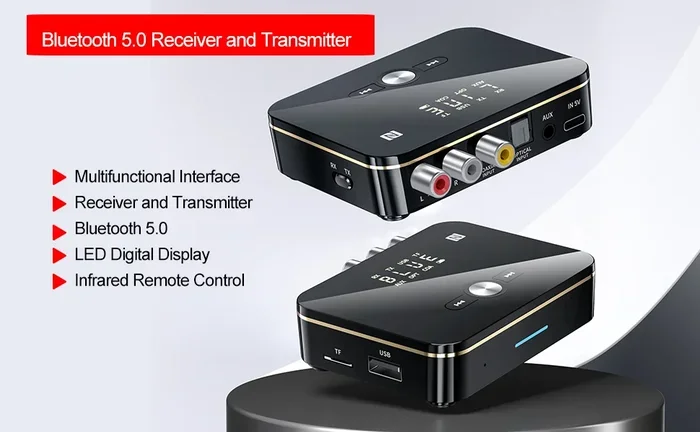
A Bluetooth adapter for TV is a small device that adds wireless Bluetooth capability to your television. Most TVs do not have built-in Bluetooth, especially older models. This adapter bridges that gap. It connects to your TV through an audio output port and then broadcasts sound over Bluetooth to your wireless devices.
Think of it like a translator. Your TV speaks one language, and your Bluetooth headphones or speakers speak another. The adapter sits in the middle and makes them understand each other. It is a simple but powerful piece of wireless connectivity technology.
These adapters come in different shapes and sizes. Some look like small USB sticks. Others are compact transmitters with cables. They all do the same core job. They take audio from your TV and send it wirelessly to any Bluetooth-enabled device nearby.
Why Do TVs Need Bluetooth Adapters?
Most TV manufacturers leave Bluetooth out to save costs. They assume most people will use built-in speakers or connect a wired soundbar. But consumer habits have changed. Today, millions of people prefer wireless headphones for TV watching. They want to listen privately without disturbing others.
Some people use Bluetooth speakers for better sound quality in a different room. Others connect their hearing aids or cochlear implants through Bluetooth. A TV Bluetooth adapter makes all of these use cases possible without spending hundreds of dollars on a new television.
How Does A Bluetooth Adapter For TV Work?
Understanding how Bluetooth streaming from a TV works helps you troubleshoot issues later. The process is straightforward once you see the big picture.
First, the adapter plugs into your TV. It connects through one of the audio output ports. This could be a 3.5mm headphone jack, an optical port, or a USB port. Once connected, the adapter receives the audio signal from your TV.
Next, the adapter turns that audio signal into a Bluetooth wireless signal. It broadcasts this signal just like a mini radio tower. Your Bluetooth headphones, speakers, or soundbar pick up this signal and play the audio.
The whole process happens in real time. Modern adapters use Bluetooth 5.0 or newer versions. This means faster connections, longer range, and better sound quality. Some adapters also support aptX codec technology, which reduces audio lag and improves fidelity.
The Role Of Audio Latency
Audio latency is the delay between the video on your screen and the sound you hear. This is one of the biggest concerns people have with wireless TV audio. When there is a noticeable delay, lips do not match the words.
Cheap adapters often have high latency. This makes for a frustrating watching experience. Better adapters use aptX Low Latency or similar codecs. These reduce the delay to almost imperceptible levels. If you plan to watch fast action movies or sports, look for an adapter with low latency support.
Types Of Bluetooth Adapters For TVs
Not all Bluetooth adapters for TV are the same. Different TVs have different audio output options. Choosing the right type matters more than you might think.
USB Bluetooth Adapters
USB Bluetooth adapters are the most common type. They plug directly into a USB port on your smart TV. Most modern smart TVs have at least one USB port. This makes USB adapters a convenient choice.
These adapters are small and unobtrusive. They stay attached to your TV permanently. You just plug them in and forget about them. Some USB adapters also double as Bluetooth receivers for other devices like keyboards or game controllers.
However, not all smart TVs support USB audio adapters. Some TVs only recognize USB storage devices. Before buying a USB adapter, check your TV manual or search online for your specific model.
3.5mm Audio Bluetooth Transmitters
3.5mm Bluetooth transmitters are the most versatile option. They connect to your TV through the standard headphone jack. Almost every TV, even older models, has a 3.5mm audio output or a 3.5mm RCA composite output.
These transmitters are small and often come with multiple cable options. You get a 3.5mm cable, RCA cables, and sometimes optical cables. This means they work with virtually any TV on the market.
The best part? 3.5mm Bluetooth transmitters are affordable. You can find reliable ones for under $30. They are also easy to set up. Just plug them in, pair your device, and you are streaming.
Optical Bluetooth Transmitters
Some TVs have an optical audio output but no 3.5mm jack. In these cases, an optical Bluetooth transmitter is your best bet. These adapters connect to your TV using a fiber optic cable and then transmit audio over Bluetooth.
Optical connections carry high-quality digital audio. This means better sound than a standard 3.5mm analog connection. If you care about audio quality, an optical transmitter is worth the extra cost.
These transmitters work great with soundbars and home theater systems. They are also a solid choice if you want to connect multiple Bluetooth speakers in different rooms using a Bluetooth audio transmitter with multipoint support.
Benefits Of Using A Bluetooth Adapter With Your TV
Switching to wireless TV audio offers several real advantages. Here is why millions of people are making the switch.
- Private listening: Watch TV at any hour without disturbing family members or neighbors. Wireless headphones for TV let you enjoy late-night movies in peace.
- Better sound quality: Many Bluetooth speakers and wireless headphones sound far better than built-in TV speakers. You get richer bass, clearer vocals, and more detailed sound.
- Freedom of movement: Walk around your home while listening to your TV. Cook, clean, or relax in another room without missing your show.
- No messy cables: Say goodbye to tangled wires running across your living room floor. A wireless streaming setup keeps your space clean and tidy.
- Affordable upgrade: Instead of buying a new TV with built-in Bluetooth, a Bluetooth adapter costs a fraction of the price.
- Multiple device support: Many adapters support Bluetooth multipoint, letting you connect two devices at once. You can switch between your TV and a phone seamlessly.
Quick Tips For Getting The Best Sound
To get the most out of your Bluetooth TV adapter, keep these tips in mind. Place the adapter close to your TV and within line of sight of your Bluetooth device. Avoid placing it behind metal objects or inside enclosed cabinets. These can weaken the Bluetooth signal range and reduce sound quality.
Also, keep your adapter updated. Some manufacturers release firmware updates that improve Bluetooth connectivity and reduce audio lag. Check the manufacturer’s website or app for updates after purchase.
How To Choose The Right Bluetooth Adapter For Your TV
Shopping for a Bluetooth adapter for TV can feel overwhelming with so many options. Here are the key factors to consider before you buy.
Check Your TV’s Audio Output Ports
Before anything else, look at the back of your TV. What audio output options do you see? Do you have a 3.5mm headphone jack? An optical port? USB ports? Knowing your TV’s ports determines which type of adapter you need.
If your TV has a 3.5mm jack, a 3.5mm Bluetooth transmitter works perfectly. If you only have optical output, you need an optical transmitter. If your TV has USB ports, a USB Bluetooth dongle might be your simplest option.
Consider Bluetooth Version And Codec Support
Look for adapters that support Bluetooth 5.0 or higher. Newer versions offer better range, faster connections, and lower power consumption. They also handle wireless audio streaming more reliably.
Codec support matters too. aptX and aptX Low Latency codecs deliver better audio quality and less delay. If you are watching action movies or playing video games, these codecs make a noticeable difference. Cheaper adapters may only support the basic SBC codec, which works fine for casual listening.
Think About Range And Battery Life
Most Bluetooth TV adapters have a range of 30 to 50 feet. This is plenty for most living rooms. If you want to walk around your entire home while watching TV, look for adapters with extended range capabilities.
Some transmitters run on batteries, while others plug in continuously. Battery-powered transmitters give you portability. Plug-in models never need charging but stay in one place. Choose based on how you plan to use your wireless TV audio setup.
Step-By-Step Setup Guide For Your Bluetooth Adapter
Setting up a Bluetooth adapter for TV streaming is simpler than you might expect. Follow these steps and you will be listening wirelessly in no time.
- Unbox your adapter and check that all cables are included. Most adapters come with a 3.5mm cable, RCA cables, and a USB power cable.
- Identify your TV’s audio output. Locate the 3.5mm jack, optical port, or USB port on the back of your TV.
- Connect the adapter. Plug the appropriate cable from the adapter into your TV’s audio output. If using a 3.5mm cable, insert it into the headphone jack.
- Power the adapter. If your adapter needs external power, plug the USB cable into a wall adapter or your TV’s USB port.
- Put your Bluetooth device in pairing mode. This usually means holding down a button on your headphones or speaker until a light flashes.
- Pair the devices. Turn on the adapter and press the pairing button. Your Bluetooth device should appear on the adapter’s indicator light or display.
- Test the audio. Play something on your TV and check if sound comes through your Bluetooth device. Adjust the volume on both the TV and the Bluetooth device.
Common Setup Mistakes To Avoid
One of the most common mistakes is plugging the adapter into the wrong port. Make sure you use the audio output port, not an input port. Another mistake is forgetting to put the Bluetooth device in pairing mode. Always check that the LED is flashing before attempting to pair.
Some people also try to pair too many devices at once. Most adapters support one or two connections at a time. Keep the number of paired devices manageable for the best experience.
Common Problems And How To Fix Them
Even with the best Bluetooth adapter for TV, you may run into occasional issues. Here are the most common problems and their solutions.
Audio Lag Or Lip Sync Issues
Audio lag happens when the sound does not match the video. This is the number one complaint about wireless TV audio. The good news that most modern adapters handle this well.
If you experience lag, first check if your adapter supports aptX Low Latency. If it does, make sure both the adapter and your Bluetooth device support the same codec. You may also try moving the adapter closer to your receiving device. Physical barriers like walls can increase latency.
Connection Drops Or Intermittent Audio
If your audio keeps cutting out, the Bluetooth range might be the issue. Move your Bluetooth device closer to the adapter. Also, check for interference from other wireless devices. Microwaves, baby monitors, and even USB 3.0 ports can cause Bluetooth signal interference.
Try changing the channel on your adapter if it has that feature. Some transmitters let you switch between Bluetooth channels to find a clearer connection.
No Sound At All
No sound usually means a connection problem. First, verify that the adapter is powered on and properly connected to your TV. Check that the TV volume is turned up and that the audio output is set to the correct port.
Next, make sure your Bluetooth device is connected to the adapter and not your phone or another device. Sometimes devices remember past pairings and connect to the wrong source. Bluetooth pairing issues like this are easy to fix by forgetting the old connection and pairing fresh.
Top Bluetooth Adapters For TV Streaming
Not sure which adapter to buy? Here are some popular options that work well for TV Bluetooth streaming.
| Adapter | Type | Bluetooth Version | Key Feature | Price Range |
|---|---|---|---|---|
| Avantree Oasis | Optical Transmitter | Bluetooth 5.0 | aptX Low Latency, multipoint | $40-$60 |
| 1Mii B06 | USB Dongle | Bluetooth 5.0 | Long range, aptX HD | $25-$35 |
| TaoTronics TT-BA07 | 3.5mm Transmitter | Bluetooth 5.0 | Low latency, compact | $15-$25 |
| Sabrent Bluetooth 5.0 | USB Adapter | Bluetooth 5.0 | Budget-friendly, easy setup | $12-$20 |
| Creative BT-W4 | USB Dongle | Bluetooth 5.2 | aptX Adaptive, multipoint | $50-$70 |
Each of these Bluetooth adapters for TV has its strengths. The Avantree Oasis is excellent for home theater setups with optical connections. The TaoTronics TT-BA07 is a great budget option for casual viewers. The Creative BT-W4 offers the latest Bluetooth 5.2 technology with adaptive codecs for the best audio experience.
Read reviews before buying. Look for feedback specifically about TV audio streaming and latency performance. Not every adapter works equally well with every TV model.
Expert Insights On Wireless TV Audio
Audio engineers often recommend using a dedicated Bluetooth audio transmitter rather than relying on built-in TV Bluetooth. Most TVs that claim to have Bluetooth only support it for low-quality audio output or for connecting accessories like keyboards and mice.
A dedicated transmitter gives you full control over the audio quality and connection settings. It also lets you connect any Bluetooth audio device, not just a limited set approved by the TV manufacturer.
Tech reviewers also suggest investing in an adapter with a strong Bluetooth range if you plan to move around your home while watching TV. Walls, furniture, and other obstacles can weaken the signal. A transmitter with Bluetooth 5.0 or better handles these challenges much more effectively than older models.
Future Of Wireless TV Audio
The future of wireless connectivity for TVs looks bright. Bluetooth 5.3 is already rolling out in newer adapters. It offers even lower latency, better energy efficiency, and stronger connections. Some manufacturers are also exploring Wi-Fi-based audio streaming as an alternative to Bluetooth for even higher quality sound.
As more TVs include built-in Bluetooth, the need for external adapters may decrease over time. But for the millions of people with older TVs, a Bluetooth adapter for TV remains the most practical and affordable solution for wireless audio.
Final Thoughts On Bluetooth TV Adapters
Can you get a Bluetooth adapter for a TV? Absolutely yes. It is one of the simplest and most affordable upgrades you can make to your home entertainment setup. Whether you want to watch movies late at night with wireless headphones or fill your kitchen with music from your living room TV, a Bluetooth adapter makes it possible.
The key is choosing the right type of adapter for your TV’s audio outputs. Consider your needs, budget, and the Bluetooth version and codec support. Follow the setup guide, troubleshoot any issues, and enjoy the freedom of wireless TV streaming.
With the right Bluetooth TV adapter, you are just a few minutes away from a better, more flexible viewing experience. No more tangled cables. No more choosing between watching TV and hearing it clearly. Wireless audio is here, and it is easier to set up than ever.
Frequently Asked Questions
Do all TVs support Bluetooth adapters?
Most TVs can work with a Bluetooth adapter regardless of age or brand. You just need the right type of adapter for your TV’s audio output. Check your TV’s ports to find the best match.
Can I connect multiple Bluetooth devices to one TV adapter?
Some adapters support Bluetooth multipoint, which allows two devices to connect at once. However, most adapters can only stream audio to one device at a time. Check the product specs before buying if you need multiple connections.
Will a Bluetooth adapter affect my TV picture quality?
No. A Bluetooth adapter only handles audio. It does not touch the video signal at all. Your picture quality stays exactly the same.
What is the best Bluetooth codec for TV streaming?
aptX Low Latency is the best codec for TV streaming. It reduces audio lag significantly, keeping sound and video in sync. If your adapter and headphones both support aptX, you will notice a much smoother experience.
Can I use a Bluetooth adapter with any Bluetooth headphones?
Yes. A Bluetooth TV adapter works with any Bluetooth headphones, speakers, or earbuds that support standard Bluetooth profiles. Just pair them the same way you would with any other device.
How far can I be from the TV with a Bluetooth adapter?
Most adapters have a range of 30 to 50 feet. Bluetooth 5.0 adapters can reach farther, sometimes up to 80 feet in open spaces. Walls and furniture will reduce the effective range.
=== CONCLUSION ===
Getting a Bluetooth adapter for your TV is one of the smartest upgrades you can make for your home entertainment. It opens up a world of wireless listening without the high cost of replacing your television. From Bluetooth TV streaming to private late-night viewing, the benefits are clear and immediate.
Choose the right adapter for your TV’s ports, follow the simple setup steps, and enjoy the freedom of wireless audio from your TV. Whether you are a casual viewer or a dedicated movie lover, a Bluetooth adapter for TV will transform how you watch and listen. Start streaming today and never look back.