Can You Connect Bluetooth To Any Car With These Tips
Can you connect Bluetooth to any car? The short answer is yes, regardless of your vehicle’s age or model. You can add wireless connectivity using adapters, FM transmitters, or new stereo systems. Bluetooth car connectivity lets you stream music and make hands-free calls safely. This guide covers every method, tip, and solution you need to get connected today.
Have you ever been stuck in traffic, staring at an old car stereo that has no Bluetooth connection? You are not alone. Many drivers wonder, can you connect Bluetooth to any car, especially when their vehicle does not have modern wireless features. The good news is that you absolutely can. Whether your car is from the 1990s or was built last year, there is a way to get Bluetooth working. This guide walks you through every option, every tip, and every solution you need. Let us get you connected.
Wireless audio has changed how we enjoy music on the road. You no longer need to fumble with CDs or scratchy FM radio stations. Bluetooth car connectivity lets you stream your favorite playlists, take calls, and use navigation apps without touching your phone. It is convenient, safe, and surprisingly affordable. Keep reading to find out exactly how to make it work in your vehicle.
Key Takeaways
- Yes, any car can get Bluetooth: You can add wireless capability to older vehicles with adapters and transmitters.
- Multiple methods exist: FM transmitters, Bluetooth adapters, and new stereos all work depending on your car.
- Pairing is simple: Most cars and phones connect in just a few easy steps.
- Audio quality varies: Your choice of method affects sound quality and reliability.
- Troubleshooting is straightforward: Most Bluetooth issues have quick, easy fixes.
- Safety matters: Hands-free calling keeps you focused on the road.
- Future-proof your ride: Upgrading your car audio system offers the best long-term Bluetooth experience.
📑 Table of Contents
- What Is Bluetooth and How Does It Work in Cars?
- Can You Connect Bluetooth To Any Car?
- Methods to Add Bluetooth to Any Vehicle
- Step-by-Step: Pairing Your Phone to Your Car
- Common Bluetooth Problems and How to Fix Them
- Tips for the Best Bluetooth Audio Quality
- Is Bluetooth Safe for Driving?
- Frequently Asked Questions
- Final Thoughts
What Is Bluetooth and How Does It Work in Cars?
Bluetooth is a wireless technology that lets devices talk to each other over short distances. It uses radio waves to send data like music, phone calls, and commands. You probably use Bluetooth every day with your headphones or speaker. The same idea works inside your car.
When you pair your phone to a car stereo, the two devices create a secure wireless link. Once paired, they remember each other. This means you do not have to reconnect every time you get in the car. Bluetooth pairing usually takes less than a minute. The process is simple and works across most devices.
There are two main profiles used in cars. The first is A2DP, which handles audio streaming. This is what lets you play music wirelessly. The second is HFP, or Hands-Free Profile. This lets you make and receive phone calls through your car speakers. Together, these two profiles give you a full wireless car audio experience.
Can You Connect Bluetooth To Any Car?
The short answer is yes. Can you connect Bluetooth to any car? Absolutely. Every vehicle can get Bluetooth capability, even if it did not come with it from the factory. The method you choose depends on your car’s current setup and your budget. Let us look at the different scenarios.
Cars With AUX Input or USB Ports
If your car has an AUX port or a USB input, adding Bluetooth is very easy. You can use a small Bluetooth adapter that plugs right in. These adapters cost between 15 and 50 dollars. They connect to your phone wirelessly and send audio through your car speakers. This is the simplest and most affordable option for modern vehicles.
Cars With Only a Cassette Player or CD Player
Older cars often have cassette players or CD decks but no AUX input. You can still add Bluetooth. A cassette adapter is a small device that looks like a tape. You put it in the cassette slot, and it connects to a Bluetooth receiver. The music plays through your car speakers just like a regular tape. These adapters are cheap and work surprisingly well.
Cars With FM Radio Only
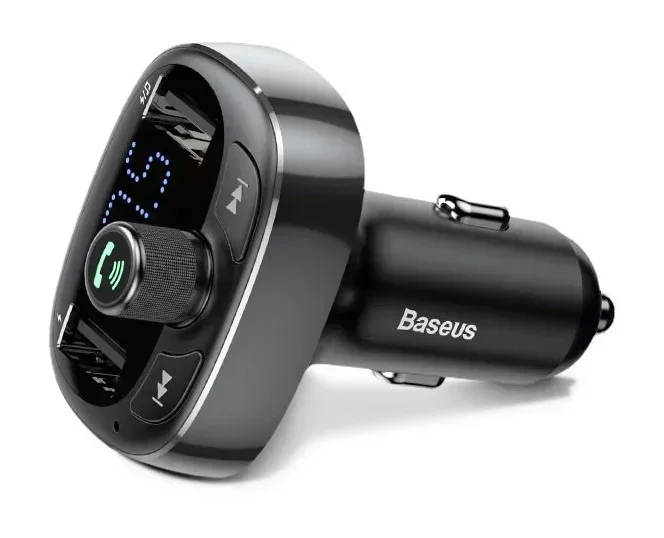
What if your car only has an FM radio? No problem. An FM Bluetooth transmitter plugs into your cigarette lighter or power outlet. It broadcasts your phone’s audio on an empty FM frequency. You tune your car radio to that frequency, and the music plays through your speakers. This method works in nearly every car ever made.
Cars With Factory Bluetooth That Is Not Working
Some cars already have Bluetooth built in, but it stopped working. This can happen after a battery dies or after a system reset. In this case, you just need to re-pair your phone. Go into your car’s Bluetooth settings, find your phone, and connect again. If the system is truly broken, a trip to the dealer or a car audio shop can fix it.
Methods to Add Bluetooth to Any Vehicle
There are several ways to bring Bluetooth to your car. Each method has its pros and cons. Let us compare them so you can pick the best one for your situation.
Bluetooth FM Transmitter
An FM transmitter is the most popular option for older cars. It plugs into your car’s power outlet and sends audio to your FM radio. You choose a frequency that has no radio station on it, and your phone connects to the transmitter. These devices are small, easy to use, and very affordable.
One thing to keep in mind is audio quality. FM transmitters can sometimes pick up static or interference. Choosing a clear frequency helps a lot. Some better models have built-in microphones for hands-free calling too.
Bluetooth AUX Adapter
If your car has an AUX input, a Bluetooth AUX adapter is a great choice. These small dongles plug into the AUX port and create a wireless bridge between your phone and your car stereo. They are easy to set up and usually do not cause any audio lag. The sound quality is clean and reliable.
Bluetooth Car Kit with Microphone
A dedicated Bluetooth car kit is a more permanent solution. These kits mount to your dashboard or windshield. They include a speaker and microphone for calls. Some kits also charge your phone while you drive. They work well for older cars that have no modern input options at all.
Replace Your Car Stereo
If you want the best possible experience, consider replacing your car stereo. A new Bluetooth car stereo gives you the best audio quality and the most features. You get Bluetooth, USB, Apple CarPlay, Android Auto, and sometimes even Wi-Fi. This option costs more but it transforms your entire car audio system.
Comparison Table: Bluetooth Methods for Cars
| Method | Cost Range | Ease of Setup | Audio Quality | Best For |
|---|---|---|---|---|
| FM Transmitter | $10 – $40 | Very Easy | Good | Cars with FM radio only |
| AUX Bluetooth Adapter | $15 – $50 | Easy | Great | Cars with AUX input |
| Cassette Bluetooth Adapter | $10 – $30 | Very Easy | Good | Cars with cassette player |
| Bluetooth Car Kit | $20 – $80 | Easy | Good | Hands-free calling focus |
| New Car Stereo | $100 – $500+ | Moderate | Excellent | Full system upgrade |
Step-by-Step: Pairing Your Phone to Your Car
Once you have your Bluetooth device ready, pairing your phone is the next step. The process is very similar across most devices. Here is how to do it.
- Turn on Bluetooth on your phone. Go to Settings and toggle Bluetooth on.
- Put your car or adapter into pairing mode. Most devices have a button or switch for this. The light will usually flash blue or red.
- Search for available devices on your phone. Your car or adapter should appear in the list.
- Tap on the device name to connect. You may see a pairing code on your car screen.
- Confirm the code on both devices if prompted.
- Wait for the connection to establish. You will hear a tone or see a confirmation on screen.
Once connected, your phone will remember this device. Next time you get in the car, Bluetooth should connect automatically. This is called auto-reconnect and it works once the initial pairing is complete.
Quick Tip: If your phone does not find the car device, make sure both are close to each other. Also, check that nothing else is connected to the car device. Some adapters only pair with one device at a time.
Common Bluetooth Problems and How to Fix Them
Bluetooth connections are not always perfect. Sometimes things go wrong. Here are the most common issues and how to solve them.
Phone Will Not Connect to Car
This is the most common problem. First, turn Bluetooth off and back on again. Then, delete the car from your phone’s Bluetooth list and pair it fresh. If that does not work, restart both your phone and your car’s audio system. A simple restart fixes most connection issues.
Audio Cuts Out or Sounds Scratchy
Interference can cause audio problems. Other electronic devices nearby, like phone chargers or GPS units, can disrupt the signal. Move your phone closer to the car’s Bluetooth receiver. Also, make sure you are using the right frequency if you have an FM transmitter.
Phone Connects but No Sound
Sometimes the connection works but you hear nothing. Check your car stereo volume. Also, check your phone’s media volume. Make sure the audio output on your phone is set to Bluetooth, not the phone speaker. This is a common mistake that trips up many users.
Bluetooth Keeps Disconnecting
If your connection drops often, your phone may be going to sleep. Go into your phone’s Bluetooth settings and look for an option called “Keep Bluetooth active during sleep” or similar. Turn this on. Also, make sure your phone battery is not too low, as low power can affect Bluetooth performance.
Bluetooth Version Compatibility Issues
Older Bluetooth versions may not work well with newer phones. Bluetooth 4.0 and older are less stable than newer versions. If you have an older car adapter, it might be time to replace it. Look for a device with Bluetooth 5.0 or higher for the best wireless connectivity experience.
Quick Tips for Better Bluetooth Performance
- Keep your phone and car device within 10 feet of each other during initial pairing.
- Update your phone’s software regularly for better Bluetooth stability.
- Clear old paired devices from both your phone and car system.
- Avoid placing your phone under a seat or far from the car’s receiver.
- Use a high-quality Bluetooth adapter for the best audio streaming results.
Tips for the Best Bluetooth Audio Quality
You have Bluetooth connected. Now you want the best sound possible. Here are some tips to improve your car audio quality with Bluetooth.
Choose the Right Bluetooth Codec
Some car stereos and adapters support different Bluetooth codecs. Codecs are compression formats that affect audio quality. AAC and aptX are higher quality codecs than the basic SBC codec. If your devices support a better codec, choose it in your settings for clearer sound.
Keep Your Phone Charged
A low battery can reduce Bluetooth performance and audio quality. Keep your phone plugged in while driving if possible. Many Bluetooth car kits include a USB charging port for this purpose.
Adjust Your EQ Settings
Most car stereos have equalizer settings. Use these to tune the sound to your liking. Boosting the bass slightly can make Bluetooth audio sound fuller. Just do not overdo it, or the sound can get muddy.
Reduce Background Noise
Wind noise and road noise can make Bluetooth audio harder to hear. Roll up your windows at higher speeds. Some cars have noise-canceling features that help. If you use an FM transmitter, a better quality model will reduce background static.
Is Bluetooth Safe for Driving?
Many drivers worry about the safety of using Bluetooth while driving. The good news is that hands-free calling with Bluetooth is much safer than holding your phone. It keeps your hands on the wheel and your eyes on the road.
Most countries and states now have laws against holding a phone while driving. Bluetooth helps you follow these laws. You can answer calls, change songs, and use navigation apps without touching your phone. Your car entertainment system becomes both fun and safe.
That said, even hands-free calls can distract you. Keep conversations short and stay aware of your surroundings. If a call is complex or stressful, pull over to take it. Bluetooth makes driving easier, but your full attention on the road always comes first.
Frequently Asked Questions
Can I add Bluetooth to a car that has no AUX or USB port?
Yes, you absolutely can. An FM Bluetooth transmitter works great for cars with only an FM radio. You can also use a cassette adapter if your car has a tape player. Both options are inexpensive and easy to install.
Why does my Bluetooth keep disconnecting from my car?
Bluetooth disconnections usually happen because of distance, interference, or low battery. Move your phone closer to the car’s receiver and make sure both devices have enough power. Restarting both devices often fixes the problem too.
Does Bluetooth affect car battery life?
Bluetooth uses very little power. It will not noticeably drain your car battery. However, if you leave your phone connected and playing music with the engine off, it can slowly drain your battery over time.
Can two phones connect to a car’s Bluetooth at the same time?
Many modern car stereos support multiple paired devices. However, only one phone can stream audio at a time. When a second phone connects, the first phone’s audio usually pauses. Check your car manual to see if your stereo supports this feature.
Is Bluetooth audio as good as a wired connection?
Bluetooth audio is very close to wired quality, especially with newer Bluetooth versions. Bluetooth 5.0 and above offer excellent sound. For most drivers, the difference between wired and wireless is barely noticeable.
Can I use Apple CarPlay or Android Auto with Bluetooth?
Apple CarPlay and Android Auto use Bluetooth for some functions but also need a USB or wireless connection for the full screen experience. Many new car stereos support these features alongside regular Bluetooth audio streaming.
Final Thoughts
Can you connect Bluetooth to any car? Yes, you can. No matter what kind of vehicle you drive, there is a Bluetooth solution that fits. From simple FM transmitters to full stereo replacements, the options are plentiful and affordable. Bluetooth car connectivity is one of the best upgrades you can make to your daily driving experience.
Start with the method that matches your car and your budget. Follow the pairing steps carefully. Troubleshoot any issues using the tips in this guide. Soon you will be streaming music, taking calls, and enjoying wireless audio every time you hit the road. The days of tangled cables and limited options are over. Your car is ready for the wireless future.