How Do I Connect Multiple Bluetooth Speakers To One Receiver
Connecting multiple Bluetooth speakers to one receiver is easier than you think. This guide walks you through every method, from using a Bluetooth adapter to leveraging built-in multi-point technology. You will learn how to set up wireless speakers, boost your sound quality, and avoid common mistakes.
Have you ever wanted to fill a whole room with rich, immersive sound using more than one Bluetooth speaker? Maybe you have been setting up a backyard party or trying to create a stereo setup in your living room. Connecting multiple Bluetooth speakers to one receiver is the key to unlocking that powerful, room-filling audio experience. It sounds complicated, but it really is not.
In this guide, we will walk you through every step. You will learn about the different methods, the equipment you need, and the simple tricks that make everything work smoothly. Whether you are a tech beginner or someone who already owns a few wireless speakers, this article has something for you. Let us get started.
Key Takeaways
- Multiple Methods Available: You can connect Bluetooth speakers using a receiver with built-in Bluetooth, a Bluetooth adapter, or a Bluetooth transmitter.
- Speaker Pairing Is Key: Understanding how to pair speakers in stereo or party mode makes a big difference in sound quality.
- Check Compatibility First: Not all receivers and speakers work together seamlessly, so verify Bluetooth versions and profiles before buying.
- Placement Matters: Proper speaker placement within Bluetooth range ensures the best audio performance.
- Troubleshooting Is Simple: Most connection issues can be fixed with a quick reset, firmware update, or repositioning.
📑 Table of Contents
- Understanding How Bluetooth Speakers Connect to a Receiver
- Methods to Connect Multiple Bluetooth Speakers to One Receiver
- Setting Up Your Speakers for the Best Sound
- Equipment You Will Need
- Troubleshooting Common Connection Issues
- Expert Tips for a Better Bluetooth Speaker Setup
- Can You Connect Bluetooth Speakers to Different Devices?
- Key Takeaways
- Conclusion
Understanding How Bluetooth Speakers Connect to a Receiver
Before you dive into the setup, it helps to understand the basics. Bluetooth is a short-range wireless technology that sends audio from one device to another. When you connect Bluetooth speakers to a receiver, the receiver acts as the central hub. It takes the audio signal and sends it out to your speakers wirelessly.
A receiver is the device that processes audio and video signals. It can be an AV receiver for your home theater or a simple stereo amplifier. The receiver sends sound to your speakers, and when Bluetooth is involved, it needs to support wireless connectivity. Some receivers come with built-in Bluetooth, while others require an external adapter.
How Bluetooth Audio Streaming Works
Bluetooth audio streaming works by sending compressed audio data between devices. The sender (your phone, tablet, or TV) transmits the signal. The receiver picks it up and turns it back into sound. This process happens almost instantly. You will hear the audio with very little delay in most cases.
The quality of the sound depends on a few things. The Bluetooth version matters a lot. Newer versions like Bluetooth 5.0 and above offer better range and sound quality. The codec used also plays a role. Codecs like aptX and LDAC deliver higher quality audio than standard SBC. So when you are choosing your equipment, keep these details in mind.
Methods to Connect Multiple Bluetooth Speakers to One Receiver
There are several ways to connect multiple Bluetooth speakers to a single receiver. Each method has its own advantages. Let us look at the most popular options so you can pick the one that fits your setup best.
Method 1: Using a Receiver with Built-In Bluetooth
The easiest method is to use a receiver that already has Bluetooth built in. Many modern receivers include this feature. You simply pair each speaker to the receiver, and you are good to go. This method works well for most home setups.
Here is how it works step by step:
- Turn on your receiver and put it in pairing mode.
- Take your first Bluetooth speaker and put it in pairing mode too.
- On the receiver, find the speaker in the Bluetooth device list.
- Select it to establish the connection.
- Repeat the process for each additional speaker.
This method is simple and does not require any extra equipment. However, not all receivers support connecting to multiple speakers at once. Some only allow one Bluetooth connection at a time. Check your receiver manual or look up the model online to confirm.
Method 2: Using a Bluetooth Adapter
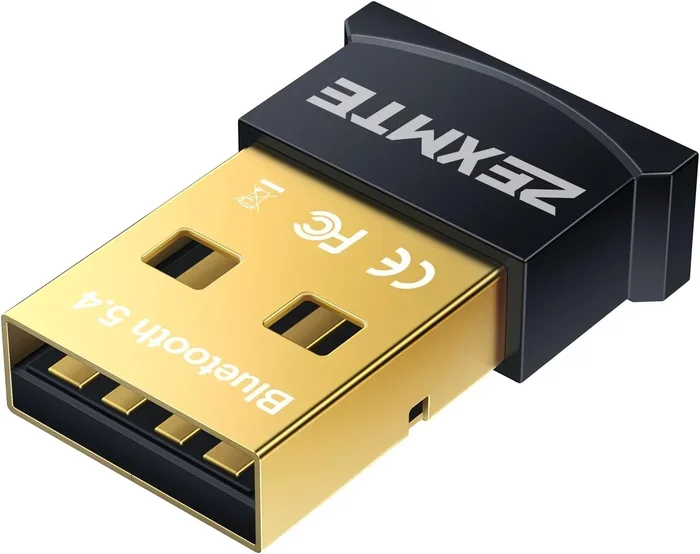
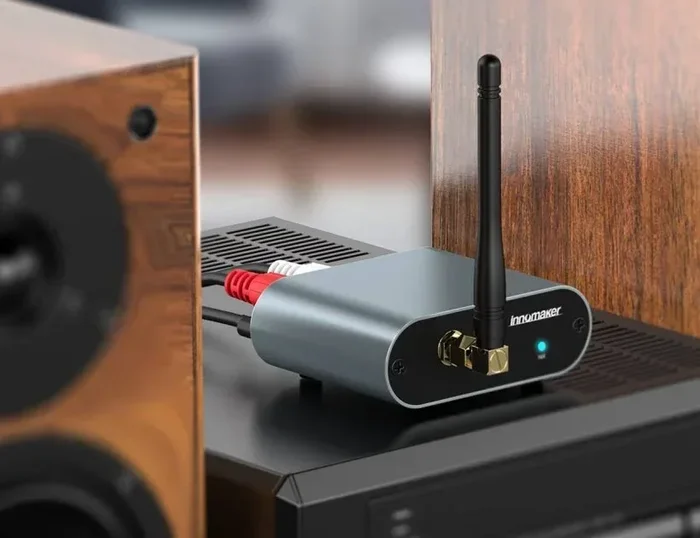
If your receiver does not have built-in Bluetooth, you can use a Bluetooth adapter. This small device plugs into your receiver and adds wireless capability. Bluetooth adapters are affordable and easy to find. They work with most audio equipment.
Here is what you need to do:
- Plug the Bluetooth adapter into the audio output on your receiver.
- Turn on the adapter and put it in pairing mode.
- Pair each Bluetooth speaker to the adapter one by one.
- Adjust the volume and audio settings on both the adapter and the receiver.
A Bluetooth adapter is a great option if you already own a good receiver. It saves you from buying a whole new piece of equipment. You can find adapters that support multiple simultaneous connections. This makes it possible to pair several speakers at once.
Method 3: Using a Bluetooth Transmitter
A Bluetooth transmitter works similarly to an adapter, but it sends audio out rather than receiving it. You connect the transmitter to your audio source, and it broadcasts the signal to your speakers. This method is popular for setups where you want more control over the wireless connection.
Some transmitters support multi-point connectivity. This means they can connect to more than one speaker at the same time. Look for transmitters that specifically advertise this feature if you want to connect multiple speakers.
Setting Up Your Speakers for the Best Sound
Once you have connected your speakers, the next step is setup. Proper setup makes a huge difference in sound quality. You want your music to sound clear, balanced, and powerful.
Speaker Placement Tips
Where you place your speakers matters a lot. Here are some quick tips:
- Keep speakers at ear level when you are sitting in your main listening position.
- Place speakers at least a few feet apart for a wider soundstage.
- Avoid putting speakers in corners, as this can cause bass to sound muddy.
- Keep speakers away from walls if possible to reduce echo.
- Make sure there are no large obstacles between the receiver and the speakers.
Good placement helps the sound waves travel freely. This leads to clearer audio and better bass response. If you are setting up speakers outside, how can I extend my Wi-Fi to about 300 feet outside my home might also help if you are using a wireless setup that relies on a network connection.
Stereo vs. Party Mode
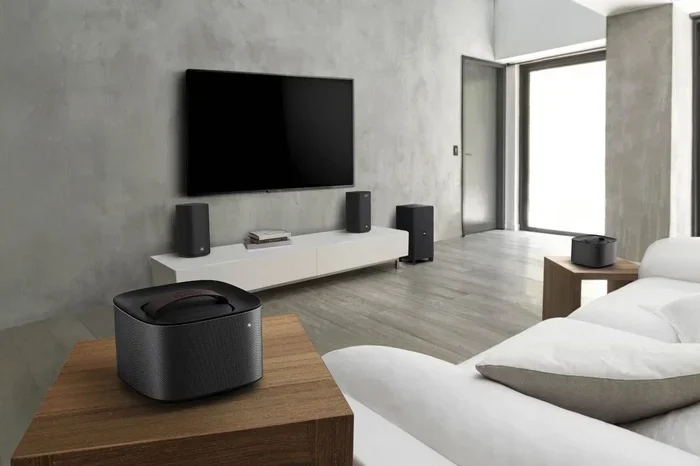
Many Bluetooth speakers offer two modes: stereo mode and party mode. In stereo mode, one speaker handles the left channel and the other handles the right. This creates a wider, more immersive sound field. It is great for listening to music in a focused way.
Party mode plays the same audio on all connected speakers. The volume gets louder, and the sound fills the entire space. This is perfect for gatherings and outdoor events. Check your speaker brand to see which modes are supported.
Matching Speaker Volumes and Levels
When you connect multiple speakers, you need to balance the volume. If one speaker is louder than the others, the sound will feel uneven. Most speakers let you adjust the volume individually. Take a few minutes to balance them out before you start listening.
Some receivers also let you adjust the speaker levels in the settings menu. This gives you more precise control. You can boost or lower the volume for each speaker channel. This is especially helpful when your speakers are different sizes or brands.
Equipment You Will Need
Having the right equipment makes the whole process much easier. Here is a list of what you might need to connect multiple Bluetooth speakers to one receiver.
| Equipment | Purpose | Cost Range |
|---|---|---|
| Bluetooth Receiver | Receives wireless audio from your source device | $20-$100 |
| Bluetooth Adapter | Adds Bluetooth to a non-Bluetooth receiver | $15-$50 |
| Bluetooth Transmitter | Sends audio wirelessly to multiple speakers | $20-$80 |
| Bluetooth Speakers | Wireless speakers that receive and play audio | $30-$300+ each |
| Audio Cables (if needed) | Connects the adapter or transmitter to the receiver | $5-$20 |
You do not need all of this equipment. What you need depends on your receiver and your goals. If your receiver already has Bluetooth, you really only need the speakers. If it does not, an adapter or transmitter is a must.
Also, if you are thinking about using speakers with other devices, keep in mind that can I use Bluetooth headphones with Roku is a common question, and the same Bluetooth pairing principles apply across many devices.
Troubleshooting Common Connection Issues
Sometimes things do not go as planned. Bluetooth connections can be finicky. Here are the most common problems and how to fix them.
Speakers Not Showing Up in the Device List
If your speaker does not appear in the Bluetooth list, try these steps:
- Make sure the speaker is in pairing mode.
- Turn Bluetooth off and back on both the speaker and the receiver.
- Move the devices closer together.
- Remove other Bluetooth devices that might be causing interference.
- Restart both devices and try again.
Sometimes a simple restart fixes everything. Bluetooth connections can get stuck. A fresh start clears the cache and resets the connection.
Audio Cutting Out or Lagging
If your audio keeps cutting out or there is a delay, here is what to check:
- Make sure you are within Bluetooth range. Most devices work within 30 feet.
- Remove physical obstacles between the speaker and the receiver.
- Check for interference from Wi-Fi routers or other electronics.
- Update the firmware on your speakers and receiver.
- Try a different Bluetooth codec if your devices support it.
Interference is one of the biggest causes of audio problems. Wi-Fi signals, microwaves, and even USB 3.0 ports can disrupt Bluetooth. Keeping your devices away from these sources helps a lot.
Uneven Sound Between Speakers
If one speaker sounds louder or quieter than the others, try this:
- Check the volume balance settings on your receiver.
- Make sure both speakers are the same model and brand if possible.
- Reposition the speakers for better sound distribution.
- Reset the Bluetooth connection and pair again from scratch.
Even small differences in speaker placement can cause volume imbalances. Take the time to adjust and test. Your ears will thank you.
Expert Tips for a Better Bluetooth Speaker Setup
Here are some pro tips that will help you get the most out of your Bluetooth speaker setup. These tips come from real-world experience and can save you a lot of frustration.
- Update Firmware Regularly: Manufacturers often release updates that improve Bluetooth performance and fix bugs. Check for updates every few months.
- Use Speakers from the Same Brand: Matching speakers ensures consistent sound quality and easier pairing.
- Keep Devices Charged: Low battery can cause connection drops and poor audio quality.
- Use a Dedicated Bluetooth Receiver: A quality receiver like the ones you might explore at Can I Make My Tv Have Bluetooth can improve your setup significantly.
- Test Before the Event: Always do a full test run before a party or gathering. This gives you time to fix any issues.
- Consider Wired Connections for Critical Speakers: For your main speakers, a wired connection to the receiver often delivers better sound quality than Bluetooth.
These small steps add up. They can turn a mediocre setup into a fantastic one. The goal is to enjoy your music without any hassle.
Can You Connect Bluetooth Speakers to Different Devices?
Yes, you can connect Bluetooth speakers to different devices, but there are limitations. Most speakers can only connect to one source at a time. Some speakers support multi-point pairing, which allows them to connect to two devices simultaneously. This is useful if you want to switch between your phone and your TV.
If you are using speakers with a laptop, you might also wonder about other connectivity options. For instance, Can I Plug Speakers Into My Laptop is a related topic that covers wired speaker connections. Both wired and wireless setups have their place in a great audio system.
The same principles apply when you are using speakers with a TV or a home theater system. Bluetooth makes it easy to stream audio without cables. But for the best quality, a wired connection is still hard to beat. Many people use a combination of both for the best of both worlds.
Key Takeaways
- Multiple Methods Available: You can connect Bluetooth speakers using a receiver with built-in Bluetooth, a Bluetooth adapter, or a Bluetooth transmitter.
- Speaker Pairing Is Key: Understanding how to pair speakers in stereo or party mode makes a big difference in sound quality.
- Check Compatibility First: Not all receivers and speakers work together seamlessly, so verify Bluetooth versions and profiles before buying.
- Placement Matters: Proper speaker placement within Bluetooth range ensures the best audio performance.
- Troubleshooting Is Simple: Most connection issues can be fixed with a quick reset, firmware update, or repositioning.
- Balance Your Setup: Matching speaker brands and adjusting volume levels ensures even, enjoyable sound throughout your space.
- Keep It Updated: Regular firmware updates keep your devices running smoothly and improve Bluetooth connectivity over time.
Conclusion
Connecting multiple Bluetooth speakers to one receiver opens up a world of audio possibilities. You can fill any room with rich, immersive sound. You can set up a stereo system or a party setup with ease. The methods we covered in this guide give you the flexibility to choose what works best for your space.
Start by checking your receiver and speakers for Bluetooth compatibility. Pick the method that fits your equipment. Follow the setup steps carefully. And do not forget to troubleshoot if anything goes wrong. With the right setup, your wireless audio experience will be amazing.
Take your time, experiment with placement, and enjoy the process. Great sound is worth the effort. Now go ahead and set up your speakers. Your ears will thank you.
Frequently Asked Questions
Can I connect more than two Bluetooth speakers to one receiver?
Yes, you can connect more than two speakers if your receiver or adapter supports multiple Bluetooth connections. Some receivers allow three or more simultaneous connections. Check your device specifications to confirm the maximum number of supported speakers.
Do all Bluetooth speakers work with every receiver?
Most Bluetooth speakers work with most receivers, but compatibility depends on the Bluetooth version and profiles supported. Look for speakers and receivers that both support the same Bluetooth profile, such as A2DP, for the best results.
Does connecting multiple Bluetooth speakers reduce sound quality?
Connecting multiple speakers can slightly reduce quality if the Bluetooth version is old or the connection is unstable. Using Bluetooth 5.0 or newer and keeping devices within range helps maintain excellent sound quality across all speakers.
Can I use a Bluetooth speaker with a wired receiver?
Yes, you can use a Bluetooth speaker with a wired receiver by adding a Bluetooth adapter or transmitter. This small device bridges the gap between the wired output of the receiver and the wireless connection to your speaker.
What is the best Bluetooth range for speaker connections?
Most Bluetooth devices work well within 30 feet of each other. Bluetooth 5.0 extends this range to about 80 feet or more. Keep your speakers and receiver within range for the best connection and audio performance.
Can I connect Bluetooth speakers from different brands to one receiver?
Yes, you can mix and match Bluetooth speaker brands. As long as the speakers support standard Bluetooth profiles, they will connect to most receivers. However, using the same brand often makes setup easier and ensures more consistent sound.