How Can I Record From Antenna Tv Without Any Hassle
Recording from antenna tv is simpler than most people think. With the right digital video recorder and a basic antenna TV setup, you can capture your favorite over-the-air channels in high definition. This guide walks you through every step, from choosing the best TV tuner card to troubleshooting common problems.
Have you ever wanted to record from antenna tv but felt confused by all the options? You are not alone. Many people cut the cord and switch to antenna TV because they want to save money. But knowing how to actually record those free channels is a different story. This guide breaks everything down into simple, easy-to-follow steps.
Whether you want to record live TV antenna shows for later or build a full home recording setup, you are in the right place. We will cover every tool, tip, and trick you need. By the end, you will know exactly how to set up your own OTA DVR system and start saving your favorite antenna TV channels in no time.
Key Takeaways
- You need three core components: an antenna, a recording device, and a display screen to start recording from antenna tv.
- OTA DVRs are the easiest option for beginners who want free, hassle-free recording without a monthly subscription.
- USB TV tuner cards work with PCs and give you full control over what and when you record.
- Antenna placement matters a lot for signal strength and recording quality.
- Free TV recording software like NextPVR and Kodi can turn any computer into a powerful recording station.
- Common mistakes include poor cable connections and ignoring signal strength, both of which ruin recordings.
📑 Table of Contents
- Why Record From Antenna Tv?
- What You Need to Record From Antenna Tv
- How to Set Up Your Antenna Recording System
- Best Devices for Recording From Antenna Tv
- Tips for Better Antenna TV Recordings
- Common Mistakes to Avoid When Recording From Antenna Tv
- Recording From Antenna Tv With Different Devices
- How to Improve Antenna Signal for Better Recordings
- Frequently Asked Questions
- Conclusion
Why Record From Antenna Tv?
Recording from antenna tv gives you freedom. You do not need a cable subscription. You do not need to pay monthly fees for a DVR service. Your local channels like ABC, NBC, CBS, and FOX come through your antenna completely free. When you add a recording device, you can watch them whenever you want.
Free over-the-air TV recording saves you hundreds of dollars every year. Cable companies charge upwards of $60 per month for their basic packages. An antenna costs once, and the channels are yours forever. Add a personal video recorder to the mix, and you have a full entertainment center that costs almost nothing to run.
Benefits of OTA Recording
- No monthly fees: Once your equipment is set up, recording costs nothing extra.
- HD and 4K quality: Many local channels broadcast in high definition for free.
- No contracts: You own your setup and can change it anytime.
- No ads on the recording process: Unlike streaming services, antenna signals carry no extra fees.
- Local news and sports: You never miss a game or a weather update.
What You Need to Record From Antenna Tv
Before you start setting up TV recording, you need the right gear. The good news is you do not need expensive equipment. A few affordable pieces will get you up and running. Let us look at what goes into a solid antenna TV setup.
The Antenna
Your antenna is the foundation of everything. Without a good antenna, your recordings will have poor picture quality or no signal at all. Indoor antennas work well if you live close to broadcast towers. Outdoor antennas reach farther and pull in stronger signals. Check your local signal map to decide which type you need.
Antenna signal strength plays a huge role in recording quality. A weak signal means pixelated video and audio dropouts. Use a signal meter or your TV’s built-in signal checker to test your area before buying. This simple step saves a lot of frustration later.
The Recording Device
The recording device is where the magic happens. There are three main options to consider:
- OTA DVR units: These are standalone devices built specifically for antenna recording. They connect directly to your antenna and TV. Popular brands include Tablo, HDHomeRun, and TiVo.
- USB TV tuner cards: These plug into a computer and let you record using software. They are budget-friendly and very flexible.
- Smart TVs with built-in recording: Some newer smart TVs have a USB recording feature. Check your TV manual to see if yours supports this.
Coaxial Cables and Connectors
You will need coaxial cables to connect your antenna to your recording device. These cables carry the coaxial cable recording signal from the antenna to your tuner. Make sure you buy high-quality cables. Cheap cables can cause signal loss and degrade your recordings. Gold-plated connectors help reduce interference.
If your TV has limited ports, consider a Can I Convert My Tv Usb Port To Hdmi adapter. This lets you connect modern devices to older TVs without any problem.
How to Set Up Your Antenna Recording System
Setting up your record TV shows antenna system is easier than you might think. Follow these steps in order, and you will have a working setup in under an hour.
Step 1: Place Your Antenna
Start by positioning your antenna. If you use an indoor model, place it near a window facing the broadcast towers. For outdoor antennas, mount them on your roof or attic. Higher placement always gives better antenna signal strength. Use a compass app on your phone to find the direction of the nearest towers.
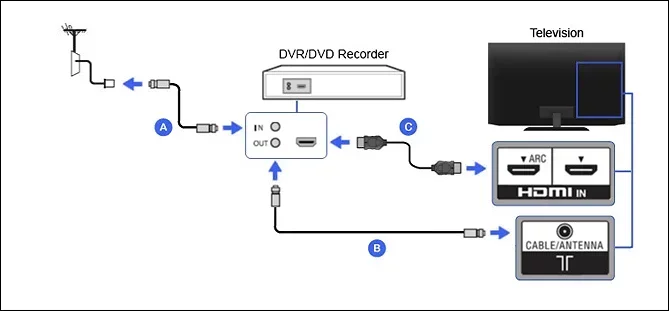
Step 2: Connect the Coaxial Cable
Run your coaxial cable from the antenna to your recording device. If you need to Can I Run Tv Cable Behind Wall, use in-wall rated cables and a fishing tool to push the wire through. Keep cable runs as short as possible to minimize signal loss.
Step 3: Connect the Recording Device to Your TV
Use an HDMI cable to connect your recording device to your television. This gives you the best picture quality. If your recording device uses a different output, check what adapters you need. A TV recording setup works best when all connections are secure and tight.
Step 4: Scan for Channels
Go into your recording device or TV settings and run a channel scan. This tells the system which antenna TV channels are available in your area. Rescan periodically because new channels may become available or existing ones can change frequencies.
Step 5: Test Your Recording
Record a short segment of a live show. Play it back and check for picture quality, audio sync, and any glitches. If something looks wrong, check your cable connections first. Loose cables are the number one cause of recording problems.
Best Devices for Recording From Antenna Tv
Not all recording devices are created equal. Some are better for certain setups than others. Here is a closer look at the top options for recording from antenna tv.
| Device Type | Price Range | Best For | Ease of Use |
|---|---|---|---|
| OTA DVR (Standalone) | $100 – $300 | Families wanting simple, TV-based recording | Very Easy |
| USB TV Tuner + PC | $20 – $80 | Tech-savvy users who want full control | Moderate |
| Smart TV Built-in Recording | Included with TV | Users who already own a compatible smart TV | Easy |
| Network DVR (HDHomeRun) | $100 – $200 | Households with multiple devices and users | Easy |
The best device for you depends on your budget and tech comfort level. If you want something simple, go with a standalone OTA DVR. If you love tinkering with technology, a USB TV tuner card paired with a computer gives you the most features.
OTA DVR Units Explained
OTA DVR units like Tablo and HDHomeRun Connect are purpose-built for antenna recording. They store recordings on a USB hard drive or a network-attached storage device. You can access your recordings from any screen in your house. These devices make free TV recording incredibly convenient.
USB TV Tuner Cards
A TV tuner card plugs into your computer’s USB port. It receives the antenna signal and turns your PC into a powerful recording machine. You need recording software to go with it. Popular options include NextPVR, Kodi, and Plex. These programs let you schedule recordings, set series reminders, and manage your library.
If you want to watch your recorded shows on other devices, consider mirroring your screen. Learn Can I Mirror Iphone To Tv With Hdmi to cast your recordings to a bigger screen for a better viewing experience.
Tips for Better Antenna TV Recordings
Getting a good recording from antenna tv is about more than just pressing record. Small details make a big difference in quality. Here are expert tips to improve your setup.
Improve Your Signal Strength
Strong signal means better recordings. Place your antenna as high as possible. Keep it away from metal objects and electronic devices that cause interference. A signal amplifier can boost weak signals, especially if you live far from broadcast towers.
Use Quality Recording Software
If you use a computer-based setup, your software matters. TV recording software like NextPVR and Kodi offer features like automatic commercial skipping, series recording, and electronic program guides. These tools make managing your recordings much easier.
Schedule Recordings in Advance
Use the electronic program guide (EPG) to schedule recordings before you go to bed. This way, you never miss a show. Set up series recording for your favorite programs so every episode gets saved automatically.
Check Your Storage Regularly
Recordings take up space. A one-hour HD recording uses about 4 to 6 gigabytes. Make sure your storage device has enough room. Set up automatic deletion of old recordings to keep things organized.
Expert Insight
Pro tip: Many people do not realize that they can record from multiple channels at the same time with the right setup. A dual-tuner OTA DVR lets you record one show while watching another. This is a game-changer for families with different viewing preferences.
Common Mistakes to Avoid When Recording From Antenna Tv
Even with the best setup, mistakes can ruin your recordings. Here are the most common errors and how to avoid them.
Skipping the Channel Scan
Some people connect everything and start recording without running a channel scan. This is a big mistake. Without a proper scan, your device will not know which channels are available. Always run a fresh scan after any setup change.
Using Low-Quality Cables
Cheap coaxial cables lose signal strength over distance. This leads to pixelated video and audio problems. Invest in quality cables with good shielding. A few extra dollars on cables can save you hours of frustration.
Ignoring Signal Strength
Weak signal causes dropped recordings and poor quality. Check your signal strength regularly. Move your antenna or add a signal amplifier if needed. A strong signal is the foundation of every great recording.
Not Updating Firmware
Recording devices and antennas sometimes need firmware updates. These updates fix bugs and improve performance. Check the manufacturer’s website regularly for updates. Keeping your devices current ensures smooth operation.
Forgetting to Set Recording Quality
Default recording settings are not always the best. Go into your device settings and choose the highest quality option. Higher quality recordings take more storage space, but they look and sound much better.
Recording From Antenna Tv With Different Devices
Your recording setup can work with many different devices. This flexibility is one of the best things about antenna TV. Let us explore how different devices fit into your antenna TV setup.
Recording on a Smart TV
Many smart TVs have a built-in USB recording feature. Simply plug in a USB hard drive, go to the recording menu, and select your channel. This is the simplest way to start free TV recording without buying extra hardware. Check your TV manual for specific instructions.
Recording on a Computer
A computer gives you the most control over your recordings. Connect a USB TV tuner, install recording software, and you are ready to go. You can schedule recordings, edit them, and even share them with family members. A computer setup is perfect for people who like to customize everything.
Want to enhance your TV audio while you watch recordings? You can Can I Make My Tv Have Bluetooth by adding a Bluetooth adapter to your TV for wireless audio streaming.
Recording on a Tablet or Phone
Some OTA DVR systems let you access recordings on your phone or tablet through an app. This means you can watch recorded antenna TV shows anywhere. The Tablo app, for example, streams your recordings to your mobile device over your home network.
How to Improve Antenna Signal for Better Recordings
Your recording quality depends entirely on signal strength. Here are proven ways to boost your antenna signal for crystal-clear recordings.
Use a Signal Amplifier
A signal amplifier boosts the antenna signal before it reaches your recording device. These devices plug in between the antenna and the tuner. They are especially helpful if you live in a rural area or far from broadcast towers.
Upgrade to a Multi-Directional Antenna
Multi-directional antennas receive signals from all directions. This is great if broadcast towers are spread out around your location. A directional antenna focuses on one direction and pulls in stronger signals from that angle. Choose based on where the towers are located near you.
Keep Cables Short and Protected
Longer cables mean more signal loss. Keep your cable runs as short as possible. If you must use long cables, use a higher-quality cable with thicker shielding. Protect outdoor cables from weather damage with waterproof covers.
Rescan After Moving Your Antenna
Every time you move or adjust your antenna, run a new channel scan. The signal landscape changes with small movements. A fresh scan ensures your device picks up all available channels at their best quality.
Frequently Asked Questions
Do I Need an Internet Connection to Record From Antenna Tv?
No, you do not need the internet to record from antenna tv. The antenna signal goes directly to your recording device through a coaxial cable. However, if you want to stream your recordings to other devices in your home, a Wi-Fi connection helps. Some smart OTA DVRs use your home network to let you watch recordings on phones and tablets.
Can I Record From Antenna Tv on a Laptop?
Yes, you can. You just need a USB TV tuner card and recording software. Plug the tuner into your laptop, connect the antenna, and install software like NextPVR or Kodi. Your laptop becomes a full recording station. This is one of the most affordable ways to start over-the-air TV recording.
What Is the Best Antenna for Recording?
The best antenna depends on your location and distance from broadcast towers. Indoor antennas like the Mohu Leaf work well for urban areas. Outdoor antennas like the Channel Master CM-7777 work better for rural areas with distant towers. Check your local signal map to find the right match.
How Much Storage Do I Need for Antenna Recordings?
A one-hour HD recording takes about 4 to 6 gigabytes. A 1 terabyte hard drive can store roughly 200 hours of HD content. If you record a lot of shows, go for a larger drive. You can also use a network-attached storage device for shared recording space across multiple devices.
Can I Record Two Channels at the Same Time?
Yes, but you need a dual-tuner recording device. A single-tuner device can only record one channel at a time. A dual-tuner or quad-tuner OTA DVR lets you record multiple shows simultaneously. This is a great feature for families who watch different channels at the same time.
Is Recording From Antenna Tv Legal?
Absolutely. Recording over-the-air broadcast signals for personal use is completely legal in the United States. The signals are free and publicly broadcast. You own your recordings and can watch them whenever you want. Just do not redistribute or sell recorded content, as that violates copyright law.
Conclusion
Recording from antenna tv is one of the smartest things you can do for your entertainment setup. It costs a fraction of what cable or streaming services charge. You get access to all your local channels in high definition. And with the right equipment, you can record shows and watch them on your schedule.
Start with a good antenna and a reliable recording device. Follow the setup steps carefully. Avoid the common mistakes we covered. Within an hour, you will have a fully functional OTA DVR system that saves you money and gives you more control over what you watch.
The beauty of free TV recording is that it keeps getting better. New devices and software make the process easier every year. Whether you are a tech beginner or a seasoned pro, there has never been a better time to switch to antenna TV and start recording your favorite shows. Grab your equipment, follow this guide, and enjoy your recordings today.