Does The Audio Technica Lp120 Really Need To Be Grounded
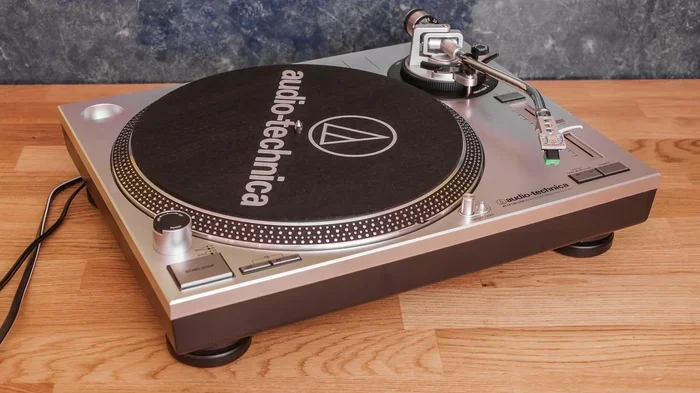
The Audio Technica LP120 is a popular budget turntable, but many users wonder if grounding is necessary. Grounding helps eliminate hum and noise from your stereo system, and yes, the LP120 does include a grounding wire for a reason. In this guide, we break down everything you need to know about turntable grounding, why it matters, and how to get the best sound from your setup.
If you own or are thinking about buying an Audio Technica LP120, you might have come across advice about grounding. Maybe a friend told you it is essential. Maybe you saw a grounding wire hanging out of the back of your turntable and wondered what it does. Either way, you are in the right place.
The short answer is yes, the Audio Technica LP120 does need to be grounded. But the full story is a bit more interesting than that. Grounding your turntable properly can mean the difference between a clean, rich listening experience and a frustrating buzz that ruins every record you play. Let us dive into the details.
Turntables are sensitive audio devices. They pick up very tiny electrical signals from the grooves of a vinyl record and amplify them so you can hear the music. Along the way, those signals can pick up interference from other electronics in your home. That interference often shows up as a low humming sound. Grounding is the simplest and most effective way to stop that hum in its tracks.
Key Takeaways
- The LP120 includes a grounding wire: Audio Technica designed this turntable with a dedicated ground terminal for a reason.
- Grounding reduces audio hum: Without proper grounding, you may hear a persistent buzzing or humming noise during playback.
- Ground loop issues are common: Connecting your turntable to certain amplifiers or receivers can create ground loops that degrade sound quality.
- Setup is simple: Attaching the grounding wire takes just a few minutes and requires no special tools.
- Not grounding can damage equipment over time: Persistent electrical interference may affect the lifespan of your audio components.
- External grounding solutions exist: If your receiver lacks a ground terminal, there are affordable workarounds available.
- Proper grounding improves overall audio quality: Clean signal paths mean better clarity, detail, and dynamics from your vinyl records.
📑 Table of Contents
What Is Grounding and Why Does It Matter?
Grounding is a fundamental concept in audio electronics, but it is simpler than it sounds. When you connect your turntable to an amplifier or receiver, electrical current flows through the cables. Every piece of equipment in your chain has a reference point for that current, and that reference point is called the ground.
Think of it like plumbing. Water flows through pipes, and there needs to be a proper path for it to travel. In audio, the ground wire provides that path for electrical signals. Without it, the signals can wander into paths they should not take, and that creates noise.
The Role of the Grounding Wire on the LP120
The Audio Technica LP120 comes with a small grounding wire attached to the back of the turntable. It is usually a thin copper wire with a small spade connector on the end. This wire connects to a ground terminal on your amplifier, receiver, or phono preamp. It is not optional. Audio Technica included it for a reason, and skipping it can lead to noticeable problems.
When you set up your turntable for the first time, one of the first things you should do is attach that grounding wire. It only takes a few seconds, and it can save you hours of frustration trying to figure out where that buzzing noise is coming from.
How Grounding Affects Audio Quality
You might be wondering if grounding really makes that big of a difference. The answer is absolutely. A properly grounded turntable produces a cleaner signal with less background noise. You will hear more detail in the music, better separation between instruments, and a more natural sound overall.
Without grounding, the audio quality suffers. You might notice a constant 60Hz hum that gets louder when you turn up the volume. In some cases, the interference can be so bad that it overpowers the music entirely. For a turntable that costs a few hundred dollars, you do not want to let something as simple as a missing ground connection ruin your listening experience.
If you are also connecting other audio gear to your system, such as speakers or an external amplifier, proper grounding becomes even more important. The Audio Technica LP120 is designed to work as part of a larger stereo setup, and grounding ensures every component plays nicely together.
Common Grounding Problems and How to Fix Them
Even when you do connect the grounding wire, you can still run into issues. Understanding these common problems helps you troubleshoot quickly and get back to enjoying your records.
Ground Loop Hum
A ground loop is one of the most common issues turntable owners face. It happens when there are multiple paths to ground in your audio chain. For example, if your turntable is grounded to one device and your amplifier is grounded to a different outlet, the electrical potential between them can create a loop. That loop generates a hum that is often quite audible.
The fix is usually straightforward. Make sure all your audio equipment is plugged into the same power strip or surge protector. This equalizes the electrical potential across all devices and eliminates the loop. If that does not work, a ground loop isolator can be a lifesaver. These small devices sit inline in your audio chain and break the loop without affecting sound quality.
Loose or Corroded Connections
Sometimes the grounding wire itself is the problem. Over time, the spade connector can loosen or corrode. A loose connection means the ground path is incomplete, and you will hear the hum return. Check your connections regularly. A quick tightening with a screwdriver often solves the issue instantly.
If the connector is corroded, you can clean it with a small amount of contact cleaner or simply replace the grounding wire. Audio Technica sells replacement parts, and third-party options work just as well.
No Ground Terminal on Your Receiver
Some modern receivers and amplifiers do not have a dedicated ground terminal. This can be frustrating, but it is not the end of the world. You have a few options in this situation. You can use a ground lift adapter, though you should be careful with these because they can introduce safety concerns. A better option is to connect the grounding wire to the RCA jacks on the back of the receiver. Many receivers use the RCA shields as a ground path, so this works just as well.
If you are running your turntable through a separate phono preamp, make sure that preamp also has a ground connection. The preamp acts as a middleman between your turntable and your amplifier, and it needs its own ground to pass a clean signal along.
Step-by-Step: How to Ground Your Audio Technica LP120
Grounding your LP120 is a simple process that anyone can do. Here is a step-by-step guide to make sure you get it right the first time.
Step 1: Gather Your Equipment
Before you start, make sure you have everything you need. You will need your Audio Technica LP120 turntable, your amplifier or receiver, and the grounding wire that came with the turntable. You will also need a small Phillips head screwdriver, though in most cases the spade connector just snaps on and off by hand.
Make sure your turntable is placed on a stable, level surface. Vibrations can affect playback quality, so a sturdy desk or dedicated turntable stand works best.
Step 2: Locate the Ground Terminal
On the back of the LP120, you will find a small metal post labeled “Ground.” It is usually near the RCA output jacks. The grounding wire is attached to this post. If it is not already connected, you will see a small copper wire hanging loose with a spade connector at the end.
Step 3: Find the Ground Terminal on Your Receiver
Now look at the back of your amplifier or receiver. There should be a ground terminal nearby, often labeled “GND” or with a ground symbol. It is usually a small metal post or screw.
If your receiver does not have a dedicated ground terminal, look for an exposed metal part on the back panel that is connected to the chassis. The RCA jacks on the back of many receivers are grounded through the chassis, so connecting the wire to the metal rim of an RCA jack can work as an alternative.
Step 4: Connect the Wire
Attach the spade connector on the grounding wire to the ground terminal on your receiver. Tighten it snugly but do not overtighten, as that can damage the terminal. Once connected, the grounding wire should be taut but not pulling on the turntable.
Step 5: Test Your Setup
Power on your turntable and amplifier. Play a record and listen carefully for any hum or buzzing. If the sound is clean and clear, your grounding is working correctly. If you still hear noise, double-check all connections and make sure everything is plugged into the same electrical outlet.
For best results, keep your audio cables away from power cables. Running signal cables parallel to power cables can introduce new interference, undoing the work you just did to eliminate the hum.
Do You Need Extra Grounding Equipment?
For most setups, the included grounding wire on the LP120 is all you need. However, there are situations where additional grounding equipment can help. Let us look at when you might need something extra and what your options are.
Ground Loop Isolators
A ground loop isolator is a small inline device that sits between your turntable and your amplifier. It breaks the ground loop while passing the audio signal through cleanly. These devices typically cost between 10 and 30 dollars and can be a quick fix for stubborn hum problems.
Ground loop isolators work well when you cannot solve the problem by plugging everything into the same outlet. They are especially useful in setups where the turntable and amplifier are on different circuits or in different rooms.
External Phono Preamps
The Audio Technica LP120 has a built-in preamp, which means you can connect it directly to a line-level input on your amplifier. However, some audiophiles prefer to bypass the built-in preamp and use an external one. An external phono preamp can offer better sound quality and more control over the amplification stage.
When you use an external preamp, it becomes part of the grounding chain. Make sure the preamp has its own ground terminal and that you connect the turntable, preamp, and amplifier all to the same ground reference point. This ensures a clean signal path from the record to your speakers.
If you are exploring audio equipment connections, you might also find it helpful to learn about converting HDMI to RCA for audio if you need to bridge different audio sources in your setup. Similarly, understanding how different audio signals work can help you troubleshoot issues more effectively.
Power Conditioning Units
For the most serious audio setups, a power conditioning unit can do wonders. These devices clean up the electrical power coming from your wall outlet, reducing noise and interference before it reaches your equipment. They are not strictly necessary for grounding your LP120, but they can improve overall sound quality in a noisy electrical environment.
Power conditioners are especially helpful if you live in an older home with wiring that is not ideal. Fluctuations in electrical current can cause all sorts of audio problems, and a good conditioner smooths out those fluctuations.
Can You Use the LP120 Without Grounding?
Technically, yes, you can use the Audio Technica LP120 without connecting the grounding wire. The turntable will still play records. But that does not mean you should skip it. The experience will be noticeably worse, and over time, the electrical interference can cause problems with other components in your chain.
When you skip grounding, the most obvious symptom is a persistent hum. That hum gets louder as you turn up the volume. In quiet passages of music, it can be incredibly distracting. You might find yourself constantly adjusting the volume or EQ to try to mask the noise.
Beyond the audible noise, ungrounded equipment is also more susceptible to electrical damage. A sudden surge or spike in your home’s electrical system can travel through the audio cables and potentially harm your turntable or amplifier. Grounding provides a safe path for excess electricity to dissipate, protecting your gear.
Some users have reported that leaving their turntable ungrounded caused intermittent crackling and popping that was not present when the ground wire was connected. These issues resolved immediately once the grounding wire was properly attached. It is a small step that makes a big difference.
If you are using the LP120 as part of a larger audio system, proper grounding becomes even more critical. When you connect multiple audio components, each one brings its own electrical characteristics into the chain. Grounding ensures they all share the same reference point, which keeps the signal clean and noise-free.
For those who also use other wireless audio devices in their home, grounding your turntable properly helps reduce interference that could affect other equipment. If you have smart home devices or wireless speakers nearby, a clean ground reference on your turntable can prevent cross-interference between devices.
Expert Tips for the Best Turntable Grounding
We have covered the basics, but here are some expert-level tips that can take your grounding setup to the next level.
- Use short grounding wires. The shorter the ground wire, the less opportunity for it to pick up interference. Keep it as short as your setup allows while still reaching the ground terminal comfortably.
- Label your cables. In a complex audio setup with many cables, it is easy to lose track of which wire does what. Use colored tape or cable labels to identify your grounding wire at a glance.
- Check your connections before every listening session. A wire that was snug yesterday can become loose over time. A quick visual check takes seconds and can prevent surprises.
- Keep your turntable away from transformers and power supplies. These devices generate electromagnetic fields that can interfere with your turntable’s signal, even with proper grounding.
- Upgrade your RCA cables if needed. High-quality RCA cables with better shielding can further reduce noise and improve the overall sound from your LP120.
If you are looking to expand your audio setup beyond just the turntable, understanding how different devices connect and interact is key. For instance, if you are considering a soundbar or portable speaker for other music sources, check out whether a Bose speaker can handle different environments to get ideas on speaker placement and care. Also, if you ever need to convert audio signals between different connection types, learning about HDMI to AV conversion can give you more flexibility in how you route audio through your home entertainment system.
Another helpful resource is understanding how different devices handle audio connections. For example, if you are connecting your phone to your car or home system, knowing how to pair Bluetooth devices properly can complement your turntable setup by giving you more options for playing music from different sources.
Final Thoughts
The Audio Technica LP120 is a fantastic turntable for the price, and grounding it properly is one of the easiest ways to get the most out of it. The grounding wire that comes in the box is not just a formality. It is an essential part of the setup that directly impacts your listening experience.
Take five minutes when you unbox your turntable to connect that grounding wire. It is a small effort that pays off in cleaner sound, less noise, and better protection for your equipment. Once it is connected, you can sit back, drop the needle on your favorite record, and enjoy the warm, rich sound that vinyl is known for.
If you run into any issues, go back to the troubleshooting steps we covered. Check your connections, make sure all your equipment shares the same power source, and consider a ground loop isolator if the hum persists. With the right setup, your LP120 will deliver audio quality that punches well above its price point.
Remember, good audio is about the details. Grounding is one of those details that is easy to overlook but makes a world of difference. Do it right, and your ears will thank you every time you sit down to listen to your favorite records.
Frequently Asked Questions
Can I use the Audio Technica LP120 without grounding it?
Yes, technically the turntable will play without a ground connection. However, you will likely hear a persistent hum or buzzing noise that degrades the listening experience. Grounding is strongly recommended for the best audio quality and to protect your equipment from electrical interference.
What happens if I do not ground my turntable properly?
Without proper grounding, you may experience audio hum, crackling, or popping sounds. In some cases, the interference can be loud enough to make records nearly unlistenable. Over time, electrical interference can also potentially affect the longevity of your audio components.
Where is the ground wire on the Audio Technica LP120?
The grounding wire is located on the back panel of the LP120, near the RCA output jacks. It is a thin copper wire with a small spade connector attached to a metal post labeled “Ground.”
Can I use a ground loop isolator instead of the built-in grounding wire?
A ground loop isolator can help solve hum issues caused by ground loops, but it does not replace the need for a proper ground connection. The isolator breaks the loop while passing the audio signal, but your turntable still needs to be grounded to its amplifier or receiver for optimal performance.
Do I need a separate phono preamp for the LP120?
No, the Audio Technica LP120 has a built-in phono preamp, so you can connect it directly to a line-level input on your amplifier or receiver. However, using an external preamp can improve sound quality and give you more control over the amplification process.
How do I know if my grounding wire is working correctly?
Play a record and listen for any hum or buzzing. If the sound is clean and clear, your grounding is working. If you still hear noise, check that the wire is securely connected to both the turntable and the amplifier, and make sure all equipment is plugged into the same power outlet.
=== CONCLUSION ===
Grounding your Audio Technica LP120 is not optional. It is a necessary step that ensures clean audio, eliminates hum, and protects your equipment. The process is simple, takes just a few minutes, and makes a dramatic difference in sound quality. Whether you are a vinyl newcomer or a seasoned collector, proper grounding is one of the easiest ways to get the best performance from your turntable. Do not skip it. Your records and your ears will thank you.